1. పరిచయం
This manual provides detailed instructions for the Keychron K10 Max Wireless Custom Mechanical Keyboard. The K10 Max is a full-sized (108-key) mechanical keyboard designed for versatility, offering 2.4 GHz, Bluetooth, and wired connectivity options. It features QMK open-source firmware for extensive customization and is compatible with Mac, Windows, and Linux operating systems.

Image 1.1: Keychron K10 Max Wireless Mechanical Keyboard with a close-up of a Keychron Super Brown switch.
2. ప్యాకేజీ విషయాలు
మీ Keychron K10 Max ప్యాకేజీలో అన్ని అంశాలు ఉన్నాయని ధృవీకరించండి:
- కీక్రోన్ K10 మాక్స్ వైర్లెస్ కస్టమ్ మెకానికల్ కీబోర్డ్
- Type-A to Type-C Cable (x1)
- Type-A 2.4GHz Receiver (x1)
- Extension Adapter for Receiver (x1)
- Keycap-Switch Puller (x1)
- Hex Key & Screwdriver (x1)
- Additional Keycaps for Windows OS

Image 2.1: Included accessories with the Keychron K10 Max keyboard.
3. సెటప్
3.1. ప్రారంభ ఛార్జింగ్
Before first use, connect the keyboard to a USB power source using the provided Type-A to Type-C cable to ensure it is fully charged.
3.2. ఆపరేటింగ్ సిస్టమ్ స్విచ్
Locate the OS switch on the side of the keyboard. Toggle it to either 'Mac' or 'Windows' depending on your operating system. This ensures correct key mapping for multimedia and function keys.

Image 3.1: Operating system switch on the Keychron K10 Max.
3.3. కనెక్టివిటీ మోడ్లు
The K10 Max supports three connectivity modes: 2.4 GHz wireless, Bluetooth 5.1, and wired USB-C.
- 2.4 GHz వైర్లెస్: For high-performance gaming and low-latency connection. Insert the Type-A 2.4GHz receiver into an available USB port on your device. The keyboard will automatically connect.
- బ్లూటూత్ 5.1: Allows connection to up to three devices simultaneously. To pair, switch the keyboard to Bluetooth mode, then press and hold Fn + 1 (or 2, 3) until the key flashes, indicating pairing mode. Select 'Keychron K10 Max' on your device's Bluetooth settings.
- వైర్డు USB-C: అందించిన USB-C కేబుల్ ఉపయోగించి కీబోర్డ్ను నేరుగా మీ పరికరానికి కనెక్ట్ చేయండి. ఈ మోడ్ కీబోర్డ్ను కూడా ఛార్జ్ చేస్తుంది.
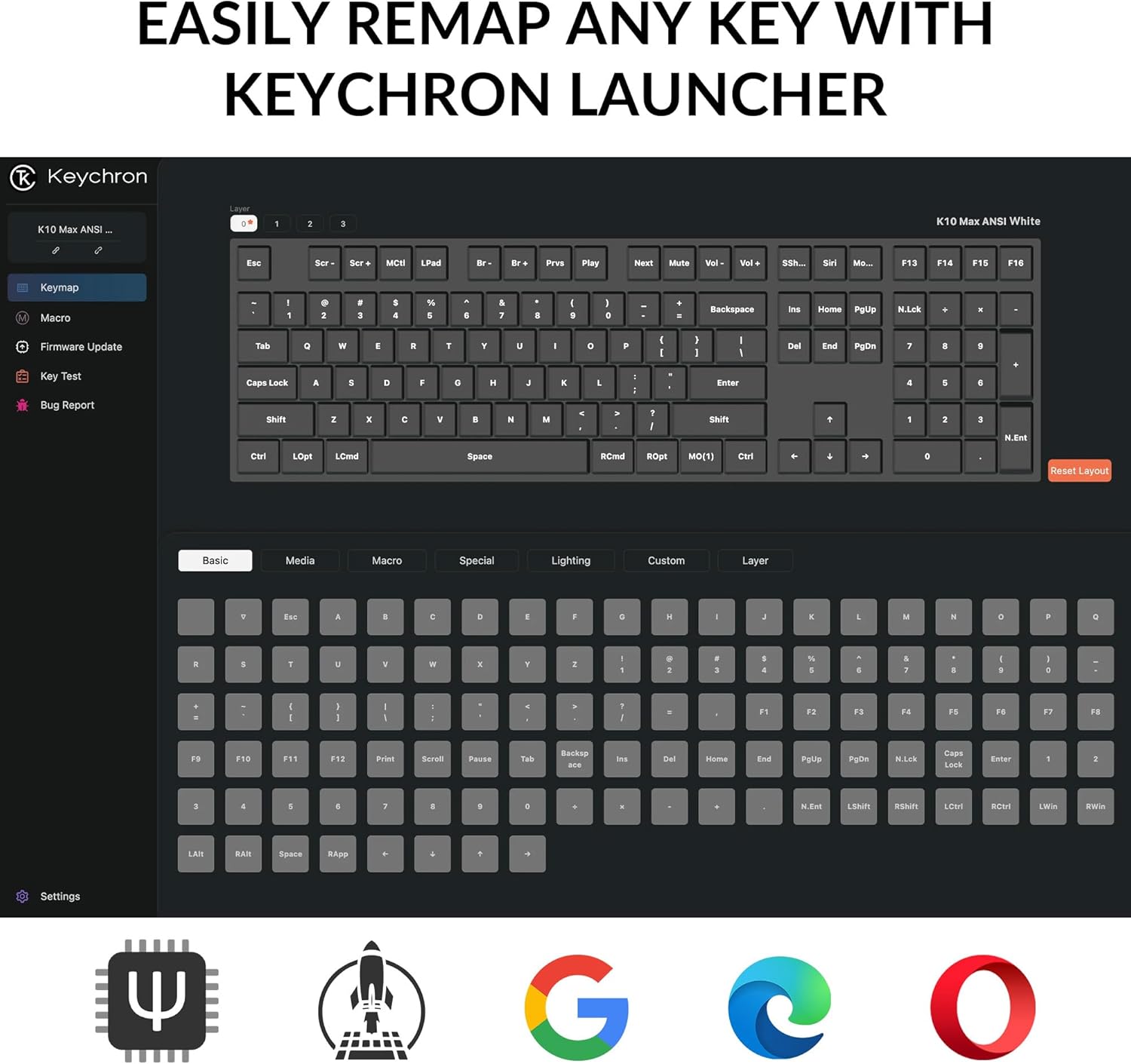
Image 3.2: Connectivity options for the Keychron K10 Max.
4. ఆపరేటింగ్ సూచనలు
4.1. Key Remapping and Customization (QMK Firmware)
The Keychron K10 Max runs on QMK open-source firmware, allowing for extensive key remapping and macro creation. Use the Keychron Launcher web application to customize key functions, lighting effects, and create custom layers.
- Access the Keychron Launcher via a web బ్రౌజర్.
- Connect your keyboard in wired mode to ensure proper communication with the Launcher.
- Follow the on-screen instructions within the Launcher to remap keys, set macros, and update firmware.

Image 4.1: Keychron Launcher interface for key remapping.
4.2. బ్యాక్లైట్ నియంత్రణ
The keyboard features a white backlight with south-facing LEDs for enhanced visibility and compatibility with most keycaps. Use the dedicated backlight keys (usually Fn + light bulb icon or similar) to cycle through various lighting effects and adjust brightness.

Image 4.2: South-facing white backlight illumination.
5. నిర్వహణ
5.1. శుభ్రపరచడం
To clean the keyboard, disconnect it from all power sources. Use a soft, lint-free cloth slightly dampనీరు లేదా తేలికపాటి శుభ్రపరిచే ద్రావణంతో నింపండి. కీబోర్డ్పై నేరుగా ద్రవాలను చల్లడం మానుకోండి. కీక్యాప్ల మధ్య శుభ్రం చేయడానికి, కంప్రెస్డ్ ఎయిర్ లేదా చిన్న బ్రష్ను ఉపయోగించండి.
5.2. హాట్-స్వాపబుల్ స్విచ్లు
The K10 Max features hot-swappable sockets, allowing you to change mechanical switches without soldering. Use the included keycap-switch puller tool for this process.
- కీక్యాప్ పుల్లర్ ఉపయోగించి కీక్యాప్ను సున్నితంగా తొలగించండి.
- Insert the switch puller around the switch, ensuring it grips the top and bottom clips.
- Pull the switch straight up to remove it.
- కొత్త స్విచ్ యొక్క పిన్లను PCB లోని రంధ్రాలతో సమలేఖనం చేసి, అది స్థానంలో క్లిక్ అయ్యే వరకు గట్టిగా నొక్కండి. పిన్లు వంగకుండా చూసుకోండి.
- కీక్యాప్ను మార్చండి.

Image 5.1: Hot-swappable Keychron Super switches.
6. ట్రబుల్షూటింగ్
- కీబోర్డ్ స్పందించడం లేదు: Ensure the keyboard is charged. Check the connectivity mode switch (2.4 GHz, Bluetooth, or wired) and ensure it matches your connection method. For wired mode, try a different USB-C cable or port.
- బ్లూటూత్ కనెక్షన్ సమస్యలు: Ensure the keyboard is in Bluetooth pairing mode (Fn + 1/2/3 flashing). Remove the keyboard from your device's Bluetooth list and attempt to re-pair. Ensure no other devices are interfering.
- 2.4 GHz wireless issues: Ensure the 2.4 GHz receiver is securely plugged into a working USB port. Try moving the receiver closer to the keyboard or using the included extension adapter.
- Keys not working or incorrect output: Verify the OS switch is set correctly (Mac/Windows). If you have remapped keys using Keychron Launcher, ensure the correct layer is active or reset to default settings within the software. Check for bent switch pins if you recently swapped switches.
- బ్యాక్లైట్ పనిచేయడం లేదు: Ensure the keyboard is charged. Cycle through backlight modes and brightness levels using the designated function keys.
If issues persist, refer to the official Keychron support resources or contact customer service.
7. స్పెసిఫికేషన్లు
| మోడల్ | కీక్రోన్ K10 మాక్స్ |
| కొలతలు | 17.61 x 5.5 అంగుళాలు (447.37 మిమీ x 139.82 మిమీ) |
| వస్తువు బరువు | 4.64 పౌండ్లు (1530 గ్రా ± 10 గ్రా) |
| ఫ్రేమ్ మెటీరియల్ | ABS ప్లాస్టిక్ |
| కీకాప్స్ | OSA డబుల్-షాట్ PBT కీక్యాప్స్ |
| స్విచ్లు | Keychron Super Mechanical Switch (Hot-swappable with 3-pin & 5-pin MX Mechanical Switches) |
| స్టెబిలైజర్ | Screw-in PCB Stabilizer |
| బ్యాక్లైట్ | South-facing White Backlight |
| MCU | ARM కార్టెక్స్-M4 32-బిట్ STM32F402 (256KB ఫ్లాష్) |
| పోలింగ్ రేటు | 1000 Hz (2.4 GHz and Wired) / 90 Hz (Bluetooth Mode) |
| N-కీ రోల్ఓవర్ (NKRO) | అవును |
| కనెక్టివిటీ | 2.4 GHz / Bluetooth 5.1 / Type-C Wired |
| అనుకూల పరికరాలు | ల్యాప్టాప్, పిసి, స్మార్ట్ఫోన్, టాబ్లెట్ |
| ఆపరేటింగ్ సిస్టమ్ అనుకూలత | macOS / Windows / Linux |
| బ్యాటరీలు | 1 లిథియం అయాన్ బ్యాటరీ (చేర్చబడింది) |

Image 7.1: Detailed product specifications.
8. వారంటీ మరియు మద్దతు
For warranty information, please refer to the documentation included with your purchase or visit the official Keychron website. For technical support, frequently asked questions, or additional assistance, please visit the అమెజాన్లో కీక్రాన్ స్టోర్ or the official Keychron support page.


