1. పరిచయం
The Boult x Mustang Torq Wireless Earbuds are designed to deliver a premium audio experience with advanced features and an iconic design. This manual provides essential information on how to set up, operate, maintain, and troubleshoot your earbuds to ensure optimal performance.
Key features include: 50 hours of playtime, Quad Mic Environmental Noise Cancellation (ENC), 45ms low latency gaming mode, Bluetooth 5.4 connectivity, and app support for custom equalization and controls.
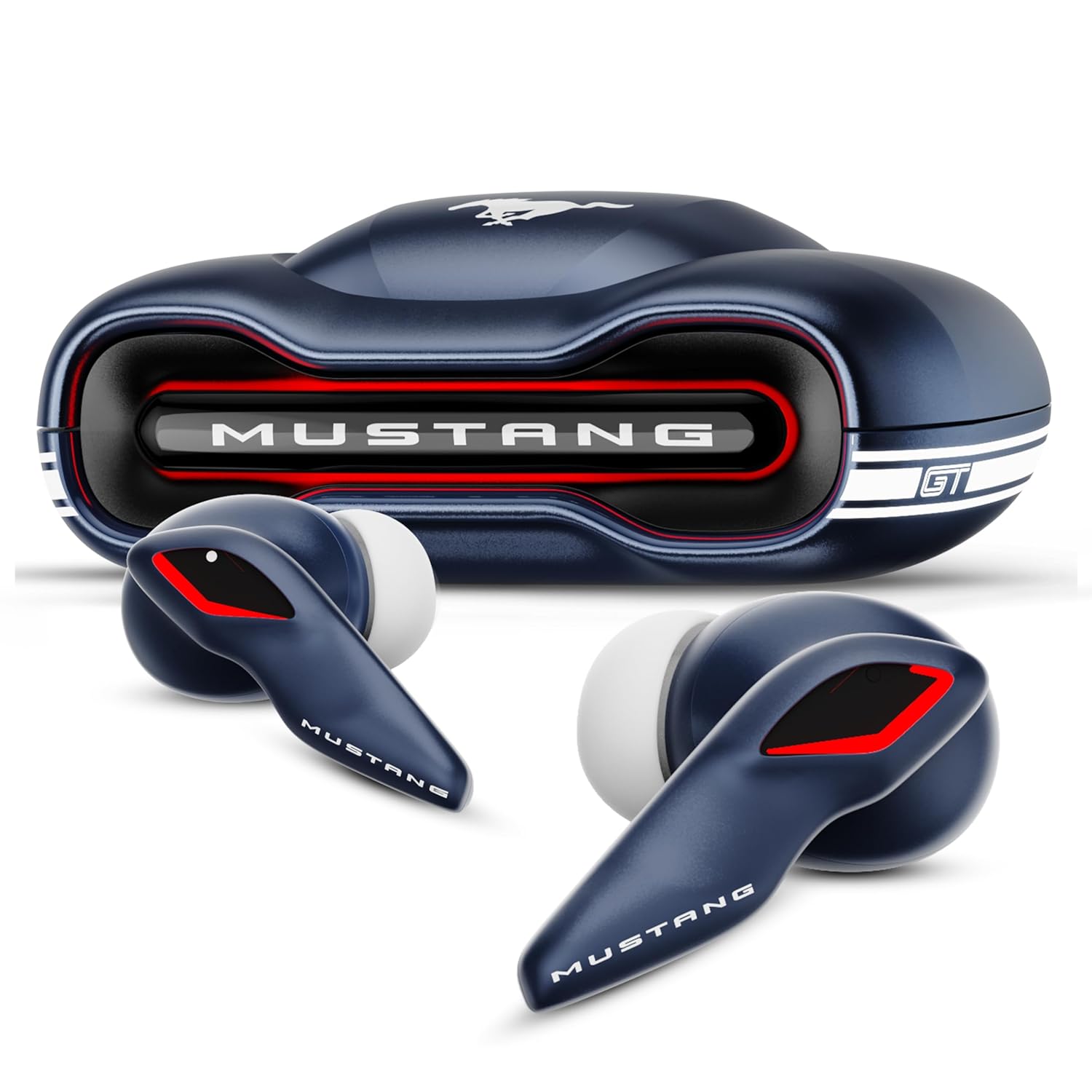
Image: The Boult x Mustang Torq Wireless Earbuds and their car-inspired charging case, showcasing the unique design.
2. ప్యాకేజీ విషయాలు
దయచేసి ఈ క్రింది అంశాల కోసం పెట్టెను ఎంచుకోండి:
- Boult x Mustang Torq Wireless Earbuds
- వైర్లెస్ ఛార్జింగ్ కేస్
- టైప్-సి ఫాస్ట్ ఛార్జింగ్ కేబుల్
- అదనపు జత ఇయర్టిప్స్
- వినియోగదారు మాన్యువల్
- వారంటీ కార్డ్

Image: A visual representation of the package contents, including the earbuds, charging case, cable, extra eartips, user manual, and warranty card.
3. సెటప్
3.1 ఇయర్బడ్లు మరియు కేస్ను ఛార్జ్ చేయడం
Before first use, fully charge the earbuds and the charging case. Connect the provided Type-C charging cable to the charging port on the case and a power source. The LEDs on the case will indicate charging status. A 10-minute charge provides approximately 100 minutes of playtime.

Image: The Boult x Mustang Torq charging case connected via a Type-C cable, illustrating the fast charging capability and 50-hour total playtime.
3.2 పవర్ చేయడం ఆన్/ఆఫ్
- పవర్ ఆన్: ఛార్జింగ్ కేస్ని తెరవండి, ఇయర్బడ్లు ఆటోమేటిక్గా పవర్ ఆన్ అవుతాయి.
- పవర్ ఆఫ్: ఇయర్బడ్లను తిరిగి ఛార్జింగ్ కేసులో ఉంచి, మూత మూసివేయండి. అవి ఆటోమేటిక్గా పవర్ ఆఫ్ అయి ఛార్జింగ్ ప్రారంభమవుతాయి.
3.3 Bluetooth Pairing (Blink & Pair)
The earbuds feature Blink & Pair technology for quick and stable connection.
- ఇయర్బడ్లు ఛార్జ్ అయ్యాయని మరియు ఛార్జింగ్ కేస్ లోపల ఉన్నాయని నిర్ధారించుకోండి.
- Open the charging case. The earbuds will enter pairing mode, indicated by flashing LEDs.
- మీ పరికరంలో (స్మార్ట్ఫోన్, టాబ్లెట్, ల్యాప్టాప్), బ్లూటూత్ను ప్రారంభించండి.
- కోసం వెతకండి "Boult Mustang Torq" or similar in the list of available devices.
- Select the earbuds to connect. Once connected, a voice prompt will confirm successful pairing.

Image: Illustration highlighting Bluetooth 5.4 for fast pairing and stable connection with the Boult x Mustang Torq Earbuds.
3.4 యాప్ సపోర్ట్
Enhance your experience by downloading the official Boult app. The app allows you to:
- Custom-tune your audio with multi-EQ modes.
- Assign custom gestures to your earbuds.
- మీ ఇయర్బడ్ల పేరు మార్చండి.
- Utilize the Quick Cleanup feature to remove dust.
- Switch between listening modes (e.g., Gaming or Music).

Image: A screenshot of the Boult Amp App, demonstrating options to tailor sound, rename earbuds, use the quick cleanup tool, and customize EQ modes and gestures.
4. మీ ఇయర్బడ్లను ఆపరేట్ చేయడం
4.1 టచ్ నియంత్రణలు
The earbuds feature intuitive touch controls on both the left (L) and right (R) earbuds:
| చర్య | ఎడమ ఇయర్బడ్ (L) | కుడి ఇయర్బడ్ (R) |
|---|---|---|
| సంగీతాన్ని ప్లే/పాజ్ చేయండి | 1 నొక్కండి | 1 నొక్కండి |
| కాల్ స్వీకరించండి | 1 నొక్కండి | 1 నొక్కండి |
| మునుపటి ట్రాక్ | 2 ట్యాప్లు | N/A |
| తదుపరి ట్రాక్ | N/A | 2 ట్యాప్లు |
| కాల్ చేయండి | 2 ట్యాప్లు | 2 ట్యాప్లు |
| వాల్యూమ్ అప్ | N/A | 3 ట్యాప్లు |
| వాల్యూమ్ డౌన్ | 3 ట్యాప్లు | N/A |
| గేమ్ మోడ్ | 4 ట్యాప్లు | 4 ట్యాప్లు |
| కాల్ని తిరస్కరించండి | లాంగ్ ప్రెస్ | లాంగ్ ప్రెస్ |
| వాయిస్ అసిస్టెంట్ | లాంగ్ ప్రెస్ | లాంగ్ ప్రెస్ |

Image: A detailed visual guide to the touch controls for the Boult x Mustang Torq Earbuds, including functions for music, calls, volume, and game mode.
4.2 గేమింగ్ మోడ్ (తక్కువ జాప్యం)
Activate the 45ms low latency Combat Gaming Mode for a synchronized audio-visual experience during gaming. Refer to the touch controls table or the Boult app to enable this mode.

Image: The Boult x Mustang Torq Earbuds and case, illustrating the 45ms Combat Gaming Mode for ultra-low latency gameplay.
4.3 Quad Mic ENC (Environmental Noise Cancellation)
The earbuds are equipped with 4 onboard microphones and ENC technology to effectively reduce background noise, ensuring clear voice transmission during calls, even in noisy environments.

Image: A close-up of the Boult x Mustang Torq Earbud, highlighting the Zen Quad Mic ENC feature with 4 beamforming mics for clear calls.
4.4 Voice Assistant Support
Access your device's voice assistant (Google Assistant, Siri) by performing the designated touch control (long press on either earbud).
5. నిర్వహణ
5.1 నీటి నిరోధకత (IPX5)
The earbuds are IPX5 water resistant, meaning they can withstand sweat and light splashes of water. They are not designed for submersion in water. Avoid exposing them to heavy rain or showering.
Image: The Boult x Mustang Torq Earbuds and case, illustrating their IPX5 water resistance for sweat and splash protection.
5.2 శుభ్రపరచడం
Regularly clean your earbuds and charging case with a soft, dry, lint-free cloth. For the earbuds, you can use the Quick Cleanup feature within the Boult app to help remove dust from the speaker mesh.
6. ట్రబుల్షూటింగ్
If you encounter any issues with your Boult x Mustang Torq Earbuds, please refer to the following common solutions:
- ధ్వని లేదు: Ensure earbuds are charged, connected to your device, and volume is turned up on both the earbuds and your device.
- జత చేయడం సమస్యలు: Make sure Bluetooth is enabled on your device. Try forgetting the device in your Bluetooth settings and re-pairing. Ensure earbuds are fully charged.
- ఒక ఇయర్బడ్ పని చేయడం లేదు: Place both earbuds back in the case, close the lid, wait a few seconds, then open again. This often re-syncs them.
- పేలవమైన కాల్ నాణ్యత: Ensure earbuds are clean and free from debris. Check your network signal. The Quad Mic ENC should help reduce background noise.
- టచ్ నియంత్రణలు స్పందించడం లేదు: మీ వేళ్లు శుభ్రంగా మరియు పొడిగా ఉన్నాయని నిర్ధారించుకోండి. ఇయర్బడ్లను కేస్లో ఉంచి, మళ్ళీ బయటకు తీయడం ద్వారా వాటిని రీస్టార్ట్ చేయడానికి ప్రయత్నించండి.
- ఛార్జింగ్ సమస్యలు: Check the Type-C cable and charging adapter. Ensure the charging contacts on the earbuds and inside the case are clean.
If the problem persists, please refer to the warranty card for customer support contact information.
7. స్పెసిఫికేషన్లు
Detailed technical specifications for the Boult x Mustang Torq Wireless Earbuds:
| ఫీచర్ | వివరాలు |
|---|---|
| మోడల్ పేరు | ఎయిర్బాస్ ఇయర్బడ్స్ |
| కనెక్టివిటీ టెక్నాలజీ | బ్లూటూత్ 5.4, వైర్లెస్ |
| వైర్లెస్ కమ్యూనికేషన్ టెక్నాలజీ | బ్లూటూత్ |
| నాయిస్ కంట్రోల్ | Sound Isolation, Quad Mic ENC |
| ఆడియో డ్రైవర్ పరిమాణం | 13 మిల్లీమీటర్లు |
| ఆడియో డ్రైవర్ రకం | డైనమిక్ డ్రైవర్ |
| ఫ్రీక్వెన్సీ రెస్పాన్స్ | 20-20000 Hz |
| సున్నితత్వం | 115 డిబి |
| ఇంపెడెన్స్ | 32 ఓం |
| ఆడియో లాటెన్సీ | 45 మిల్లీసెకన్లు (గేమింగ్ మోడ్) |
| బ్యాటరీ లైఫ్ (ఇయర్బడ్స్) | 50 గంటల వరకు (ఛార్జింగ్ కేసుతో) |
| ఛార్జింగ్ సమయం | 100 Minutes (earbuds + case) |
| హెడ్ఫోన్స్ జాక్ | టైప్-సి ఫాస్ట్ ఛార్జింగ్ జాక్ |
| నియంత్రణ రకం | కాల్ కంట్రోల్, టచ్ కంట్రోల్, వాల్యూమ్ కంట్రోల్ |
| వాయిస్ అసిస్టెంట్ సపోర్ట్ | గూగుల్ అసిస్టెంట్, సిరి |
| నీటి నిరోధక స్థాయి | IPX5 (చెమట మరియు నీటి నిరోధకం) |
| వస్తువు బరువు | 61 గ్రాములు |
| ఉత్పత్తి కొలతలు | 4.7 x 9 x 9.6 సెం.మీ |
| మెటీరియల్ | రబ్బరు |
| మూలం దేశం | భారతదేశం |

చిత్రం: క్లోజప్ view emphasizing the 13mm massive drivers within the Boult x Mustang Torq Earbuds, indicating powerful audio output.
8. వారంటీ మరియు మద్దతు
The Boult x Mustang Torq Wireless Earbuds come with a 1 సంవత్సరాల తయారీదారు వారంటీ కొనుగోలు చేసిన తేదీ నుండి.
For warranty claims, technical support, or any product-related inquiries, please refer to the contact information provided on your Warranty Card included in the package. You may also visit the official Boult webతదుపరి సహాయం కోసం సైట్.
Manufacturer: Boult, Exotic Mile Pvt. Ltd., B67 Wazirpur Industrial Area, New Delhi 110052, India.


