1. పరిచయం
This manual provides essential information for the proper setup, operation, and maintenance of your Hannspree Tab 13.3 Zeus 3 SN14TP6B IPS tablet. Please read this manual thoroughly before using the device to ensure optimal performance and longevity.
2. ప్యాకేజీ విషయాలు
ప్యాకేజీని తెరిచిన తర్వాత, క్రింద జాబితా చేయబడిన అన్ని వస్తువులు ఉన్నాయని మరియు మంచి స్థితిలో ఉన్నాయని ధృవీకరించండి:
- Hannspree Tab 13.3 Zeus 3 SN14TP6B IPS Tablet
- పవర్ అడాప్టర్
- USB ఛార్జింగ్ కేబుల్
- త్వరిత ప్రారంభ గైడ్
- వారంటీ కార్డ్
గమనిక: నిర్దిష్ట ఉపకరణాలు ప్రాంతం లేదా రిటైలర్ను బట్టి మారవచ్చు.
3. ఉత్పత్తి ముగిసిందిview
మీ టాబ్లెట్ యొక్క భౌతిక భాగాలతో మిమ్మల్ని మీరు పరిచయం చేసుకోండి.
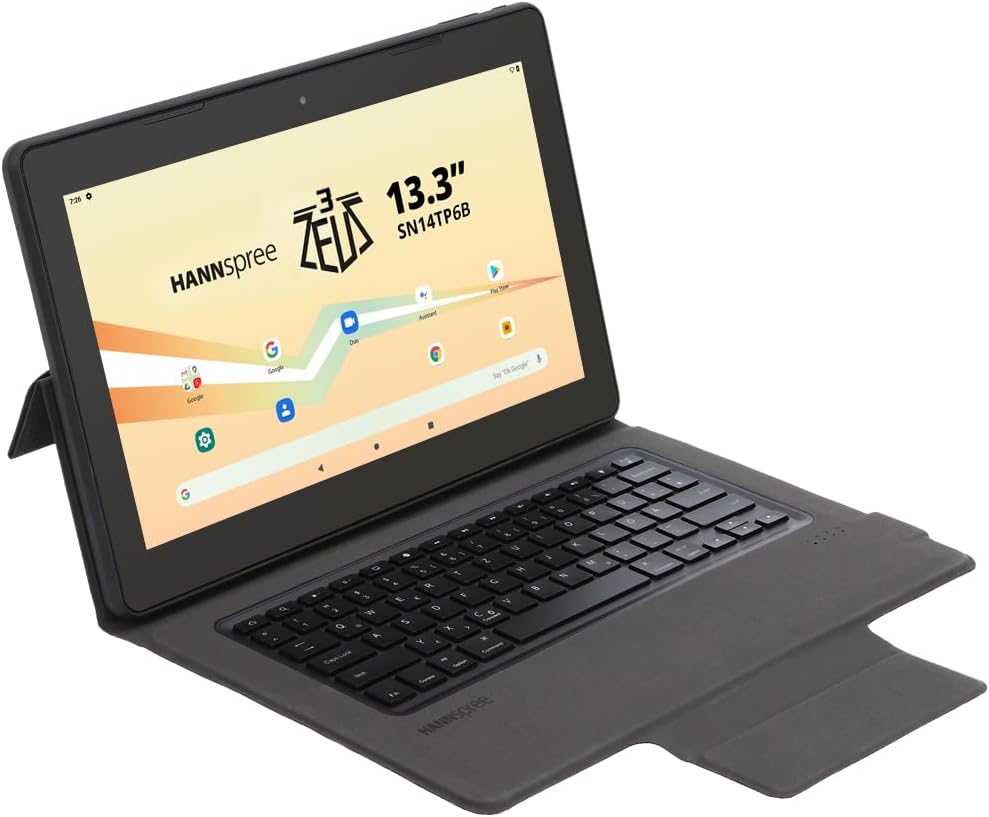
మూర్తి 3.1: The Hannspree Tab 13.3 Zeus 3 SN14TP6B IPS tablet shown with its detachable keyboard case, viewed from an angle. The screen displays the Hannspree logo and various app icons.

మూర్తి 3.2: The Hannspree Tab 13.3 Zeus 3 SN14TP6B IPS tablet positioned in a stand configuration, showcasing the display with the Hannspree logo and Android interface elements.

మూర్తి 3.3: The rear panel of the Hannspree Tab 13.3 Zeus 3 SN14TP6B IPS tablet, displaying the Hannspree brand name and regulatory markings.
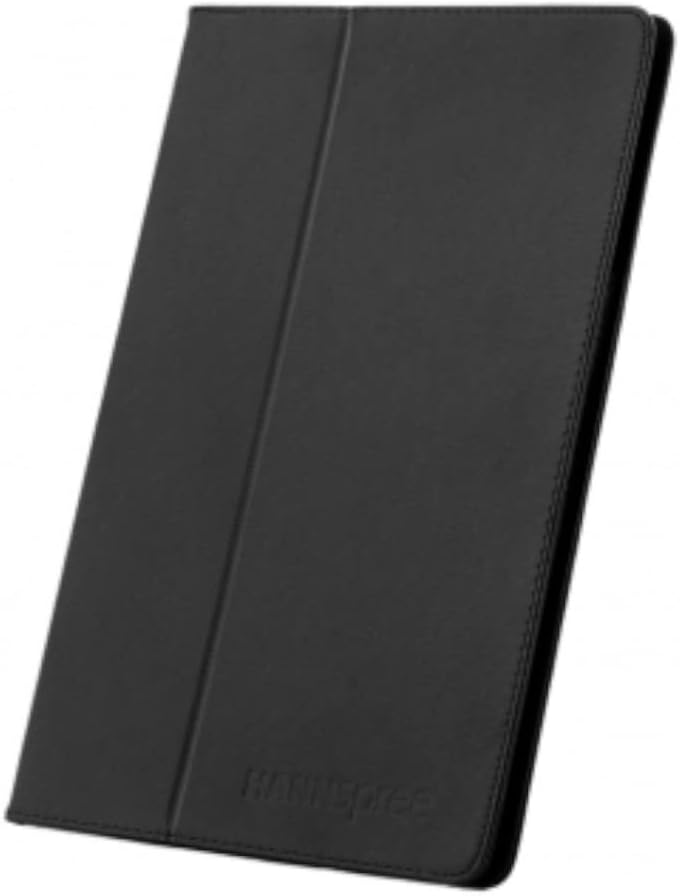
మూర్తి 3.4: The Hannspree Tab 13.3 Zeus 3 SN14TP6B IPS tablet enclosed within its protective keyboard case, shown in a closed, folded position.
3.1. బటన్లు మరియు పోర్ట్లు
- పవర్ బటన్: Located on the side/top edge. Press and hold to power on/off or restart. Short press to wake/sleep the screen.
- వాల్యూమ్ బటన్లు: Located near the power button. Press to adjust media volume or notification volume.
- USB-C పోర్ట్: పరికరాన్ని ఛార్జ్ చేయడానికి మరియు డేటా బదిలీ కోసం కంప్యూటర్కు కనెక్ట్ చేయడానికి.
- హెడ్ఫోన్ జాక్: Standard 3.5mm audio output for headphones or external speakers.
- మైక్రో SD కార్డ్ స్లాట్: For expanding storage capacity (card not included).
- ముందు కెమెరా: వీడియో కాల్స్ మరియు సెల్ఫీల కోసం.
- వెనుక కెమెరా: ఫోటోలు మరియు వీడియోలు తీయడం కోసం.
- స్పీకర్లు: ఆడియో అవుట్పుట్ కోసం.
4. సెటప్
4.1. ప్రారంభ ఛార్జింగ్
Before first use, fully charge your tablet. Connect the USB charging cable to the tablet's USB-C port and the power adapter. Plug the adapter into a wall outlet. The charging indicator will typically illuminate or the battery icon on the screen will show charging status.
4.2. పవర్ చేయడం ఆన్/ఆఫ్
- పవర్ ఆన్ చేయడానికి: Press and hold the Power button until the Hannspree logo appears on the screen.
- పవర్ ఆఫ్ చేయడానికి: Press and hold the Power button until a power menu appears. Select "Power off" and confirm.
- పునఃప్రారంభించడానికి: Press and hold the Power button until a power menu appears. Select "Restart" and confirm.
4.3. ప్రారంభ సెటప్
Upon first power-on, the tablet will guide you through the initial setup process. This typically includes:
- మీ భాషను ఎంచుకోవడం.
- Wi-Fi నెట్వర్క్కి కనెక్ట్ చేస్తోంది.
- మీ Google ఖాతాతో సైన్ ఇన్ చేయడం లేదా కొత్తదాన్ని సృష్టించడం.
- స్క్రీన్ లాక్ (పిన్, నమూనా, పాస్వర్డ్) సెటప్ చేస్తోంది.
- Reviewనిబంధనలు మరియు షరతులను అంగీకరించడం మరియు అంగీకరించడం.
5. టాబ్లెట్ను ఆపరేట్ చేయడం
5.1. ప్రాథమిక నావిగేషన్
The Hannspree Tab 13.3 Zeus 3 runs on the Android operating system. Navigation is primarily touch-based:
- నొక్కండి: ఒక అంశాన్ని ఎంచుకోవడానికి లేదా అప్లికేషన్ను తెరవడానికి.
- నొక్కండి మరియు పట్టుకోండి: సందర్భోచిత మెనూలను యాక్సెస్ చేయడానికి లేదా చిహ్నాలను తరలించడానికి.
- స్వైప్: స్క్రీన్లు, జాబితాలు లేదా పేజీల ద్వారా స్క్రోల్ చేయడానికి.
- పించ్-టు-జూమ్: చిత్రాలను జూమ్ ఇన్ లేదా అవుట్ చేయడానికి మరియు web పేజీలు.
5.2. Wi-Fiకి కనెక్ట్ చేస్తోంది
- వెళ్ళండి సెట్టింగ్లు > నెట్వర్క్ & ఇంటర్నెట్ > Wi-Fi.
- Wi-Fiని టోగుల్ చేయి On.
- జాబితా నుండి మీకు కావలసిన నెట్వర్క్ను ఎంచుకోండి.
- ప్రాంప్ట్ చేయబడితే నెట్వర్క్ పాస్వర్డ్ను నమోదు చేయండి, ఆపై నొక్కండి కనెక్ట్ చేయండి.
5.3. Managing Applications
- యాప్లను ఇన్స్టాల్ చేయండి: Open the Google Play Store app, search for the desired app, and tap ఇన్స్టాల్ చేయండి.
- యాప్లను అన్ఇన్స్టాల్ చేయండి: Tap and hold an app icon on the home screen or app drawer, then drag it to "Uninstall" or select "App info" and choose "Uninstall". Alternatively, go to సెట్టింగ్లు > యాప్లు > అన్ని యాప్లను చూడండి, యాప్ను ఎంచుకుని, నొక్కండి అన్ఇన్స్టాల్ చేయండి.
6. నిర్వహణ
6.1. టాబ్లెట్ను శుభ్రపరచడం
టాబ్లెట్ స్క్రీన్ మరియు బాడీని శుభ్రం చేయడానికి మృదువైన, మెత్తటి బట్టను ఉపయోగించండి. మొండి మరకల కోసం, కొద్దిగా dampen the cloth with water or a screen-cleaning solution. Avoid using harsh chemicals, abrasive materials, or excessive moisture.
6.2. సాఫ్ట్వేర్ నవీకరణలు
మీ టాబ్లెట్ తాజా ఫీచర్లు, భద్రతా ప్యాచ్లు మరియు పనితీరు మెరుగుదలలను కలిగి ఉందని నిర్ధారించుకోవడానికి సాఫ్ట్వేర్ నవీకరణల కోసం క్రమం తప్పకుండా తనిఖీ చేసి, ఇన్స్టాల్ చేయండి. వెళ్ళండి సెట్టింగ్లు > వ్యవస్థ > సిస్టమ్ నవీకరణ అందుబాటులో ఉన్న నవీకరణల కోసం తనిఖీ చేయడానికి.
6.3. బ్యాటరీ సంరక్షణ
- బ్యాటరీ జీవితకాలం క్షీణించే తీవ్రమైన ఉష్ణోగ్రతలను నివారించండి.
- బ్యాటరీ తరచుగా పూర్తిగా ఖాళీ అవ్వనివ్వకండి.
- సరైన ఛార్జింగ్ కోసం ఒరిజినల్ ఛార్జర్ మరియు కేబుల్ని ఉపయోగించండి.
7. ట్రబుల్షూటింగ్
ఈ విభాగం మీ టాబ్లెట్తో మీరు ఎదుర్కొనే సాధారణ సమస్యలను పరిష్కరిస్తుంది.
7.1. Tablet Does Not Power On
- బ్యాటరీ ఛార్జ్ అయ్యిందని నిర్ధారించుకోండి. టాబ్లెట్ను దాని ఛార్జర్కు కనెక్ట్ చేసి, దాన్ని మళ్లీ ఆన్ చేయడానికి ప్రయత్నించే ముందు కొన్ని నిమిషాలు వేచి ఉండండి.
- Try a forced restart: Press and hold the Power button for approximately 10-15 seconds.
7.2. Wi-Fi కనెక్షన్ సమస్యలు
- సెట్టింగ్లలో Wi-Fi ప్రారంభించబడిందని నిర్ధారించుకోండి.
- మీ Wi-Fi రౌటర్ మరియు టాబ్లెట్ను పునఃప్రారంభించండి.
- టాబ్లెట్ సెట్టింగ్లలో నెట్వర్క్ను మర్చిపోయి, తిరిగి కనెక్ట్ చేయండి.
- మీరు Wi-Fi సిగ్నల్ పరిధిలో ఉన్నారని నిర్ధారించుకోండి.
7.3. అప్లికేషన్లు క్రాష్ కావడం లేదా స్తంభించడం
- అప్లికేషన్ను మూసివేసి తిరిగి తెరవండి.
- యాప్ కాష్ను క్లియర్ చేయండి: వెళ్ళండి సెట్టింగ్లు > యాప్లు > అన్ని యాప్లను చూడండి, సమస్యాత్మక యాప్ను ఎంచుకుని, ఆపై నిల్వ & కాష్ > కాష్ని క్లియర్ చేయండి.
- టాబ్లెట్ను పునఃప్రారంభించండి.
- యాప్ దాని తాజా వెర్షన్కి నవీకరించబడిందని నిర్ధారించుకోండి.
8. స్పెసిఫికేషన్లు
| ఫీచర్ | వివరాలు |
|---|---|
| మోడల్ పేరు | Tab HANNspree 13,3 Zeus 3 SN14TP6B IPS |
| అంశం మోడల్ సంఖ్య | SN14TP6B |
| బ్రాండ్ | హాన్స్ప్రీ |
| ఆపరేటింగ్ సిస్టమ్ | ఆండ్రాయిడ్ |
| స్టాండింగ్ స్క్రీన్ డిస్ప్లే సైజు | 13.3 అంగుళాలు |
| డిస్ప్లే రిజల్యూషన్ | 1920 x 1080 పిక్సెల్లు |
| గరిష్ట స్క్రీన్ రిజల్యూషన్ | 1920x1080 |
| ప్రాసెసర్ | 2 GHz (AMD Processor Brand) |
| కార్డ్ వివరణ | ఇంటిగ్రేటెడ్ |
| వైర్లెస్ స్టాండర్డ్ | 802.11గ్రా |
| ఫ్లాష్ మెమరీ పరిమాణం | 128 GB |
| రంగు | నీలం |
| ఉత్పత్తి కొలతలు (L x W x H) | 18 x 30 x 6 సెం.మీ |
| వస్తువు బరువు | 2 కిలోలు |
| మొదటి తేదీ అందుబాటులో ఉంది | ఆగస్టు 15 2024 |
9. వారంటీ మరియు మద్దతు
For warranty information and technical support, please refer to the warranty card included in your product package or visit the official Hannspree webవారంటీ క్లెయిమ్ల కోసం మీ కొనుగోలు రుజువును ఉంచండి.


