పరిచయం
Thank you for choosing the Edifier STAX Spirit S5 Wireless Planar Magnetic Headphones. These headphones are engineered to deliver an exceptional audio experience, featuring advanced planar magnetic drivers with EqualMass diaphragms for precise sound reproduction and minimal distortion. With Qualcomm Snapdragon Sound technology, LDAC, and LHDC codec support, the S5 provides high-resolution wireless audio. This manual provides detailed instructions for setup, operation, maintenance, and troubleshooting to ensure you get the most out of your new headphones.
ప్యాకేజీ విషయాలు
క్రింద జాబితా చేయబడిన అన్ని వస్తువులు మీ ప్యాకేజీలో చేర్చబడ్డాయని దయచేసి ధృవీకరించండి:
- 1 x Edifier STAX Spirit S5 Headset
- 2 x Cooling Mesh Earpads (pre-installed or spare)
- 1 x USB టైప్-C ఛార్జింగ్ కేబుల్
- 1 x Earpad Pick Tool
- 1 x 3.5mm AUX ఆడియో కేబుల్
- 1 x 3.5mm నుండి 6.35mm అడాప్టర్
- 1 x Headphone Carrying Case
- 2 x Earpad Pouches
- 1 x వినియోగదారు మాన్యువల్
ఉత్పత్తి ముగిసిందిview
Familiarize yourself with the components and controls of your Edifier STAX Spirit S5 headphones.

ముందు view of the Edifier STAX Spirit S5 headphones, showcasing their sleek black design and over-ear cups.

A user wearing the Edifier STAX Spirit S5 headphones, demonstrating their comfortable fit and profile ఉపయోగం సమయంలో.
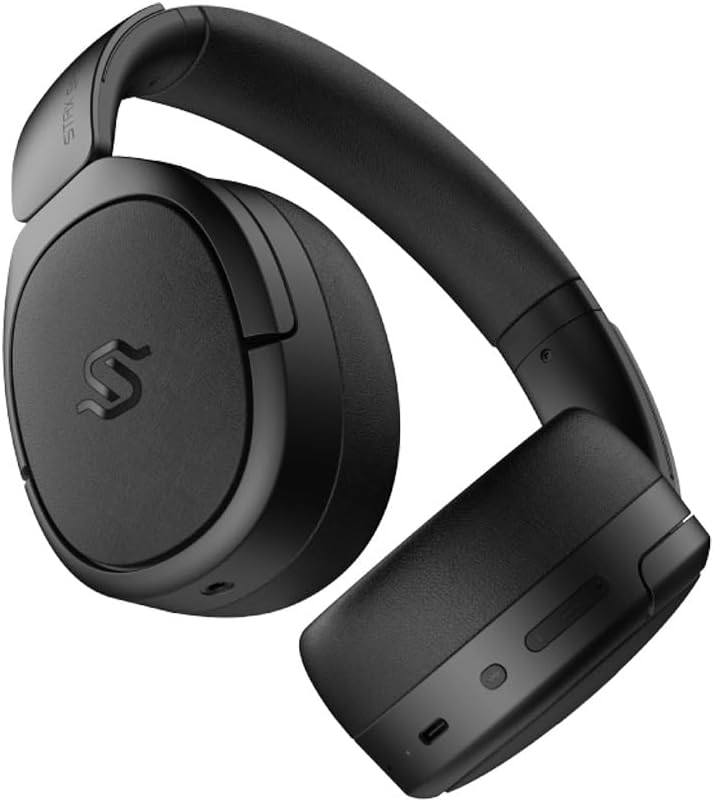
వైపు view of the headphones, highlighting the control buttons and ports located on the right earcup, including the USB-C port.

A detailed close-up of the control buttons on the earcup, showing the power button, volume controls, and the USB-C charging port.

The Edifier STAX Spirit S5 headphones folded compactly, illustrating their portability and ease of storage in the included carrying case.
సెటప్
హెడ్ఫోన్లను ఛార్జ్ చేస్తోంది
Before first use, fully charge your Edifier STAX Spirit S5 headphones.
- Connect the supplied USB Type-C cable to the charging port on the headphones and the other end to a USB power adapter (not included) or a computer's USB port.
- The LED indicator will show charging status. It typically takes approximately 10 minutes for a quick charge, providing extended playback. A full charge can provide up to 80 hours of battery life.
- Once fully charged, the LED indicator will change (refer to the specific indicator behavior in your quick start guide, if available).
పవర్ ఆన్/ఆఫ్
- పవర్ ఆన్: Press and hold the Power button for approximately 3 seconds until the indicator light illuminates.
- పవర్ ఆఫ్: సూచిక లైట్ ఆపివేయబడే వరకు పవర్ బటన్ను దాదాపు 5 సెకన్ల పాటు నొక్కి పట్టుకోండి.
బ్లూటూత్ పెయిరింగ్
The STAX Spirit S5 uses Bluetooth V5.4 for stable and fast transmission.
- హెడ్ఫోన్లు పవర్ ఆఫ్లో ఉన్నాయని నిర్ధారించుకోండి.
- జత చేసే మోడ్ను సూచిస్తూ, సూచిక కాంతి వేగంగా మెరిసే వరకు పవర్ బటన్ను దాదాపు 5-7 సెకన్ల పాటు నొక్కి పట్టుకోండి.
- మీ పరికరంలో (స్మార్ట్ఫోన్, టాబ్లెట్, కంప్యూటర్), బ్లూటూత్ను ప్రారంభించి, అందుబాటులో ఉన్న పరికరాల జాబితాలో "ఎడిఫైయర్ STAX స్పిరిట్ S5" కోసం శోధించండి.
- Select the headphones to connect. Once successfully paired, the indicator light will stop flashing and remain solid or turn off, depending on the model's specific behavior.
- Google ఫాస్ట్ పెయిర్: For Android devices, the headphones support Google Fast Pair for quick and seamless connection. Simply power on the headphones near your Android device, and a pairing prompt will appear.
- Multi-device Connection: The S5 can connect to two audio devices simultaneously. After pairing with the first device, put the headphones back into pairing mode and connect to the second device. The headphones will intelligently switch between the two.
వైర్డు కనెక్షన్
The headphones support both USB-C and 3.5mm AUX wired connections.
- USB-C Audio: Connect the USB Type-C cable from the headphones to a compatible USB-C port on your device for digital audio playback and charging.
- 3.5mm AUX Audio: Connect the 3.5mm AUX cable to the audio input port on the headphones and the other end to your audio source's 3.5mm output. Use the included 3.5mm to 6.35mm adapter for devices with a 6.35mm jack. Note that the headphones must be powered on for passive wired mode.
ఆపరేటింగ్ సూచనలు
ప్రాథమిక నియంత్రణలు
The main controls are located on the earcup:
- పవర్ బటన్:
- Press and hold for 3 seconds to Power On.
- Press and hold for 5 seconds to Power Off.
- Press and hold for 5-7 seconds (from off) to enter Bluetooth pairing mode.
- వాల్యూమ్ అప్ (+): వాల్యూమ్ పెంచడానికి షార్ట్ ప్రెస్ చేయండి.
- వాల్యూమ్ డౌన్ (-): వాల్యూమ్ తగ్గించడానికి షార్ట్ ప్రెస్ చేయండి.
- Multi-function Button (often between volume buttons):
- షార్ట్ ప్రెస్: సంగీతాన్ని ప్లే చేయండి/పాజ్ చేయండి.
- Short press: Answer/End call.
- Long press: Reject call.
- డబుల్ ప్రెస్: తదుపరి ట్రాక్.
- ట్రిపుల్ ప్రెస్: మునుపటి ట్రాక్.
ఆడియో టెక్నాలజీస్
The STAX Spirit S5 supports various high-fidelity audio codecs for an optimal listening experience:
- Qualcomm Snapdragon Sound: Ensures stable RF connection and efficient power consumption for extended listening.
- LDAC & LHDC: Compatible with Hi-Res Audio and Wireless Hi-Res Audio, delivering exceptional detail and clarity.
- aptX HD, aptX Adaptive, aptX Lossless: Part of the Snapdragon Audio technology, providing high-resolution audio with ultra-low latency (as low as 89ms with aptX Adaptive).
కాల్ ఫంక్షనాలిటీ
The headphones are equipped with dual microphones and Qualcomm cVc technology for clear calls.
- శబ్దం రద్దు: Integrated Qualcomm cVc actively suppresses ambient noise, enhancing voice clarity during calls.
- గోప్యత: The closed-back design helps ensure conversation privacy.
నిర్వహణ
సరైన నిర్వహణ మీ హెడ్ఫోన్ల దీర్ఘాయువు మరియు పనితీరును నిర్ధారిస్తుంది.
- శుభ్రపరచడం:
- హెడ్ఫోన్లను మృదువైన, పొడి వస్త్రంతో తుడవండి.
- For earpads, use a slightly damp cloth if necessary, but avoid excessive moisture.
- కఠినమైన రసాయనాలు, శుభ్రపరిచే ద్రావకాలు లేదా బలమైన డిటర్జెంట్లు ఉపయోగించవద్దు.
- ఇయర్ప్యాడ్ భర్తీ:
- The STAX Spirit S5 comes with two sets of earpads (mesh and leather).
- To replace, gently pull off the existing earpad. Use the included earpad pick tool if needed to carefully detach it from the earcup.
- Align the new earpad with the earcup and press firmly around the edges until it clicks securely into place.
- నిల్వ:
- When not in use, store the headphones in the provided carrying case to protect them from dust, scratches, and impacts.
- తీవ్రమైన ఉష్ణోగ్రతలు లేదా అధిక తేమలో నిల్వ చేయడం మానుకోండి.
- బ్యాటరీ సంరక్షణ:
- బ్యాటరీ జీవితాన్ని కాపాడుకోవడానికి, హెడ్ఫోన్లను తరచుగా పూర్తిగా డిశ్చార్జ్ చేయకుండా ఉండండి.
- ఎక్కువ కాలం నిల్వ చేస్తే, నిల్వ చేయడానికి ముందు బ్యాటరీని దాదాపు 50% ఛార్జ్ చేయండి.
ట్రబుల్షూటింగ్
మీ హెడ్ఫోన్లతో మీకు సమస్యలు ఎదురైతే, ఈ క్రింది సాధారణ సమస్యలు మరియు పరిష్కారాలను చూడండి:
| సమస్య | సాధ్యమైన కారణం | పరిష్కారం |
|---|---|---|
| హెడ్ఫోన్లు పవర్ ఆన్ చేయవు. | తక్కువ బ్యాటరీ. | USB-C కేబుల్ ఉపయోగించి హెడ్ఫోన్లను ఛార్జ్ చేయండి. |
| బ్లూటూత్ ద్వారా జత చేయడం సాధ్యం కాదు. | హెడ్ఫోన్లు జత చేసే మోడ్లో లేవు; పరికరం బ్లూటూత్ ఆఫ్లో ఉంది; జోక్యం. | Ensure headphones are in pairing mode (flashing light). Turn Bluetooth off/on on your device. Move closer to the device. Clear previous pairings on your device. |
| శబ్దం లేదు లేదా తక్కువ వాల్యూమ్ ఉంది. | వాల్యూమ్ చాలా తక్కువగా ఉంది; తప్పు ఆడియో మూలం; కేబుల్ వదులుగా ఉంది (వైర్డ్ మోడ్). | Increase volume on headphones and source device. Ensure correct audio output is selected on your device. Check wired connections. |
| Poor audio quality (wireless). | Distance from device; interference; low-quality audio source. | Reduce distance to your device. Avoid strong electromagnetic interference. Use high-quality audio files/streaming services. |
| కాల్స్ సమయంలో మైక్రోఫోన్ పనిచేయడం లేదు. | Incorrect input device selected; microphone muted. | Ensure the headphones are selected as the input device in your call application settings. Check if the microphone is muted. |
If the problem persists, please contact Edifier customer support.
స్పెసిఫికేషన్లు
Key technical specifications for the Edifier STAX Spirit S5 headphones:
| బ్రాండ్ | ఎడిఫైయర్ |
| మోడల్ పేరు | S5 |
| మోడల్ సంఖ్య | S5spaceblack |
| రంగు | నలుపు |
| కనెక్టివిటీ టెక్నాలజీ | వైర్డు, వైర్లెస్ (బ్లూటూత్) |
| వైర్లెస్ కమ్యూనికేషన్ టెక్నాలజీ | బ్లూటూత్ |
| బ్లూటూత్ వెర్షన్ | V5.4 (implied from feature bullets) |
| హెడ్ఫోన్ జాక్ | 3.5mm Jack, USB-C |
| ఇంపెడెన్స్ | 120 ఓం |
| చెవి ప్లేస్మెంట్ | ఓవర్-ఇయర్ |
| ఫారమ్ ఫ్యాక్టర్ | Circum-Aural |
| వస్తువు బరువు | 420 గ్రాములు |
| బ్యాటరీ కూర్పు | లిథియం-అయాన్ |
| పునర్వినియోగపరచదగిన బ్యాటరీ | అవును |
| ఛార్జింగ్ సమయం | Approx. 10 minutes (for quick charge) |
| ప్రత్యేక లక్షణాలు | ఫాస్ట్ ఛార్జింగ్ |
| అనుకూల పరికరాలు | Computer, Laptop, Mobile Phone |
| ఉత్పత్తి కోసం నిర్దిష్ట ఉపయోగాలు | Music, Professional, Studio Listening |
వారంటీ మరియు మద్దతు
The Edifier STAX Spirit S5 headphones come with a two-year warranty, ensuring reliable performance and support.
For technical assistance, warranty claims, or further inquiries, please contact Edifier customer support through their official webమీరు ఉత్పత్తిని కొనుగోలు చేసిన సైట్ లేదా రిటైలర్. వారంటీ ధ్రువీకరణ కోసం దయచేసి మీ కొనుగోలు రుజువును ఉంచుకోండి.


