పరిచయం
The KIEUIENK Digital Pet Electronic Game Machine is an interactive virtual pet device designed for entertainment and fostering responsibility. It features multiple built-in game modes and a user-friendly interface, making it suitable for various age groups. Its compact design with smooth corners ensures durability and ease of handling.

చిత్రం: ముందు భాగం view of the KIEUIENK Digital Pet Electronic Game Machine in purple, featuring a screen, three control buttons (RESET, SELECT, DECIDE), and a keychain attachment. The device has a unicorn and cloud design.
భద్రతా సమాచారం
This product is designed with child safety in mind, featuring smooth corners and durable PP material. No specific safety warnings beyond general electronic device handling are provided by the manufacturer. Always supervise young children during use. Keep away from water and extreme temperatures.
పెట్టెలో ఏముంది
- 1 x Electronic Pet Game Machine (Purple)
- 1 x Keychain attachment

Image: The Electronic Pet Game Machine shown with its attached keychain, highlighting its portability.
సెటప్
బ్యాటరీ సంస్థాపన
The device is powered by batteries. To install or replace batteries:
- పరికరం వెనుక బ్యాటరీ కంపార్ట్మెంట్ను గుర్తించండి.
- బ్యాటరీ కంపార్ట్మెంట్ కవర్ను తెరవడానికి చిన్న స్క్రూడ్రైవర్ను (చేర్చబడలేదు) ఉపయోగించండి.
- Insert the required batteries (type and quantity typically indicated inside the compartment) ensuring correct polarity (+/-).
- బ్యాటరీ కంపార్ట్మెంట్ కవర్ను మార్చండి మరియు దానిని స్క్రూతో భద్రపరచండి.
ప్రారంభ పవర్ ఆన్
After battery installation, the device should power on automatically or by pressing the 'RESET' button. Follow on-screen prompts to set up your virtual pet.
ఆపరేటింగ్ సూచనలు
నియంత్రణలు
The device features three primary control buttons:
- రీసె: Used to restart the device or return to the main menu in some contexts.
- ఎంచుకోండి: Navigates through menu options or cycles through choices.
- DECIDE: Confirms a selection or performs an action.
- రద్దు చేయండి: Used to exit a menu or cancel an action.

చిత్రం: క్లోజప్ view of the bottom portion of the digital pet device, clearly showing the 'RESET', 'SELECT', 'DECIDE', and 'CANCEL' buttons.
Caring for Your Virtual Pet
Your virtual pet requires regular attention to thrive. Key activities include:
- ఫీడింగ్: Provide food when your pet is hungry.
- ఆడుతోంది: Engage in mini-games to keep your pet happy and entertained.
- శుభ్రపరచడం: Clean up after your pet to maintain its health.
- క్రమశిక్షణ: Address misbehavior to teach your pet good habits.
- Medical Care: Administer medicine if your pet falls ill.
గేమ్ మోడ్లు
The device includes multiple built-in game modes for extended entertainment. Use the 'SELECT' and 'DECIDE' buttons to navigate through the game menu and choose your preferred activity.

Image: A child holding the purple digital pet game machine, demonstrating its handheld nature and ease of use during play.
నిర్వహణ
- శుభ్రపరచడం: పరికరాన్ని మృదువైన, పొడి వస్త్రంతో తుడవండి. ద్రవ క్లీనర్లను లేదా రాపిడి పదార్థాలను ఉపయోగించవద్దు.
- నిల్వ: పరికరాన్ని ప్రత్యక్ష సూర్యకాంతి మరియు తీవ్రమైన ఉష్ణోగ్రతలు లేకుండా చల్లని, పొడి ప్రదేశంలో నిల్వ చేయండి.
- బ్యాటరీ సంరక్షణ: లీకేజీని నివారించడానికి పరికరం ఎక్కువ కాలం ఉపయోగించబడకపోతే బ్యాటరీలను తీసివేయండి.
ట్రబుల్షూటింగ్
| సమస్య | సాధ్యమైన కారణం | పరిష్కారం |
|---|---|---|
| పరికరం ఆన్ చేయదు. | తక్కువ లేదా డెడ్ బ్యాటరీలు; తప్పు బ్యాటరీ ఇన్స్టాలేషన్. | బ్యాటరీలను మార్చండి; సరైన ధ్రువణతను నిర్ధారించుకోండి. |
| స్క్రీన్ ఖాళీగా లేదా స్తంభించి ఉంది. | Software glitch; low battery. | Press the 'RESET' button; replace batteries. |
| బటన్లు స్పందించడం లేదు. | Software glitch; physical obstruction. | Press the 'RESET' button; ensure buttons are not stuck. |
స్పెసిఫికేషన్లు
| ఫీచర్ | వివరాలు |
|---|---|
| ఉత్పత్తి పేరు | Virtual Electronic Digital Pet |
| మోడల్ సంఖ్య | B0D7BQ18PR |
| మెటీరియల్ | PP (పాలీప్రొఫైలిన్) |
| ఉత్పత్తి కొలతలు | సుమారుగా 5.8 x 4.9 x 1.7 సెం.మీ (2.28 x 1.93 x 0.67 అంగుళాలు) |
| బరువు | 26గ్రా |
| ప్రదర్శన రకం | LCD |
| శక్తి మూలం | బ్యాటరీ ఆధారితమైనది |
| కంట్రోలర్ రకం | బటన్ నియంత్రణ |
| సిఫార్సు చేసిన వయస్సు | 10 - 20 years (as per manufacturer) |
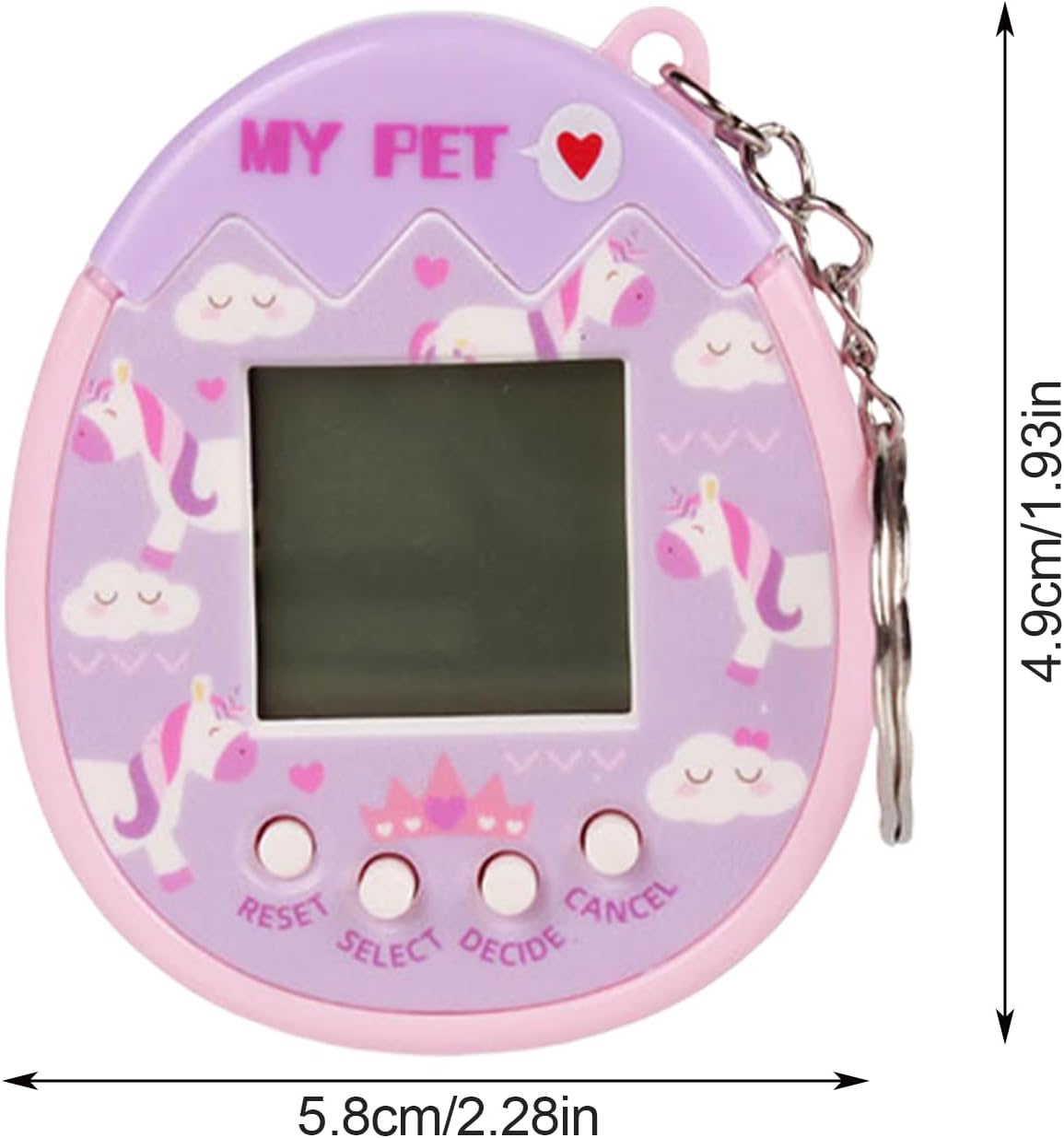
Image: The digital pet game machine with arrows and measurements indicating its dimensions: 5.8cm/2.28in width and 4.9cm/1.93in height.
వారంటీ మరియు మద్దతు
For product support, inquiries, or warranty information, please contact the manufacturer, KIEUIENK, through their official channels or the retailer from whom the product was purchased. Please retain your proof of purchase for any warranty claims.
