పరిచయం
This manual provides essential information for the safe and efficient operation, maintenance, and troubleshooting of your Taurus Homeland Ultimate Digital Wash Cordless Rechargeable Vacuum Cleaner. Please read this manual thoroughly before first use and keep it for future reference.

Image: The Taurus Homeland Ultimate Digital Wash Cordless Rechargeable Vacuum Cleaner, shown in its upright configuration.
ముఖ్యమైన భద్రతా సూచనలు
అగ్ని ప్రమాదాలు, విద్యుత్ షాక్ లేదా గాయం ప్రమాదాన్ని తగ్గించడానికి విద్యుత్ ఉపకరణాలను ఉపయోగిస్తున్నప్పుడు ఎల్లప్పుడూ ప్రాథమిక భద్రతా జాగ్రత్తలను అనుసరించండి.
- ఆరుబయట లేదా తడి ఉపరితలాలపై ఉపయోగించవద్దు.
- బొమ్మలాగా వాడుకోవడానికి అనుమతించవద్దు. పిల్లలు లేదా సమీపంలో ఉపయోగించినప్పుడు దగ్గరగా శ్రద్ధ అవసరం.
- ఈ మాన్యువల్లో వివరించిన విధంగా మాత్రమే ఉపయోగించండి. తయారీదారు సిఫార్సు చేసిన అటాచ్మెంట్లను మాత్రమే ఉపయోగించండి.
- దెబ్బతిన్న త్రాడు లేదా ప్లగ్తో ఉపయోగించవద్దు. ఉపకరణం సరిగ్గా పని చేయకపోతే, పడిపోయినట్లయితే, పాడైపోయినట్లయితే, ఆరుబయట వదిలివేయబడినట్లయితే లేదా నీటిలో పడిపోయినట్లయితే, దానిని సేవా కేంద్రానికి తిరిగి ఇవ్వండి.
- త్రాడుతో లాగడం లేదా తీసుకెళ్లడం చేయవద్దు, త్రాడును హ్యాండిల్గా ఉపయోగించవద్దు, త్రాడుపై తలుపును మూసివేయండి లేదా పదునైన అంచులు లేదా మూలల చుట్టూ త్రాడును లాగండి. త్రాడుపై ఉపకరణాన్ని నడపవద్దు. వేడిచేసిన ఉపరితలాల నుండి త్రాడును దూరంగా ఉంచండి.
- త్రాడుపై లాగడం ద్వారా అన్ప్లగ్ చేయవద్దు. అన్ప్లగ్ చేయడానికి, ప్లగ్ని పట్టుకోండి, త్రాడు కాదు.
- తడి చేతులతో ప్లగ్ లేదా ఉపకరణాన్ని నిర్వహించవద్దు.
- ఓపెనింగ్స్లో ఏ వస్తువును ఉంచవద్దు. ఏ ఓపెనింగ్ బ్లాక్ చేయబడినా ఉపయోగించవద్దు; దుమ్ము, మెత్తటి, జుట్టు మరియు గాలి ప్రవాహాన్ని తగ్గించే ఏదైనా లేకుండా ఉంచండి.
- జుట్టు, వదులుగా ఉండే దుస్తులు, వేళ్లు మరియు శరీరంలోని అన్ని భాగాలను ఓపెనింగ్స్ మరియు కదిలే భాగాలకు దూరంగా ఉంచండి.
- సిగరెట్లు, అగ్గిపుల్లలు లేదా వేడి బూడిద వంటి కాలుతున్న లేదా ధూమపానం చేసే ఏదైనా తీసుకోవద్దు.
- డస్ట్ కప్ మరియు/లేదా ఫిల్టర్లు లేకుండా ఉపయోగించవద్దు.
- అన్ప్లగ్ చేయడానికి ముందు అన్ని నియంత్రణలను ఆఫ్ చేయండి.
- మెట్లపై శుభ్రం చేసేటప్పుడు అదనపు జాగ్రత్తలు తీసుకోండి.
- గ్యాసోలిన్ వంటి మండే లేదా మండే ద్రవాలను తీయడానికి లేదా అవి ఉండే ప్రాంతాల్లో ఉపయోగించవద్దు.
- ఉపకరణాన్ని ఇంటి లోపల నిల్వ చేయండి. ప్రమాదాలను నివారించడానికి ఉపయోగించిన తర్వాత దూరంగా ఉంచండి.
- తయారీదారు పేర్కొన్న ఛార్జర్తో మాత్రమే రీఛార్జ్ చేయండి. ఒక రకమైన బ్యాటరీ ప్యాక్కు సరిపోయే ఛార్జర్ను మరొక బ్యాటరీ ప్యాక్తో ఉపయోగించినప్పుడు అగ్ని ప్రమాదాన్ని సృష్టించవచ్చు.
- ప్రత్యేకంగా నియమించబడిన బ్యాటరీ ప్యాక్లతో మాత్రమే ఉపకరణాలను ఉపయోగించండి. ఏదైనా ఇతర బ్యాటరీ ప్యాక్ల ఉపయోగం గాయం మరియు అగ్ని ప్రమాదాన్ని సృష్టించవచ్చు.
- బ్యాటరీ ప్యాక్ ఉపయోగంలో లేనప్పుడు, పేపర్ క్లిప్లు, నాణేలు, కీలు, గోర్లు, స్క్రూలు లేదా ఒక టెర్మినల్ నుండి మరొక టెర్మినల్కు కనెక్ట్ చేయగల ఇతర చిన్న మెటల్ వస్తువులు వంటి ఇతర మెటల్ వస్తువుల నుండి దూరంగా ఉంచండి. బ్యాటరీ టెర్మినల్లను కలిపి షార్ట్ చేయడం వలన కాలిన గాయాలు లేదా మంటలు సంభవించవచ్చు.
- దుర్వినియోగ పరిస్థితులలో, బ్యాటరీ నుండి ద్రవాన్ని బయటకు తీయవచ్చు; పరిచయాన్ని నివారించండి. అనుకోకుండా పరిచయం ఏర్పడితే, నీటితో ఫ్లష్ చేయండి. ద్రవం కళ్లను సంప్రదించినట్లయితే, అదనంగా వైద్య సహాయం తీసుకోండి. బ్యాటరీ నుండి విడుదలయ్యే ద్రవం చికాకు లేదా కాలిన గాయాలకు కారణం కావచ్చు.
ఉత్పత్తి భాగాలు
Familiarize yourself with the various parts of your vacuum cleaner and its accessories.

చిత్రం: ఒక ఓవర్ హెడ్ view displaying all included components: main vacuum unit, extension tube, motorized brush head, various nozzles, wall mount, charging adapter, and mop accessories.
- Main Vacuum Unit (with integrated digital display and dustbin)
- Detachable Lithium Battery (29.6V 2200mAh)
- పొడిగింపు ట్యూబ్
- Motorized Floor Brush with LED lights and rubber wheels
- Fuzzy Roller (for hard floors)
- Helix Roller (for carpets)
- 2-in-1 Long Brush/Crevice Tool
- వాల్ బ్రాకెట్
- ఛార్జింగ్ అడాప్టర్
- Water Tank and Mop Attachment
- HEPA ఫిల్టర్
సెటప్ మరియు అసెంబ్లీ
అన్ప్యాకింగ్:
ప్యాకేజింగ్ నుండి అన్ని భాగాలను జాగ్రత్తగా తొలగించండి. భవిష్యత్తులో నిల్వ లేదా రవాణా కోసం ప్యాకేజింగ్ను ఉంచండి.
బ్యాటరీ ఇన్స్టాలేషన్:
Ensure the battery is fully charged before first use. Align the detachable lithium battery with the main vacuum unit and slide it into place until it clicks securely.

Image: A hand connecting the charging adapter to the main vacuum unit for battery charging.
వాక్యూమ్ను అసెంబ్లింగ్ చేయడం:
For Upright Use:
Connect the extension tube to the main vacuum unit. Then, attach the motorized floor brush to the other end of the extension tube. Ensure all connections click into place firmly.
హ్యాండ్హెల్డ్ ఉపయోగం కోసం:
Attach desired accessories (e.g., 2-in-1 long brush/crevice tool) directly to the main vacuum unit.
Installing Rollers:
Depending on your floor type, install either the fuzzy roller (for hard floors) or the helix roller (for carpets) into the motorized floor brush. Refer to the maintenance section for detailed instructions on roller installation and removal.
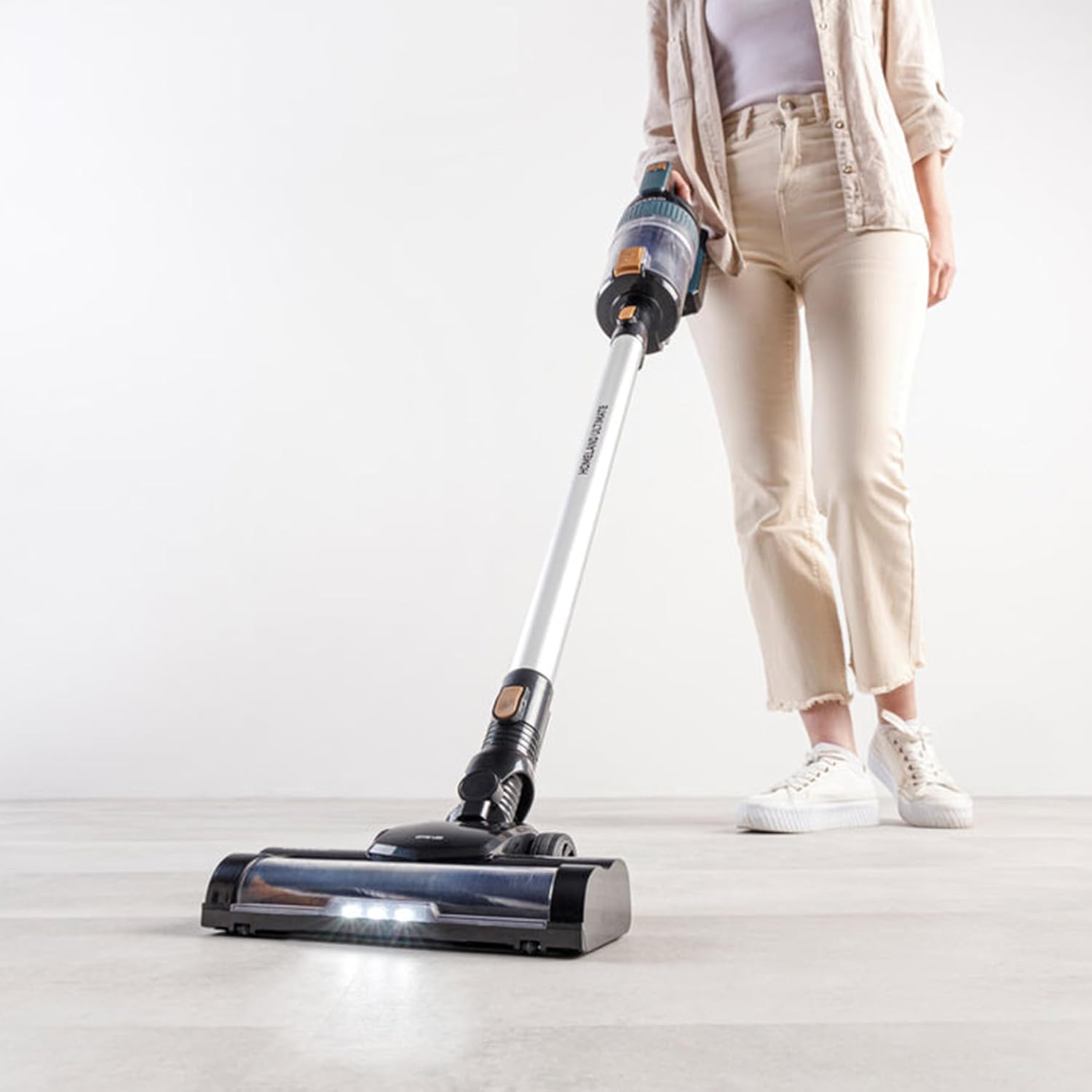
Image: A hand inserting the blue fuzzy roller into the brush head.

Image: A hand inserting the black and brown helix roller into the brush head.
Wall Bracket Installation (Optional):
Choose a suitable location near a power outlet. Secure the wall bracket to the wall using appropriate screws and anchors (not included). This allows for convenient storage and charging.
ఆపరేటింగ్ సూచనలు
పవర్ ఆన్/ఆఫ్:
Press the power button located on the main unit handle to turn the vacuum cleaner on or off.
చూషణ శక్తిని సర్దుబాటు చేయడం:
The vacuum features 2 speeds: Eco and Max. Use the mode selection button (refer to diagram in product components) to switch between these modes. The digital display will indicate the current power setting and battery level.

Image: A close-up of the vacuum's handle showing the digital display with battery percentage.
వాక్యూమింగ్:
Move the vacuum cleaner slowly and steadily over the surface to be cleaned. The motorized brush is effective for both parquet and hard floors, as well as carpets (with appropriate roller). The LED lights on the brush head illuminate the cleaning path.

Image: A person using the Taurus vacuum cleaner on a light-colored floor, demonstrating its maneuverability.
Using the Water Tank and Mop (Wet Cleaning):
Attach the water tank and mop attachment to the motorized floor brush. Fill the water tank with clean water. The mop function allows for simultaneous vacuuming and wet cleaning of hard floors. Do not use on carpets or rugs.

Image: A hand pouring water into the integrated water tank on the motorized brush head for the mopping function.
బ్యాటరీ లైఫ్:
The vacuum offers an autonomy of 40-50 minutes depending on the power mode used. The digital display shows the remaining battery percentage. Recharge the battery when the indicator is low.
నిర్వహణ మరియు శుభ్రపరచడం
క్రమం తప్పకుండా నిర్వహణ సరైన పనితీరును నిర్ధారిస్తుంది మరియు మీ వాక్యూమ్ క్లీనర్ యొక్క జీవితాన్ని పొడిగిస్తుంది.
డస్ట్బిన్ను ఖాళీ చేయడం:
The dustbin has a 600ml capacity. Empty the dustbin after each use or when the MAX fill line is reached. To empty, detach the dustbin from the main unit (refer to product components diagram) and open the bottom flap over a waste bin.
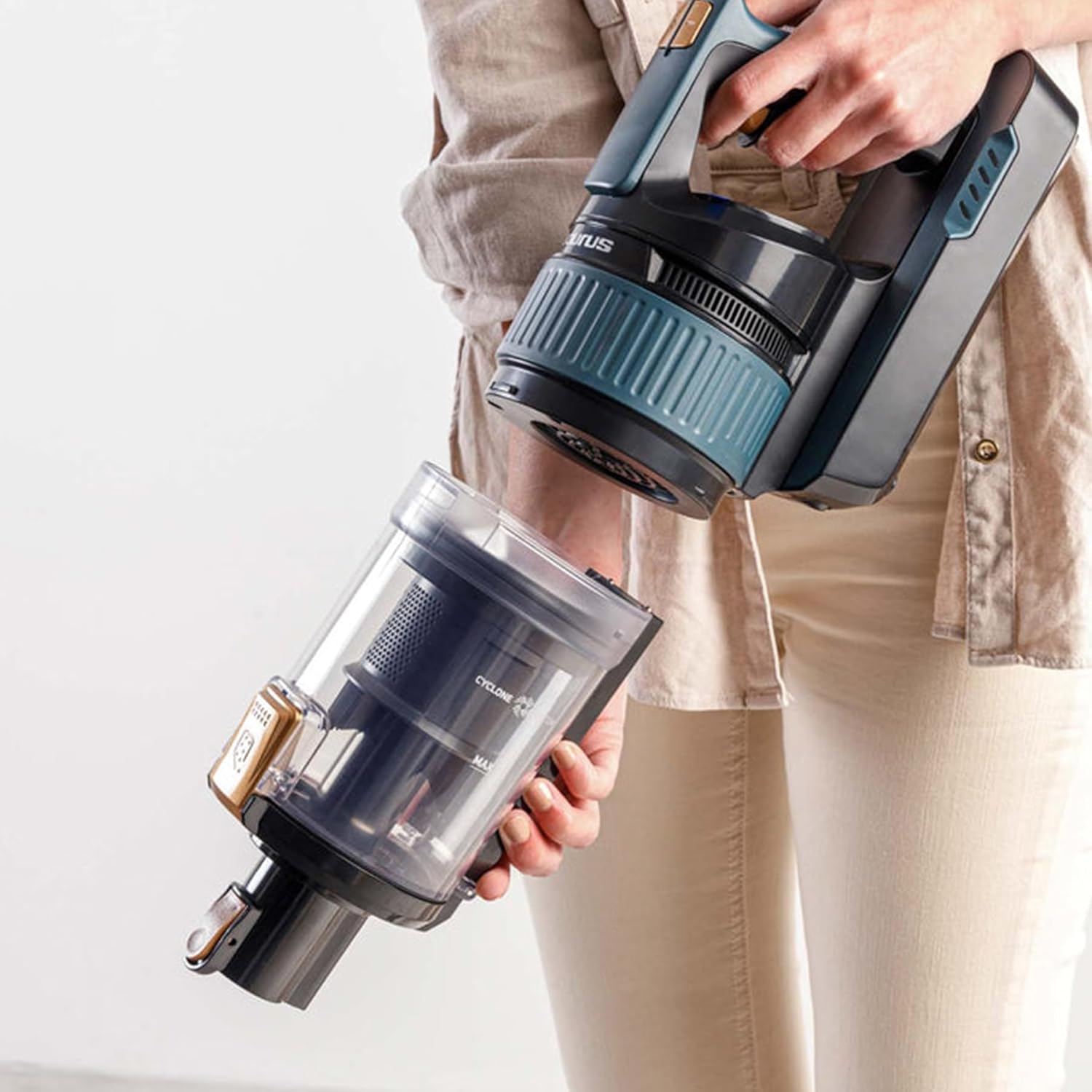
Image: A hand detaching the transparent dustbin from the main vacuum unit.
శుభ్రపరిచే ఫిల్టర్లు:
The vacuum features triple advance filtration with a HEPA filter. Regularly clean the filters to maintain suction power. Tap out loose dirt from the pre-filter and HEPA filter. The HEPA filter can be gently rinsed with cold water; ensure it is completely dry before re-installing. Do not wash other filter components unless specified.

చిత్రం: పేలినది view showing the various components of the vacuum's multi-stage filtration system, including the HEPA filter.
Cleaning Brush Rollers:
Remove the brush roller from the motorized floor brush by unlocking the side latch. Remove any tangled hair, threads, or debris. The rollers can be wiped clean with a damp cloth. Ensure they are dry before re-inserting.
Cleaning the Water Tank and Mop Pad:
After wet cleaning, empty any remaining water from the tank. Rinse the tank and mop pad with clean water. The mop pad can be machine washed or hand washed. Allow all parts to air dry completely before reassembly and storage.
బాహ్య క్లీనింగ్:
వాక్యూమ్ క్లీనర్ యొక్క బాహ్య భాగాన్ని మృదువైన, d శుభ్రముపరచుతో తుడవండి.amp గుడ్డ. రాపిడి క్లీనర్లు లేదా ద్రావకాలు ఉపయోగించవద్దు.
ట్రబుల్షూటింగ్
కస్టమర్ సర్వీస్ను సంప్రదించే ముందు, దయచేసి ఈ క్రింది సాధారణ సమస్యలు మరియు పరిష్కారాలను చూడండి.
| సమస్య | సాధ్యమైన కారణం | పరిష్కారం |
|---|---|---|
| వాక్యూమ్ ఆన్ అవ్వదు. | బ్యాటరీ ఛార్జ్ చేయబడలేదు లేదా సరిగ్గా ఇన్స్టాల్ చేయబడలేదు. | బ్యాటరీ పూర్తిగా ఛార్జ్ అయి సురక్షితంగా స్థానంలోకి చేరుకుందని నిర్ధారించుకోండి. |
| చూషణ నష్టం. | Dustbin is full; Filters are clogged; Blockage in nozzle/tube/brush head. | Empty dustbin. Clean or replace filters. Check for and remove any blockages. |
| Brush roller not spinning. | Debris tangled in brush roller; Brush roller not properly installed. | Remove brush roller and clear any obstructions. Re-install brush roller correctly. |
| తక్కువ బ్యాటరీ జీవితం. | Battery not fully charged; Using Max power mode excessively; Battery degradation. | Ensure full charge. Use Eco mode for longer runtime. If battery life significantly decreases, consider battery replacement. |
| Water not dispensing from mop tank. | Water tank empty; Nozzle clogged. | Refill water tank. Check and clear any clogs in the water dispensing nozzle. |
ఉత్పత్తి లక్షణాలు
- మోడల్: HVCA7298B (Homeland Ultimate Digital)
- శక్తి: 400W
- మోటారు వేగం: 80000 RPM (Brushless Digital Driver Motor)
- బ్యాటరీ: Detachable Lithium Battery 29.6V 2200mAh
- చూషణ శక్తి: 20000PA (20KPA), 140AW
- డస్ట్బిన్ సామర్థ్యం: 600 మి.లీ
- స్వయంప్రతిపత్తి: 40-50 minutes (depending on speed)
- వేగం: 2 (Eco, Max)
- వడపోత: Triple Advance Filtration with HEPA Filter
- బరువు: Approximately 2 kg (main unit), 8.05 kg (packaged)
- కొలతలు: 12 x 23 x 120 సెం.మీ (ఉత్పత్తి)
- మెటీరియల్: ప్లాస్టిక్
- రంగు: నలుపు/వెండి
- ప్రత్యేక లక్షణాలు: Cordless, Smart LED Display, Electric Floor Brush with LED, Water Tank and Mop
వారంటీ మరియు మద్దతు
Your Taurus Homeland Ultimate Digital Wash Cordless Rechargeable Vacuum Cleaner comes with a 2 సంవత్సరాల వారంటీ (1 Year Retail + 1 Year Extended). To activate your extended warranty and for further support, please visit the official Taurus Appliances webసైట్.
For customer service inquiries, technical support, or spare parts, please contact Taurus customer support through their official channels. Always provide your model number (HVCA7298B) and purchase date when seeking assistance.

Image: A circular graphic indicating a "2 Year Warranty" with details for retail and extended warranty, and a website address for registration.
You can find more information and register your product at: taurusappliances.co.za


