పరిచయం
This manual provides detailed instructions for the installation, operation, and maintenance of your CAMECHO Android 13 Car Radio. This double DIN unit features a 9-inch display and is designed for Hyundai Santa Fe models from 2006 to 2012. It includes advanced features such as Android 13 OS, 4GB RAM + 64GB ROM, GPS navigation, wireless CarPlay, Android Auto, Bluetooth 5.0, RDS/FM radio, and MirrorLink functionality.
Please read this manual thoroughly before installation and use to ensure proper functionality and to avoid damage to the unit or your vehicle.
ప్యాకేజీ విషయాలు
క్రింద జాబితా చేయబడిన అన్ని అంశాలు మీ ప్యాకేజీలో చేర్చబడ్డాయని ధృవీకరించండి. ఏవైనా అంశాలు తప్పిపోయినా లేదా దెబ్బతిన్నా, దయచేసి కస్టమర్ మద్దతును సంప్రదించండి.
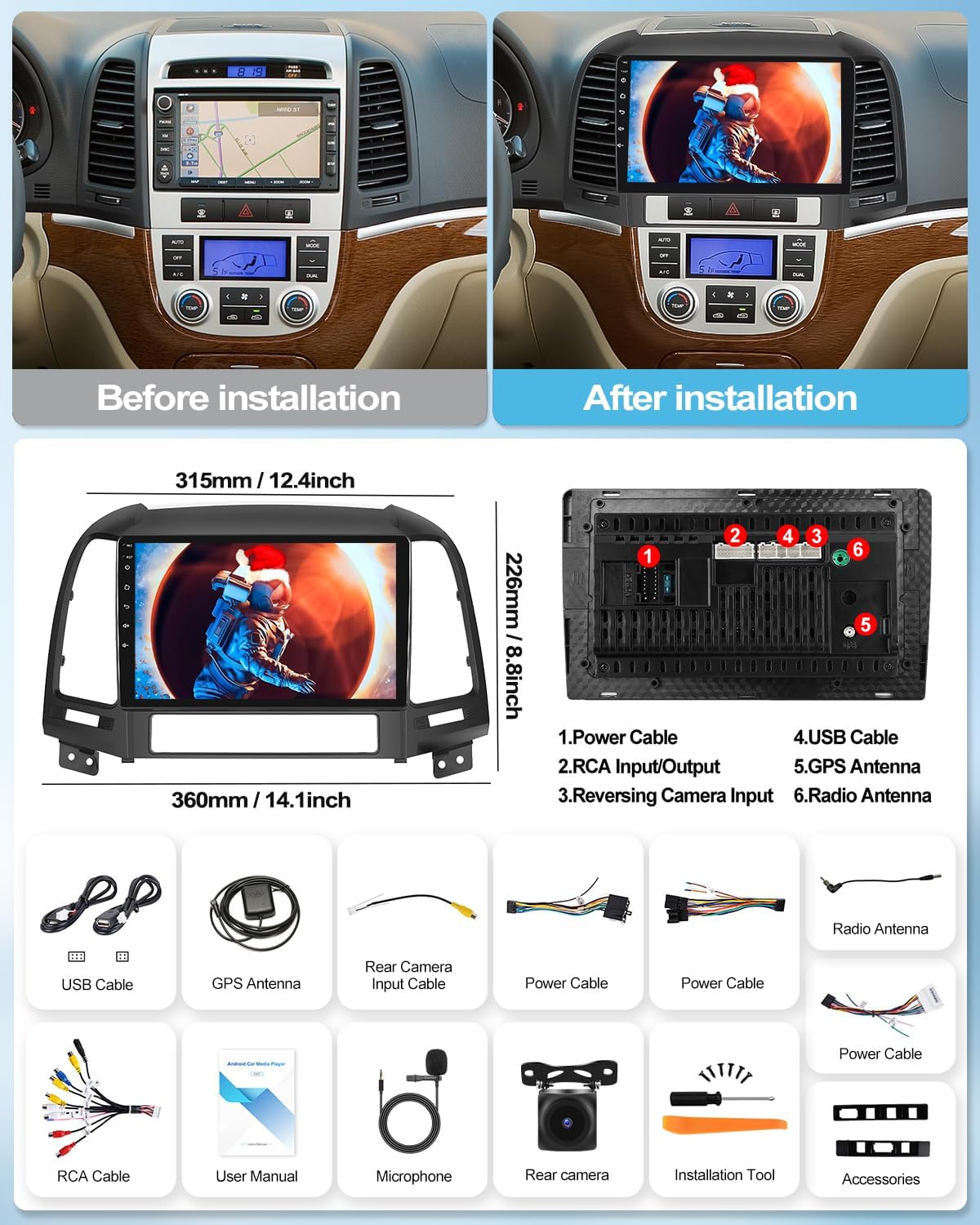
Image showing the car radio unit, USB cables, GPS antenna, rear camera input cable, power cables, radio antenna, RCA cable, user manual, microphone, rear camera (optional), installation tool, and other accessories.
- CAMECHO Android 13 Car Radio Unit (9-inch display)
- పవర్ కేబుల్ హార్నెస్
- USB కేబుల్స్ (x2)
- GPS యాంటెన్నా
- వెనుక కెమెరా ఇన్పుట్ కేబుల్
- RCA కేబుల్
- రేడియో యాంటెన్నా
- వినియోగదారు మాన్యువల్ (ఈ పత్రం)
- మైక్రోఫోన్
- ఇన్స్టాలేషన్ టూల్స్
- Accessories (mounting brackets, screws)
- Note: Rear camera is often sold separately.
స్పెసిఫికేషన్లు
| ఆపరేటింగ్ సిస్టమ్ | ఆండ్రాయిడ్ 13 |
| RAM | 4GB |
| ROM | 64GB |
| ప్రదర్శన పరిమాణం | 9 అంగుళాలు |
| డిస్ప్లే రిజల్యూషన్ | 1080P HD Touchscreen |
| ప్రాసెసర్ | 4 కోర్లు |
| కనెక్టివిటీ | Wi-Fi, Bluetooth 5.0, USB, RCA |
| నావిగేషన్ | Built-in GPS (Online/Offline support) |
| స్మార్ట్ఫోన్ ఇంటిగ్రేషన్ | Wireless CarPlay, Wireless Android Auto, MirrorLink |
| రేడియో ట్యూనర్ | FM/RDS రేడియో |
| ఆడియో అవుట్పుట్ మోడ్ | Stereo, Surround (4.0 channel configuration) |
| వీడియో ఎన్కోడింగ్ మద్దతు | AVC, MPEG-4, MKV, WMV |
| అనుకూల వాహనాలు | Hyundai Santa Fe (2006-2012) |

This image highlights key features such as the 1080P touchscreen, 4-core processor, built-in WiFi, wireless CarPlay, GPS navigation, Android Auto, steering wheel control, rear camera compatibility, FM/RDS radio, EQ sound tuning, and Bluetooth connectivity.
ఇన్స్టాలేషన్ గైడ్
Professional installation is recommended. If you choose to install the unit yourself, ensure the vehicle's battery is disconnected before starting. Refer to your vehicle's service manual for specific dashboard removal instructions.
అనుకూలత తనిఖీ
This car radio is designed for Hyundai Santa Fe models from 2006 to 2012. If you are unsure about compatibility, please provide a photo of your car's central console and the back of your original CD player to customer support for verification.

This image illustrates the appearance of the car's dashboard before and after the installation of the CAMECHO Android 13 car radio, showing the integrated 9-inch display.
వైరింగ్ రేఖాచిత్రం
The following diagram shows the rear connections of the car radio unit. Ensure all cables are securely connected to their corresponding ports.

వివరణాత్మక వెనుక భాగం view of the car radio unit, indicating connection points for: 1. Power Cable, 2. RCA Input/Output, 3. Reversing Camera Input, 4. USB Cable, 5. GPS Antenna, 6. Radio Antenna.
- బ్యాటరీని డిస్కనెక్ట్ చేయండి: Before beginning, disconnect the negative terminal of your vehicle's battery.
- పాత రేడియోను తీసివేయండి: Carefully remove the trim panels and screws securing the factory radio. Disconnect all wiring harnesses.
- వైరింగ్ హార్నెస్ను కనెక్ట్ చేయండి: Connect the provided power cable harness to the vehicle's wiring and the new head unit. Ensure all connections are firm.
- పెరిఫెరల్స్ కనెక్ట్ చేయండి:
- GPS యాంటెన్నా: GPS యాంటెన్నాను స్పష్టమైన కాంతి ఉన్న ప్రదేశంలో అమర్చండి. view of the sky (e.g., dashboard, A-pillar). Connect it to the GPS antenna port.
- USB కేబుల్స్: Route the USB cables to a convenient location (e.g., glove box, center console) for connecting USB devices.
- రేడియో యాంటెన్నా: Connect the vehicle's radio antenna to the unit.
- Rear Camera (Optional): If installing a rear camera, connect its video input to the "Reversing Camera Input" port and its power to the reverse light circuit.
- RCA కేబుల్స్: బాహ్య కోసం RCA కేబుల్లను కనెక్ట్ చేయండి ampవర్తిస్తే లైఫైయర్లు లేదా సబ్ వూఫర్లు.
- మైక్రోఫోన్: Connect the external microphone for improved call quality.
- పరీక్ష యూనిట్: Before fully reassembling the dashboard, temporarily reconnect the battery and test the unit's basic functions (power on, radio, sound, touch screen).
- సురక్షిత యూనిట్: Mount the new car radio into the dashboard opening using the provided brackets and screws.
- డాష్బోర్డ్ను తిరిగి అమర్చండి: Carefully reattach all trim panels and secure them.
- బ్యాటరీని మళ్లీ కనెక్ట్ చేయండి: వాహనం యొక్క బ్యాటరీ యొక్క నెగటివ్ టెర్మినల్ను తిరిగి కనెక్ట్ చేయండి.
ప్రారంభ సెటప్ మరియు కాన్ఫిగరేషన్
మొదటి పవర్ ఆన్
Upon the first power-on, the system will boot up. You may be prompted to select your language and time zone. Follow the on-screen instructions.
Wi-Fi కనెక్షన్
To access online features, download apps, or use online navigation, connect the unit to a Wi-Fi network.
- వెళ్ళండి సెట్టింగ్లు > నెట్వర్క్ & ఇంటర్నెట్ > Wi-Fi.
- Wi-Fi ని ఆన్ చేసి, జాబితా నుండి మీకు కావలసిన నెట్వర్క్ను ఎంచుకోండి.
- ప్రాంప్ట్ చేయబడితే పాస్వర్డ్ను నమోదు చేసి కనెక్ట్ చేయండి.

This image displays the car radio's interface for Wi-Fi connection, showing various applications and social media icons, indicating internet access capabilities.
GPS Navigation Setup
The unit comes with built-in GPS. For offline navigation, you need to download maps.
- Wi-Fiకి కనెక్ట్ చేయండి.
- Open the pre-installed navigation app (e.g., Here WeGo).
- Download the required regional maps for offline use.

This image shows the car radio screen displaying GPS navigation, with a route highlighted and icons for different navigation applications.
ఆపరేటింగ్ సూచనలు
వైర్లెస్ కార్ప్లే & ఆండ్రాయిడ్ ఆటో
Connect your smartphone wirelessly to access CarPlay or Android Auto features, including navigation, calls, messages, and music.
- మీ స్మార్ట్ఫోన్లో బ్లూటూత్ మరియు Wi-Fi ప్రారంభించబడిందని నిర్ధారించుకోండి.
- On the car radio, open the "Zlink" application (or similar CarPlay/Android Auto app).
- Pair your phone via Bluetooth with the car radio.
- Follow the on-screen prompts to activate CarPlay or Android Auto.

This image shows the car radio screen running both Wireless CarPlay and Android Auto, displaying common applications like Phone, Maps, Messages, and Music.
MirrorLink Function
MirrorLink allows you to display your phone's screen directly on the car radio's display.
- Connect your phone to the car radio via USB or Wi-Fi hotspot.
- Open the MirrorLink application on the car radio.
- For iOS devices, activate AirPlay on your iPhone and select the car radio.
- For Android devices, enable USB debugging in developer options and select "USB data transfer" mode, then follow the app's instructions.

This image demonstrates the MirrorLink feature, showing a smartphone screen being mirrored onto the car radio's display.
బ్లూటూత్ 5.0
Use Bluetooth for hands-free calling and audio streaming.
- Go to the Bluetooth application on the car radio.
- మీ ఫోన్లో బ్లూటూత్ని ప్రారంభించి, అందుబాటులో ఉన్న పరికరాల కోసం శోధించండి.
- Select the car radio (e.g., "CAMECHO_BT") from your phone's list and pair.
- ప్రాంప్ట్ చేయబడితే జత చేసే కోడ్ను నిర్ధారించండి.

This image shows the Bluetooth 5.0 interface on the car radio, illustrating hands-free calling and music playback features.
FM/RDS రేడియో
Access FM radio stations and RDS information.
- Open the "Radio" application.
- Use the scan function to find available stations or manually tune.
- Press and hold a station number for three seconds to save it as a preset.

This image shows the FM/RDS radio interface on the car radio, displaying station frequencies, signal strength, and controls for tuning and presets.
స్ప్లిట్ స్క్రీన్ ఫంక్షన్
Run two applications simultaneously on the screen, such as navigation and music playback.
- మొదటి అప్లికేషన్ను తెరవండి.
- Press and hold the recent apps button (usually a square icon) or swipe up from the bottom and hold.
- Drag the first app to one side of the screen.
- Select the second app to fill the other side.

This image demonstrates the split-screen functionality, showing navigation on one side of the display and a music player on the other, allowing simultaneous use of two applications.
స్టీరింగ్ వీల్ నియంత్రణ
The unit supports original steering wheel controls. Configuration may be required.
- వెళ్ళండి సెట్టింగ్లు > స్టీరింగ్ వీల్ నియంత్రణ.
- Follow the on-screen instructions to map your vehicle's steering wheel buttons to the corresponding functions on the car radio. This typically involves pressing and holding a button on the steering wheel, then selecting the desired function on the screen.

This image shows the car radio's interface for configuring steering wheel controls, allowing users to assign functions to their vehicle's steering wheel buttons.
వెనుక కెమెరా డిస్ప్లే
If a rear camera is connected, the display will automatically switch to the camera view వాహనాన్ని రివర్స్ గేర్లో ఉంచినప్పుడు.

This image shows the car radio displaying the rear camera view, complete with parking guidelines and icons indicating features such as HD image quality, waterproof design, night vision, and wide-angle view.
Optional Functions (Accessories Not Included)
The car radio supports various external accessories to enhance its functionality. These accessories are not included in the standard package and must be purchased separately.
- DVR (Digital Video Recorder): Connect an external DVR for recording driving footage.
- DAB+ (Digital Audio Broadcasting): Add a DAB+ receiver for digital radio broadcasts.
- OBD2 (On-Board Diagnostics): Connect an OBD2 scanner via Bluetooth to monitor vehicle data.
- వీడియో అవుట్పుట్: Connect external monitors for rear-seat entertainment.
- బాహ్య మైక్రోఫోన్: For improved voice clarity during calls or voice commands.
- 360 Panoramic Camera: ఒక సమగ్ర కోసం view around your vehicle.

This image illustrates various optional functions that can be integrated with the car radio, such as DVR, DAB+, 360-degree panoramic camera, OBD2 diagnostics, video output, and an external microphone.
ట్రబుల్షూటింగ్
మీ కారు రేడియోతో మీకు సమస్యలు ఎదురైతే, ఈ క్రింది సాధారణ సమస్యలు మరియు పరిష్కారాలను చూడండి:
| సమస్య | సాధ్యమైన కారణం | పరిష్కారం |
|---|---|---|
| యూనిట్ పవర్ ఆన్ చేయదు. | వదులుగా ఉన్న విద్యుత్ కనెక్షన్, పేలిపోయిన ఫ్యూజ్, తప్పు వైరింగ్. | Check power cable connections. Inspect vehicle's fuse box and the unit's fuse. Verify wiring against the diagram. |
| శబ్దం లేదు. | Volume too low, mute activated, speaker wiring issue, incorrect audio source. | Increase volume. Check if mute is active. Verify speaker wiring. Select correct audio source. |
| బ్లూటూత్ కనెక్ట్ కావడం లేదు. | Bluetooth off on phone/unit, incorrect pairing process, interference. | రెండు పరికరాల్లోనూ బ్లూటూత్ ప్రారంభించబడిందని నిర్ధారించుకోండి. మునుపటి జతలను తొలగించి, తిరిగి జత చేయండి. యూనిట్కు దగ్గరగా తరలించండి. |
| GPS సిగ్నల్ పోయింది లేదా సరిగ్గా లేదు. | GPS antenna obstruction, poor antenna placement, outdated maps. | GPS యాంటెన్నా స్పష్టంగా ఉందని నిర్ధారించుకోండి view of the sky. Reposition antenna if necessary. Update maps via Wi-Fi. |
| CarPlay/Android Auto not starting. | Incorrect connection method, app not installed/updated, phone compatibility. | Ensure correct wireless connection (Bluetooth + Wi-Fi). Update "Zlink" app. Check phone compatibility and OS version. |
| స్టీరింగ్ వీల్ నియంత్రణలు పనిచేయడం లేదు. | Incorrect wiring, controls not configured. | Verify steering wheel control wiring. Perform the steering wheel control learning process in settings. |
ఈ పరిష్కారాలను ప్రయత్నించిన తర్వాత కూడా సమస్య కొనసాగితే, దయచేసి మరింత సహాయం కోసం కస్టమర్ మద్దతును సంప్రదించండి.
నిర్వహణ
To ensure the longevity and optimal performance of your CAMECHO car radio, follow these maintenance guidelines:
- స్క్రీన్ క్లీనింగ్: స్క్రీన్ను సున్నితంగా తుడవడానికి మృదువైన, మెత్తటి బట్టను ఉపయోగించండి. మొండి మరకల కోసం, కొద్దిగా dampనీటితో లేదా స్క్రీన్-సేఫ్ క్లీనర్తో వస్త్రాన్ని తుడవండి. కఠినమైన రసాయనాలు లేదా రాపిడి పదార్థాలను నివారించండి.
- సాఫ్ట్వేర్ అప్డేట్లు: Periodically check for system software updates via the unit's settings menu (requires Wi-Fi connection). Keeping the software updated ensures optimal performance and access to new features.
- విపరీతమైన ఉష్ణోగ్రతలను నివారించండి: Do not expose the unit to extreme temperatures for prolonged periods, as this can affect its electronic components.
- ద్రవపదార్థాల నుండి రక్షించండి: Prevent any liquids from entering the unit, as this can cause severe damage.
- కేబుల్ కనెక్షన్లు: Periodically check that all cables connected to the unit are secure and free from damage.
వారంటీ మరియు కస్టమర్ మద్దతు
Your CAMECHO car radio comes with a standard manufacturer's warranty. Please refer to the warranty card included in your package for specific terms and conditions.
మద్దతును సంప్రదించండి
For technical assistance, troubleshooting beyond this manual, or warranty inquiries, please contact CAMECHO customer support.
ఇమెయిల్: CAMECHOVIP@126.com
Please provide your product model number (B0D8KB4ZW3) and a detailed description of the issue when contacting support.

Image of a customer support representative, indicating available assistance.


