1. పరిచయం
Thank you for choosing the FUNYET 2-in-1 Touchscreen Laptop, Model FUN01-03. This device combines the versatility of a tablet with the productivity of a laptop, featuring a 14-inch display, 12th Gen N100 Processor, 16GB DDR5 RAM, and a 512GB SSD. This manual provides essential information for setting up, operating, maintaining, and troubleshooting your new device to ensure optimal performance and longevity.
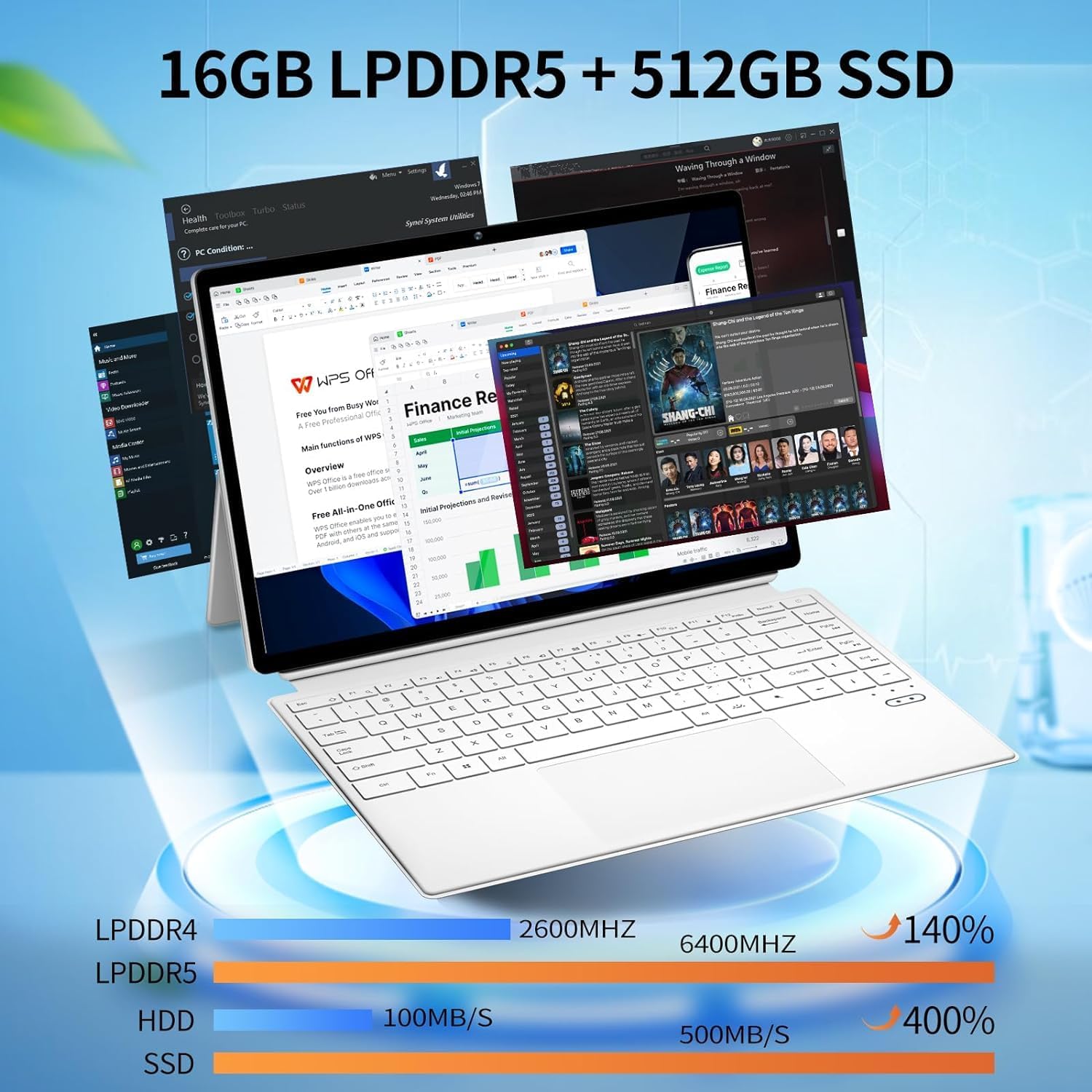
Figure 1: FUNYET 2-in-1 Laptop in its standard laptop configuration.
2. ప్యాకేజీ విషయాలు
మీ ఉత్పత్తి ప్యాకేజింగ్లో అన్ని అంశాలు ఉన్నాయని నిర్ధారించుకోండి:
- 14 అంగుళాల టాబ్లెట్ కంప్యూటర్
- AC అడాప్టర్
- సూచనలు (ఈ మాన్యువల్)
- వారంటీ కార్డ్
3. ఉత్పత్తి ముగిసిందిview
3.1 ముఖ్య లక్షణాలు
- ప్రాసెసర్: 12th Gen Celeron N100 (up to 3.4 GHz, 4 cores, 4 threads)
- RAM: 16GB DDR5
- నిల్వ: 512GB SSD
- ప్రదర్శన: 14-inch Touchscreen, 1920 x 1200 pixels (16:10 aspect ratio)
- ఆపరేటింగ్ సిస్టమ్: Windows 11 ప్రో
- వైర్లెస్ కనెక్టివిటీ: వై-ఫై 6 (802.11ax), బ్లూటూత్ 5.2
- కెమెరాలు: 2MP ఫ్రంట్, 5MP వెనుక
- బ్యాటరీ లైఫ్: 8 గంటల వరకు (సగటు వినియోగం)
- బరువు: సుమారు 2 పౌండ్లు
- కొలతలు: 12.5 x 8.4 x 0.4 అంగుళాలు

Figure 2: Device showcasing its memory and storage capabilities with multiple applications running.
3.2 ఫిజికల్ ఓవర్view (Ports and Buttons)
Familiarize yourself with the various ports and buttons on your FUNYET 2-in-1 Laptop:

మూర్తి 3: వివరంగా view of the device's ports and controls.
- పవర్ బటన్: పరికరాన్ని ఆన్ లేదా ఆఫ్ చేయడానికి నొక్కి, పట్టుకోండి.
- వాల్యూమ్ నియంత్రణ: Adjust the audio output level.
- Type-C (Full-featured): డేటా బదిలీ, వీడియో అవుట్పుట్ మరియు పవర్ డెలివరీకి మద్దతు ఇస్తుంది.
- Type-C (Charging and Data Transfer): Primarily for charging the device and basic data transfer.
- మైక్రో HDMI: బాహ్య డిస్ప్లేలు లేదా ప్రొజెక్టర్లకు కనెక్ట్ చేయండి.
4. ప్రారంభ సెటప్
4.1 పవర్ ఆన్
- Ensure the device is charged or connected to the AC adapter.
- నొక్కండి మరియు పట్టుకోండి పవర్ బటన్ (refer to Figure 3) until the screen illuminates.
4.2 Wi-Fiకి కనెక్ట్ చేస్తోంది
- Once the device is powered on, navigate to the Wi-Fi settings in Windows 11.
- Select your preferred network and enter the password if prompted.
4.3 Operating System Setup (Windows 11 Pro)
Follow the on-screen prompts to complete the Windows 11 Pro setup, including language selection, user account creation, and privacy settings.

Figure 4: The Windows 11 Pro interface pre-installed on the device.
5. ఆపరేటింగ్ సూచనలు
5.1 కీబోర్డ్ మరియు టచ్ప్యాడ్
The device features a full-sized backlit keyboard and a responsive touchpad for navigation and input.

Figure 5: The backlit keyboard and integrated touchpad.
5.2 టచ్స్క్రీన్ కార్యాచరణ
Utilize the 14-inch touchscreen for intuitive interaction with Windows 11 Pro. Pinch-to-zoom, swipe, and tap gestures are supported.

Figure 6: Device used in tablet mode, highlighting the touchscreen.
5.3 2-ఇన్-1 మోడ్లు
The flexible hinge allows the device to transform into various modes:
- ల్యాప్టాప్ మోడ్: టైపింగ్ మరియు ఉత్పాదకత కోసం ప్రామాణిక ల్యాప్టాప్ కాన్ఫిగరేషన్.
- టాబ్లెట్ మోడ్: Fold the keyboard back to use as a tablet.
- స్టాండ్ మోడ్: Position the screen for media consumption or presentations.

Figure 7: Proper and improper kickstand usage for stable positioning.
For a visual guide on transforming your device into different modes, please watch the official product video below:
Video 1: Official FUNYET demonstration of the 2-in-1 laptop's various modes and tablet functionality.
6. బ్యాటరీ నిర్వహణ
6.1 ఛార్జింగ్
Connect the provided AC adapter to the designated Type-C port (refer to Figure 3) and plug it into a power outlet. The charging indicator light will illuminate.
6.2 Battery Life Optimization
బ్యాటరీ జీవితాన్ని పెంచడానికి:
- స్క్రీన్ ప్రకాశాన్ని సౌకర్యవంతమైన స్థాయికి సర్దుబాటు చేయండి.
- Close unused applications and browser tabs.
- Enable battery saver mode in Windows settings.
- ఉపయోగంలో లేనప్పుడు బాహ్య పరిధీయ పరికరాలను డిస్కనెక్ట్ చేయండి.

Figure 8: Battery performance estimates for various usage scenarios.
7 కనెక్టివిటీ
7.1 Wi-Fi 6 and Bluetooth 5.2
The device supports Wi-Fi 6 for fast and stable internet connections and Bluetooth 5.2 for connecting wireless peripherals like headphones or mice.

చిత్రం 9: పైగాview of wireless connectivity and camera specifications.
7.2 External Displays
Use the Micro HDMI port to connect your laptop to an external monitor or television for an extended display experience.
8. Integrated Cameras
The FUNYET 2-in-1 Laptop is equipped with two cameras:
- ముందు కెమెరా: 2 Megapixels, suitable for video calls and online meetings.
- వెనుక కెమెరా: 5 Megapixels, for capturing photos and videos.
9. సాంకేతిక లక్షణాలు
| ఫీచర్ | స్పెసిఫికేషన్ |
|---|---|
| మోడల్ పేరు | వినోదం 1 |
| అంశం మోడల్ సంఖ్య | FUN01-03 |
| స్టాండింగ్ స్క్రీన్ డిస్ప్లే సైజు | 14 అంగుళాలు |
| స్క్రీన్ రిజల్యూషన్ | 1920 x 1200 పిక్సెల్లు |
| గరిష్ట స్క్రీన్ రిజల్యూషన్ | 1920x1200 పిక్సెల్స్ |
| ప్రాసెసర్ | 1.0 Celeron (12th Gen N100) |
| RAM | 16 DDR5 |
| హార్డ్ డ్రైవ్ | 512 GB SSD |
| గ్రాఫిక్స్ కోప్రాసెసర్ | ఇంటెల్ UHD గ్రాఫిక్స్ |
| ఆపరేటింగ్ సిస్టమ్ | Windows 11 ప్రో |
| వైర్లెస్ రకం | బ్లూటూత్, వై-ఫై 6 |
| సగటు బ్యాటరీ జీవితం | 8 గంటలు |
| వస్తువు బరువు | 2 పౌండ్లు |
| ఉత్పత్తి కొలతలు | 12.5 x 8.4 x 0.4 అంగుళాలు |
10. ట్రబుల్షూటింగ్
మీ పరికరంతో మీకు సమస్యలు ఎదురైతే, ఈ క్రింది పరిష్కారాలను ప్రయత్నించండి:
- పరికరం ఆన్ చేయడం లేదు: Ensure the AC adapter is securely connected and the battery has sufficient charge. Try a different power outlet.
- స్క్రీన్ ఖాళీగా ఉంది లేదా స్పందించడం లేదు: Restart the device. If in tablet mode, ensure the screen is clean and free of obstructions.
- Wi-Fi కనెక్టివిటీ సమస్యలు: Check your router and modem. Restart the device and your network equipment. Ensure Wi-Fi is enabled in Windows settings.
- నెమ్మది పనితీరు: Close unnecessary applications. Check for Windows updates. Ensure sufficient free space on the SSD.
- కీబోర్డ్ లేదా టచ్ప్యాడ్ స్పందించడం లేదు: Restart the device. Ensure no physical obstructions are present.
11. వారంటీ మరియు కస్టమర్ మద్దతు
FUNYET offers a 1-year free repair warranty for all products. Additionally, we provide 30 రోజుల ఉచిత మార్పిడి. If you have any questions or require assistance with your FUNYET 2-in-1 Laptop, please do not hesitate to contact our customer support team. We are dedicated to providing prompt assistance and will reply within 24 hours.
సంప్రదింపు సమాచారం:
- ఇమెయిల్: funyetstore@outlook.com
- ఫోన్: +1 800-986-9631 (4AM-10PM PT)

Figure 10: FUNYET customer support and warranty details.


