1. పరిచయం
This manual provides essential information for the safe and efficient operation of your OMTech Galvo 50W Fiber Laser Engraver Cutter. This all-metal body fiber laser engraver is designed for precision marking and cutting on various materials, offering high accuracy and speed.
Key features include a 0.01 mm spot diameter, a 5.9''x5.9'' workbed, and a maximum engraving speed of up to 10,000 mm/s. The laser is classified as Class 2 with an output power of 0.874 mW.

Figure 1: OMTech Galvo 50W Fiber Laser Engraver Cutter unit.
2. భద్రతా సమాచారం
Always prioritize safety when operating the laser engraver. Failure to follow safety guidelines can result in serious injury or damage to the equipment.
- కంటి రక్షణ: Always wear appropriate laser safety glasses to protect your eyes from laser radiation.
- వెంటిలేషన్: Ensure adequate ventilation in the work area to remove fumes and particles generated during engraving or cutting.
- మెటీరియల్ అనుకూలత: Only engrave or cut materials approved for fiber lasers. Avoid materials that produce toxic fumes or are highly flammable.
- అత్యసవర నిలుపుదల: అత్యవసర స్టాప్ బటన్ యొక్క స్థానం మరియు ఆపరేషన్ గురించి మిమ్మల్ని మీరు పరిచయం చేసుకోండి.
- పర్యవేక్షణ: ఆపరేషన్ సమయంలో యంత్రాన్ని ఎట్టి పరిస్థితుల్లోనూ వదిలివేయవద్దు.
3. సెటప్
3.1 ప్రారంభ ప్లేస్మెంట్ మరియు కనెక్షన్లు
Place the laser engraver on a stable, level surface. Connect the power cable and ensure all necessary peripheral connections are secure.
3.2 Software Installation and Compatibility
The OMTech Galvo 50W is compatible with LightBurn software and comes pre-loaded with EZCad. Install the required software on your computer (Windows 7, 8, 10, 11, or macOS) to control the laser engraving operations.

Figure 2: The laser engraver is compatible with LightBurn and EZCad on multiple operating systems.
3.3 Focusing with Red Dot Pointer
The engraver is equipped with a red dot indicator to assist in adjusting the laser focus. To activate or deactivate the red dot guider, press the dedicated focus button.

Figure 3: Red dot pointer for precise focus adjustment.
3.4 Rotary Axis Connection
For engraving on curved surfaces such as rings and bracelets, the unit includes a rotary axis connection port. Connect a compatible rotary axis accessory to this port as per the accessory's instructions.

Figure 4: The laser engraver supports a rotary axis for cylindrical objects.
4. ఆపరేటింగ్ సూచనలు
4.1 చెక్కడం మరియు కత్తిరించే ప్రక్రియ
- Prepare your design in LightBurn or EZCad software.
- Place the material on the workbed. For curved items, use the rotary axis.
- Use the red dot pointer to adjust the focus for optimal results.
- Set the appropriate laser parameters (power, speed, frequency) for your material.
- Initiate the engraving or cutting process from the software.
- Monitor the process and ensure proper ventilation.
4.2 High Accuracy and Speed
The laser engraver offers high accuracy at 0.01 mm, allowing for detailed engravings. Its maximum engraving speed of 10,000 mm/s significantly boosts productivity.
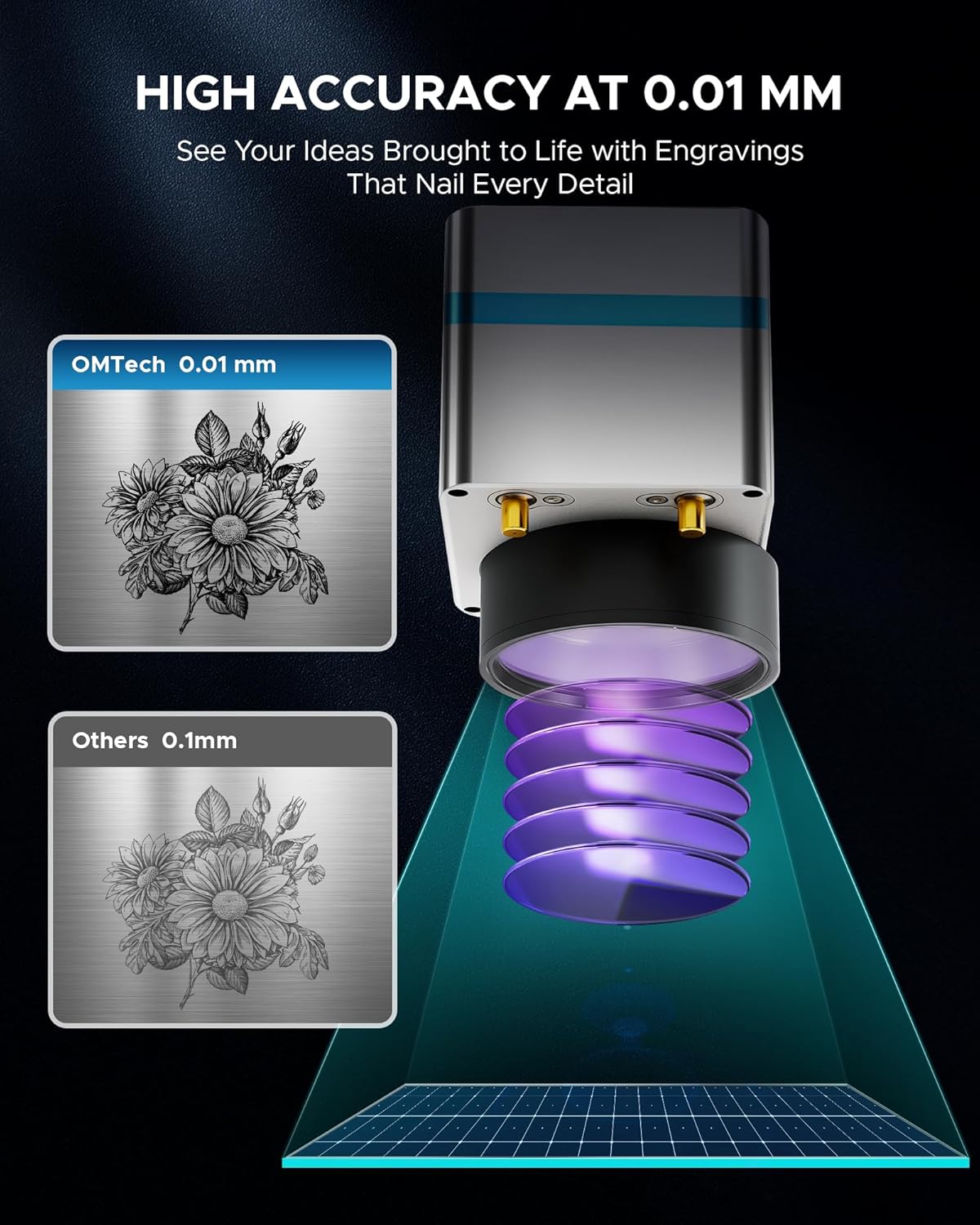
చిత్రం 5: ఉదాample of high-accuracy engraving.

Figure 6: Speed comparison highlighting the fiber laser's performance.
4.3 మెటీరియల్ అనుకూలత
The OMTech Galvo 50W Fiber Laser Engraver Cutter is suitable for marking and etching a wide range of materials, including but not limited to:
- లోహాలు: Brass, Aluminum, Silver, Tungsten, Titanium, Gold, Stainless Steel, Cast Aluminum, Copper.
- Non-Metals: Brick, Granite, Tile, Marble, Stone, Acrylic, Leather, Paper, Plastic, Wood, Glass.

Figure 7: Various materials suitable for engraving with the OMTech 50W Fiber Laser.
5. నిర్వహణ
క్రమం తప్పకుండా నిర్వహణ మీ లేజర్ చెక్కే వ్యక్తి యొక్క దీర్ఘాయువు మరియు సరైన పనితీరును నిర్ధారిస్తుంది.
- లెన్స్ క్లీనింగ్: Periodically clean the laser lens with a specialized lens cleaning solution and cloth to maintain beam quality.
- వర్క్బెడ్ క్లీనింగ్: Keep the workbed clean from debris and residue to prevent interference with engraving and ensure proper material placement.
- కనెక్షన్ తనిఖీలు: Regularly inspect all cables and connections for any signs of wear or looseness.
- వెంటిలేషన్ సిస్టమ్: Ensure the ventilation system is clear and functioning effectively to extract smoke and particles.
6. ట్రబుల్షూటింగ్
ఈ విభాగం మీరు ఎదుర్కొనే సాధారణ సమస్యలను పరిష్కరిస్తుంది.
6.1 Laser Not Engaging
If the red laser pointer is active but the fiber laser does not engage, check the internal connections. A common issue can be a loose flat control cable from the mainboard to the fiber laser source. If accessible and you are comfortable, carefully open the case and ensure this cable is securely plugged in. If the issue persists or you are unsure, contact customer support.
6.2 సాఫ్ట్వేర్ కనెక్షన్ సమస్యలు
If the software (LightBurn or EZCad) fails to connect to the engraver, ensure:
- The engraver is powered on.
- The USB cable is securely connected to both the engraver and the computer.
- The correct drivers are installed on your computer.
- No other software is attempting to communicate with the engraver simultaneously.
7. స్పెసిఫికేషన్లు
| ఫీచర్ | స్పెసిఫికేషన్ |
|---|---|
| మోడల్ సంఖ్య | LYF-60W (Galvo 50W) |
| లేజర్ పవర్ | 50W |
| లేజర్ క్లాస్ | 2 |
| అవుట్పుట్ పవర్ | 0.874 మె.వా |
| పని ప్రాంతం | 5.9" x 5.9" (150మిమీ x 150మిమీ) |
| స్పాట్ వ్యాసం | 0.01 మి.మీ |
| గరిష్టంగా చెక్కడం వేగం | 10,000 mm/s |
| మార్కింగ్ ఖచ్చితత్వం | ± 0.001 మి.మీ |
| Max. Single Pass Marking Depth | 0.1 మి.మీ |
| లేజర్ తరంగదైర్ఘ్యం | 1064 ఎన్ఎమ్ |
| Estimated Laser Service Life | 100,000+ గంటలు |
| అనుకూల సాఫ్ట్వేర్ | LightBurn, EZCad |
| మద్దతు ఉన్న చిత్ర ఆకృతులు | .bmp, .gif, .jpg, .jpeg, .dxf, .dst, .ai |
| Rotary Axis Compatibility | అవును |
| నికర బరువు | 40 పౌండ్లు |
| కొలతలు (L x W x H) | 15.8" x 13.4" x 21.3" |
| తయారీదారు | ఓఎంటెక్ |
| మొదటి తేదీ అందుబాటులో ఉంది | జూలై 2, 2024 |

చిత్రం 8: పైగాview of key product specifications.
8. వారంటీ మరియు మద్దతు
OMTech provides comprehensive customer service and support for its products.
- వారంటీ: A 2-year support period is provided for this product.
- కస్టమర్ సేవ: A 24-hour service team is available in the US, Philippines, and China.
- సాంకేతిక మద్దతు: Professional pre-sales and after-sales service, technical support, and on-site experience (by appointment) are offered.
సంప్రదింపు సమాచారం:
ఫోన్: +1 (949) 438-4949
ఇమెయిల్ మద్దతు: SUPPORT@OMTECHLASER.COM
ఈమెయిల్ టెక్ సపోర్ట్: TECHSUPPORT@OMTLASER.COM
9. ఉత్పత్తి వీడియోలు
No relevant product videos created by the seller were found in the provided data for the OMTech Galvo 50W Fiber Laser Engraver Cutter. The available videos pertain to a different product (WIFI Backup Camera) and have therefore not been embedded.


