పరిచయం
This manual provides comprehensive instructions for the installation, operation, and maintenance of your DAYBETTER IP65 Waterproof Smart WiFi LED Strip Lights. Please read this guide thoroughly before use to ensure proper functionality and safety. This product is designed for both indoor and outdoor applications, offering versatile lighting options with smart control features.
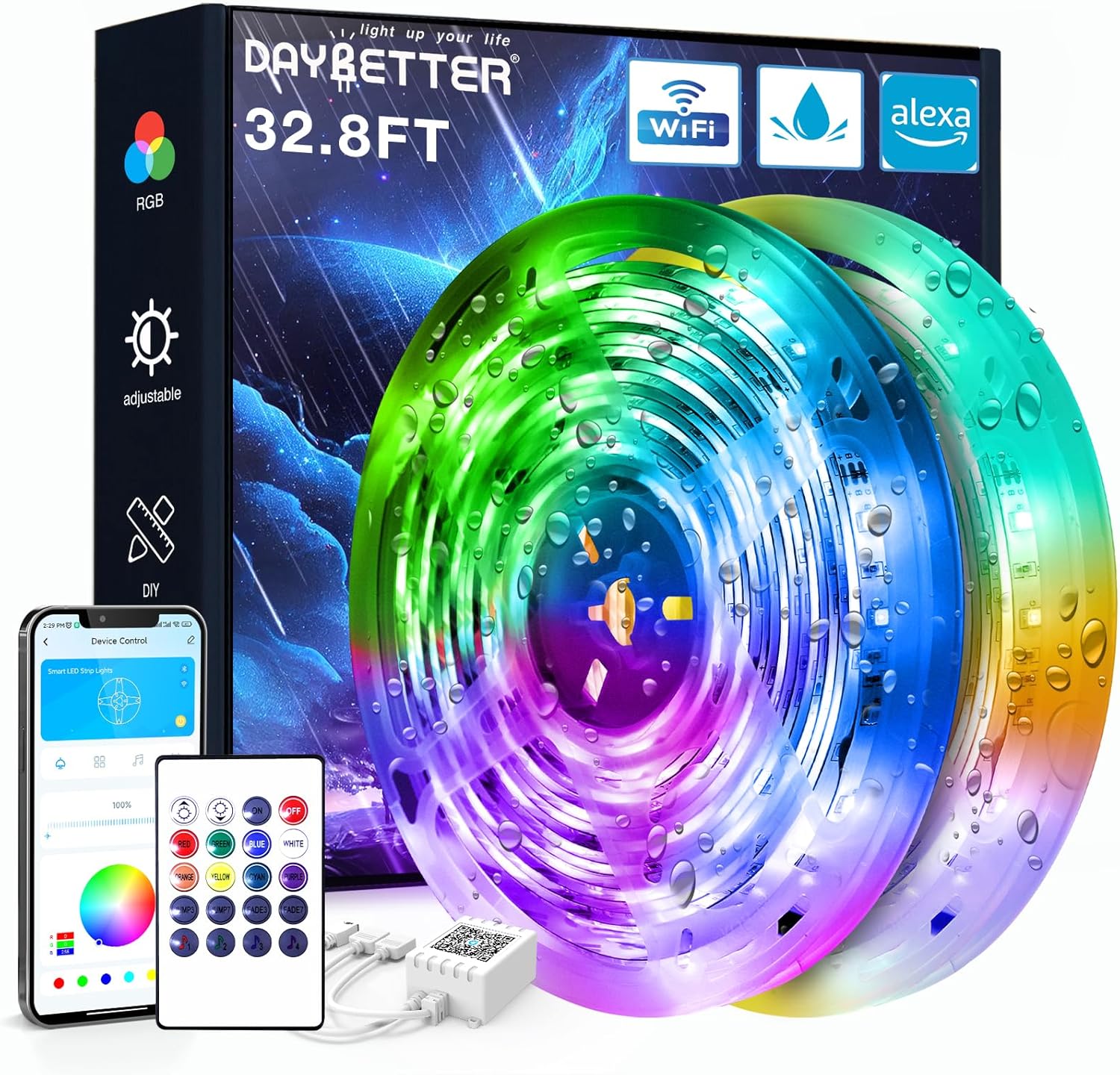
Image: DAYBETTER IP65 Waterproof Smart WiFi LED Strip Lights product packaging and components, including the coiled LED strips, remote control, and power adapter.
ఉత్పత్తి ముగిసిందిview
ప్యాకేజీ విషయాలు:
- 1 x LED Light Strip (32.8ft)
- 1 x IR రిమోట్ కంట్రోల్
- 1 x పవర్ అడాప్టర్
- 1 x IR Receiver/Controller
ముఖ్య లక్షణాలు:
- IP65 జలనిరోధిత రేటింగ్: Suitable for use in rainy and humid environments. గమనిక: నీటిలో మునిగిపోవడానికి రూపొందించబడలేదు.
- Smart WiFi Connectivity: Control lights via a smartphone application.
- వాయిస్ నియంత్రణ: హ్యాండ్స్-ఫ్రీ ఆపరేషన్ కోసం అలెక్సా మరియు గూగుల్ అసిస్టెంట్తో అనుకూలమైనది.
- Color Changing (RGB): Offers a wide spectrum of colors for various lighting effects.
- టైమర్ ఫంక్షన్: Schedule automatic on/off times.
- సంగీతం సమకాలీకరణ: Lights can change in rhythm with music.
భద్రతా సమాచారం
- సంస్థాపన లేదా నిర్వహణకు ముందు విద్యుత్ సరఫరా డిస్కనెక్ట్ చేయబడిందని నిర్ధారించుకోండి.
- Do not cut the LED strip while it is connected to power.
- Avoid bending the LED strip at sharp angles to prevent damage to the circuit.
- The LED strip is IP65 waterproof, meaning it is protected against water jets. It is కాదు designed to be submerged in water.
- అందించిన పవర్ అడాప్టర్ను మాత్రమే ఉపయోగించండి. అననుకూల అడాప్టర్ను ఉపయోగించడం వల్ల ఉత్పత్తి దెబ్బతినవచ్చు లేదా భద్రతా ప్రమాదం ఏర్పడవచ్చు.
- Keep the IR receiver unobstructed for optimal remote control functionality.
- స్థానిక నిబంధనల ప్రకారం బ్యాటరీలను బాధ్యతాయుతంగా పారవేయండి.
సెటప్ సూచనలు
1. తయారీ:
- Unroll the LED strip lights.
- Choose a clean, dry, and smooth surface for installation. Thoroughly clean the surface to ensure optimal adhesive performance.
2. కనెక్ట్ చేసే భాగాలు:
- Connect the LED strip to the IR receiver. Ensure the arrows on both the strip connector and the IR receiver align correctly. Misalignment will prevent the lights from functioning.
- పవర్ అడాప్టర్ను IR రిసీవర్కి కనెక్ట్ చేయండి.
- పవర్ అడాప్టర్ను తగిన పవర్ అవుట్లెట్లోకి ప్లగ్ చేయండి.

Image: Connection diagram for LED strip lights, IR receiver, adapter, and remote. Note the importance of aligning arrows on connectors.
3. సంస్థాపన:
- Peel off the protective backing from the adhesive tape on the back of the LED strip.
- Carefully press the LED strip onto the prepared surface, applying firm and even pressure along its length.
- Ensure the IR receiver is placed in a location where it can receive signals from the remote control.

చిత్రం: ఉదాample of DAYBETTER LED strip lights installed on a house exterior, demonstrating outdoor application.
ఆపరేటింగ్ సూచనలు
1. రిమోట్ కంట్రోల్ ఆపరేషన్:
Point the IR remote control directly at the IR receiver to operate the lights. The remote allows you to:
- లైట్లు ఆన్/ఆఫ్ చేయండి.
- ప్రకాశాన్ని సర్దుబాటు చేయండి.
- Select various static colors.
- Choose dynamic lighting modes (e.g., flash, fade, strobe).
2. Smart App Control:
Download the DAYBETTER app (or specified compatible app) from your smartphone's app store. Follow the in-app instructions to connect your LED strip lights to your home WiFi network. The app provides advanced control features:
- రంగు చక్రం నుండి ఖచ్చితమైన రంగు ఎంపిక.
- Customizable lighting scenes.
- Setting schedules and timers for automatic operation.
- Music synchronization modes.

Image: Smartphone displaying the DAYBETTER app, demonstrating app control over the LED strip lights.
3. Voice Control (Alexa & Google Assistant):
Once connected to the app, you can link your DAYBETTER lights to Amazon Alexa or Google Assistant. Refer to the app's instructions for linking smart home devices. Once linked, you can use voice commands such as:
- "అలెక్సా, లివింగ్ రూమ్ లైట్లు వెలిగించు."
- "Hey Google, set the bedroom lights to blue."
- "అలెక్సా, బయటి లైట్లను 50% వరకు డిమ్ చేయి."

Image: Outdoor setting with people, illustrating voice control functionality with Alexa and Google Assistant.
నిర్వహణ
- శుభ్రపరచడం: Gently wipe the LED strip with a soft, dry cloth. For outdoor installations, ensure the power is off and use a damp cloth if necessary, then dry thoroughly. Avoid harsh chemicals or abrasive cleaners.
- కనెక్షన్ తనిఖీ: Periodically inspect all connections (strip to receiver, receiver to adapter) to ensure they are secure and free from corrosion or damage.
- అంటుకునే దీర్ఘాయువు: If the adhesive begins to lose its grip, consider using additional mounting clips or a stronger double-sided adhesive tape suitable for the environment.
- బ్యాటరీ భర్తీ: Replace the remote control battery (Lithium Metal, included) when its range or responsiveness decreases.
ట్రబుల్షూటింగ్
| సమస్య | సాధ్యమైన కారణం | పరిష్కారం |
|---|---|---|
| లైట్లు వెలగవు. | No power, incorrect connection, faulty component. | Check power outlet. Ensure all connections (strip to receiver, receiver to adapter) are secure and arrows align. Test with another power source if possible. |
| రిమోట్ కంట్రోల్ పనిచేయడం లేదు. | Battery depleted, IR receiver obstructed, remote out of range. | Replace remote battery. Ensure direct line of sight to IR receiver. Move closer to the receiver. |
| యాప్ నియంత్రణ పనిచేయడం లేదు. | WiFi connectivity issue, incorrect app setup. | Ensure your phone and lights are on the same 2.4GHz WiFi network. Restart the app and the lights. Re-pair the device in the app if necessary. |
| లైట్లు మిణుకుమిణుకుమంటున్నాయి లేదా తప్పు రంగులను ప్రదర్శిస్తున్నాయి. | Loose connection, damaged strip, power fluctuation. | Check all physical connections. Ensure the power adapter is providing stable power. If a section of the strip is damaged, it may need replacement. |
| Adhesive not sticking. | Surface not clean or dry, unsuitable surface material. | Ensure the surface is thoroughly cleaned and dry before application. For porous or uneven surfaces, use additional mounting clips or stronger adhesive. |
స్పెసిఫికేషన్లు
| ఫీచర్ | వివరాలు |
|---|---|
| బ్రాండ్ | డేబెటర్ |
| మోడల్ సంఖ్య | TB51325020WV2 |
| ASIN | B0D95R5GCN |
| పొడవు | 32.8 అడుగులు |
| జలనిరోధిత రేటింగ్ | IP65 (Protected against water jets) |
| కంట్రోలర్ రకం | App Control, Voice Control (Alexa, Google Assistant), IR Remote Control |
| కాంతి వనరుల సంఖ్య | 150 |
| పవర్ అడాప్టర్ | చేర్చబడింది |
| రిమోట్ బ్యాటరీ | 1 లిథియం మెటల్ బ్యాటరీ (చేర్చబడింది) |
| వస్తువు బరువు | 0.43 కిలోగ్రాములు (15.2 ఔన్సులు) |
| ప్యాకేజీ కొలతలు | 6.61 x 6.42 x 1.69 అంగుళాలు |
| మొదటి తేదీ అందుబాటులో ఉంది | జూలై 10, 2024 |
కస్టమర్ మద్దతు
For further assistance, technical support, or warranty inquiries, please contact DAYBETTER customer service through the retailer's platform or the official DAYBETTER website. When contacting support, please provide your product model number (TB51325020WV2) and a detailed description of the issue.
You can visit the official DAYBETTER store for more information: DAYBETTER Store on Amazon


