1. ఉత్పత్తి ముగిసిందిview
The ZAGG Pro Keys 2 is a comprehensive keyboard and case solution designed specifically for the iPad Pro 13 (M4). It integrates a full-featured keyboard with a protective case, enhancing both productivity and device safety. The design allows for flexible use, transforming your iPad into a more versatile tool for various tasks.

ముఖ్య లక్షణాలు:
- మన్నికైన రక్షణ: Polycarbonate case with rubberized edges and corner bumpers provides 6.6 ft (2m) drop protection.
- వేరు చేయగలిగిన కీబోర్డ్: Allows for flexible use, separating the keyboard from the case.
- Laptop-Style Backlit Keys: Designed for accurate and comfortable typing, with seven customizable backlight colors.
- Magnetic Folio Cover & Adjustable Stand: Protects the screen and offers two viewing కోణాలు.
- Multi-Device Bluetooth Pairing: Connects to up to two devices simultaneously for seamless switching.
- Integrated Stylus Holder: Securely stores your Apple Pencil or Pro Stylus.
- దీర్ఘకాలం ఉండే బ్యాటరీ: Up to one year of battery life with energy-saving features.
2. సెటప్ మరియు ఇన్స్టాలేషన్
2.1 అనుకూలత
The ZAGG Pro Keys 2 is specifically designed for the iPad Pro 13-inch (M4) model. Ensure your device is compatible before proceeding with installation.

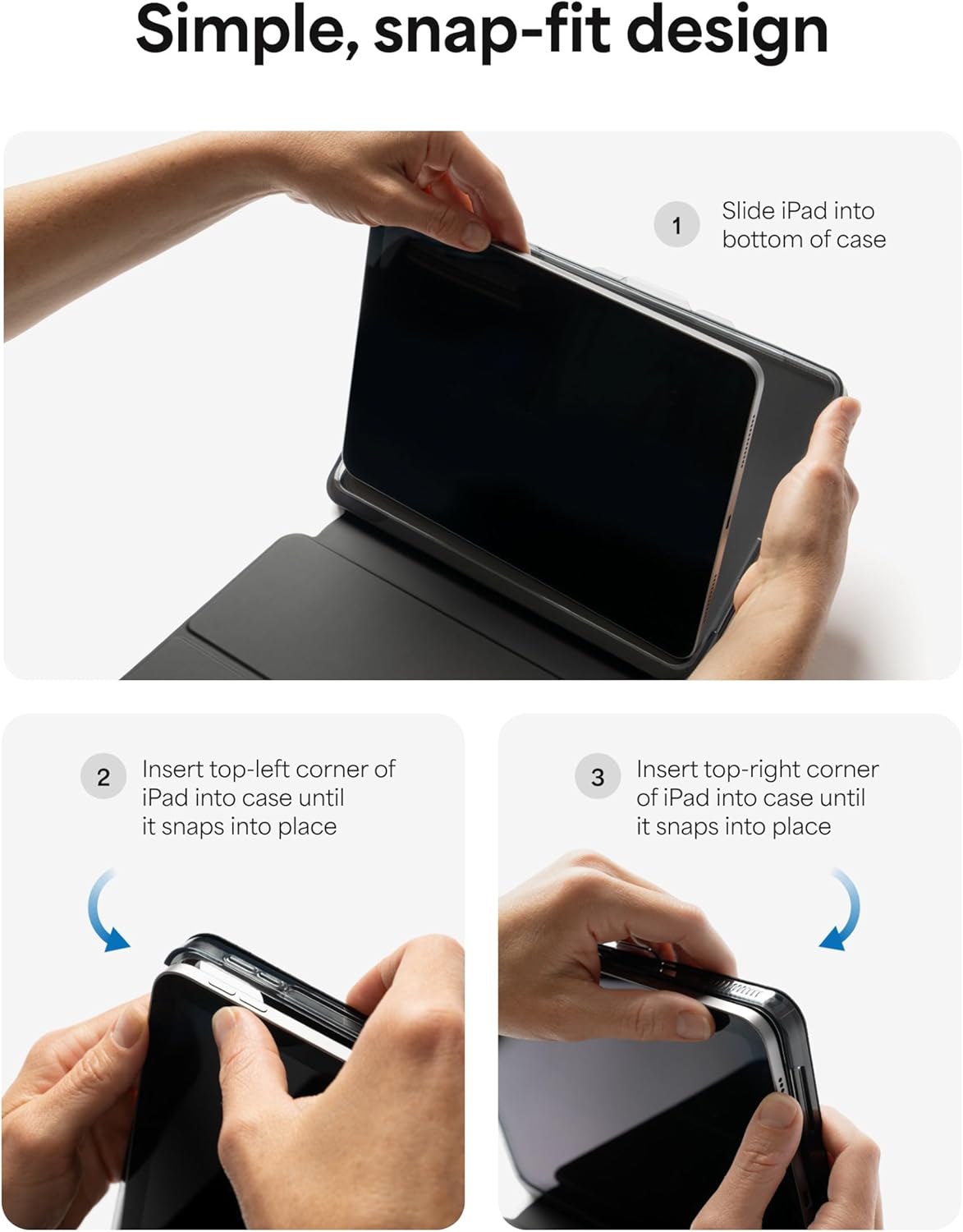
2.2 Attaching Your iPad to the Case
Follow these steps to securely attach your iPad to the Pro Keys 2 case:
- Slide iPad into bottom of case: Gently slide the bottom edge of your iPad into the case, ensuring it aligns with the charging port and speakers.
- Insert top-left corner: Press the top-left corner of your iPad into the case until it snaps securely into place.
- Insert top-right corner: Press the top-right corner of your iPad into the case until it snaps securely into place.
2.3 Pairing the Keyboard via Bluetooth
The Pro Keys 2 keyboard connects wirelessly via Bluetooth. It can pair with up to two devices simultaneously.
- పవర్ ఆన్: కీబోర్డ్ ఛార్జ్ చేయబడిందని మరియు పవర్ ఆన్ చేయబడిందని నిర్ధారించుకోండి.
- జత చేసే మోడ్ని సక్రియం చేయండి: Press and hold the Bluetooth pairing key (usually indicated by a Bluetooth icon or a number like '1' or '2' with a Bluetooth symbol) for a few seconds until the indicator light flashes, signifying pairing mode.
- Enable Bluetooth on iPad: మీ ఐప్యాడ్లో, ఇక్కడికి వెళ్లండి సెట్టింగ్లు > బ్లూటూత్ మరియు బ్లూటూత్ను ఆన్ చేయండి.
- కీబోర్డ్ను ఎంచుకోండి: Your iPad will search for available devices. Select "ZAGG Pro Keys 2" from the list.
- జత చేయడాన్ని నిర్ధారించండి: జత చేసే ప్రక్రియను పూర్తి చేయడానికి స్క్రీన్పై ఉన్న ఏవైనా ప్రాంప్ట్లను అనుసరించండి. విజయవంతంగా జత చేసినప్పుడు కీబోర్డ్లోని ఇండికేటర్ లైట్ ఘనమవుతుంది.
- Pairing a Second Device (Optional): To pair a second device, repeat steps 2-5 using the other Bluetooth pairing key (e.g., '2'). You can switch between paired devices by pressing the corresponding Bluetooth key.

3. ఆపరేటింగ్ సూచనలు
3.1 Using the Detachable Keyboard and Folio Cover
The Pro Keys 2 offers versatile configurations for different uses:
- టైపింగ్ మోడ్: Place the iPad into one of the two magnetic grooves on the keyboard for a stable typing experience.
- డిటాచ్డ్ మోడ్: The keyboard can be detached from the case, allowing you to place your iPad on one surface and the keyboard on another for ergonomic flexibility.
- Viewing మోడ్: The magnetic folio cover folds back to create an adjustable stand, offering two optimal viewing angles for media consumption or presentations.

3.2 Keyboard Backlighting
The keyboard features backlit keys with seven color options to enhance visibility in low-light conditions.
- ప్రకాశాన్ని సర్దుబాటు చేయండి: Use the dedicated backlight keys (often F11/F12 or similar) to cycle through brightness levels.
- రంగు మార్చండి: Use the dedicated color key (often a lightbulb icon) to cycle through the seven available backlight colors.

3.3 Stylus Holder
The integrated stylus holder provides a secure place for your Apple Pencil or Pro Stylus, ensuring it is always within reach and protected.

4. నిర్వహణ మరియు సంరక్షణ
Proper care will extend the life and performance of your ZAGG Pro Keys 2 keyboard case.
- కేసును శుభ్రపరచడం: ఒక మృదువైన ఉపయోగించండి, డిamp కేసు వెలుపలి భాగాన్ని తుడవడానికి వస్త్రం. కఠినమైన రసాయనాలు లేదా రాపిడి క్లీనర్లను నివారించండి.
- కీబోర్డ్ శుభ్రపరచడం: కీలను సున్నితంగా తుడవడానికి మృదువైన, మెత్తటి బట్టను ఉపయోగించండి. మొండి ధూళి కోసం, కొద్దిగా dampened cloth can be used. Ensure no liquid enters the keyboard.
- బ్యాటరీ ఛార్జింగ్: Charge the keyboard using the provided USB-C cable. A full charge can last up to one year with typical use. The keyboard features a sleep/wake function to conserve battery life when not in use.

5. ట్రబుల్షూటింగ్
If you encounter issues with your ZAGG Pro Keys 2, refer to the table below for common problems and solutions.
| సమస్య | సాధ్యమైన కారణం | పరిష్కారం |
|---|---|---|
| కీబోర్డ్ బ్లూటూత్ ద్వారా కనెక్ట్ కావడం లేదు | Keyboard is off, low battery, or not in pairing mode. iPad Bluetooth is off or already connected to another device. | Ensure keyboard is charged and powered on. Put keyboard into pairing mode. Check iPad Bluetooth settings. Forget device on iPad and re-pair. |
| కీలు స్పందించడం లేదు | Low battery, connection issue, or keyboard is off. | Charge the keyboard. Re-establish Bluetooth connection. Power cycle the keyboard. |
| బ్యాక్లైట్ పనిచేయడం లేదు లేదా మసకగా ఉంది | Backlight is off or set to lowest brightness. Low battery. | Press backlight brightness keys to increase brightness. Charge the keyboard. |
| iPad does not fit securely in case | Incorrect iPad model or improper installation. | Verify iPad model is Pro 13-inch (M4). Re-install iPad following the snap-fit instructions carefully. |
6. స్పెసిఫికేషన్లు
Detailed technical specifications for the ZAGG Pro Keys 2 iPad Pro 13 (M4) Keyboard Case.
| ఫీచర్ | వివరాలు |
|---|---|
| మోడల్ పేరు | Pro Keys 2 |
| అనుకూలత | iPad Pro 13 (M4) |
| కనెక్టివిటీ | బ్లూటూత్ |
| కీబోర్డ్ రకం | Laptop-style, Detachable |
| బ్యాక్లైటింగ్ | 7-color RGB Backlit |
| డ్రాప్ ప్రొటెక్షన్ | 6.6 అడుగుల (2మీ) వరకు |
| బ్యాటరీ లైఫ్ | Up to 1 year (based on 1 hour/day use) |
| శక్తి మూలం | బ్యాటరీ ఆధారితం (1 లిథియం అయాన్ బ్యాటరీ కూడా ఉంది) |
| మెటీరియల్ | Plastic, Polycarbonate, Rubber |
| రంగు | నలుపు |
| వస్తువు బరువు | 3.76 పౌండ్లు |
| ప్యాకేజీ కొలతలు | 13.23 x 10.43 x 1.54 అంగుళాలు |
7. వారంటీ మరియు మద్దతు
7.1 వారంటీ సమాచారం
ZAGG products are designed for durability and performance. For specific warranty details regarding your Pro Keys 2 keyboard case, please refer to the warranty card included with your product or visit the official ZAGG webసైట్. వారంటీ నిబంధనలు సాధారణంగా తయారీ లోపాలను కవర్ చేస్తాయి.
7.2 కస్టమర్ మద్దతు
For further assistance, technical support, or inquiries about your ZAGG Pro Keys 2, please contact ZAGG Customer Support through their official channels. You can typically find contact information (phone, email, or support portal) on the ZAGG webసైట్:
- ZAGG Official Webసైట్: zagg.com
- ZAGG Store on Amazon: Visit the ZAGG Store


