1. పరిచయం
Thank you for choosing the aigo SA03 Open Ear Earbuds. These wireless Bluetooth headphones feature a unique clip-on design, allowing you to enjoy audio while remaining aware of your surroundings. Designed for comfort and stability, they are suitable for various activities, including fitness and daily use. This manual provides detailed instructions for setup, operation, and maintenance to ensure optimal performance.
2. ప్యాకేజీ విషయాలు
క్రింద జాబితా చేయబడిన అన్ని వస్తువులు మీ ప్యాకేజీలో చేర్చబడ్డాయని దయచేసి ధృవీకరించండి:
- aigo SA03 Open Ear Earbuds (Left and Right)
- వైర్లెస్ ఛార్జింగ్ కేస్
- USB ఛార్జింగ్ కేబుల్ (టైప్-సి)
- వినియోగదారు మాన్యువల్
3. ఉత్పత్తి ముగిసిందిview
The aigo SA03 earbuds are designed for an open-ear listening experience, ensuring comfort and situational awareness. Each earbud is lightweight, weighing approximately 4.5 grams.

Figure 3.1: aigo SA03 Open Ear Earbuds and Charging Case.
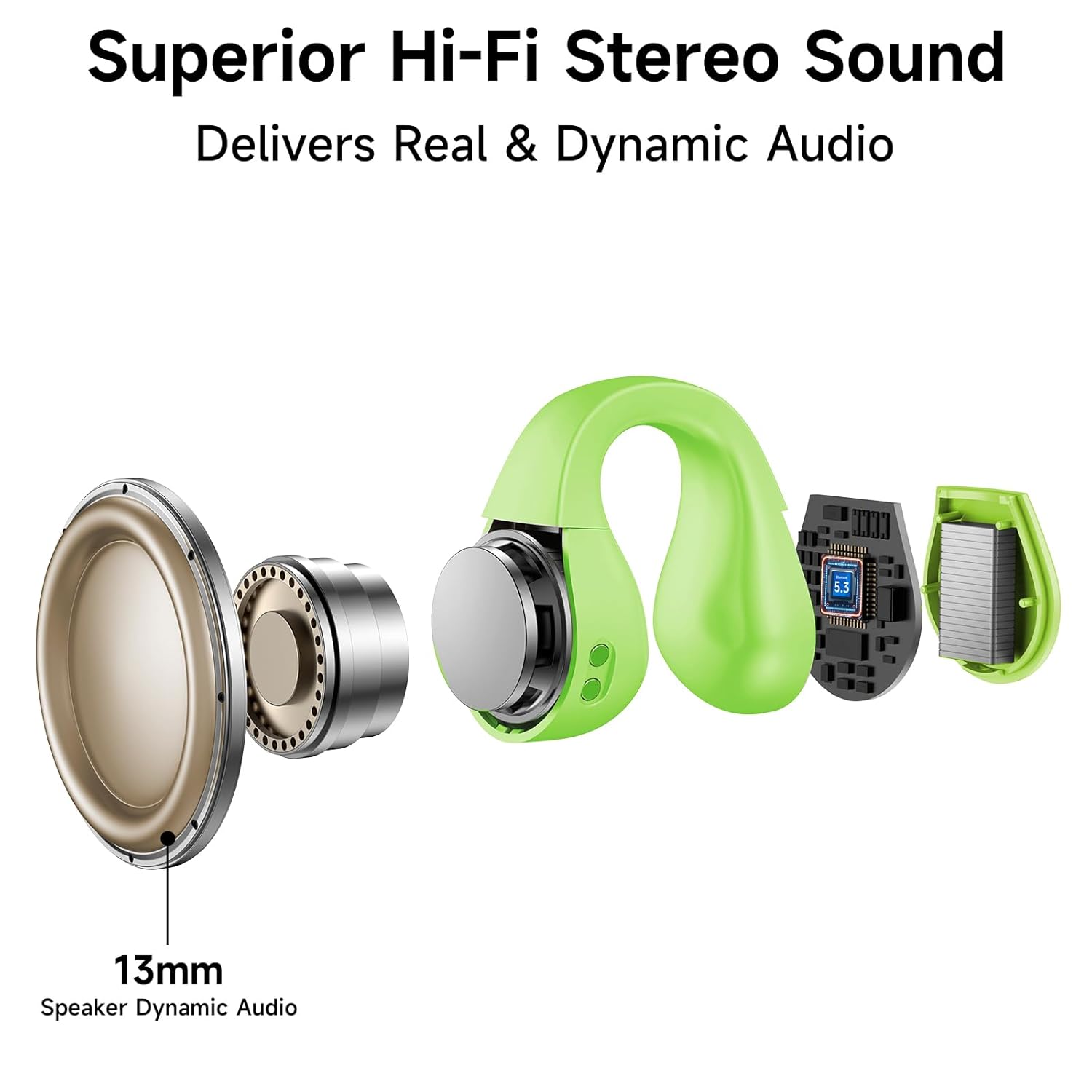
The earbuds feature a dynamic audio driver for clear sound reproduction.

Figure 3.2: Internal components of an earbud, highlighting the 13mm dynamic audio driver.
4. సెటప్
4.1 ఇయర్బడ్లు మరియు కేస్ను ఛార్జ్ చేయడం
Before first use, fully charge the earbuds and the charging case. The charging case has a 500mAh battery capacity, providing extended playtime.
- ఇయర్బడ్లను ఛార్జింగ్ కేసులో ఉంచండి, అవి సరిగ్గా అమర్చబడి ఉన్నాయని నిర్ధారించుకోండి.
- USB ఛార్జింగ్ కేబుల్ను కేస్లోని ఛార్జింగ్ పోర్ట్కు మరియు పవర్ సోర్స్కి కనెక్ట్ చేయండి.
- The charging indicators on the case will illuminate to show charging status.
- పూర్తిగా ఛార్జ్ కావడానికి సాధారణంగా దాదాపు 1.5 గంటలు పడుతుంది.
The fully charged case can provide up to 15 charges for the earbuds, offering a total playtime of up to 60 hours.

Figure 4.1: Charging case with battery life and capacity information.
4.2 బ్లూటూత్ జత చేయడం
The earbuds utilize Bluetooth 5.1 technology for a stable and fast connection.
- ఇయర్బడ్లు ఛార్జ్ అయ్యాయని నిర్ధారించుకోండి.
- ఛార్జింగ్ కేస్ను తెరవండి. ఇయర్బడ్లు ఆటోమేటిక్గా జత చేసే మోడ్లోకి ప్రవేశిస్తాయి.
- మీ పరికరంలో (స్మార్ట్ఫోన్, టాబ్లెట్, కంప్యూటర్), బ్లూటూత్ను ప్రారంభించండి.
- కోసం వెతకండి available Bluetooth devices and select "aigo SA03" from the list.
- కనెక్ట్ అయిన తర్వాత, వాయిస్ ప్రాంప్ట్ విజయవంతమైన జతను నిర్ధారిస్తుంది.
The earbuds support automatic re-connection to the last paired device when removed from the case and Bluetooth is active on the device.

Figure 4.2: Bluetooth pairing process on a mobile device.
5. ఆపరేటింగ్ సూచనలు
5.1 ఇయర్బడ్స్ ధరించడం
The aigo SA03 earbuds feature an ergonomic clip-on design for a secure and comfortable fit. Adjust the earbuds to fit your ears properly to avoid discomfort during extended wear.

Figure 5.1: Ergonomic design and adjustment for comfortable fit.
These earbuds are designed to stay stable during physical activity, making them suitable for sports and workouts. They are also IP44 waterproof, offering protection against sweat and light splashes.

Figure 5.2: Earbuds worn during cycling, highlighting their secure fit for sports.
5.2 టచ్ నియంత్రణలు
The earbuds feature touch-sensitive controls for managing calls and media playback:
- సమాధానం/ముగింపు కాల్: ఇయర్బడ్పై ఒక్కసారి నొక్కండి.
- కాల్ని తిరస్కరించండి: ఇయర్బడ్పై రెండుసార్లు నొక్కండి.
- సంగీతాన్ని ప్లే/పాజ్ చేయండి: ఇయర్బడ్పై ఒక్కసారి నొక్కండి.
- తదుపరి ట్రాక్: కుడి ఇయర్బడ్పై రెండుసార్లు నొక్కండి.
- మునుపటి ట్రాక్: ఎడమ ఇయర్బడ్పై రెండుసార్లు నొక్కండి.
- వాయిస్ అసిస్టెంట్ను సక్రియం చేయండి: ఏ ఇయర్బడ్పైనా మూడుసార్లు నొక్కండి.
చిత్రం 5.3: స్మార్ట్ టచ్ కంట్రోల్ ఫంక్షన్లు.
5.3 కాల్స్ చేయడం మరియు స్వీకరించడం
The built-in microphone provides clear audio for calls.
- కాల్కు సమాధానం ఇవ్వడం: When a call comes in, single tap either earbud.
- కాల్ని ముగించడం: During a call, single tap either earbud.
- కాల్ను తిరస్కరించడం: When a call comes in, double tap either earbud.
5.4 సంగీతం వినడం
After pairing, you can play music from your connected device.
- ప్లే/పాజ్: ఏ ఇయర్బడ్నైనా ఒకసారి నొక్కండి.
- తదుపరి ట్రాక్: కుడి ఇయర్బడ్ని రెండుసార్లు నొక్కండి.
- మునుపటి ట్రాక్: ఎడమ ఇయర్బడ్ని రెండుసార్లు నొక్కండి.
6. నిర్వహణ
6.1 శుభ్రపరచడం
- ఇయర్బడ్లు మరియు ఛార్జింగ్ కేసును మృదువైన, పొడి, మెత్తటి బట్టతో క్రమం తప్పకుండా శుభ్రం చేయండి.
- రాపిడి పదార్థాలు, ద్రావకాలు లేదా స్ప్రే క్లీనర్లను ఉపయోగించడం మానుకోండి.
- ఇయర్బడ్లు మరియు కేస్ రెండింటిలోనూ ఛార్జింగ్ కాంటాక్ట్లు శుభ్రంగా మరియు చెత్త లేకుండా ఉన్నాయని నిర్ధారించుకోండి.
6.2 నిల్వ
- ఉపయోగంలో లేనప్పుడు, ఇయర్బడ్లను రక్షించడానికి మరియు వాటిని ఛార్జ్లో ఉంచడానికి వాటి ఛార్జింగ్ కేసులో నిల్వ చేయండి.
- తీవ్రమైన ఉష్ణోగ్రతలు మరియు ప్రత్యక్ష సూర్యకాంతి నుండి దూరంగా చల్లని, పొడి ప్రదేశంలో నిల్వ చేయండి.
7. ట్రబుల్షూటింగ్
| సమస్య | పరిష్కారం |
|---|---|
| ఇయర్బడ్లు ఆన్ చేయడం లేదు | Ensure earbuds are charged. Place them in the charging case and close the lid, then open again. |
| పరికరంతో జత చేయడం సాధ్యపడలేదు | Make sure Bluetooth is enabled on your device. Ensure earbuds are in pairing mode (open case). Forget previous pairings on your device and try again. |
| ధ్వని లేదా తక్కువ వాల్యూమ్ లేదు | Check volume levels on both earbuds and your connected device. Ensure earbuds are properly connected. Try re-pairing. |
| అడపాదడపా కనెక్షన్ | Ensure your device is within the 32-foot operating distance. Avoid obstacles between earbuds and device. Check for interference from other wireless devices. |
| ఇయర్బడ్లు ఛార్జ్ కావడం లేదు | Verify the charging cable is securely connected to both the case and power source. Ensure charging contacts on earbuds and case are clean. |
8. స్పెసిఫికేషన్లు
| ఫీచర్ | వివరాలు |
|---|---|
| మోడల్ | SA03 |
| కనెక్టివిటీ టెక్నాలజీ | వైర్లెస్ (బ్లూటూత్) |
| బ్లూటూత్ వెర్షన్ | 5.1 |
| ఆడియో డ్రైవర్ రకం | డైనమిక్ డ్రైవర్ (13మి.మీ) |
| నియంత్రణ రకం | టచ్ కంట్రోల్ |
| ఛార్జింగ్ సమయం | సుమారు 1.5 గంటలు |
| బ్యాటరీ లైఫ్ (ఇయర్బడ్స్) | 60 గంటల వరకు (ఛార్జింగ్ కేసుతో) |
| ఛార్జింగ్ కేస్ కెపాసిటీ | 500mAh |
| వస్తువు బరువు (ఒక్కో ఇయర్బడ్కు) | 4.53 గ్రా (0.16 ఔన్సులు) |
| నీటి నిరోధక స్థాయి | IP44 జలనిరోధిత |
| గరిష్ట ఆపరేటింగ్ దూరం | 32 అడుగులు |
| అనుకూల పరికరాలు | Cellphones, Desktops, Gaming Consoles, Laptops, Car Audio Systems |
| మెటీరియల్ | యాక్రిలోనిట్రైల్ బుటాడిన్ స్టైరీన్ (ABS) |
9. వారంటీ మరియు మద్దతు
వారంటీ సమాచారం మరియు కస్టమర్ మద్దతు కోసం, దయచేసి కొనుగోలు సమయంలో అందించిన డాక్యుమెంటేషన్ను చూడండి లేదా మీ రిటైలర్ను సంప్రదించండి. ఏవైనా వారంటీ క్లెయిమ్ల కోసం మీ కొనుగోలు రుజువును ఉంచండి.


