పరిచయం
The Caliber RMD035DAB-FBA is a versatile 1DIN car radio designed to enhance your in-car audio experience. It features an integrated DAB+/FM tuner for crystal clear radio reception, Bluetooth for hands-free calling and audio streaming, and multiple media playback options including USB and Micro SD cards. This manual provides detailed instructions for installation, operation, and maintenance to ensure optimal performance and longevity of your device.

Figure 1: Caliber RMD035DAB-FBA Car Radio Front View
కీ ఫీచర్లు
- DAB+ ట్యూనర్: Enjoy crystal clear and interference-free digital radio reception.
- FM Tuner with RDS-EON: Standard FM radio reception with enhanced data services.
- బ్లూటూత్ కనెక్టివిటీ: హ్యాండ్స్-ఫ్రీ కాలింగ్ మరియు వైర్లెస్ ఆడియో స్ట్రీమింగ్ కోసం.
- USB & Micro SD Playback: Supports music playback from USB drives and Micro SD cards up to 32GB.
- 2.1A USB Charging: Conveniently charge your smartphone or other devices.
- ఆక్స్-ఇన్: 3.5mm జాక్ ద్వారా బాహ్య ఆడియో పరికరాలను కనెక్ట్ చేయండి.
- RCA అవుట్పుట్: బాహ్య కనెక్షన్ కోసం ampజీవితకారులు.
- ఆడియో ఫార్మాట్ మద్దతు: Compatible with MP3, WMA, APE, FLAC, and AAC audio formats.
- Standard 1 DIN Size: Easy installation in most vehicles.

చిత్రం 2: పైగాview of Product Features and Connectivity Options
సెటప్ మరియు ఇన్స్టాలేషన్
This unit is designed for standard 1 DIN installation. Professional installation is recommended to ensure proper wiring and functionality.
1. ప్రీ-ఇన్స్టాలేషన్ చెక్
- Ensure your vehicle has a standard 1 DIN opening.
- Verify that your vehicle's wiring harness is compatible with the ISO connection provided.
- Disconnect the vehicle's negative battery terminal before starting installation to prevent electrical shorts.
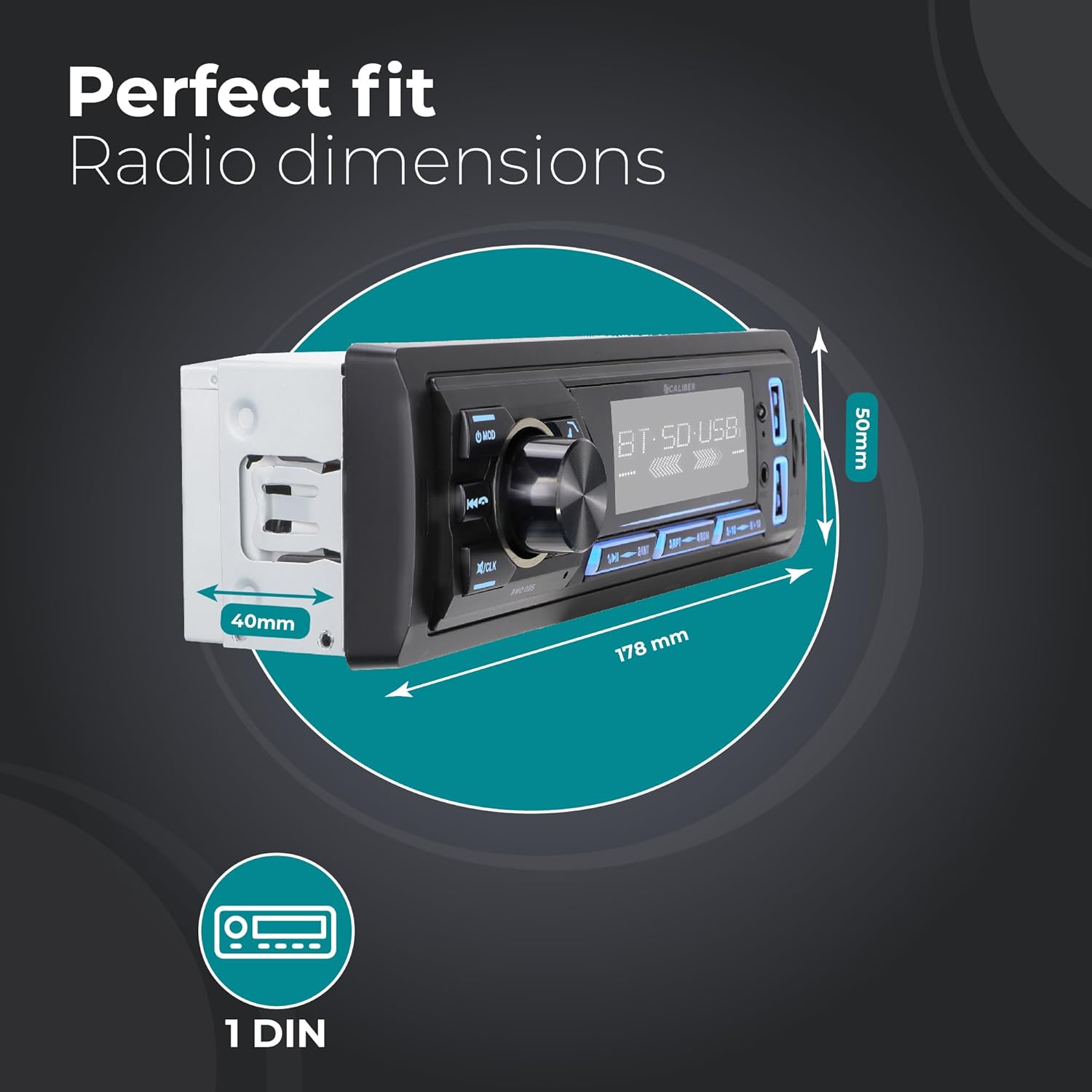
Figure 3: Car Radio Dimensions for Installation
2. వైరింగ్ కనెక్షన్లు
Connect the following wires according to the ISO standard and your vehicle's wiring diagram:
- పసుపు (స్థిరమైన శక్తి): Connect to a constant 12V supply.
- Red (Accessory Power): Connect to a switched 12V supply (ignition).
- నలుపు (నేల): Connect to a good chassis ground point.
- Blue (Antenna/Ampలైఫైయర్ రిమోట్): Connect to power antenna or external ampలైఫైయర్ రిమోట్ టర్న్-ఆన్.
- స్పీకర్ వైర్లు: Connect to your vehicle's speakers (e.g., White/White-Black for Front Left, Grey/Grey-Black for Front Right, Green/Green-Black for Rear Left, Purple/Purple-Black for Rear Right).
- DAB+ యాంటెన్నా: Connect the included DAB+ antenna to the dedicated DAB antenna input on the rear of the unit. Position the antenna for optimal reception.
- RCA అవుట్పుట్లు: బాహ్యాన్ని ఉపయోగిస్తుంటే amplifier, connect RCA cables from the unit's RCA outputs to the ampలైఫైయర్ ఇన్పుట్లు.
3. యూనిట్ మౌంట్
- Slide the metal mounting sleeve into the vehicle's dashboard opening until it locks into place.
- Carefully slide the car radio unit into the mounting sleeve until it clicks securely.
- వాహనం యొక్క నెగటివ్ బ్యాటరీ టెర్మినల్ను తిరిగి కనెక్ట్ చేయండి.
ఆపరేటింగ్ సూచనలు
1. ప్రాథమిక నియంత్రణలు
- పవర్ ఆన్/ఆఫ్: నొక్కండి MOD button briefly to turn the unit on. Press and hold to turn off.
- వాల్యూమ్ నియంత్రణ: వాల్యూమ్ సర్దుబాటు చేయడానికి పెద్ద సెంట్రల్ నాబ్ను తిప్పండి.
- మోడ్ ఎంపిక: నొక్కండి MOD button repeatedly to cycle through available modes (DAB+, FM, Bluetooth, USB, SD, AUX).
- మ్యూట్: Briefly press the volume knob to mute/unmute audio.
- గడియార సెట్టింగ్: నొక్కండి మరియు పట్టుకోండి /CLK button to enter clock setting mode. Use the volume knob to adjust hours/minutes and press the knob to confirm.
2. రేడియో ఆపరేషన్ (DAB+/FM)
- బ్యాండ్ ఎంచుకోవడం: రేడియో మోడ్లో, నొక్కండి BND button to switch between FM1, FM2, FM3, DAB1, DAB2, DAB3.
- ఆటోమేటిక్ స్కాన్: నొక్కండి మరియు పట్టుకోండి BND button to perform an automatic scan and store strong stations.
- మాన్యువల్ ట్యూనింగ్: ఉపయోగించండి ◀◀ మాగ్నిఫికేషన్ (మునుపటి ట్రాక్) మరియు ▶▶ (next track) buttons for manual tuning.
- ప్రీసెట్ స్టేషన్లు: బటన్లను నొక్కండి 1 కు 6 to select a stored preset station. To store a station, tune to the desired frequency, then press and hold one of the preset buttons (1-6) until you hear a beep.

Figure 4: DAB+ Digital Radio Experience
3. బ్లూటూత్ ఆపరేషన్
- జత చేయడం:
- ఉపయోగించి బ్లూటూత్ మోడ్ను ఎంచుకోండి MOD button. The display will show "BT".
- మీ మొబైల్ పరికరంలో, బ్లూటూత్ని ప్రారంభించండి మరియు అందుబాటులో ఉన్న పరికరాల కోసం శోధించండి.
- Select "Caliber RMD035DAB" (or similar name) from the list. If prompted for a PIN, enter "0000".
- Once paired, the display will show "CONNECTED".
- హ్యాండ్స్-ఫ్రీ కాలింగ్:
- సమాధానం కాల్: నొక్కండి ☎ ☎ స్పెసిఫికేషన్లు (phone) button.
- కాల్ ముగించు: నొక్కండి ☎ ☎ స్పెసిఫికేషన్లు (phone) button again.
- కాల్ని తిరస్కరించండి: నొక్కండి మరియు పట్టుకోండి ☎ ☎ స్పెసిఫికేషన్లు (phone) button.
- రీడియల్: బ్లూటూత్ మోడ్లో, నొక్కండి ☎ ☎ స్పెసిఫికేషన్లు (phone) button twice to redial the last number.
- బ్లూటూత్ ఆడియో స్ట్రీమింగ్ (A2DP):
- Once paired, audio from your device will stream to the car radio.
- ఉపయోగించండి ◀◀ మాగ్నిఫికేషన్ మరియు ▶▶ ట్రాక్లను దాటవేయడానికి బటన్లు.
- Use the volume knob to adjust playback volume.

Figure 5: Bluetooth Audio Streaming Interface
4. USB and Micro SD Playback
- Insert a USB drive into the USB port or a Micro SD card into the SD card slot. The unit will automatically switch to USB/SD mode and begin playback.
- ఉపయోగించండి ◀◀ మాగ్నిఫికేషన్ మరియు ▶▶ ట్రాక్లను దాటవేయడానికి బటన్లు.
- నొక్కండి 1/▶▶ ఆడటానికి / పాజ్ చేయడానికి బటన్.
- The unit supports MP3, WMA, APE, FLAC, and AAC audio formats.
5. AUX-ఇన్ ఆపరేషన్
- Connect an external audio device (e.g., MP3 player) to the AUX-in port on the front panel using a 3.5mm audio cable.
- ఉపయోగించి AUX మోడ్ను ఎంచుకోండి MOD బటన్.
- Control playback and volume from the connected external device.
6. USB ఛార్జింగ్ ఫంక్షన్
- The dedicated USB charging port (2.1A) allows you to charge your smartphone or other USB-powered devices.
- Simply connect your device's USB charging cable to the charging port.

Figure 6: USB Charging Port Location
నిర్వహణ
- శుభ్రపరచడం: Use a soft, dry cloth to clean the unit's front panel. For stubborn dirt, dampగుడ్డను నీటితో కొద్దిగా తుడవండి. రాపిడి క్లీనర్లు లేదా ద్రావకాలను ఉపయోగించవద్దు.
- ఉష్ణోగ్రత: యూనిట్ను తీవ్రమైన ఉష్ణోగ్రతలు, ఎక్కువసేపు ప్రత్యక్ష సూర్యకాంతి లేదా అధిక తేమకు గురిచేయకుండా ఉండండి.
- వెంటిలేషన్: Ensure the unit has adequate ventilation to prevent overheating. Do not block ventilation openings.
- ఫ్యూజ్ ప్రత్యామ్నాయం: If the unit does not power on, check the fuse located on the rear of the unit. Replace with a fuse of the same rating (typically 10A).
ట్రబుల్షూటింగ్
| సమస్య | సాధ్యమైన కారణం | పరిష్కారం |
|---|---|---|
| శక్తి లేదు | Incorrect wiring; Blown fuse; Vehicle battery low. | Check power and ground connections. Replace fuse if blown. Check vehicle battery. |
| శబ్దం లేదు | Volume too low; Mute activated; Speaker wires disconnected/shorted. | వాల్యూమ్ పెంచండి. మ్యూట్ను డీయాక్టివేట్ చేయండి. స్పీకర్ వైరింగ్ను తనిఖీ చేయండి. |
| పేలవమైన రేడియో రిసెప్షన్ (FM) | యాంటెన్నా కనెక్ట్ కాలేదు; బలహీనమైన సిగ్నల్ ప్రాంతం; దెబ్బతిన్న యాంటెన్నా. | Ensure antenna is properly connected. Try tuning to a stronger station. Inspect antenna for damage. |
| Poor radio reception (DAB+) | DAB+ antenna not connected/positioned correctly; Out of DAB+ service area. | Ensure DAB+ antenna is connected and positioned optimally (e.g., on windshield). Check DAB+ coverage in your area. |
| బ్లూటూత్ జత చేయడం లేదు | Unit not in pairing mode; Device Bluetooth off; Incorrect PIN. | Ensure unit is in Bluetooth mode. Turn Bluetooth on/off on device. Enter "0000" if prompted for PIN. |
| USB/SD ప్లే కావడం లేదు | మద్దతు లేదు file ఫార్మాట్; పాడైంది files; USB/SD card not inserted correctly; Card capacity too large. | నిర్ధారించండి files are supported (MP3/WMA/APE/FLAC/AAC). Reinsert USB/SD. Use cards up to 32GB. |
స్పెసిఫికేషన్లు
| ఫీచర్ | వివరాలు |
|---|---|
| బ్రాండ్ | క్యాలిబర్ |
| మోడల్ | RMD035DAB-FBA |
| టైప్ చేయండి | 1 DIN Car Radio |
| కనెక్టివిటీ టెక్నాలజీ | బ్లూటూత్, USB |
| ప్రత్యేక లక్షణాలు | Built-In Bluetooth, RCA Output, FM Tuner, DAB+, Hands-Free Calling, USB Charging (2.1A) |
| అనుకూల పరికరాలు | స్మార్ట్ఫోన్, టాబ్లెట్, పర్సనల్ కంప్యూటర్ |
| ఆడియో అవుట్పుట్ మోడ్ | స్టీరియో |
| స్పీకర్ సరౌండ్ సౌండ్ ఛానల్ కాన్ఫిగరేషన్ | 4.0 |
| అవుట్పుట్ వాట్tage | 4 x 55 వాట్స్ |
| మద్దతు ఉన్న ఆడియో ఫార్మాట్లు | MP3, WMA, APE, FLAC, AAC |
| USB/Micro SD Capacity | 32GB వరకు |
| ఉత్పత్తి కొలతలు (L x W x H) | 17.8 x 4 x 5 సెం.మీ (7.01 x 1.57 x 1.97 అంగుళాలు) |
| వస్తువు బరువు | 500 గ్రా (1.1 పౌండ్లు) |
వారంటీ మరియు మద్దతు
Specific warranty details for the Caliber RMD035DAB-FBA are not provided in this manual. Please refer to the warranty card included with your product packaging or visit the official Caliber webఅత్యంత తాజా వారంటీ సమాచారం మరియు కస్టమర్ సపోర్ట్ కాంటాక్ట్ల కోసం సైట్.
For technical assistance or service inquiries, please contact Caliber customer support through their official channels.


