పరిచయం
This instruction manual provides detailed guidance for the safe installation, operation, and maintenance of your WELLFOR 20" x 30" LED Mirrored Bathroom Cabinet. Please read this manual thoroughly before installation and retain it for future reference.

Image: The WELLFOR 20" x 30" LED Mirrored Bathroom Cabinet, showcasing its illuminated mirror and sleek design in a modern bathroom setting.
ముఖ్యమైన భద్రతా సమాచారం
To reduce the risk of electric shock, fire, injury to persons, or property damage, please observe the following safety instructions:
- విద్యుత్ పరికర వ్యవస్థాపన: All electrical work must be performed by a qualified electrician in accordance with local codes and regulations. Ensure power is disconnected at the circuit breaker before installation.
- మౌంటు: The cabinet must be securely mounted to a structural support in the wall. Do not mount on drywall alone.
- నీటి బహిర్గతం: This product is designed for bathroom use but should not be directly exposed to water spray or submerged.
- గాజు నిర్వహణ: Handle glass components with care. Tempered glass is strong but can break if struck with force.
- శుభ్రపరచడం: Use only mild, non-abrasive cleaners. Avoid harsh chemicals that may damage the mirror surface or electrical components.
ప్యాకేజీ విషయాలు
ఇన్స్టాలేషన్ ప్రారంభించే ముందు అన్ని భాగాలు ఉన్నాయని నిర్ధారించుకోండి:
- LED Mirrored Bathroom Cabinet (Main Unit)
- టెంపర్డ్ గ్లాస్ అల్మారాలు
- Removable Aluminum Shelf
- మౌంటింగ్ హార్డ్వేర్ (స్క్రూలు, యాంకర్లు)
- ఇన్స్ట్రక్షన్ మాన్యువల్
స్పెసిఫికేషన్లు
| ఫీచర్ | వివరాలు |
|---|---|
| బ్రాండ్ | వెల్ఫర్ |
| మోడల్ | 20" x 30" LED Mirrored Bathroom Cabinet |
| కొలతలు (W x H x D) | 20" x 30" x 5.12" |
| మౌంటు రకం | ఉపరితల మౌంట్ |
| డోర్ శైలి | Single Right Opening Mirror Door |
| లైటింగ్ | Dimmable LED (3000K-6000K), 2200 Lumens, CRI 90+ |
| ప్రత్యేక లక్షణాలు | Defogging, Memory Function, Motion Sensor Interior Lights, Outlets & USB Ports |
| బరువు | 48.5 పౌండ్లు |
| భద్రతా ధృవీకరణ | ETL-listed (US and Canada) |

Image: Diagram illustrating the dimensions of the cabinet: 20 inches width, 30 inches height, and 5.12 inches depth.
సంస్థాపన మరియు సెటప్
Professional installation by a qualified electrician is highly recommended for hardwired connections.
అవసరమైన సాధనాలు:
- డ్రిల్
- కొలిచే టేప్
- స్థాయి
- పెన్సిల్
- స్క్రూడ్రైవర్
- Wire Strippers (for hardwiring)
మౌంటు సూచనలు:
- ప్రాంతాన్ని సిద్ధం చేయండి: Ensure the wall area is clean and clear. Turn off power to the installation area at the circuit breaker.
- మౌంటు పాయింట్లను గుర్తించండి: Use a level and measuring tape to mark the desired height and position for the cabinet. Identify wall studs for secure mounting.
- డ్రిల్ పైలట్ రంధ్రాలు: Drill pilot holes at the marked locations. If mounting into drywall without studs, use appropriate wall anchors (not included, or use provided if suitable).
- హార్డ్వైర్ కనెక్షన్: Connect the cabinet's electrical wiring to the household wiring. Ensure proper grounding and insulation. Consult a qualified electrician if unsure.
- క్యాబినెట్ను అమర్చండి: Carefully lift the cabinet and align it with the pilot holes. Secure it to the wall using the provided mounting screws. Ensure it is level and firmly attached.
- షెల్ఫ్లను ఇన్స్టాల్ చేయండి: Insert the tempered glass shelves and the removable aluminum shelf into the desired positions within the cabinet.
- అతుకులు సర్దుబాటు చేయండి: The DTC soft-close hinges are 110° adjustable. Fine-tune the door alignment if necessary using a screwdriver.
- శక్తిని పునరుద్ధరించండి: ఇన్స్టాలేషన్ పూర్తయిన తర్వాత మరియు అన్ని కనెక్షన్లు సురక్షితంగా ఉన్న తర్వాత, సర్క్యూట్ బ్రేకర్ వద్ద పవర్ను పునరుద్ధరించండి.

చిత్రం: వివరణాత్మకం view of the cabinet's interior, highlighting features such as internal LED light motion sensors, non-adjustable glass shelf with 4000K lighting, removable aluminum shelf, 110° DTC soft-close hinges, and integrated outlets with USB charger ports.
ఆపరేషన్
Your WELLFOR LED Mirrored Bathroom Cabinet features several advanced functions for convenience and comfort.
1. LED Lighting Control:
- పవర్ ఆన్/ఆఫ్: Short touch the power icon on the mirror surface to turn the main LED lighting ON or OFF.
- ప్రకాశం సర్దుబాటు (డిమ్మింగ్): While the light is ON, long touch the power icon to adjust brightness from 5% to 100%. Release when desired brightness is reached. The cabinet features a memory function that retains your last brightness setting.
- రంగు ఉష్ణోగ్రత సర్దుబాటు: Short touch the color temperature icon to cycle through 6000K (Cool White), 4000K (Neutral White), and 3000K (Warm White). Long touch the color temperature icon to smoothly adjust the light temperature between 6000K and 3000K.

Image: Illustration showing the mirror displaying 6000K White, 4000K Neutral, and 3000K Warm light settings, with instructions for short and long touch controls for color temperature adjustment.
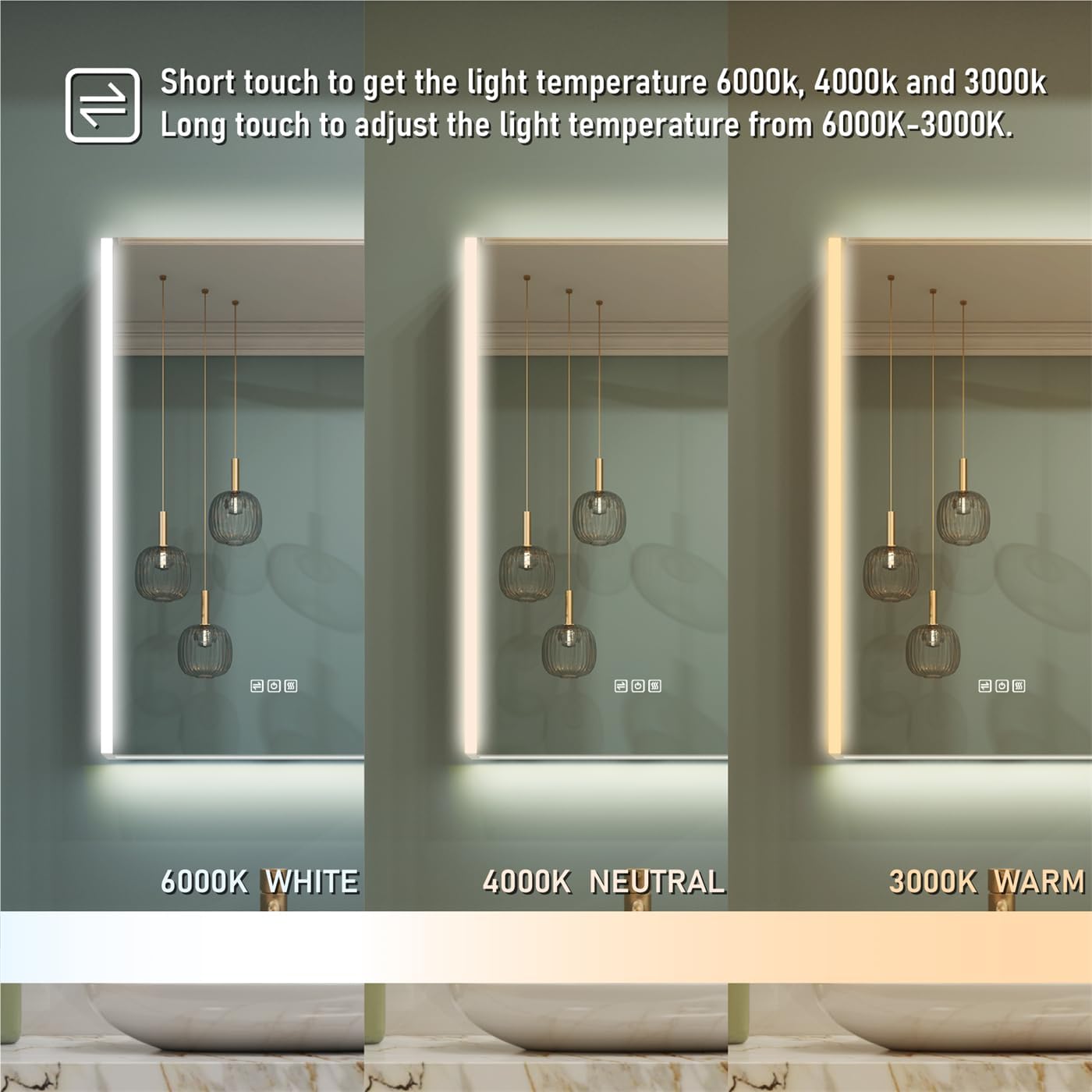
Image: Illustration demonstrating the dimming function, showing the mirror at 100%, 50%, and 5% brightness levels, with instructions for short touch to turn ON/OFF and long touch for brightness control.
2. Anti-Fog Function:
- యాక్టివేషన్: Short touch the defogging icon on the mirror surface to activate the anti-fog function.
- ఆటోమేటిక్ షట్-ఆఫ్: The defogger will automatically turn off after 60 minutes to conserve energy.

Image: Visual comparison of the mirror before and after defogging, with a hand touching the defogging icon and text indicating "Short touch to turn ON/OFF the defogger."
3. Motion Sensor Interior Lights:
- The interior LED stripe lights automatically activate when the cabinet door is opened and turn off when the door is closed. This feature provides convenient illumination for stored items.
4. Outlets & USB Ports:
- The integrated 3-pin outlets and USB ports inside the cabinet provide convenient power for charging small electronic devices like electric toothbrushes, shavers, or smartphones.
- పరికరాలు వాల్యూమ్కు అనుకూలంగా ఉన్నాయని నిర్ధారించుకోండిtage and current provided by the outlets.
నిర్వహణ
- అద్దం శుభ్రపరచడం: ఒక మృదువైన ఉపయోగించండి, డిamp cloth and a mild glass cleaner. Do not spray cleaner directly onto the mirror surface; apply it to the cloth first. Avoid abrasive cleaners or harsh chemicals.
- క్యాబినెట్ శుభ్రపరచడం: బాహ్య మరియు లోపలి ఉపరితలాలను మృదువైన, d తో తుడవండి.amp cloth. For stubborn spots, use a mild, non-abrasive household cleaner.
- విద్యుత్ భాగాలు: Ensure the power is OFF before cleaning near any electrical components. Do not allow water to enter the outlets or USB ports.
- కీలు సంరక్షణ: Periodically check the hinges for smooth operation. If they become stiff, a small amount of silicone-based lubricant can be applied.
ట్రబుల్షూటింగ్
| సమస్య | సాధ్యమైన కారణం | పరిష్కారం |
|---|---|---|
| LED lights do not turn ON. | No power supply; loose electrical connection; faulty LED driver. | Check circuit breaker. Ensure all electrical connections are secure. If problem persists, contact a qualified electrician or customer support. |
| యాంటీ-ఫాగ్ ఫంక్షన్ పనిచేయడం లేదు. | ఫంక్షన్ యాక్టివేట్ కాలేదు; విద్యుత్ సమస్య. | Ensure the defogging icon is touched to activate. Check power supply. |
| Interior motion sensor lights not working. | Door not fully closed/opened; sensor obstruction. | Ensure the door is fully opened to trigger the sensor. Check for any obstructions near the sensor. |
| Outlets/USB ports not providing power. | No power supply; internal wiring issue. | Verify the main power to the cabinet is ON. If other functions work, contact customer support. |
వారంటీ మరియు మద్దతు
For warranty information or technical support, please contact WELLFOR customer service. Refer to your purchase documentation for specific warranty terms and contact details.
You can visit the WELLFOR store for more information: WELLFOR Store on Amazon


