1. పరిచయం
The Nitecore NB20000 Gen III is a high-capacity, lightweight portable power bank designed for reliable power on the go. This manual provides essential information for the safe and efficient operation of your device, including features, setup, usage, and maintenance.
2 కీ ఫీచర్లు
- మెరుగైన పోర్టబిలిటీ: The NB20000 Gen III is 13% shorter and significantly lighter than its predecessor, making it ideal for outdoor activities such as hiking, cycling, and climbing.
- అధిక సామర్థ్యం: Equipped with a 20,000mAh battery, providing extended power for smartphones, tablets, headlamps, and other compatible devices.
- మన్నికైన నిర్మాణం: Crafted from woven carbon fiber material with a carbon fiber reinforced polymer frame, ensuring lightweight strength and durability. Features four corner cushions for impact resistance and a secure grip.
- డ్యూయల్ USB-C పోర్ట్లు: Offers simultaneous output from two USB-C ports, with up to 18W input and a maximum output of 22.5W.
- పాస్-త్రూ ఛార్జింగ్: Allows charging of the power bank and connected devices concurrently.
- బహుళ-ప్రోటోకాల్ అనుకూలత: Supports popular fast charging protocols including QC, PD, FCP, and SCP for efficient device charging.
- తక్కువ కరెంట్ మోడ్: Capable of charging low-current devices such as wireless headphones and wearables (minimum output: 60mA).
- ప్రయాణం సిద్ధంగా ఉంది: Certified for airline travel and features an IPX5 water resistance rating, suitable for various weather conditions.
3. ఉత్పత్తి ముగిసిందిview
Familiarize yourself with the components of your Nitecore NB20000 Gen III Power Bank.
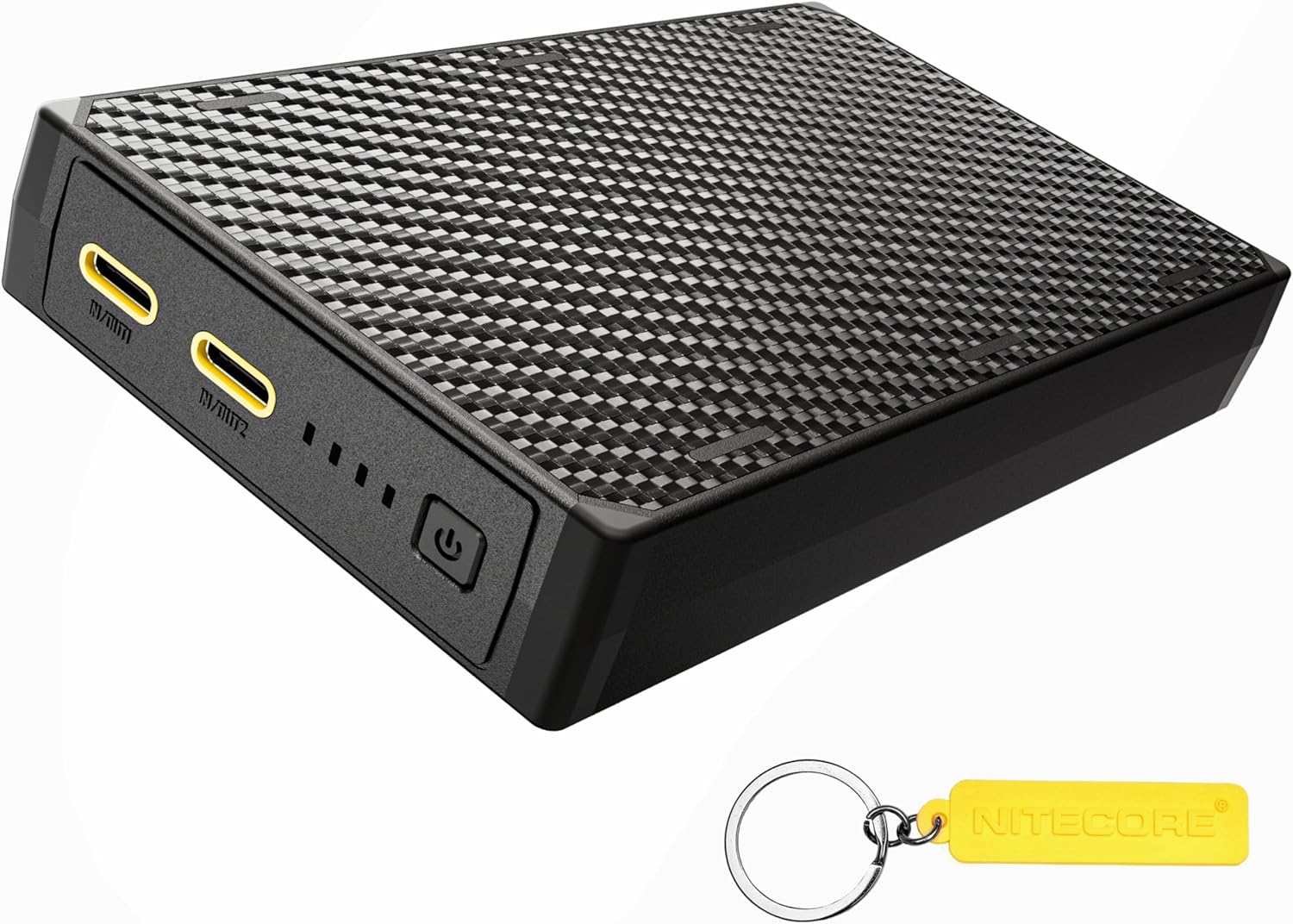
- USB-C Ports (IN/OUT1, IN/OUT2): Used for both charging the power bank and charging external devices.
- పవర్ బటన్: Activates the power bank and checks the battery level.
- LED సూచికలు: Four blue LED lights display the current power level and charging status.
4. Initial Setup and Charging the Power Bank
Before first use, it is recommended to fully charge your NB20000 Gen III Power Bank.
- Connect a USB-C charging cable to either of the USB-C ports (IN/OUT1 or IN/OUT2) on the power bank.
- కేబుల్ యొక్క మరొక చివరను అనుకూలమైన USB పవర్ అడాప్టర్కి కనెక్ట్ చేయండి (చేర్చబడలేదు).
- The LED indicators will illuminate and flash to show the charging progress. Once all four LEDs are constant-on, the power bank is fully charged.
The NB20000 Gen III supports up to 18W input for fast recharging.
5. ఆపరేటింగ్ సూచనలు
5.1 బాహ్య పరికరాలను ఛార్జ్ చేయడం

- Connect your device's charging cable to one of the USB-C ports (IN/OUT1 or IN/OUT2) on the power bank.
- కేబుల్ యొక్క మరొక చివరను మీ పరికరానికి కనెక్ట్ చేయండి.
- The power bank will automatically begin charging your device. The LED indicators will show the remaining power level.
The NB20000 Gen III can output up to 22.5W and supports various fast charging protocols for efficient charging.
5.2 పాస్-త్రూ ఛార్జింగ్
The power bank supports pass-through charging, allowing it to be recharged while simultaneously charging external devices.
- Connect the power bank to a power adapter for recharging (as described in Section 4).
- Connect your external device to the other available USB-C port on the power bank.
- Both the power bank and your device will charge simultaneously.
5.3 తక్కువ కరెంట్ మోడ్
To charge low-current devices (e.g., wireless headphones, smartwatches) that may not be detected by standard charging modes:
- With the power bank on, press and hold the power button for approximately 2 seconds until the first LED indicator starts flashing. This indicates entry into low current mode.
- Connect your low-current device to the power bank.
- To exit low current mode, press and hold the power button again for approximately 2 seconds. The LED indicator will stop flashing.
6. Power Level Display
The four blue LED indicators provide a clear indication of the power bank's remaining battery level.

| LED సూచికలు | శక్తి స్థాయి |
|---|---|
| 4 నిరంతరం | 75% - 100% |
| 3 నిరంతరం | 50% - 75% |
| 2 నిరంతరం | 25% - 50% |
| 1 నిరంతరం | 10% - 25% |
| 1 ఫ్లాషింగ్ | < 10% (Nearly depleted, recharge promptly) |
7. స్పెసిఫికేషన్లు
| ఫీచర్ | వివరాలు |
|---|---|
| బ్రాండ్ | నిట్కోర్ |
| మోడల్ | NB20000 Gen III |
| బ్యాటరీ కెపాసిటీ | 20000 మిల్లీamp గంటలు (mAh) |
| కనెక్టర్ రకం | USB టైప్ C |
| ఇన్పుట్ | Up to 18W (USB-C) |
| అవుట్పుట్ | Max 22.5W (Dual USB-C) |
| ప్రత్యేక లక్షణాలు | Fast Charging, Slim Design, IPX5 Water Resistance, Low Current Mode |
| వాల్యూమ్tage | 3.6V (నామమాత్రం) |
| శక్తి సాంద్రత | 247mWh/g |
8. నిర్వహణ
8.1 శుభ్రపరచడం
Wipe the power bank with a soft, dry cloth. Avoid using abrasive cleaners, solvents, or harsh chemicals.
8.2 నిల్వ
పవర్ బ్యాంక్ను చల్లని, పొడి ప్రదేశంలో ప్రత్యక్ష సూర్యకాంతి మరియు తీవ్రమైన ఉష్ణోగ్రతలకు దూరంగా నిల్వ చేయండి. దీర్ఘకాలిక నిల్వ కోసం, బ్యాటరీ ఆరోగ్యాన్ని కాపాడుకోవడానికి ప్రతి మూడు నెలలకు ఒకసారి పవర్ బ్యాంక్ను సుమారు 50-75% వరకు ఛార్జ్ చేయాలని సిఫార్సు చేయబడింది.
9. భద్రతా సమాచారం
- Do not expose the power bank to water, fire, or extreme temperatures.
- పరికరాన్ని పడవేయడం, పంక్చర్ చేయడం లేదా విడదీయడం మానుకోండి.
- పిల్లలకు దూరంగా ఉంచండి.
- అనుకూల ఛార్జింగ్ కేబుల్లు మరియు అడాప్టర్లను మాత్రమే ఉపయోగించండి.
- If the power bank swells, emits smoke, or shows other abnormalities, discontinue use immediately.
- స్థానిక నిబంధనల ప్రకారం పవర్ బ్యాంక్ను బాధ్యతాయుతంగా పారవేయండి.
10. ట్రబుల్షూటింగ్
10.1 పవర్ బ్యాంక్ ఛార్జింగ్ కావడం లేదు
- ఛార్జింగ్ కేబుల్ పవర్ బ్యాంక్ మరియు పవర్ అడాప్టర్ రెండింటికీ సురక్షితంగా కనెక్ట్ చేయబడిందని నిర్ధారించుకోండి.
- Verify that the power adapter is functioning correctly and connected to a live power source.
- వేరే USB-C కేబుల్ లేదా పవర్ అడాప్టర్ని ప్రయత్నించండి.
10.2 పవర్ బ్యాంక్ నుండి పరికరం ఛార్జ్ కావడం లేదు
- Ensure the power bank has sufficient charge (check LED indicators).
- Verify the charging cable is securely connected to both the power bank and your device.
- Try a different charging cable or USB-C port on the power bank.
- If charging a low-current device, ensure Low Current Mode is activated (refer to Section 5.3).
- Restart the power bank by pressing the power button.
11. వారంటీ మరియు మద్దతు
For warranty information and customer support, please refer to the documentation included with your purchase or visit the official Nitecore webసైట్. మీరు మరింత సమాచారాన్ని ఇక్కడ కూడా కనుగొనవచ్చు అమెజాన్లో నైట్కోర్ స్టోర్.


