పరిచయం
This manual provides detailed instructions for the setup, operation, and maintenance of your FLYINGVOICE FIP12WP Home VoIP Phone. Please read this guide thoroughly to ensure proper use and to maximize the benefits of your device.
వీడియో: పైగాview of the FLYINGVOICE FIP12WP Big Button VoIP Phone for Seniors. This video highlights key features and benefits of the phone, demonstrating its user-friendly design for elderly individuals.
ప్యాకేజీ విషయాలు
ప్యాకేజీలో అన్ని వస్తువులు ఉన్నాయని నిర్ధారించుకోండి:
- FLYINGVOICE FIP12WP VoIP Phone Base Unit
- హ్యాండ్సెట్
- చుట్టబడిన హ్యాండ్సెట్ త్రాడు
- ఈథర్నెట్ కేబుల్
- ఎసి పవర్ అడాప్టర్
- Desktop Stand / Wall Mount Bracket
- త్వరిత ప్రారంభ గైడ్
సెటప్
1. హ్యాండ్సెట్ను కనెక్ట్ చేయడం
Connect one end of the coiled handset cord to the handset and the other end to the designated port on the phone base unit. Ensure a secure connection.

చిత్రం: Diagram illustrating the connection of the handset to the phone base unit using the coiled cord.
2. Connecting to Network (VoIP)
Connect one end of the Ethernet cable to the LAN port on the phone base unit and the other end to your router or network switch. This phone supports Power over Ethernet (PoE) for simultaneous data and power transmission, or it can be powered via the AC adapter.
3. పవర్ కనెక్షన్
If not using PoE, connect the AC power adapter to the power port on the phone base unit and then plug it into a standard electrical outlet.
4. Desktop Stand / Wall Mount Setup
The phone can be used on a desktop with the included stand or mounted on a wall. For desktop use, attach the stand to the back of the phone for a 45-degree viewing angle. For wall mounting, use the provided bracket and screws to secure the phone to a wall.
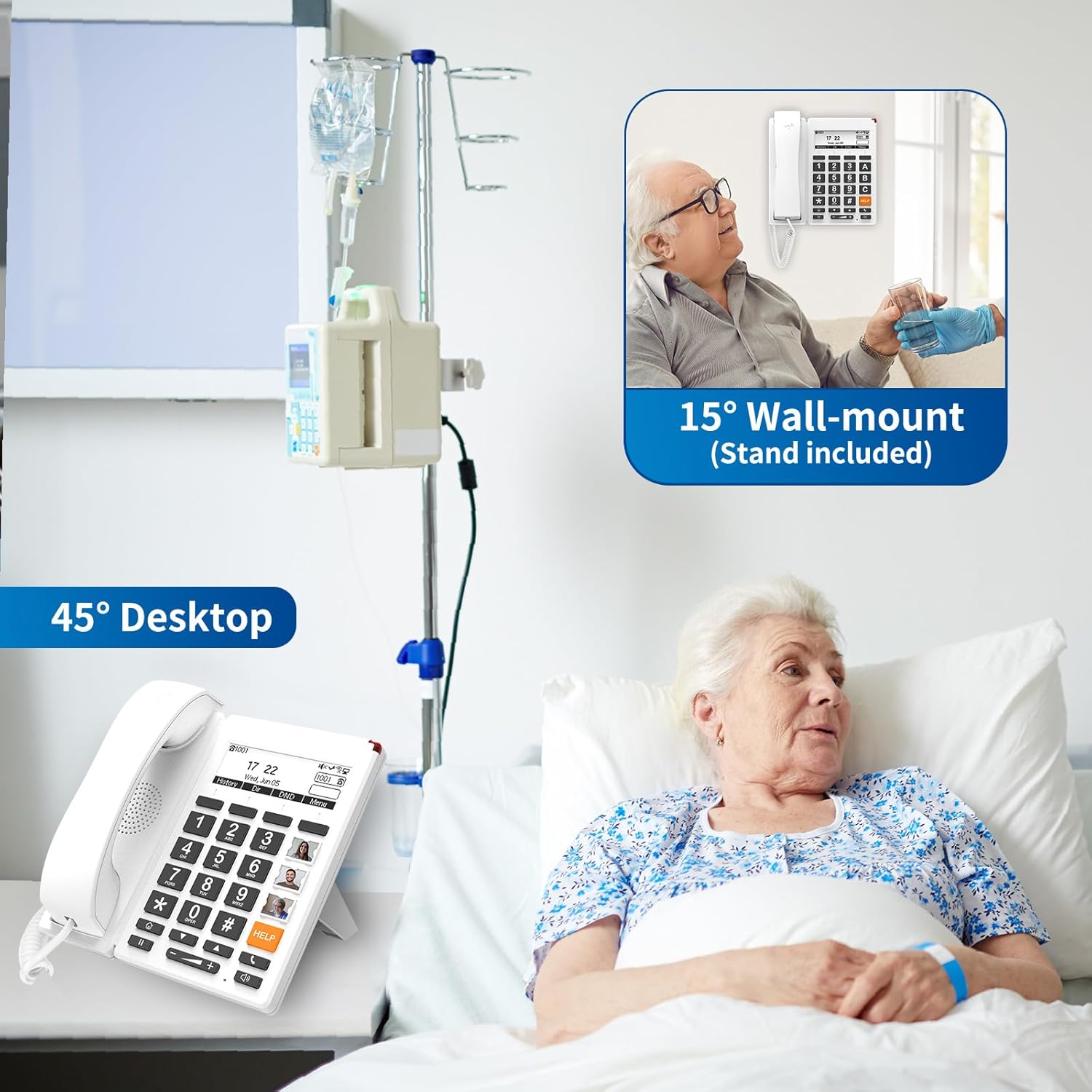
చిత్రం: The FIP12WP phone configured for desktop use at a 45-degree angle and wall-mounted at a 15-degree angle.

చిత్రం: Diagram illustrating the attachment of the desktop stand to the phone base unit.

చిత్రం: Diagram illustrating the process of wall mounting the phone using the provided bracket.
ఆపరేటింగ్ సూచనలు
1. Basic Calling
హ్యాండ్సెట్ని ఎత్తండి లేదా నొక్కండి స్పీకర్ button to get a dial tone. Dial the desired phone number using the large numeric keypad. Press the # key to confirm or wait a few seconds for the call to connect automatically.
2. Customized Image Keys / Speed Dial
The phone features customizable image keys (M1-M9) for one-touch dialing. Lift the transparent cover on each key to insert a photo of the contact. To program a number, refer to the detailed programming instructions in the full user guide (not provided here). Once programmed, simply press the corresponding image key to dial the contact.

చిత్రం: The FIP12WP phone displaying custom images in the one-touch speed dial keys, facilitating easy calling for users.
3. HELP Button / Emergency Calling
అంకితభావం కలిగిన సహాయం button allows for instant access to emergency assistance. This button can be programmed to dial a specific emergency contact or service. In an emergency, press the సహాయం బటన్.
4. Adjustable Volume
Adjust the handset and speakerphone volume using the dedicated volume buttons (- మరియు +) located below the numeric keypad. The handset volume can exceed 90dB, and the speakerphone volume can exceed 110dB for users with hearing impairments.
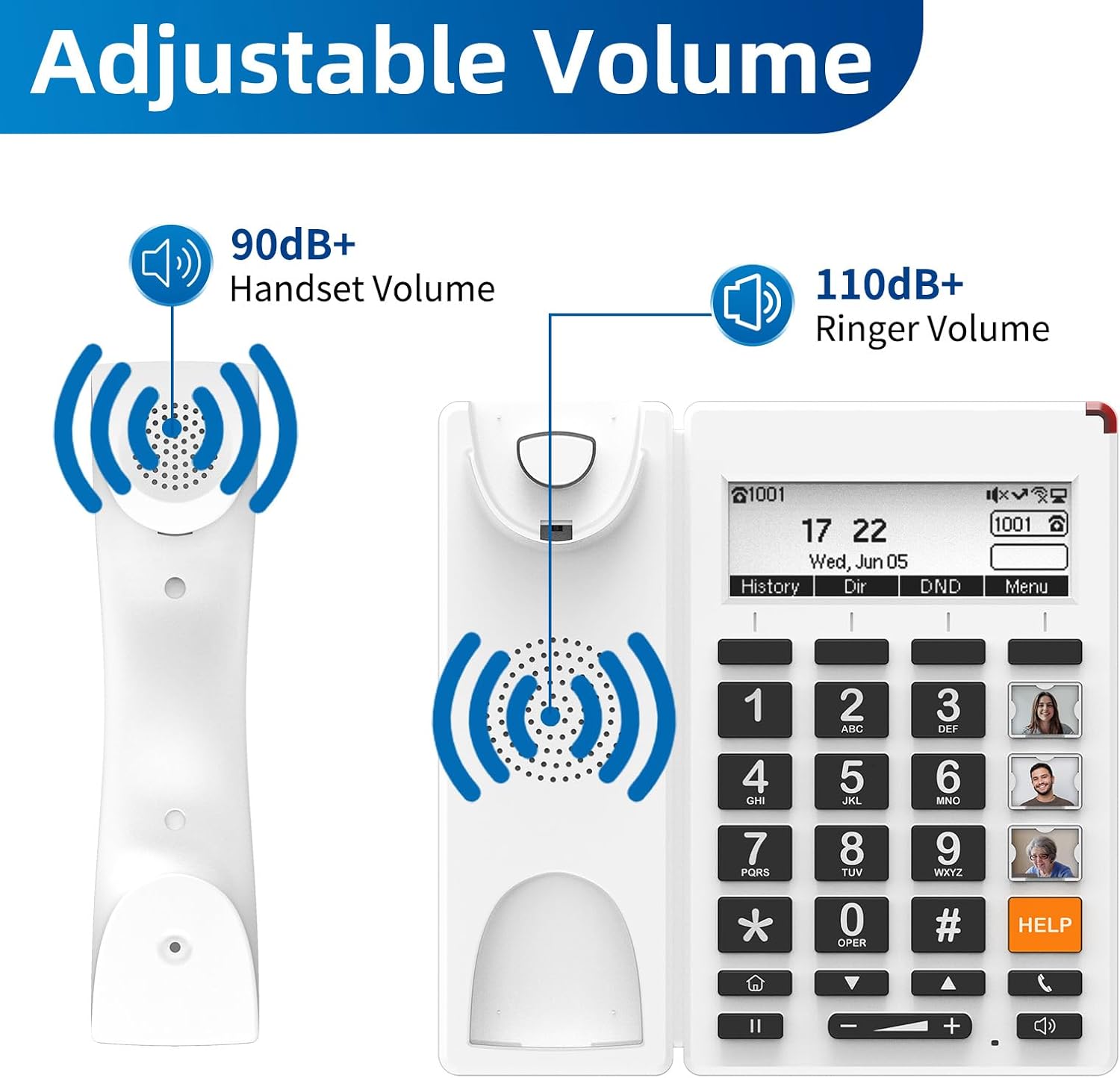
చిత్రం: Visual representation of the adjustable volume levels for both the handset and ringer, highlighting the enhanced audio output.
5. స్పీకర్ఫోన్ కార్యాచరణ
స్పీకర్ఫోన్ను ఉపయోగించడానికి, స్పీకర్ button. This allows for hands-free communication. Press the స్పీకర్ button again to end the call or switch back to the handset.
6. Red Indication Light
A bright red indication light on the top of the phone alerts users to incoming calls or missed messages, providing a visual cue for individuals with hearing impairments.
7. Adjustable Backlight & Auto Screen-Off
The phone features an adjustable backlight for the LCD screen and an auto screen-off function. These settings can be configured through the phone's menu to improve visibility and conserve energy, especially during nighttime hours.

చిత్రం: The FIP12WP phone demonstrating its adjustable backlight and auto screen-off feature, designed for comfortable viewవివిధ లైటింగ్ పరిస్థితుల్లో ing.
కీ ఫీచర్లు
- Customized Image Keys: Nine programmable keys allow users to insert photos of contacts for easy one-touch dialing.
- పెద్ద బటన్లు: Large, easy-to-see buttons are designed for users with reduced vision.
- Dedicated HELP Key: Provides instant access to emergency contacts or services.
- మెరుగైన వాల్యూమ్: Handset volume over 90dB and speakerphone volume over 110dB for clear calls.
- Red Indication Light: Visual alerts for incoming calls and missed messages.
- వాల్-మౌంటబుల్ డిజైన్: Saves space and ensures secure installation.
- HD Voice Quality: Supports G.722, G.711 WB, Opus, and AMR-WB codecs for superior audio clarity.
- Wi-Fi కనెక్టివిటీ: Supports 2.4G Wi-Fi for flexible network deployment.
- PoE మద్దతు: Power over Ethernet for simplified installation.

చిత్రం: The FLYINGVOICE FIP12WP Home VoIP Phone, featuring large, easy-to-read buttons and a clear display.

చిత్రం: An infographic summarizing the main features of the FIP12WP, such as its backlit LCD, 2 SIP accounts, 4 DSS keys, 2*10/100M Ethernet, 2.4G Wi-Fi, HD Voice, PoE, 3 adjustable angles, and wall-mountable design.
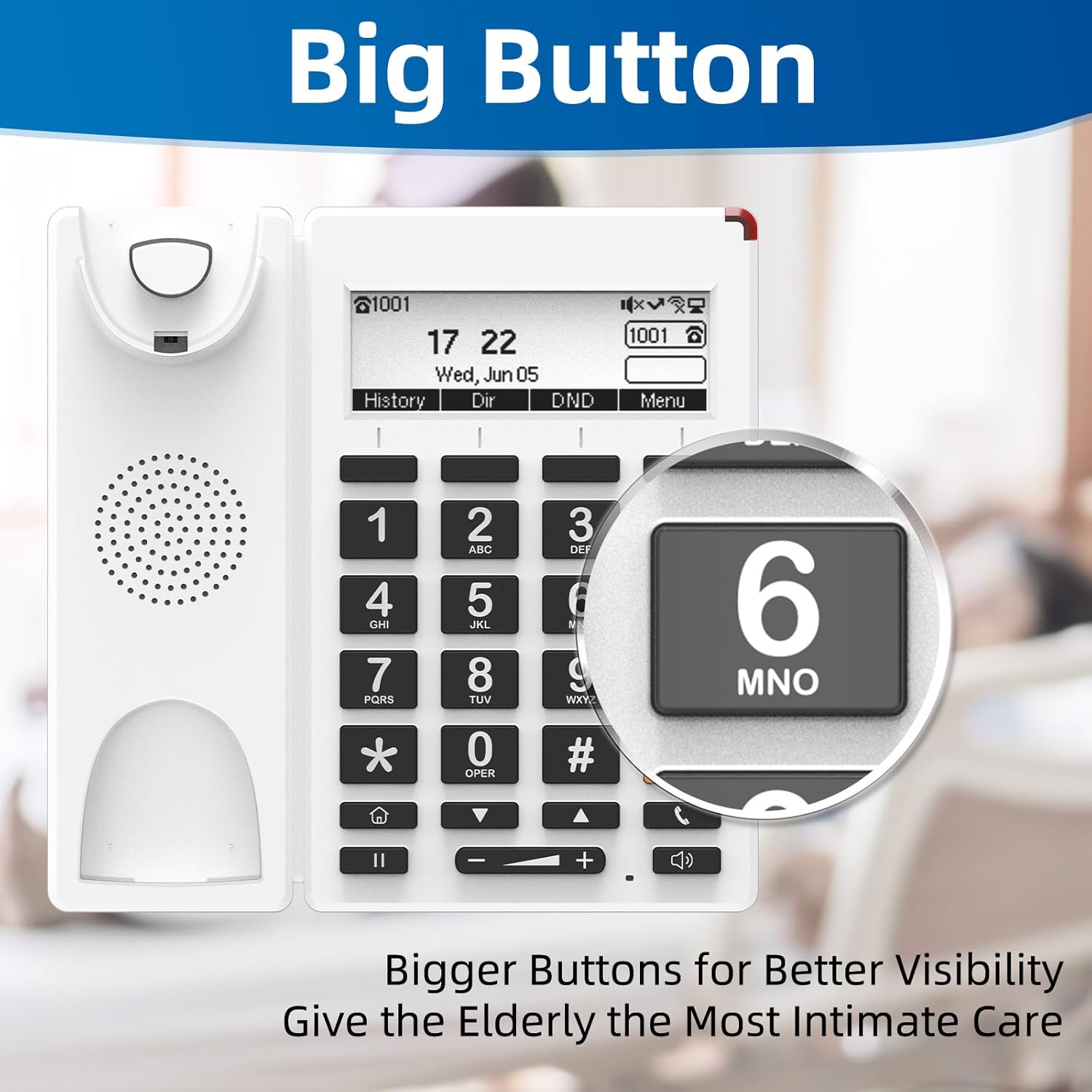
చిత్రం: ఒక క్లోజప్ view emphasizing the large, easy-to-read buttons of the FIP12WP phone, designed for enhanced visibility.
Management & Compatibility
Remote Management Tools
The FIP12WP can be centrally managed using Flyingvoice FACS (Cloud-based) and FDC (Local Network) management tools. These tools allow for efficient configuration and monitoring of the device.

చిత్రం: Screenshots of the FACS (Cloud-based) and FDC (Local Network) management tools, illustrating remote configuration capabilities for the phone.
విస్తృత అనుకూలత
The FIP12WP is compatible with a wide range of VoIP services and platforms, including Asterisk, Broadsoft, Yeastar, Huawei, Metaswitch, Phonesuite, PortaOne, VitalPBX, Vodia, VOIP.MS, ZYCOO, RingCentral, and Nextiva.

చిత్రం: A collage of logos representing various VoIP platforms and services that are compatible with the FIP12WP phone.
అప్లికేషన్ దృశ్యాలు
The FLYINGVOICE FIP12WP is designed for various environments where ease of use and reliable communication are crucial:
- గృహ వినియోగం: Ideal for seniors living alone, providing simple and secure communication.
- నర్సింగ్ హోమ్లు: Facilitates easy contact with family and staff, enhancing resident well-being.
- ఆసుపత్రులు: Offers a straightforward communication method for patients and medical personnel.
- Assisted Living Facilities: Supports independent living with accessible phone features.

చిత్రం: A visual representation of the FIP12WP phone being used in different settings, such as nursing homes, hospitals, and private residences.
వీడియో: This video demonstrates the FLYINGVOICE FIP12WP VoIP Phone's suitability for seniors and its use in nursing home environments, highlighting its ease of use and accessibility features.
నిర్వహణ
To ensure the longevity and optimal performance of your FIP12WP phone, follow these maintenance guidelines:
- శుభ్రపరచడం: ఒక మృదువైన ఉపయోగించండి, డిamp cloth to clean the phone's surface. Avoid using harsh chemicals or abrasive cleaners.
- త్రాడు సంరక్షణ: Periodically check the handset and Ethernet cables for any signs of wear or damage. Replace if necessary.
- పర్యావరణం: ఫోన్ను పొడి వాతావరణంలో, ప్రత్యక్ష సూర్యకాంతి, అధిక వేడి లేదా తేమకు దూరంగా ఉంచండి.
ట్రబుల్షూటింగ్
If you encounter issues with your FIP12WP phone, try the following steps:
- డయల్ టోన్ లేదు: Check all cable connections (handset, Ethernet, power). Ensure your VoIP service is active and your router is functioning correctly.
- కాల్స్ చేయలేరు/స్వీకరించలేరు: Verify network connectivity. Ensure the phone is registered with your VoIP service provider. Check if call blocking features are accidentally activated.
- తక్కువ వాల్యూమ్: ఉపయోగించి వాల్యూమ్ను సర్దుబాటు చేయండి - మరియు + buttons. Ensure the handset is properly seated.
- స్క్రీన్ సమస్యలు: If the screen is blank or unresponsive, check the power connection. If the backlight is too dim, adjust it through the phone's menu settings.
- Emergency Button Not Working: Ensure the HELP button is correctly programmed with the desired emergency number.
For further assistance, please contact FLYINGVOICE customer support.
స్పెసిఫికేషన్లు
| బ్రాండ్ | ఫ్లయింగ్ వాయిస్ |
| మోడల్ | FIP12WP |
| టెలిఫోన్ రకం | వైర్డు VoIP ఫోన్ |
| మెటీరియల్ | ప్లాస్టిక్ |
| శక్తి మూలం | AC adapter / PoE |
| హ్యాండ్సెట్ వాల్యూమ్ | 90 డిబికి పైగా |
| స్పీకర్ఫోన్ వాల్యూమ్ | 110 డిబికి పైగా |
| కనెక్టివిటీ | 2.4G Wi-Fi, Ethernet (2*10/100M) |
| అనుకూల పరికరాలు | VoIP services, PSTN, basic landline phone systems |
| బహుళ లైన్ ఆపరేషన్ | సింగిల్-లైన్ ఆపరేషన్ |
| కాలర్ గుర్తింపు | నం |
వారంటీ మరియు మద్దతు
For warranty information and technical support, please refer to the documentation included with your product or visit the official FLYINGVOICE webవారంటీ క్లెయిమ్ల కోసం కొనుగోలు రుజువుగా మీ కొనుగోలు రసీదును ఉంచండి.


