1. పరిచయం
The KINMATES TikTok Scrolling Ring is a versatile Bluetooth-connected remote control designed to enhance your digital experience. It provides hands-free control for scrolling through social media platforms like TikTok, turning pages in e-book reading applications on iPads and Android tablets, and managing media playback. Its compact and ergonomic design ensures comfortable use for extended periods, making it ideal for multitasking or users with limited hand mobility.

Figure 1.1: KINMATES TikTok Scrolling Ring and its portable charging case.
2. ఉత్పత్తి ముగిసిందిview & ఏమి చేర్చబడింది
Your KINMATES Scrolling Ring package includes the following components:
- KINMATES TikTok Scrolling Ring (T01)
- పోర్టబుల్ ఛార్జింగ్ కేసు
- USB ఛార్జింగ్ కేబుల్ (టైప్-సి)
- వినియోగదారు మాన్యువల్ (ఈ పత్రం)

Figure 2.1: Contents of the KINMATES Scrolling Ring package.
3. సెటప్
3.1 పరికరాన్ని ఛార్జ్ చేస్తోంది
Before first use, ensure the KINMATES Scrolling Ring and its charging case are fully charged. Connect the provided USB Type-C cable to the charging port on the case and plug the other end into a compatible USB power source (e.g., computer, wall adapter). The indicator lights on the case will show the charging status. Once fully charged, the lights will remain solid or turn off, depending on the model.
3.2 బ్లూటూత్ జత చేయడం
To connect your KINMATES Scrolling Ring to your device:
- Ensure the ring is charged and powered on.
- మీ స్మార్ట్ఫోన్ లేదా టాబ్లెట్లో, బ్లూటూత్ సెట్టింగ్లకు నావిగేట్ చేయండి.
- బ్లూటూత్ ఆన్ చేయండి.
- కోసం వెతకండి available devices. The ring should appear as "T01" or "KINMATES".
- Select the device to pair. Once connected, the indicator light on the ring may change or stop blinking.

Figure 3.1: Visual representation of the Bluetooth pairing process.
4. ఆపరేటింగ్ సూచనలు
4.1 సాధారణ నియంత్రణలు
The KINMATES Scrolling Ring features intuitive controls for various functions:
- స్క్రోలింగ్: Use the scroll wheel to navigate content up or down.
- Liking/Interacting: Double-tap the main button to "like" or interact with content.
- వాల్యూమ్ నియంత్రణ: Use the side button(s) to adjust the volume of your device.
- ప్లే/పాజ్: A single press of the main button may control media play/pause functions in compatible applications.

మూర్తి 4.1: వివరంగా view of the scrolling ring's control buttons.
4.2 TikTok Scrolling
For TikTok, simply use the scroll wheel to effortlessly move between videos without touching your phone screen. Double-tap the main button to quickly like videos.
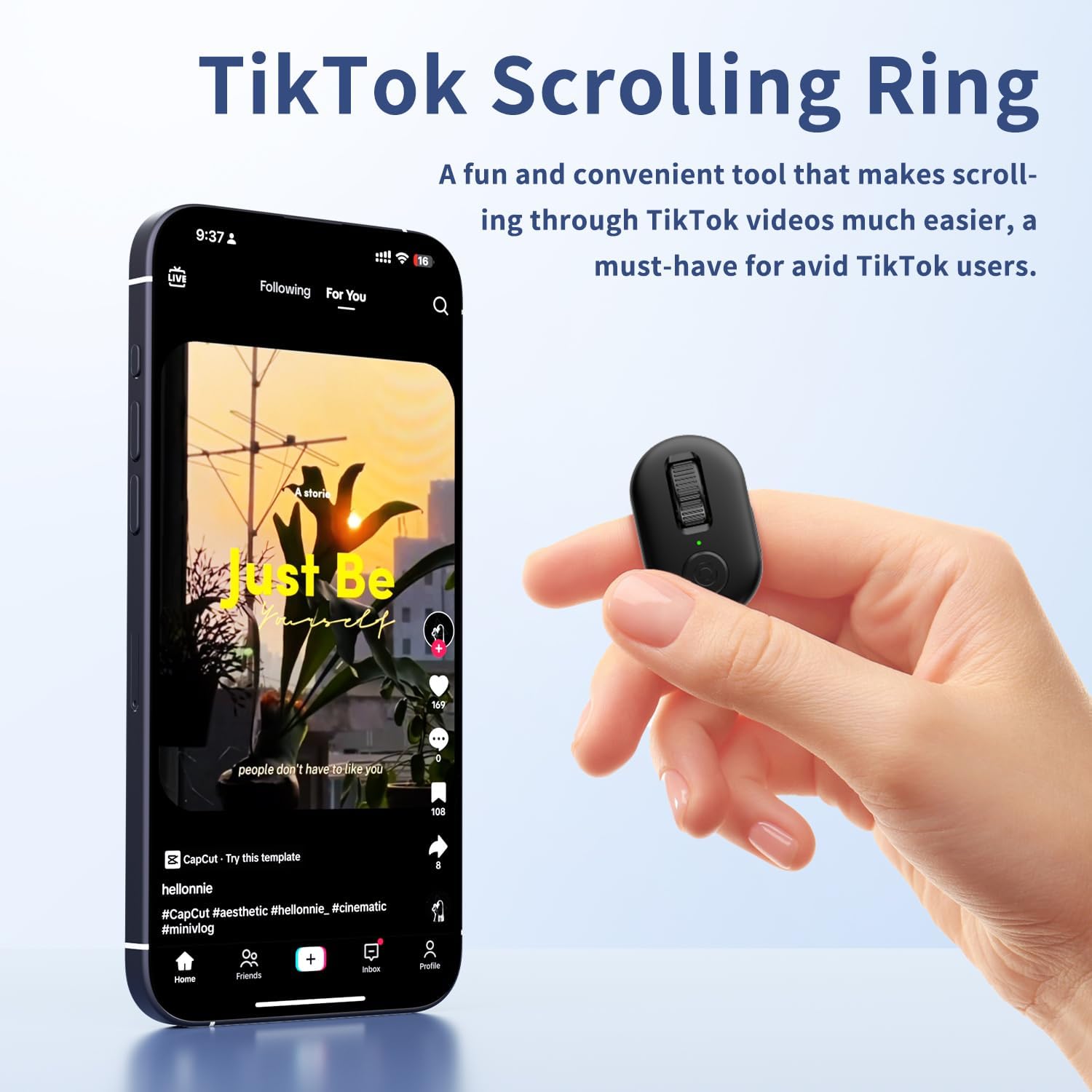
Figure 4.2: Hands-free TikTok scrolling with the KINMATES ring.
4.3 Ebook Page Turning
The ring functions as a convenient page turner for iPad and Android tablet e-book reading apps. The mute button ensures quiet operation, allowing for undisturbed reading, especially at night. Note: This device is not designed for Kindle devices like Paperwhite, Oasis, or Scribe.

Figure 4.3: Effortless e-book page turning with the KINMATES ring.
4.4 పరికర అనుకూలత
The KINMATES Scrolling Ring is compatible with the majority of iPhones, iPads, and Android devices. For iPhones or iPads, it requires iOS 14.8 or later.

Figure 4.4: Broad compatibility with popular mobile devices.
5. నిర్వహణ
5.1 శుభ్రపరచడం
To maintain the performance and appearance of your scrolling ring, wipe it regularly with a soft, dry, lint-free cloth. Avoid using abrasive cleaners, solvents, or aerosol sprays directly on the device.
5.2 బ్యాటరీ సంరక్షణ
The device features a rechargeable battery. For optimal battery life, avoid fully discharging the battery frequently. Store the device in its charging case when not in use to keep it charged and protected. If storing for an extended period, ensure it has at least a 50% charge.
6. ట్రబుల్షూటింగ్
| సమస్య | సాధ్యమైన కారణం | పరిష్కారం |
|---|---|---|
| పరికరం జత కావడం లేదు | Low battery; Bluetooth off on device; Out of range; Already paired to another device. | Charge the ring; Enable Bluetooth; Move closer to the device; Disconnect from other devices. |
| ప్రతిస్పందించని నియంత్రణలు | Device not connected; App not compatible; Interference. | Re-pair the device; Check app compatibility; Move away from other wireless devices. |
| తక్కువ బ్యాటరీ జీవితం | Frequent usage; Old battery. | Ensure full charge before use; Contact support if battery life significantly degrades. |
7. స్పెసిఫికేషన్లు
- మోడల్: T01
- బ్రాండ్: కిన్మేట్స్
- రంగు: నలుపు
- వస్తువు బరువు: 3.52 ఔన్సులు
- ప్యాకేజీ కొలతలు: 4.06 x 3.5 x 1.54 అంగుళాలు
- అనుకూల పరికరాలు: Tablet, Smartphone (Requires iOS 14.8+ for Apple devices)
- మద్దతు ఉన్న పరికరాల గరిష్ట సంఖ్య: 1 (at a time)
- ప్రత్యేక ఫీచర్: Page Turner for iPad & Android Tablet Ebook Reading, Tiktok Scrolling Ring
8. వారంటీ మరియు మద్దతు
For product support, technical assistance, or warranty inquiries, please contact KINMATES customer service at support@kinmates.com. Please provide your model number (T01) and a detailed description of your issue for prompt assistance.


