పరిచయం
Thank you for choosing the COOLCRAZY N8 Dual Dash Cam. This device is designed to provide comprehensive recording of your driving journey with its advanced 4K front and 1080P rear cameras. Equipped with features like 5G WiFi, GPS, night vision, and parking mode, the N8 ensures your safety and provides crucial evidence when needed. This manual will guide you through the installation, operation, and maintenance of your dash cam to ensure optimal performance.
ప్యాకేజీ విషయాలు
దయచేసి మీ ప్యాకేజీలో అన్ని అంశాలు ఉన్నాయని ధృవీకరించండి:
- 1 x COOLCRAZY N8 4K Dash Cam
- 1 x 1080P Rear Camera
- కార్ ఛార్జర్తో 1 x 11.8 అడుగుల విద్యుత్ సరఫరా కేబుల్
- 1 x 20.3 అడుగుల వెనుక కెమెరా కేబుల్
- 1 x Suction cup mount with built-in GPS
- 1 x 64GB మెమరీ కార్డ్
- 2 x Electrostatic Stickers
- 1 x వినియోగదారు మాన్యువల్
- 1 x Mount Tool (Pry Tool)
- 1 x Dust Free Cloth

Image: All components included in the COOLCRAZY N8 Dash Cam package, including the main unit, rear camera, cables, mount, memory card, and accessories.
ఉత్పత్తి ముగిసిందిview
The COOLCRAZY N8 features a compact design with a 3-inch IPS screen for clear viewing. The front camera records in stunning 4K resolution, while the rear camera captures 1080P footage, providing comprehensive coverage of your vehicle's surroundings. Integrated GPS tracks your location and speed, and 5G WiFi allows for seamless app connectivity.

Image: The COOLCRAZY N8 Dual Dash Cam, showcasing its main unit, rear camera, and a smartphone displaying the companion app's interface with GPS and video playback.
కీ ఫీచర్లు
- 4K+1080P Dual Recording: Records videos up to Ultra HD 4K (front) and 1080P (rear) resolution, capturing clear details like license plates and road signs. Features a 170° front camera and a 150° rear camera for maximum road coverage.

Image: Demonstrates the dash cam's ability to capture clear license plates with both front 4K UHD and rear 1080P FHD cameras, highlighting wide-angle views.
- Built-in 5G WiFi: Experience unmatched speed and convenience. View and manage footage on iOS/Android devices, download 4K videos instantly, and share on social media. Manage recordings anytime, anywhere.

Image: Illustrates the dash cam's built-in 5G Wi-Fi and GPS capabilities, showing app connectivity for live viewING, file browsing, and sharing on social media platforms.
- 24-hour Parking Mode & Superior Night Vision: When parked, the dash cam automatically switches to parking mode for monitoring and protection. Features Time Lapse recording to save power and storage (requires additional ACC hardwire kit). F1.5 Extra-large aperture ensures clear details in low-light environments.

Image: Compares the dash cam's superior night vision performance (left) against a standard camera (right), showing clearer details and license plate readability in low light.

Image: Displays the four optional 24/7 parking modes: Motion Detection, Collision Detection, Low Bitrate Mode, and Low Framerate Mode, emphasizing continuous vehicle protection.
- అంతర్నిర్మిత GPS: Enables real-time live speed and compass display on the 3” IPS screen. View your driving route and location on the app, with speed stamps embedded in the video for additional evidence.

Image: Highlights the dash cam's WiFi connectivity and high-precision GPS, showing how the built-in WiFi allows for live viewing మరియు file management, while GPS tracks location and speed.
- లూప్ రికార్డింగ్ & G-సెన్సార్: పాత foo ని ఆటోమేటిక్గా ఓవర్రైట్ చేస్తుంది.tage when the memory is full, ensuring continuous recording with the included 64GB card. The built-in G-sensor detects sudden movements or impacts, automatically locking and protecting associated footagఇ ఓవర్రైట్ నుండి.

Image: Illustrates the loop recording function, where new records overwrite old ones, and shows recording times for different memory card sizes (32GB, 64GB, 128GB, 256GB).

Image: Details the buffered parking mode, which saves 15 seconds before and 30 seconds after motion detection, and the G-sensor's adjustable motion detection for collision protection.
- సూపర్ కెపాసిటర్: Provides reliable and long-lasting performance even in extreme temperatures, offering higher heat/cold resistance and a longer product life compared to traditional batteries.
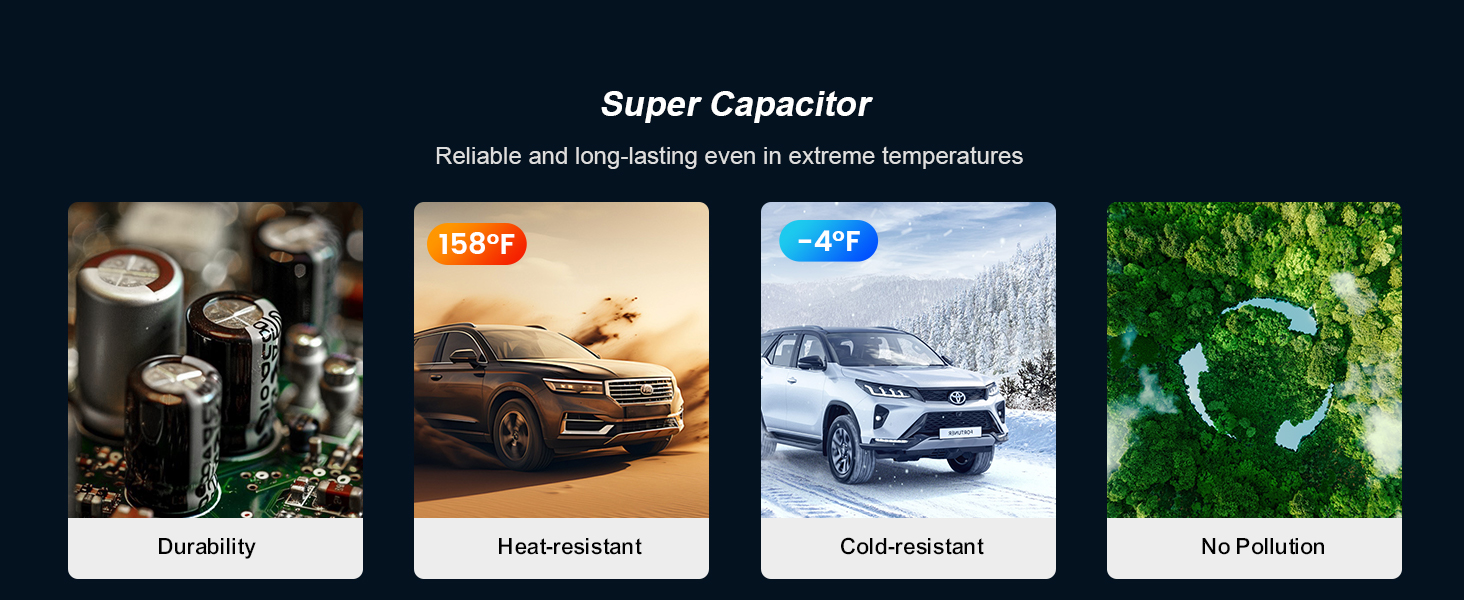
Image: Explains the benefits of the supercapacitor, including durability, heat resistance (up to 158°F), cold resistance (down to -4°F), and environmental friendliness (no pollution).
- Dual HDR: Equipped with advanced HDR technology to balance bright and dark details, ensuring clear capture of license plates and other crucial information in various lighting conditions, including strong sunlight, tunnels, heavy rain, snowfall, and overcast skies.

Image: Illustrates the Dual HDR feature, showing how it improves image quality by reducing glare (top comparison) and compensating for darkness (bottom comparison) to retain all details.
సెటప్ మరియు ఇన్స్టాలేషన్
Follow these steps for a quick and easy installation:
- విండ్షీల్డ్ సిద్ధం చేయండి: Clean the area on your windshield where you intend to mount the dash cam. Ensure it is free of dust and grease for optimal suction.
- Attach Electrostatic Sticker: Apply one of the provided electrostatic stickers to the cleaned area on the windshield. This helps protect your windshield and makes removal easier.
- ఫ్రంట్ డాష్ కామ్ను మౌంట్ చేయండి: Attach the suction cup mount with the built-in GPS to the electrostatic sticker. Press firmly to ensure a secure grip. Adjust the angle of the dash cam for an optimal view ముందున్న రహదారి.
- పవర్ కనెక్ట్ చేయండి: Plug the 11.8ft power supply cable into the dash cam's Type-C port and the other end into your car's cigarette lighter socket.
- వెనుక కెమెరాను ఇన్స్టాల్ చేయండి: Attach the rear camera to the rear window glass using its adhesive. Route the 20.3ft rear camera cable from the rear camera to the front dash cam, connecting it to the designated port. Use the included pry tool to neatly tuck the cable along the car's headliner and pillars.
- పవర్ ఆన్ మరియు టెస్ట్: Start your vehicle. The dash cam should automatically power on and begin recording. Check the screen to ensure both front and rear camera views are displayed correctly.

Image: A diagram illustrating the simple 5-minute quick installation process, showing connections between the car charger, front dash cam, rear camera, and rear cable.
ఆపరేటింగ్ సూచనలు
ప్రాథమిక ఆపరేషన్
- పవర్ ఆన్/ఆఫ్: The dash cam will automatically power on and start recording when your vehicle's ignition is turned on. It will power off automatically when the ignition is turned off. You can also manually power it on/off using the power button.
- రికార్డింగ్: Once powered on, the dash cam automatically begins continuous loop recording. The recording indicator will typically flash or remain solid.
- స్క్రీన్ డిస్ప్లే: The 3-inch IPS screen displays real-time footage from both front and rear cameras. You can switch between views or turn off the screen display while recording continues in the background.
Using the Mobile App (Viidure App)
The COOLCRAZY N8 features built-in 5G WiFi for seamless connection to your smartphone via the Viidure App (available on App Store and Google Play).
- అనువర్తనాన్ని డౌన్లోడ్ చేయండి: కోసం వెతకండి "Viidure" in your device's app store and install it.
- Enable Dash Cam WiFi: On the dash cam, navigate to the settings menu and enable the WiFi function. The screen will display the WiFi network name (SSID) and password.
- మీ ఫోన్ను కనెక్ట్ చేయండి: On your smartphone, go to WiFi settings, find the dash cam's SSID, and enter the password to connect.
- Access Footage: Open the Viidure App. You can now view లైవ్ ఫూtage, రికార్డ్ చేసిన వీడియోలను బ్రౌజ్ చేయండి, డౌన్లోడ్ చేయండి files to your phone, and adjust dash cam settings directly from the app.
పార్కింగ్ మోడ్
To enable 24-hour parking monitoring, an optional ACC hardwire kit is required (ASIN: B0DH5BH9KS). Once installed, the dash cam will automatically activate parking mode when the vehicle is turned off. It supports various parking modes including motion detection, collision detection, low bitrate recording, and low framerate recording.
G-Sensor and Emergency Recording
The built-in G-sensor automatically detects sudden impacts or rapid acceleration/deceleration. When such an event occurs, the dash cam will automatically lock the current video segment, preventing it from being overwritten by loop recording. These emergency videos are stored in a separate folder for easy access.
నిర్వహణ
- లెన్స్లను శుభ్రపరచడం: Use the provided dust-free cloth or a soft, lint-free cloth to gently wipe the camera lenses. Avoid using abrasive cleaners or solvents.
- స్క్రీన్ క్లీనింగ్: Wipe the IPS screen with a soft, dry cloth. Do not press too hard on the screen.
- SD కార్డ్ సంరక్షణ: Periodically format the included 64GB memory card (every 2-4 weeks is recommended) within the dash cam's settings to maintain optimal performance and prevent data corruption. Use only high-quality Class 10 or U3 microSD cards.
- ఉష్ణోగ్రత: Avoid exposing the dash cam to extreme temperatures for prolonged periods. The supercapacitor design provides excellent heat and cold resistance, but prolonged exposure to direct sunlight in a hot car can still affect its lifespan.
ట్రబుల్షూటింగ్
| సమస్య | సాధ్యమైన కారణం | పరిష్కారం |
|---|---|---|
| డాష్ కామ్ పవర్ ఆన్ అవ్వదు. | విద్యుత్ సరఫరా లేదు; కనెక్షన్ కోల్పోయింది; కారు ఛార్జర్ చెడిపోయింది. | Check car charger connection and car's power outlet. Ensure ignition is on. Try a different USB-C cable or car charger. |
| రికార్డింగ్ ఆగిపోతుంది లేదా స్తంభించిపోతుంది. | SD card full; slow SD card; SD card error. | Format the SD card. Use a high-speed (Class 10 or U3) microSD card. Replace the SD card if issues persist. |
| వీడియో footage అస్పష్టంగా లేదా అస్పష్టంగా ఉంది. | లెన్స్ పై రక్షణ పొర; మురికి లెన్స్; తప్పుగా ఫోకస్ చేయడం. | లెన్స్ నుండి ఏదైనా రక్షణ పొరను తీసివేయండి. లెన్స్ను మృదువైన వస్త్రంతో శుభ్రం చేయండి. కెమెరా సురక్షితంగా అమర్చబడిందని మరియు వైబ్రేట్ కాకుండా చూసుకోండి. |
| WiFi కనెక్షన్ సమస్యలు. | Incorrect password; too far from dash cam; app issue. | Ensure correct WiFi password. Stay close to the dash cam. Restart the app and dash cam. Reinstall the app if necessary. |
| పార్కింగ్ మోడ్ పనిచేయడం లేదు. | No hardwire kit; incorrect settings. | Ensure the ACC hardwire kit is correctly installed. Check parking mode settings in the dash cam menu. |
సాంకేతిక లక్షణాలు
| ఫీచర్ | స్పెసిఫికేషన్ |
|---|---|
| మోడల్ పేరు | N8 |
| ఉత్పత్తి కొలతలు | 2.94 x 3.76 x 3.3 అంగుళాలు |
| వస్తువు బరువు | 1.6 ఔన్సులు |
| వీడియో క్యాప్చర్ రిజల్యూషన్ | Front: 4K (3840*2160P), Rear: 1080P |
| ముందు కెమెరా కోణం | 170° వైడ్ యాంగిల్ |
| వెనుక కెమెరా కోణం | 150° వైడ్ యాంగిల్ |
| ప్రదర్శించు | 3" IPS స్క్రీన్ |
| కనెక్టివిటీ | Built-In 5G WiFi, Built-In GPS |
| నైట్ విజన్ | F1.5 Extra-large aperture, HDR Technology |
| నిల్వ | Supports up to 256GB (64GB card included) |
| శక్తి మూలం | supercapacitor |
| మౌంటు రకం | విండ్షీల్డ్ మౌంట్ (చూషణ కప్పు) |
వారంటీ మరియు మద్దతు
COOLCRAZY provides an 18-month extended guarantee for your N8 Dual Dash Cam, ensuring peace of mind with your purchase. Our dedicated after-sales team is available 24/7 to assist you with any inquiries or concerns.
For customer support, please contact us via email:


