పరిచయం
This manual provides comprehensive instructions for the FL ESPORTS CMK98 Wireless Mechanical Gaming Keyboard. Designed for both Windows and Mac systems, this 99-key layout keyboard features tri-mode connectivity, hot-swappable switches, and customizable RGB lighting. Please read this manual thoroughly to ensure proper setup and operation.

చిత్రం: ఒక ఓవర్view of the FL ESPORTS CMK98 keyboard, highlighting its gasket structure, high-quality silencer fills, hot-swap capability, software support, PBT keycaps, wireless 3-mode connectivity, Win/Mac compatibility, 16.8 million RGB lighting, 4000mAh battery, and 96% compact layout.
సెటప్
1. ప్యాకేజీ విషయాలు
- FL ESPORTS CMK98 Wireless Mechanical Gaming Keyboard
- USB-C కేబుల్
- 2.4GHz USB Receiver (stored in keyboard)
- కీకాప్ పుల్లర్
- స్విచ్ పుల్లర్
- వినియోగదారు మాన్యువల్ (ఈ పత్రం)
2. కనెక్టివిటీ మోడ్లు
The CMK98 keyboard supports three connection modes: Bluetooth 5.0, 2.4GHz Wireless, and USB-C Wired.
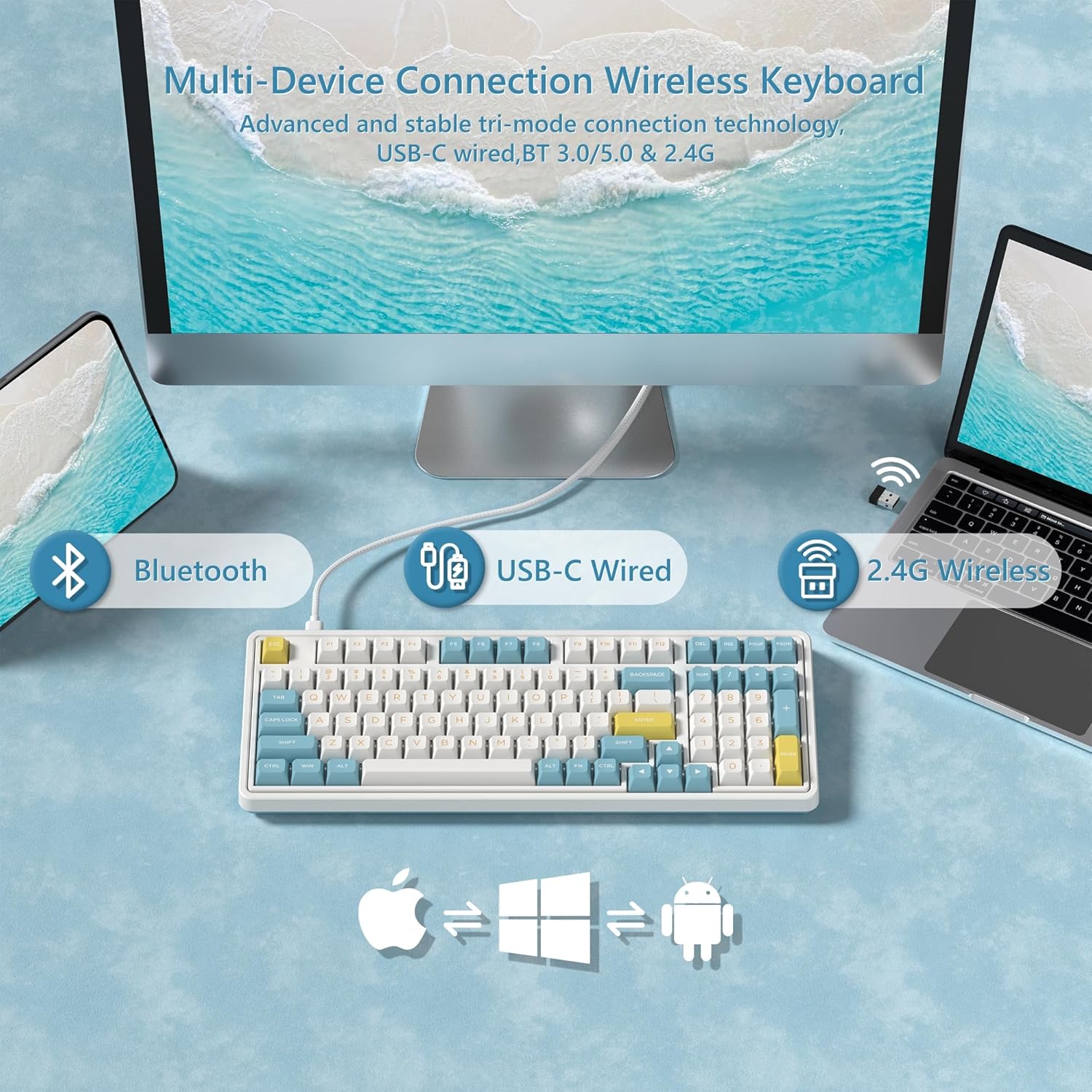
Image: Diagram illustrating the versatile connectivity options of the CMK98 keyboard, demonstrating how it can connect to multiple devices using Bluetooth, a USB-C cable, or the 2.4GHz wireless receiver.
2.1. 2.4GHz వైర్లెస్ మోడ్
- Locate the 2.4GHz USB receiver stored in the compartment on the back of the keyboard.
- మీ కంప్యూటర్లో అందుబాటులో ఉన్న USB పోర్ట్కి USB రిసీవర్ని ప్లగ్ చేయండి.
- On the keyboard's side switch, slide it to the 2.4G wireless icon position.
- కీబోర్డ్ స్వయంచాలకంగా కనెక్ట్ అవ్వాలి.
Video: Demonstrates the setup and connection process for the FL ESPORTS CMK98 keyboard, including locating the 2.4GHz receiver and switching modes.

Image: A close-up of the keyboard's side, featuring the toggle switch for selecting between Bluetooth, 2.4GHz wireless, and USB-C wired modes, alongside the USB-C charging port.
2.2. బ్లూటూత్ మోడ్
- On the keyboard's side switch, slide it to the Bluetooth icon position.
- నొక్కి పట్టుకోండి FN + Q, FN + W, లేదా FN + E for 3-5 seconds to enter pairing mode (the indicator light will flash rapidly).
- On your device (computer, tablet, phone), open Bluetooth settings and search for "CMK98".
- Select "CMK98" to pair. The indicator light will become solid when connected.
- మీరు మూడు బ్లూటూత్ పరికరాలను జత చేయవచ్చు మరియు వాటి మధ్య మారవచ్చు FN + ప్ర/ప/ఉ/ఉ.
2.3. USB-C వైర్డ్ మోడ్
- అందించిన USB-C కేబుల్ను కీబోర్డ్ యొక్క USB-C పోర్ట్కి కనెక్ట్ చేయండి.
- USB-C కేబుల్ యొక్క మరొక చివరను మీ కంప్యూటర్లో అందుబాటులో ఉన్న USB పోర్ట్కు కనెక్ట్ చేయండి.
- On the keyboard's side switch, slide it to the USB-C wired icon position.
- The keyboard will function as a wired device and charge simultaneously.
3. Operating System Compatibility Switch
The keyboard features a switch on the back to toggle between Windows (WIN) and Mac (MAC) compatibility modes. Ensure this switch is set correctly for your operating system to ensure proper key mapping.

చిత్రం: వివరణాత్మక view of the keyboard's bottom, highlighting the switch used to select between Mac and Windows operating system compatibility modes.
ఆపరేటింగ్ సూచనలు
1. కీలక విధులు మరియు లేఅవుట్
The CMK98 features a 99-key layout, including a dedicated number pad. Standard keyboard functions apply. Use the FN key in combination with other keys for secondary functions, such as media control or lighting adjustments.
Video: Demonstrates the compact 99-key layout of the CMK98 mechanical keyboard and its "creamy" typing sound.
2. RGB లైటింగ్
The keyboard features 1.68 million customizable RGB backlight options. Specific key combinations with the FN key allow you to cycle through various lighting effects, adjust brightness, and change speed. Refer to the software section for advanced customization.
3. Macro Programming (Pro Software)
All keys support macro customization. Download the dedicated driver software from the official FL ESPORTS website to record and edit macros, customize key functions, and set music rhythm lighting effects. The software also supports N-key rollover for simultaneous key presses.

Image: This image displays the user interface of the CMK98's dedicated software, where users can customize key functions, create macros, and manage RGB lighting effects.
4. Hot-Swappable Switches and Keycaps
The CMK98 features a hot-swappable PCB, allowing you to easily replace 3-pin or 5-pin mechanical switches without soldering. The included keycap puller and switch puller facilitate this process.
- కావలసిన కీక్యాప్ను సున్నితంగా తొలగించడానికి కీక్యాప్ పుల్లర్ను ఉపయోగించండి.
- Use the switch puller to carefully grip and pull out the switch.
- కొత్త స్విచ్ యొక్క పిన్లను PCB లోని రంధ్రాలతో సమలేఖనం చేసి, అది స్థానంలో క్లిక్ అయ్యే వరకు గట్టిగా నొక్కండి.
- కీక్యాప్ను మార్చండి.

చిత్రం: ఒక మాగ్నిఫైడ్ view of a single mechanical switch, illustrating its internal components and design.
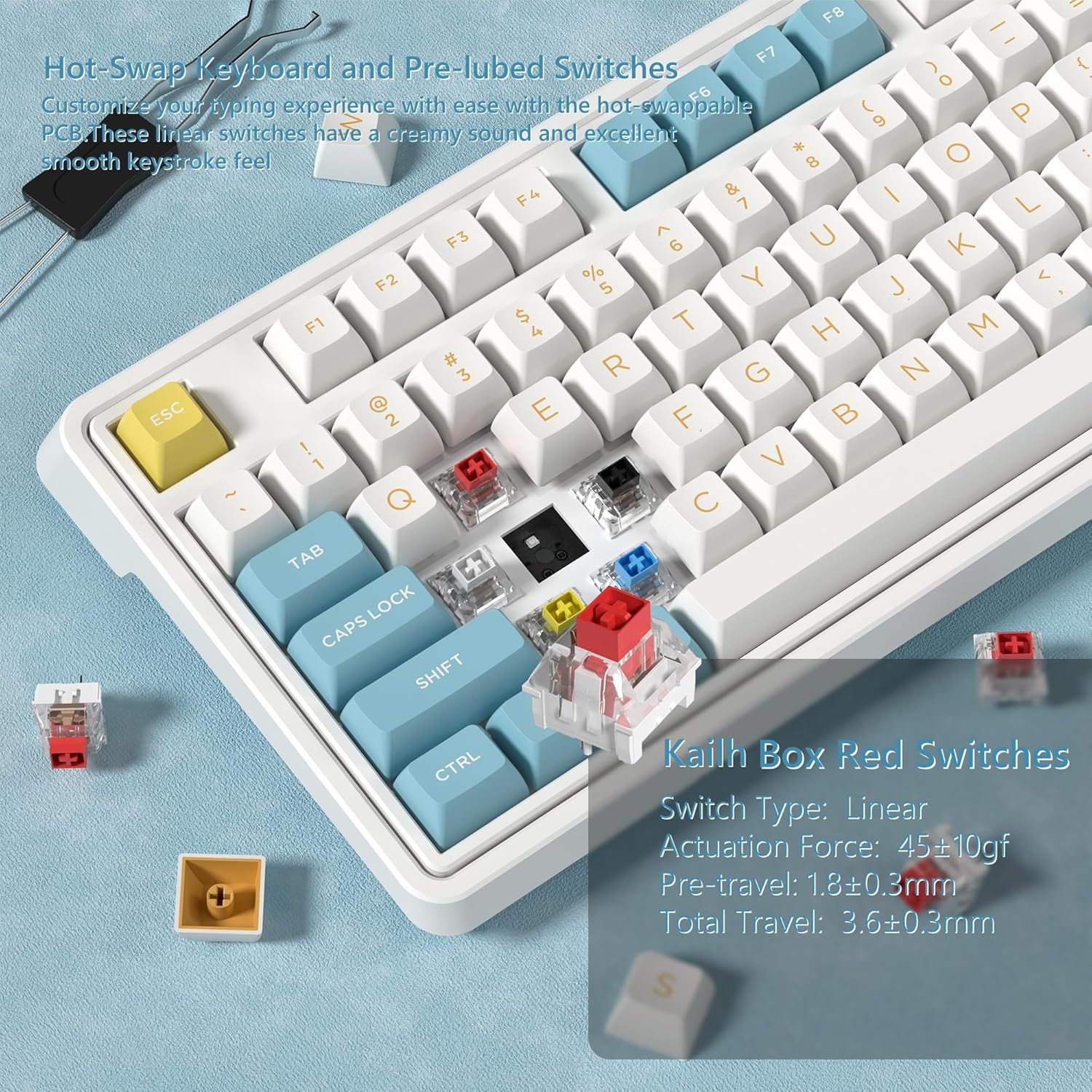
చిత్రం: వివరణాత్మక view showing how to remove and install mechanical switches on the hot-swappable PCB of the CMK98 keyboard, along with the tools provided for this process.
5. బ్యాటరీ నిర్వహణ
The keyboard is equipped with a built-in 4000mAh lithium polymer battery. Connect the USB-C cable to charge the keyboard. An indicator light will typically show charging status.
- ఛార్జింగ్: Connect the keyboard via USB-C cable to a power source.
- బ్యాటరీ లైఫ్: Up to 260 hours with backlight off, up to 35 hours with backlight on (usage may vary).

Image: This graphic highlights the keyboard's 4000mAh battery, providing estimated usage times of 260 hours with the backlight off and 35 hours with the backlight on.
నిర్వహణ
1. శుభ్రపరచడం
మీ కీబోర్డ్ను శుభ్రం చేయడానికి, ముందుగా దానిని అన్ని విద్యుత్ వనరుల నుండి డిస్కనెక్ట్ చేయండి. మృదువైన, మెత్తటి బట్టను ఉపయోగించి కొద్దిగా శుభ్రం చేయండి.ampened with water or a mild cleaning solution. Avoid harsh chemicals or abrasive materials. For cleaning between keycaps, use compressed air or remove keycaps with the provided puller for thorough cleaning.
2. Switch and Keycap Care
When replacing switches or keycaps, handle them gently to avoid damaging the pins or the PCB sockets. Store spare switches and keycaps in a clean, dry place.
ట్రబుల్షూటింగ్
- కీబోర్డ్ స్పందించడం లేదు:
- కీబోర్డ్ ఛార్జ్ అయ్యిందని నిర్ధారించుకోండి.
- Check the connection mode switch (2.4G, Bluetooth, USB-C) is set correctly.
- 2.4GHz కోసం, USB రిసీవర్ సురక్షితంగా ప్లగిన్ చేయబడిందని నిర్ధారించుకోండి.
- For Bluetooth, re-pair the device.
- వైర్లెస్ సమస్యలను తోసిపుచ్చడానికి USB-C కేబుల్ ద్వారా కనెక్ట్ చేయడానికి ప్రయత్నించండి.
- నమోదు కాని లేదా డబుల్-టైప్ చేయని కీలు:
- This could indicate a faulty switch. Utilize the hot-swappable feature to replace the affected switch.
- కీక్యాప్లు సరిగ్గా అమర్చబడ్డాయని నిర్ధారించుకోండి.
- RGB లైటింగ్ పనిచేయడం లేదు:
- Check if the lighting is turned off or set to minimum brightness using FN key combinations.
- Ensure the keyboard software is installed and updated for full control.
- బ్లూటూత్ కనెక్షన్ అస్థిరంగా ఉంది:
- కీబోర్డ్ మీ పరికరం పరిధిలో ఉందని నిర్ధారించుకోండి.
- ఇతర వైర్లెస్ పరికరాల నుండి జోక్యాన్ని తగ్గించండి.
- కీబోర్డ్ను తిరిగి జత చేయడానికి ప్రయత్నించండి.
స్పెసిఫికేషన్లు
| ఫీచర్ | వివరాలు |
|---|---|
| మోడల్ | CMK98 |
| కనెక్టివిటీ | 2.4G వైర్లెస్, బ్లూటూత్ 5.0, USB-C వైర్డ్ |
| లేఅవుట్ | 99 keys with Number Pad |
| స్విచ్లు | Hot-Swappable (3-pin/5-pin compatible), Pre-lubed Linear Switches |
| కీకాప్స్ | డబుల్ షాట్ PBT |
| బ్యాక్లైట్ | 1.68 మిలియన్ RGB |
| బ్యాటరీ | 4000mAh లిథియం పాలిమర్ |
| అనుకూలత | Windows, Mac |
| ప్రత్యేక లక్షణాలు | Gasket Structure, PCB Single Key Slotting, Macro Customization, N-Key Rollover |
| కొలతలు | 16.97 x 8.15 x 2.32 అంగుళాలు |
| వస్తువు బరువు | 4.36 పౌండ్లు |
వారంటీ మరియు మద్దతు
For warranty information and technical support, please refer to the official FL ESPORTS webసైట్ లేదా వారి కస్టమర్ సర్వీస్ను సంప్రదించండి. వారంటీ క్లెయిమ్ల కోసం మీ కొనుగోలు రసీదును ఉంచండి.
తయారీదారు: FL ESPORTS


