1. పరిచయం
This manual provides comprehensive instructions for the safe and efficient operation, installation, and maintenance of your Abestorm DecDust 1080 Air Filtration System. This high-efficiency unit is designed to effectively control airborne dust and particles in workshops, garages, and industrial environments, ensuring cleaner air quality.
2. ముఖ్యమైన భద్రతా సూచనలు
Please read all instructions carefully before operating the unit. Failure to follow these instructions may result in electric shock, fire, or serious injury.
- ఏదైనా నిర్వహణ లేదా శుభ్రపరిచే ముందు ఎల్లప్పుడూ విద్యుత్ సరఫరాను డిస్కనెక్ట్ చేయండి.
- దెబ్బతిన్న త్రాడు లేదా ప్లగ్తో యూనిట్ను ఆపరేట్ చేయవద్దు.
- యూనిట్ను నీరు లేదా అధిక తేమ నుండి దూరంగా ఉంచండి.
- ఆపరేషన్ సమయంలో యూనిట్ చుట్టూ సరైన వెంటిలేషన్ ఉండేలా చూసుకోండి.
- ఈ ఉత్పత్తిలో క్యాన్సర్ మరియు పుట్టుకతో వచ్చే లోపాలు లేదా ఇతర పునరుత్పత్తి హాని కలిగించే రసాయనాలు కాలిఫోర్నియా రాష్ట్రానికి తెలుసు. (ప్రతిపాదన 65 హెచ్చరిక)
- This product does not meet California's regular requirements and cannot be shipped to California.
3. ప్యాకేజీ విషయాలు
క్రింద జాబితా చేయబడిన అన్ని వస్తువులు మీ ప్యాకేజీలో చేర్చబడ్డాయని ధృవీకరించండి:
- Abestorm DecDust 1080 Air Filtration System Unit
- Remote Control (requires 1 AA battery, not included)
- MERV-11 Micron Filters (pre-installed, quantity 3)
- Hanging Chains (4 sets)
- Ceiling Hooks (4 pieces)
- Wall Mounting Brackets and Screws (4 sets)
- వినియోగదారు మాన్యువల్

Figure 3.1: Abestorm DecDust 1080 Air Filtration System and included accessories.

మూర్తి 3.2: వివరంగా view of the air filtration unit, MERV-11 filters, remote control, and all mounting hardware.
4. సెటప్ మరియు ఇన్స్టాలేషన్
The Abestorm DecDust 1080 offers multiple installation options to suit your workspace needs.
4.1 మౌంటు ఐచ్ఛికాలు
- Suspended by Chains: Use the provided chains and ceiling hooks to hang the unit from the ceiling. Ensure the ceiling structure can support the unit's weight (approximately 30.2 lbs).
- వాల్ మౌంట్: Utilize the wall mounting brackets and screws to secure the unit to a sturdy wall.
- Flatwise Placement: The unit can be placed flat on a workbench or elevated surface.
- Vertical Placement: The unit can also be placed upright on a flat surface.

Figure 4.1: Various installation methods for the Abestorm DecDust 1080.

చిత్రం 4.2: ఉదాamples of the air filtration system installed in various environments.
4.2 ప్రారంభ సెటప్ దశలు
- Unpack the unit and all accessories.
- Ensure the MERV-11 filters are correctly installed in their slots.
- Choose your desired mounting method and securely install the unit.
- Insert 1 AA battery into the remote control.
- Plug the unit into a standard 110V power outlet.
వీడియో 4.1: ఒక ఓవర్view of the Abestorm DecDust 1080 Air Filtration System, demonstrating its features and potential installation scenarios. This video is provided by TOOVEM Industry U.S.
వీడియో 4.2: ఒక పునఃview of the DecDust 1080IG model, which shares many features with the DecDust 1080. Note that the ionizer feature shown in this video is specific to the 'IG' variant and may not be present on your DecDust 1080 model. This video is provided by TOOVEM Industry U.S.
5. ఆపరేటింగ్ సూచనలు
The unit can be operated via the touch panel on the device or the included remote control.
5.1 కంట్రోల్ ప్యానెల్ మరియు రిమోట్ కంట్రోల్
- పవర్ ఆన్/ఆఫ్: Press the power button on the unit or remote to turn the system on or off.
- వేగం సర్దుబాటు: The unit features two speed settings:
- Low Speed: 780 CFM
- High Speed: 1080 CFM
- టైమర్ ఫంక్షన్: Set the unit to operate for 1 to 9 hours using the timer button on the remote control.
- రిమోట్ కంట్రోల్ 26 అడుగుల వరకు పరిధిని కలిగి ఉంటుంది.

Figure 5.1: Control panel and remote control for the air filtration system.

Figure 5.2: The 270-degree air intake design maximizes particle capture.

Figure 5.3: Visual representation of the 270-degree air intake and filtration process.

Figure 5.4: Key performance indicators of the vortex fan.
5.2 Optional Ducting
Air ducts can be added to the outlet for directed emission control and to prevent secondary pollution. The unit is suitable for ducts under 10 inches. Please measure the outlet size before purchasing ducts.

Figure 5.5: Illustration of optional outlet ducting.
6. నిర్వహణ
Regular maintenance ensures optimal performance and longevity of your air filtration system.
6.1 ఫిల్టర్ భర్తీ
- The unit is equipped with three MERV-11 micron filters.
- Filters should be replaced every 4-6 months, depending on usage and air quality.
- To replace filters, simply slide out the old filters from their slots and insert new ones. The design allows for effortless maintenance.

Figure 6.1: Easy filter replacement process.
7. ట్రబుల్షూటింగ్
If you encounter issues with your Abestorm DecDust 1080, refer to the following common problems and solutions:
| సమస్య | సాధ్యమైన కారణం | పరిష్కారం |
|---|---|---|
| యూనిట్ ఆన్ చేయబడలేదు. | విద్యుత్ సరఫరా లేదు. | Check if the power cord is securely plugged into a working outlet. Ensure the power switch is in the 'On' position. |
| తగ్గిన గాలి ప్రవాహం. | అడ్డుపడే ఫిల్టర్లు. | Inspect and replace the MERV-11 filters if they appear dirty or clogged. |
| రిమోట్ కంట్రోల్ పనిచేయడం లేదు. | డెడ్ బ్యాటరీ లేదా అడ్డంకి. | Replace the AA battery in the remote control. Ensure there are no obstructions between the remote and the unit's IR receiver. |
| ఆపరేషన్ సమయంలో అసాధారణ శబ్దం. | Loose components or foreign objects. | Turn off and unplug the unit. Carefully inspect for any loose parts or foreign objects inside the unit or around the fan. |
8. స్పెసిఫికేషన్లు
| ఫీచర్ | వివరాలు |
|---|---|
| మోడల్ సంఖ్య | డిసెంబర్ 1080 |
| బ్రాండ్ | Abestorm |
| గాలి ప్రవాహం (CFM) | 780 (Low Speed) - 1080 (High Speed) |
| కవరేజ్ ఏరియా | 1100 చ.అ.ల వరకు |
| శబ్దం స్థాయి | <60dBA |
| ఫిల్టర్ రకం | MERV-11 Micron Filters (3 included) |
| Intake Design | 270° Three-sided |
| నియంత్రణ పద్ధతి | Touch Panel & Remote Control (26ft range) |
| టైమర్ | 1-9 గంటలు |
| ఉత్పత్తి కొలతలు | 19.4"L × 19.4"W × 9.6"H |
| వస్తువు బరువు | 30.2 పౌండ్లు |
| పవర్ ఇన్పుట్ | 110V (Standard) |
| వాట్tage | 151 వాట్స్ |
| ధృవపత్రాలు | UL ధృవీకరించబడింది |
| రిమోట్ బ్యాటరీ | 1 AA బ్యాటరీ అవసరం (చేర్చబడలేదు) |
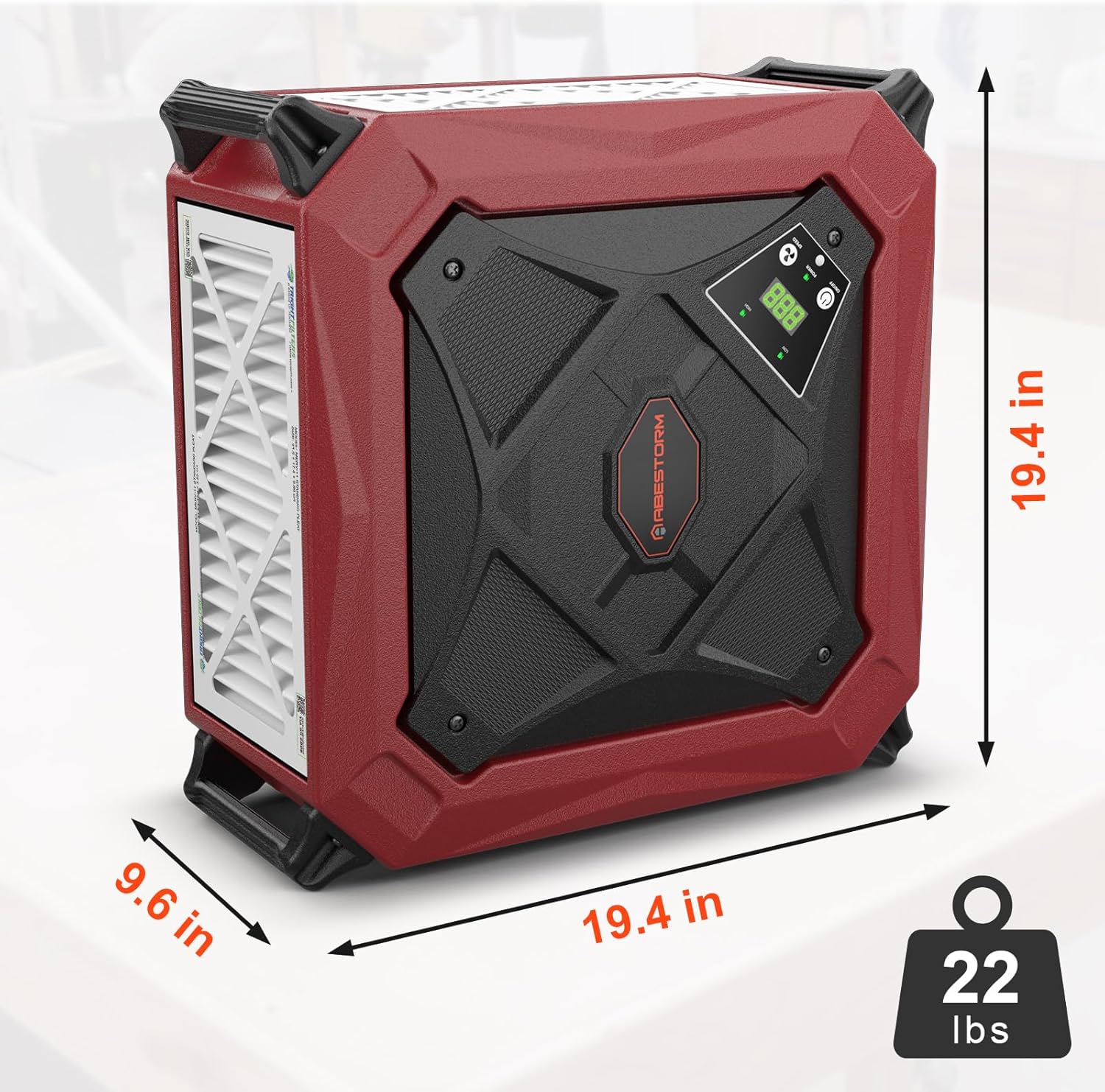
చిత్రం 8.1: ఉత్పత్తి కొలతలు మరియు బరువు.
9. వారంటీ మరియు మద్దతు
For warranty information or technical support, please contact Abestorm customer service. Keep your purchase receipt as proof of purchase.
Optional protection plans may be available for extended coverage. Refer to your retailer for details on purchasing additional protection plans.


