1. పరిచయం
This manual provides essential instructions for setting up, operating, maintaining, and troubleshooting your Blackview BV4800 Rugged Phone. Please read this guide thoroughly to ensure proper use and to maximize the device's features and longevity. The Blackview BV4800 is designed for durability, featuring IP68/IP69K waterproof and MIL-STD-810H drop-proof certifications, a 6.56-inch HD+ display, a 5180mAh battery, and running on Android 13 with Doke OS 3.1.
2. ప్యాకేజీ విషయాలు
మీ ఉత్పత్తి ప్యాకేజీలో అన్ని అంశాలు ఉన్నాయని ధృవీకరించండి:
- నలుపుview BV4800 కఠినమైన ఫోన్
- USB టైప్-సి కేబుల్
- పవర్ అడాప్టర్
- SIM ఎజెక్టర్ సాధనం
- త్వరిత ప్రారంభ గైడ్
- వారంటీ కార్డ్
3. పరికరం ముగిసిందిview
Familiarize yourself with the physical components of your Blackview BV4800 phone.
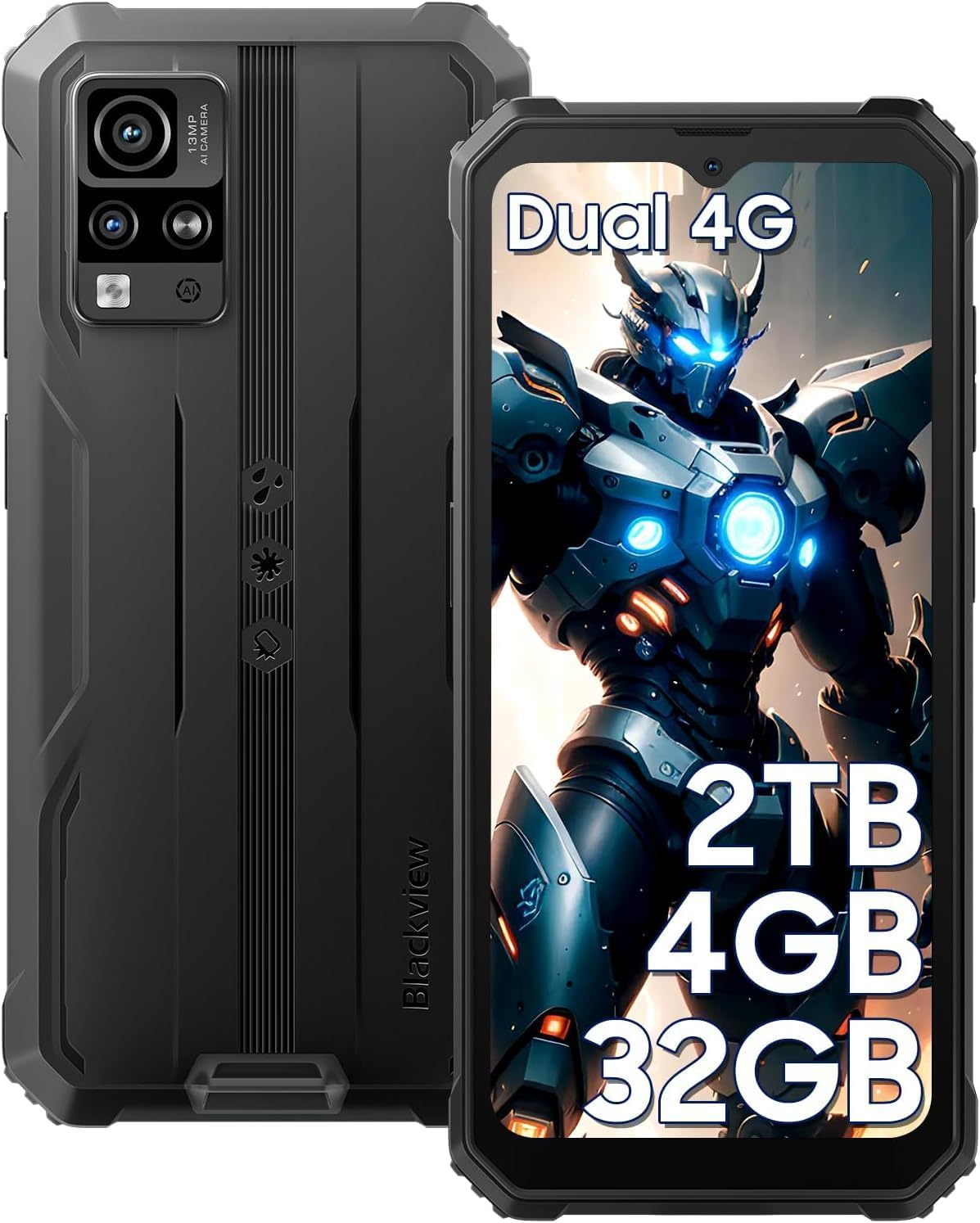
మూర్తి 3.1: ముందు మరియు వెనుక View నల్లజాతికి చెందినview BV4800. This image displays the phone's rugged exterior, including the rear camera module and the display.
- ముందు కెమెరా: డిస్ప్లే మధ్యలో ఎగువన ఉంది.
- ప్రదర్శన: 6.56-inch HD+ touchscreen.
- వాల్యూమ్ బటన్లు: ఆడియో స్థాయిలను సర్దుబాటు చేయడానికి పక్కన.
- పవర్ బటన్: On the side, for turning the device on/off and screen lock/unlock.
- USB టైప్-సి పోర్ట్: At the bottom, protected by a flap, for charging and data transfer.
- స్పీకర్: దిగువన ఉంది.
- వెనుక కెమెరాలు: Located on the back, including the 13MP main camera.
- ఫ్లాష్లైట్: Adjacent to the rear cameras.
- SIM/MicroSD Card Slot: On the side, accessible with the SIM ejector tool.
4. సెటప్
4.1. SIM కార్డ్ మరియు మైక్రో SD కార్డ్ ఇన్స్టాలేషన్
ది బ్లాక్view BV4800 supports two Nano SIM cards and one MicroSD/TF card simultaneously. Ensure the phone is powered off before installation.
- ఫోన్ పక్కన సిమ్ కార్డ్ ట్రేని గుర్తించండి.
- ట్రే పక్కన ఉన్న చిన్న రంధ్రంలోకి సిమ్ ఎజెక్టర్ సాధనాన్ని చొప్పించి, ట్రే బయటకు వచ్చే వరకు గట్టిగా నొక్కండి.
- Carefully place your Nano SIM cards and MicroSD card into the designated slots on the tray. Ensure they are correctly oriented as indicated on the tray.
- Gently push the tray back into the phone until it is flush with the device's side.
- After inserting a storage card, restart the cellphone for proper recognition.
4.2. ప్రారంభ పవర్ ఆన్
మీ పరికరాన్ని మొదటిసారి ఆన్ చేయడానికి:
- Press and hold the Power button located on the side of the phone until the Blackview logo appears on the screen.
- భాష ఎంపిక, Wi-Fi కనెక్షన్ మరియు Google ఖాతా సెటప్తో సహా ప్రారంభ సెటప్ను పూర్తి చేయడానికి ఆన్-స్క్రీన్ ప్రాంప్ట్లను అనుసరించండి.
4.3. పరికరాన్ని ఛార్జ్ చేస్తోంది
Before first use, fully charge your Blackview BV4800.

మూర్తి 4.3.1: నలుపును ఛార్జ్ చేస్తోందిview BV4800. The image shows the phone connected to a charger via its USB-C port, highlighting its 5180mAh battery capacity.
- Open the protective flap covering the USB Type-C port at the bottom of the phone.
- Connect the USB Type-C cable to the phone's port and the other end to the power adapter.
- పవర్ అడాప్టర్ను వాల్ అవుట్లెట్లోకి ప్లగ్ చేయండి.
- ఛార్జింగ్ ఇండికేటర్ స్క్రీన్పై కనిపిస్తుంది. పూర్తిగా ఛార్జ్ కావడానికి చాలా గంటలు పట్టవచ్చు.
- In case of low battery, if the smartphone cannot power on, keep the charger connected for at least 30 minutes before attempting to power it on.
5. Operating Your Blackview BV4800
5.1. ప్రాథమిక నావిగేషన్
The BV4800 uses a touchscreen interface. Common gestures include:
- నొక్కండి: ఒక అంశాన్ని ఎంచుకోండి లేదా యాప్ను తెరవండి.
- స్వైప్: స్క్రీన్లు లేదా జాబితాల ద్వారా స్క్రోల్ చేయండి.
- చిటికెడు: చిత్రాలను జూమ్ ఇన్ లేదా అవుట్ చేయండి మరియు web పేజీలు.
- లాంగ్ ప్రెస్: సందర్భోచిత మెనూలను యాక్సెస్ చేయండి లేదా చిహ్నాలను తరలించండి.
5.2. Android 13 & Doke OS 3.1 Features
Your BV4800 runs on Android 13, enhanced with Blackview's Doke OS 3.1, offering improved privacy, personalization, and additional functionalities.

మూర్తి 5.2.1: Android 13 and Doke OS 3.1 Interface. This image illustrates the user interface with features like notification permissions, privacy controls, and app customization.
- గోప్యతా నియంత్రణలు: Manage app permissions, notification access, and clipboard history.
- వ్యక్తిగతీకరణ: Customize themes, icons, and widgets to suit your preferences.
- Per-App Language: Set different languages for individual applications.
- కాల్ రికార్డింగ్: Utilize the built-in call recording feature (check local regulations).
- Exercise Index Tracking: Monitor your physical activity directly from the device.
5.3 కనెక్టివిటీ
The BV4800 supports 4G cellular networks and Wi-Fi connectivity.
- Wi-Fi: వెళ్ళండి సెట్టింగ్లు > నెట్వర్క్ & ఇంటర్నెట్ > Wi-Fi అందుబాటులో ఉన్న Wi-Fi నెట్వర్క్లకు కనెక్ట్ చేయడానికి.
- మొబైల్ డేటా (4G): మీ SIM కార్డ్ యాక్టివ్గా ఉందని మరియు మొబైల్ డేటా ఎనేబుల్ చేయబడిందని నిర్ధారించుకోండి సెట్టింగ్లు > నెట్వర్క్ & ఇంటర్నెట్ > మొబైల్ నెట్వర్క్.
- బ్లూటూత్: Connect to wireless accessories via సెట్టింగ్లు > కనెక్ట్ చేయబడిన పరికరాలు > బ్లూటూత్.
5.4. కెమెరా ఫీచర్లు
Capture moments with the 13MP rear camera and 5MP front camera, featuring various modes.

మూర్తి 5.4.1: నలుపుview BV4800 Camera Modes. This image displays the phone's camera capabilities, including Night Mode, Panorama Mode, Beauty Mode, and Underwater Mode.
- 13MP ప్రధాన కెమెరా: అధిక రిజల్యూషన్ ఫోటోల కోసం.
- 5MP ఫ్రంట్ కెమెరా: సెల్ఫీలు మరియు వీడియో కాల్స్ కోసం.
- Underwater Mode: Allows photography in aquatic environments.
- రాత్రి మోడ్: తక్కువ కాంతి పరిస్థితుల్లో తీసిన ఫోటోలను మెరుగుపరుస్తుంది.
- పనోరమా మోడ్: Captures wide-angle scenic views.
- Improved HDR: Balances exposure in challenging lighting.
- 0.1s Ultra-fast PDAF: For quick and accurate focusing.
5.5. ప్రత్యేక లక్షణాలు
- Glove Mode: Enables sensitive screen operation even when wearing gloves. Activate this feature in Settings > Smart assistance > Glove mode.
- Face ID Recognition: Unlock your phone securely using facial recognition. Set up in Settings > Security & privacy > Face unlock.
- GPS నావిగేషన్: Supports GPS, Beidou, GLONASS, and Galileo for accurate positioning and navigation.
- OTG ఫంక్షన్: Use your BV4800 as a power bank to charge other devices or connect USB peripherals.
6. నిర్వహణ
Proper maintenance ensures the longevity and optimal performance of your Blackview BV4800.
6.1. Durability Features and Guidelines

మూర్తి 6.1.1: నలుపుview BV4800 Durability. This image highlights the phone's IP68/IP69K waterproof and MIL-STD-810H drop-proof ratings, showing it resistant to dust, shocks, and water.
- IP68/IP69K Waterproof: The phone can withstand immersion in water up to 1.5 meters deep for 30 minutes. Ensure all port covers are securely closed before exposing the device to water.
- MIL-STD-810H Drop-proof: Certified to withstand drops from up to 1.5 meters. While rugged, avoid intentional drops or extreme impacts.
- డస్ట్ ప్రూఫ్: పరికరం దుమ్ము ప్రవేశానికి వ్యతిరేకంగా రక్షించబడింది.
గమనిక: While the phone is rugged, extreme conditions or improper handling can still cause damage. Always ensure port covers are sealed when in wet or dusty environments.
6.2. శుభ్రపరచడం
To clean your phone, use a soft, lint-free cloth. For stubborn dirt, slightly dampen గుడ్డను నీటితో తడిపివేయండి. కఠినమైన రసాయనాలు లేదా రాపిడి పదార్థాలను ఉపయోగించకుండా ఉండండి.
6.3. సాఫ్ట్వేర్ నవీకరణలు
మీ పరికరం తాజా ఫీచర్లు, భద్రతా ప్యాచ్లు మరియు పనితీరు మెరుగుదలలను కలిగి ఉందని నిర్ధారించుకోవడానికి సాఫ్ట్వేర్ నవీకరణల కోసం క్రమం తప్పకుండా తనిఖీ చేసి, ఇన్స్టాల్ చేయండి. వెళ్ళండి సెట్టింగ్లు > సిస్టమ్ > సిస్టమ్ అప్డేట్.
7. ట్రబుల్షూటింగ్
This section addresses common issues you might encounter with your Blackview BV4800.
| సమస్య | సాధ్యమైన పరిష్కారం |
|---|---|
| ఫోన్ పవర్ ఆన్ అవ్వడం లేదు. | బ్యాటరీ ఛార్జ్ అయ్యిందని నిర్ధారించుకోండి. పవర్ ఆన్ చేయడానికి ప్రయత్నించే ముందు కనీసం 30 నిమిషాలు ఛార్జర్కు కనెక్ట్ చేయండి. |
| Cannot detect SIM card. | Ensure the SIM card is correctly inserted and the tray is fully closed. Restart the phone. Verify SIM card is active with your carrier. |
| పేలవమైన నెట్వర్క్ సిగ్నల్. | Move to an area with better network coverage. Check if mobile data is enabled. Contact your carrier for network issues. |
| టచ్స్క్రీన్ స్పందించలేదు. | Restart the phone. If the issue persists, perform a factory reset (backup data first). |
| Apps freezing or crashing. | యాప్ కాష్ను క్లియర్ చేయండి (సెట్టింగ్లు > యాప్లు > [యాప్ పేరు] > నిల్వ & కాష్ > కాష్ను క్లియర్ చేయండి). Update the app or the phone's software. |
| బ్యాటరీ త్వరగా అయిపోతుంది. | Reduce screen brightness, close background apps, disable unnecessary features (GPS, Bluetooth, Wi-Fi when not in use). Check battery usage in settings. |
If you encounter issues not listed here or if the suggested solutions do not resolve the problem, please contact Blackview కస్టమర్ మద్దతు.
8. స్పెసిఫికేషన్లు
Key technical specifications for the Blackview BV4800 Rugged Phone:
| ఫీచర్ | వివరాలు |
|---|---|
| మోడల్ | BV4800 |
| ఆపరేటింగ్ సిస్టమ్ | Android 13.0 with Doke OS 3.1 |
| ప్రదర్శించు | 6.56-inch HD+ (720 x 1612 resolution) |
| RAM | 4GB (2GB భౌతిక + 2GB వర్చువల్) |
| అంతర్గత నిల్వ | 32GB |
| విస్తరించదగిన నిల్వ | Up to 2TB via MicroSD/TF card |
| వెనుక కెమెరా | 13MP |
| ఫ్రంట్ కెమెరా | 5MP |
| బ్యాటరీ కెపాసిటీ | 5180mAh |
| కనెక్టివిటీ | 4G LTE, Wi-Fi, Bluetooth, GPS (GPS, Beidou, GLONASS, Galileo) |
| SIM స్లాట్లు | Dual Nano SIM + 1 MicroSD/TF card slot |
| మన్నిక | IP68/IP69K Waterproof & Dustproof, MIL-STD-810H Drop-proof |
| కొలతలు | 7.28 x 3.58 x 2.05 అంగుళాలు (ప్యాకేజీ) |
| వస్తువు బరువు | 1.1 పౌండ్లు |
9. వారంటీ మరియు మద్దతు
నలుపుview offers a 2-year guarantee service for all Blackview phones. For any issues or inquiries regarding your BV4800, please contact Blackview కస్టమర్ మద్దతు.
- వారంటీ వ్యవధి: కొనుగోలు చేసిన తేదీ నుండి 2 సంవత్సరాలు.
- మద్దతు సంప్రదించండి: Refer to the contact information provided in your Quick Start Guide or on the official Blackview webసైట్.
- ఆన్లైన్ వనరులు: సందర్శించండి నలుపుview Amazonలో స్టోర్ చేయండి అదనపు ఉత్పత్తి సమాచారం మరియు మద్దతు కోసం.
వారంటీ క్లెయిమ్ల కోసం దయచేసి మీ కొనుగోలు రుజువును ఉంచుకోండి.


