పరిచయం
This manual provides comprehensive instructions for the safe and effective operation of your Aputure Storm 1200x Dual-Color Point Source Light Fixture. The Storm 1200x is a professional-grade lighting solution designed for high-end film productions, video, and photo sessions, featuring a 1200W dual-color point source with Aputure’s breakthrough Blair LED chipset, a ProLock locking Bowens mount, and advanced dimming technology.

The Aputure Storm 1200x is a 1200W tunable white high-fidelity point source lamp equipped with a ProLock Bowens Mount, designed for professional lighting applications.
కీ ఫీచర్లు
- High Lux Output: Delivers 24000 lux at 3m at 5600K with the included hyper reflector, maintaining high SSI values (P3200: 87, CIE D5600: 87).
- Versatile Color Temperature: CCT range of 2500K to 10000K with advanced white-point control and green-magenta color correction (±100% full ASC MITC range).
- Advanced Dimming Technology: Ensures flicker-free, color-accurate operation from 0.1% to 100% brightness, even at low output levels.
- ProLock Locking Bowens Mount: Securely supports standard and heavier Bowens mount modifiers, ensuring precise optical alignment.
- కఠినమైన డిజైన్: IP65 dust and weather-resistant certification for reliable performance in demanding environments.
సెటప్
అన్ప్యాకింగ్ మరియు తనిఖీ
Carefully remove all components from the packaging. Inspect the light fixture and accessories for any signs of damage during transit. Retain the original packaging for future storage or transport.
ఫిక్స్చర్ను మౌంట్ చేస్తోంది
- Attach the Aputure Storm 1200x to a sturdy light stand or rigging system using its integrated mounting yoke. Ensure the mounting point is capable of supporting the fixture's weight (approximately 64 pounds).
- Securely tighten all locking mechanisms on the stand and the fixture's yoke to prevent accidental movement.
Attaching Modifiers (Bowens Mount)
The Storm 1200x features a ProLock locking Bowens mount for secure attachment of light modifiers.
- Align the three mounting tabs of your Bowens mount modifier with the corresponding slots on the Storm 1200x's front.
- Insert the modifier and rotate it clockwise until it clicks into place. The ProLock mechanism will engage, providing a secure fit.
- తీసివేయడానికి, బోవెన్స్ మౌంట్లోని విడుదల బటన్ను నొక్కి, మాడిఫైయర్ను అపసవ్య దిశలో తిప్పండి.
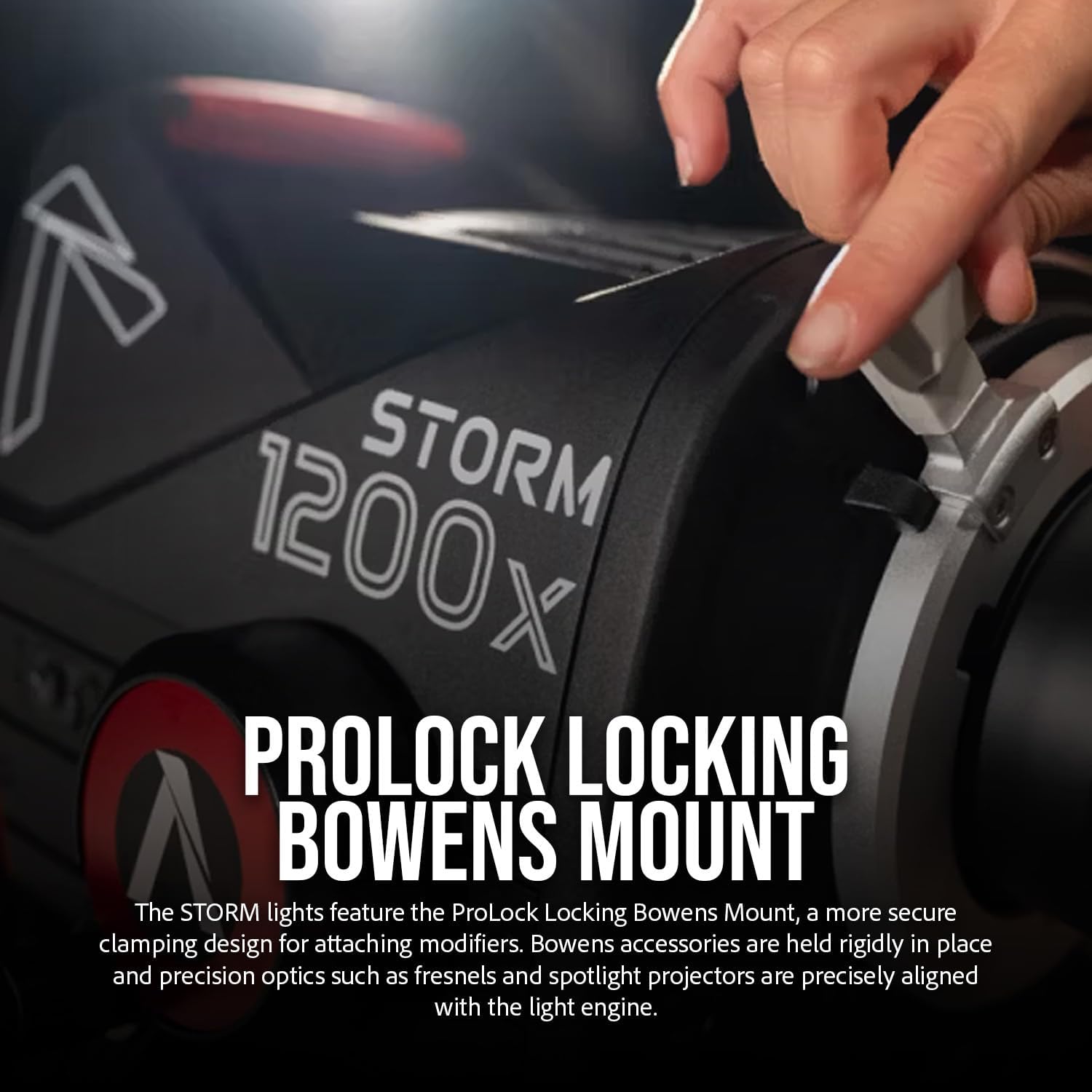
The ProLock locking Bowens Mount ensures secure attachment and precise alignment of light modifiers.
పవర్ కనెక్షన్
Connect the power cable to the fixture's power input and then to a suitable power source. Ensure the power source meets the fixture's voltagఇ మరియు ప్రస్తుత అవసరాలు.
ఆపరేటింగ్ సూచనలు
పవర్ ఆన్/ఆఫ్
Locate the power switch on the fixture. Toggle it to the 'ON' position to power on the light. Toggle to 'OFF' to power down.
ప్రకాశాన్ని సర్దుబాటు చేయడం (డిమ్మింగ్)
The Storm 1200x features advanced dimming technology, allowing for precise brightness control from 0.1% to 100% in stepless increments. Use the control knob or integrated display interface to adjust the intensity.
Color Temperature (CCT) Adjustment
Adjust the Correlated Color Temperature (CCT) between 2500K and 10000K using the dedicated controls. This allows you to match various ambient light conditions or creative requirements.
Green-Magenta Correction
The fixture offers ±100% green-magenta color correction (full ASC MITC range) for fine-tuning the white point and achieving optimal color accuracy, especially when mixing with other light sources or correcting for specific camera sensors.
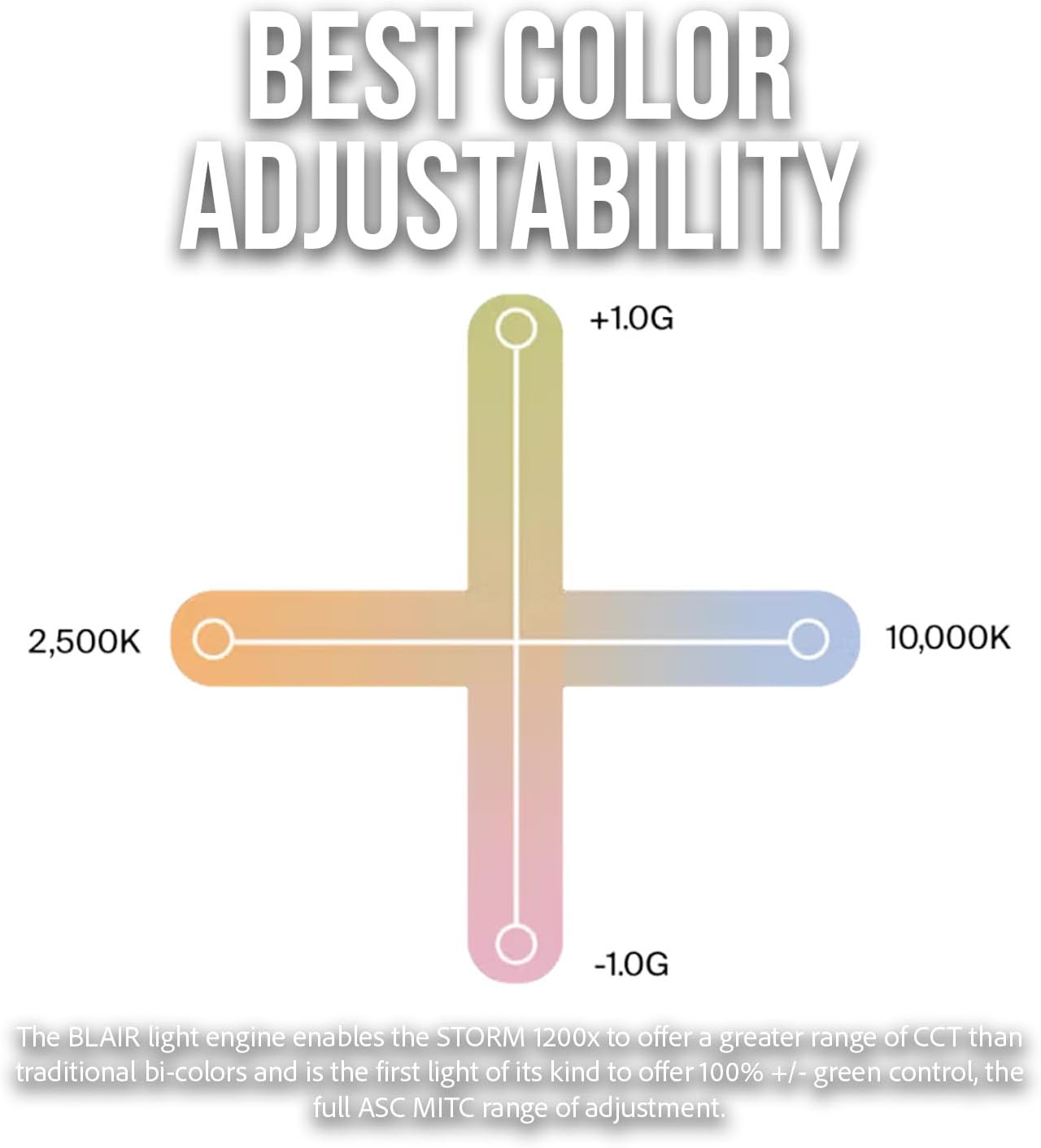
The Storm 1200x offers extensive CCT and green-magenta adjustment for precise color control.
Blair LED Chipset and Color Accuracy
The Aputure Storm 1200x utilizes a breakthrough proprietary Blair LED chipset, which includes an indigo diode. This enhances the colors of fluorescing materials, resulting in more accurate light output that closely matches natural daylight and tungsten sources. This technology ensures exceptional brightness and color fidelity.

The Blair-CG chipset in the Storm 1200x provides superior color rendering compared to traditional RGBW LEDs.
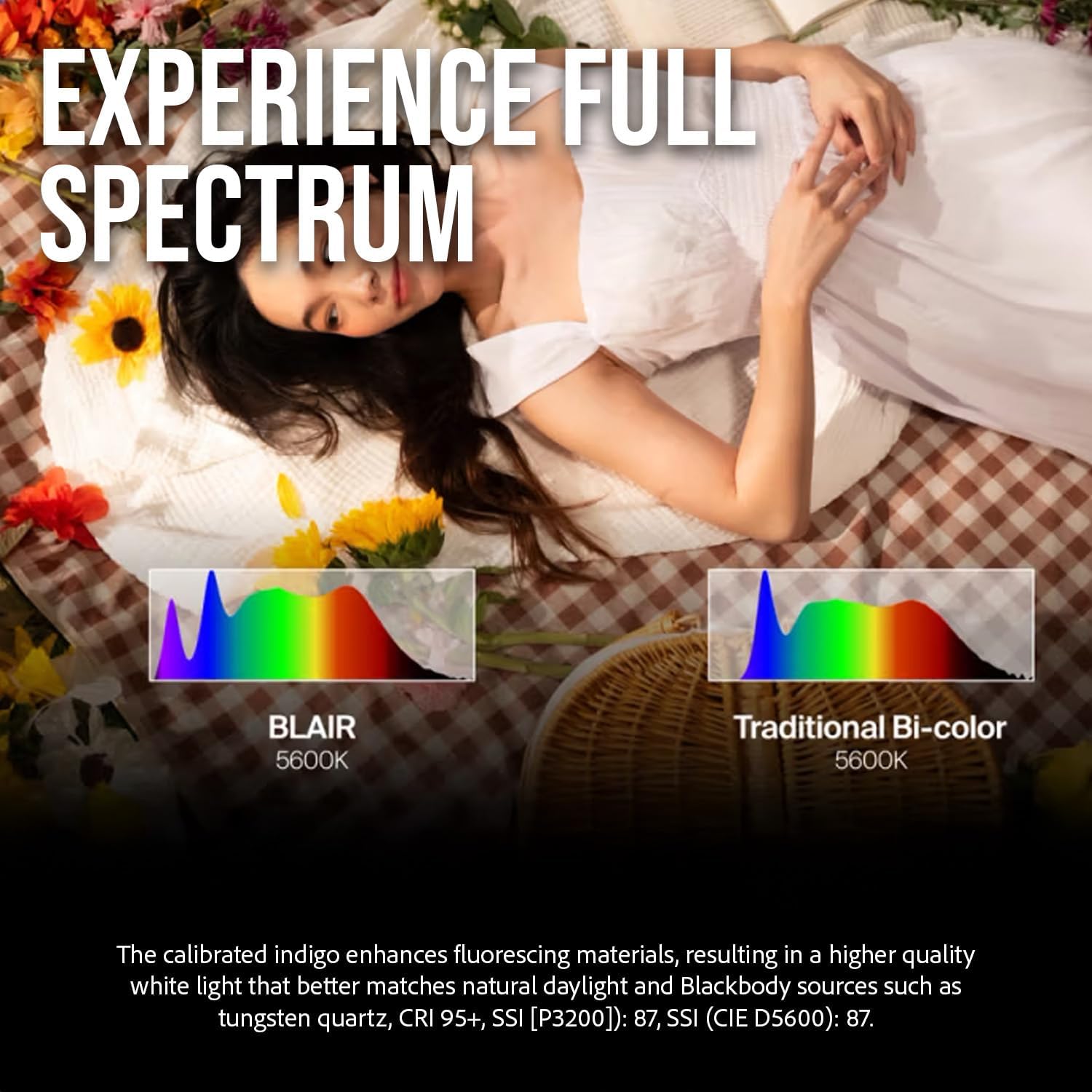
Experience full spectrum lighting with the Blair chipset, which enhances fluorescing materials for higher quality white light.
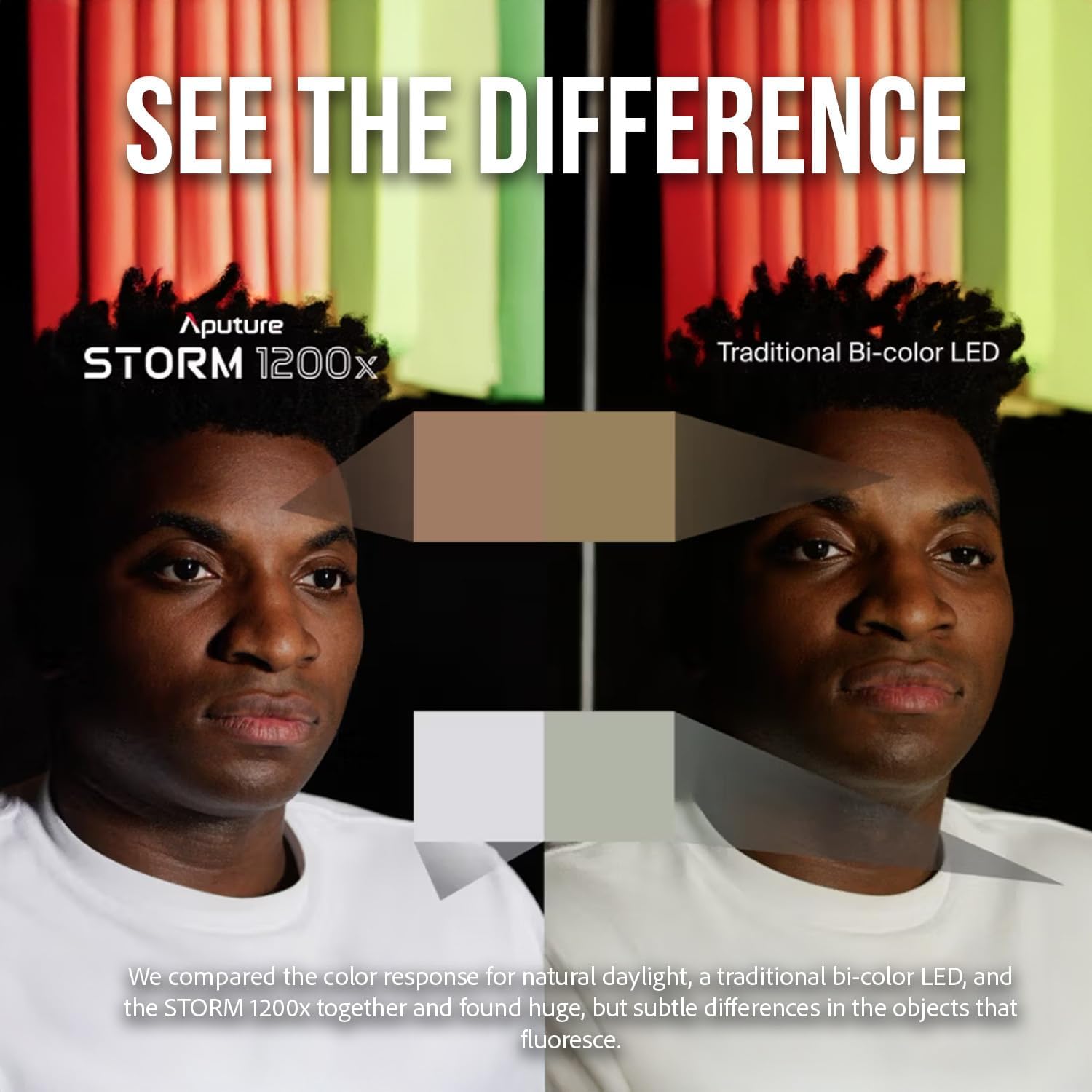
Observe the difference in color response between the Storm 1200x and traditional bi-color LEDs, particularly in how they render fluorescing objects.
నిర్వహణ
క్లీనింగ్
Regularly clean the exterior of the fixture with a soft, dry cloth. For stubborn dirt, a slightly damp cloth can be used. Do not use harsh chemicals or abrasive cleaners. Ensure the light is powered off and disconnected before cleaning.
నిల్వ
When not in use, store the Aputure Storm 1200x in a cool, dry place, away from direct sunlight and excessive humidity. It is recommended to use the original packaging or a dedicated carrying case for protection during storage and transport.
పర్యావరణ పరిరక్షణ
The Storm 1200x has an IP65 dust and weather-resistant certification. While it can withstand demanding environments, avoid prolonged exposure to heavy rain or submersion in water. Always ensure all ports and covers are properly sealed when operating in adverse conditions.
ట్రబుల్షూటింగ్
- లైట్ పవర్ ఆన్ చేయడం లేదు:
- పవర్ కేబుల్ ఫిక్చర్ మరియు పవర్ అవుట్లెట్ రెండింటికీ సురక్షితంగా కనెక్ట్ చేయబడిందో లేదో తనిఖీ చేయండి.
- పవర్ అవుట్లెట్ పని చేస్తుందో లేదో తనిఖీ చేయండి.
- Ensure the power switch on the fixture is in the 'ON' position.
- Flickering or Inconsistent Output:
- Confirm that the power supply is stable and meets the fixture's requirements.
- ఏవైనా వదులుగా ఉన్న కేబుల్ కనెక్షన్ల కోసం తనిఖీ చేయండి.
- If using DMX or wireless control, ensure the signal is stable and correctly configured.
- Modifier Not Attaching Securely:
- Ensure the Bowens mount tabs on the modifier are not damaged or bent.
- Verify that the modifier is correctly aligned with the slots on the fixture before rotating.
- Apply firm but gentle pressure and rotate clockwise until the ProLock mechanism engages.
- అసాధారణ శబ్దం లేదా వాసన:
- Immediately power off and disconnect the fixture from the power source.
- Do not attempt to operate the light. Contact Aputure customer support for assistance.
For issues not listed here, or if troubleshooting steps do not resolve the problem, please contact Aputure customer support.
స్పెసిఫికేషన్లు
| ఉత్పత్తి కొలతలు | 19.25"లీ x 18"వా x 17.25"హ |
| వస్తువు బరువు | 64 పౌండ్లు |
| మోడల్ సంఖ్య | AP20334A20 |
| బ్రాండ్ | అపుచర్ |
| కనెక్టివిటీ టెక్నాలజీ | ఆప్టికల్ పల్స్ |
| CCT పరిధి | 2500K నుండి 10000K |
| మసకబారిన పరిధి | 0.1% to 100% (Stepless) |
| మౌంట్ రకం | ProLock Locking Bowens Mount |
| వాతావరణ నిరోధకత | IP65 Dust and Weather-Resistant |
వారంటీ మరియు మద్దతు
Aputure products are designed and manufactured to the highest quality standards. For information regarding warranty coverage and to access technical support, please visit the official Aputure website or contact their customer service department. Please have your product model number (AP20334A20) and purchase details ready when seeking support.
తాజా మద్దతు వనరులు మరియు సంప్రదింపు సమాచారం కోసం, దయచేసి సందర్శించండి: www.aputure.com/support


