1. ఉత్పత్తి ముగిసిందిview
The Fantech REVOLVER II WGP12 is a versatile 2.4GHz wireless gamepad designed for an immersive gaming experience across multiple platforms, including PC, PlayStation 3, and Laptops. It features dual vibration motors for tactile feedback, a built-in rechargeable battery for extended play, and an ergonomic design for comfortable use.
- యూనివర్సల్ అనుకూలత: Seamlessly connects with PC, PS3, and Laptops via a 2.4GHz wireless connection.
- పునర్వినియోగపరచదగిన బ్యాటరీ: Equipped with a built-in lithium battery for long-lasting wireless gameplay.
- Dual Vibration Motors: Provides immersive feedback that responds to in-game actions.

Image 1.1: Fantech REVOLVER II WGP12 Wireless Gamepad showcasing its key features including 2.4GHz wireless, familiar layout, pro rumble, and X-Input/D-Input compatibility.
2. సెటప్ గైడ్
2.1 ప్యాకేజీ విషయాలు
Before proceeding, please ensure all items are present:
- Fantech REVOLVER II WGP12 Wireless Gamepad
- USB 2.4GHz వైర్లెస్ డాంగిల్
- USB ఛార్జింగ్ కేబుల్
- వినియోగదారు మాన్యువల్ (ఈ పత్రం)
2.2 వైర్లెస్గా కనెక్ట్ చేయడం
- Insert the USB 2.4GHz wireless dongle into an available USB port on your PC, PS3, or Laptop.
- Turn on the Fantech REVOLVER II WGP12 Gamepad by pressing the central 'Fantech' logo button.
- The gamepad will automatically connect to the dongle. The indicator lights on the gamepad will confirm a successful connection.

Image 2.1: The Fantech REVOLVER II WGP12 Gamepad and its 2.4 GHz wireless USB dongle, illustrating the wireless connection method.
2.3 ప్రారంభ ఛార్జింగ్
For optimal performance, it is recommended to fully charge the gamepad before its first use.
- Connect the small end of the USB charging cable to the charging port on the gamepad.
- Connect the larger end of the USB charging cable to a USB power source (e.g., computer USB port, USB wall adapter).
- The indicator lights on the gamepad will show the charging status. A full charge typically takes approximately 3 hours.
3. ఆపరేటింగ్ సూచనలు
3.1 బటన్ లేఅవుట్
The REVOLVER II WGP12 features a familiar console-like layout, designed for intuitive control and quick adaptation. It includes a D-pad, dual analog sticks, action buttons (A, B, X, Y), shoulder buttons, triggers, and dedicated Start/Select buttons.

Image 3.1: A user holding the Fantech REVOLVER II WGP12 Gamepad, demonstrating its familiar console-like button layout and ergonomic design.
3.2 డ్యూయల్ వైబ్రేషన్ ఫీడ్బ్యాక్
Experience enhanced immersion with the gamepad's dual vibration motors. These motors provide tactile feedback for in-game events such as collisions, explosions, and other actions, bringing a new level of realism to your gaming sessions. Ensure your game supports vibration feedback for this feature to function.

Image 3.2: Close-up of the Fantech REVOLVER II WGP12 Gamepad highlighting the dual vibration feedback motors, indicated by wave patterns.
3.3 Wired and Wireless Modes
The REVOLVER II WGP12 supports both wireless and wired connectivity. For wireless play, use the 2.4GHz USB dongle. If you prefer a wired connection or need to charge while playing, simply connect the gamepad to your device using the USB charging cable. The gamepad will automatically switch to wired mode when connected via cable.

Image 3.3: Two Fantech REVOLVER II WGP12 Gamepads, one connected via cable (wired mode) and another with its USB dongle (wireless mode), illustrating dual connectivity options.
4. నిర్వహణ
4.1 బ్యాటరీ సంరక్షణ
The gamepad features a built-in 600mAh rechargeable lithium-ion battery. To prolong battery life:
- బ్యాటరీని తరచుగా పూర్తిగా డిశ్చార్జ్ చేయడాన్ని నివారించండి.
- Charge the gamepad using the provided USB cable and a compatible power source.
- If storing the gamepad for an extended period, charge it to approximately 50% and store in a cool, dry place.
- A full charge provides approximately 10 hours of standby time.
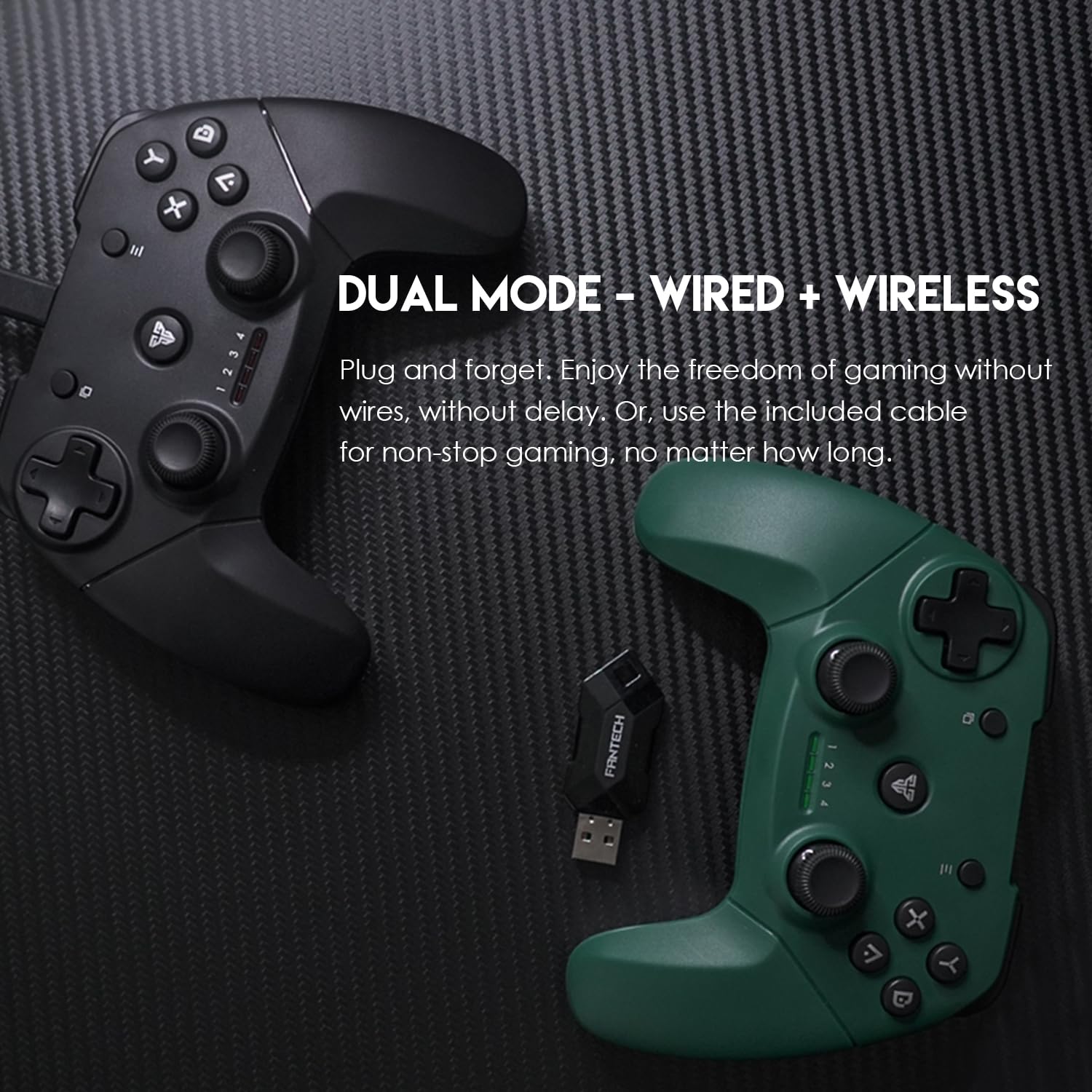
Image 4.1: The Fantech REVOLVER II WGP12 Gamepad with a battery icon, indicating its built-in rechargeable battery feature.
4.2 శుభ్రపరచడం
To clean your gamepad, use a soft, dry cloth. For stubborn dirt, a slightly damp cloth can be used, followed by immediate drying. Avoid using harsh chemicals, abrasive cleaners, or solvents, as these can damage the surface and internal components.
4.3 నిల్వ
Store the gamepad in a clean, dry environment away from direct sunlight, extreme temperatures, and excessive moisture. Keep it away from strong magnetic fields to prevent potential interference with its electronic components.
5. ట్రబుల్షూటింగ్
| సమస్య | సాధ్యమైన కారణం | పరిష్కారం |
|---|---|---|
| Gamepad does not turn on. | తక్కువ లేదా క్షీణించిన బ్యాటరీ. | Charge the gamepad for at least 30 minutes. |
| Gamepad does not connect wirelessly. | Dongle not properly inserted or not recognized. Gamepad out of range. | Ensure the USB dongle is securely inserted. Try a different USB port. Move the gamepad closer to the dongle (within 7-8 meters). |
| వైబ్రేషన్ ఫీడ్బ్యాక్ పనిచేయడం లేదు. | Game does not support vibration. Vibration feature disabled in game settings. | Check if the game supports vibration feedback. Verify vibration settings within the game. |
| Input lag or dropped connection. | Interference from other wireless devices. Low battery. | Move away from other 2.4GHz wireless devices. Charge the gamepad. |
6. సాంకేతిక లక్షణాలు
| ఫీచర్ | స్పెసిఫికేషన్ |
|---|---|
| మోడల్ సంఖ్య | WGP12 |
| కనెక్టివిటీ | 2.4GHz Wireless / Wired (USB) |
| బటన్లు | 17 PC లు |
| కంపనం | డ్యూయల్ వైబ్రేషన్ మోటార్స్ |
| బ్యాటరీ | 600mAh Built-in Rechargeable Lithium-ion |
| వైర్లెస్ రేంజ్ | 7మీ - 8మీ |
| ఛార్జింగ్ సమయం | సుమారు 3 గంటలు |
| స్టాండ్బై సమయం | సుమారు 10 గంటలు |
| ఉత్పత్తి కొలతలు (LxWxH) | 16 x 5 x 11 సెం.మీ |
| కంట్రోలర్ బరువు | 182 గ్రా (సుమారుగా) |
| వస్తువు బరువు (ప్యాకేజింగ్తో) | 210గ్రా |
| మూలం దేశం | చైనా |
| సాధారణ పేరు | Controller Joystick for PC and Play station |

Image 6.1: Visual representation of the Fantech REVOLVER II WGP12 Gamepad's dimensions and a summary of its technical specifications.
7. వారంటీ మరియు మద్దతు
For warranty information and customer support, please refer to the documentation provided at the point of purchase or contact your retailer. Manufacturer contact details may also be available on the product packaging or the official Fantech webసైట్.


