1. పరిచయం
Thank you for choosing the EVRAIN T8 PRO Mini PC. This compact and powerful device is designed for various computing needs, featuring an 8-inch touch screen, robust connectivity options, and efficient performance. This manual provides essential information for setting up, operating, maintaining, and troubleshooting your Mini PC to ensure optimal performance and longevity.
2. ఉత్పత్తి ముగిసిందిview
2.1. ప్యాకేజీ విషయాలు
- EVRAIN T8 PRO Mini PC
- పవర్ అడాప్టర్
- వినియోగదారు మాన్యువల్ (ఈ పత్రం)
2.2. పరికర లేఅవుట్ మరియు పోర్ట్లు
Familiarize yourself with the various ports and features of your EVRAIN T8 PRO Mini PC.

Figure 2.2.1: Front and Rear Port Layout of the EVRAIN T8 PRO Mini PC. The image displays the mini PC with its 8-inch touch screen showing a Windows desktop. Below it, two detailed diagrams illustrate the front and rear ports. The rear ports include two RJ45 Gigabit LAN ports, two USB 3.0 ports, a DisplayPort (DP), an HDMI port, and a DC power input. The front ports include a 3.5mm audio jack, a Type-C port, two USB 3.0 ports, two USB 2.0 ports, a TF-card slot, and the power button.

Figure 2.2.2: EVRAIN T8 PRO Mini PC Dimensions and Port Identification. This image provides a visual representation of the mini PC's dimensions (8.3 inches wide, 5.1 inches deep, 1.57 inches high) and clearly labels all available ports on both the front and rear panels. Rear ports include Double Gigabit LAN ports, USB 3.0, DP, HDMI, and DC. Front ports include Jack, Type-C, USB 3.0, USB 2.0, TF-card, and Power button.
- 8-అంగుళాల టచ్ స్క్రీన్: Integrated display for direct interaction.
- Dual Gigabit LAN Ports (RJ45): స్థిరమైన వైర్డు నెట్వర్క్ కనెక్షన్ల కోసం.
- USB 3.0 పోర్ట్లు (x4): High-speed data transfer for peripherals.
- USB 2.0 పోర్ట్లు (x2): ప్రామాణిక USB పరికరాలను కనెక్ట్ చేయడానికి.
- HDMI పోర్ట్: బాహ్య డిస్ప్లేలకు కనెక్ట్ చేయడానికి.
- డిస్ప్లేపోర్ట్ (DP): బాహ్య డిస్ప్లేలకు కనెక్ట్ చేయడానికి.
- టైప్-సి పోర్ట్: Versatile port for data and display.
- 3.5mm ఆడియో జాక్: హెడ్ఫోన్లు లేదా బాహ్య స్పీకర్ల కోసం.
- TF-Card Slot: For expandable storage via microSD cards.
- DC పవర్ ఇన్పుట్: పవర్ అడాప్టర్ను కనెక్ట్ చేయడానికి.
- పవర్ బటన్: పరికరాన్ని ఆన్/ఆఫ్ చేయడానికి.
3. సెటప్
3.1. ప్రారంభ కనెక్షన్
- పెరిఫెరల్స్ కనెక్ట్ చేయండి: Connect your keyboard, mouse, and any other necessary USB devices to the available USB ports.
- నెట్వర్క్ కనెక్షన్: For wired internet, connect an Ethernet cable to one of the RJ45 LAN ports. For wireless internet, the device supports WiFi 6 and will prompt for network setup during initial Windows configuration.
- బాహ్య ప్రదర్శన (ఐచ్ఛికం): If using an external monitor, connect it to the HDMI or DisplayPort.
- పవర్ కనెక్షన్: Connect the provided power adapter to the DC power input port on the Mini PC, then plug the adapter into a power outlet.
Video 3.1.1: Unpacking and Initial Setup Guide. This video demonstrates the process of unboxing the EVRAIN T8 PRO Mini PC and connecting essential peripherals like a keyboard and mouse, followed by powering on the device for the first time.
3.2. First Boot and Windows 11 Pro Setup
- Press the Power Button on the front of the Mini PC.
- The device will boot into Windows 11 Pro. Follow the on-screen instructions to complete the initial setup, including language selection, region, network connection, and user account creation.
- Ensure you have an active internet connection for Windows activation and updates.
4. ఆపరేటింగ్ సూచనలు
4.1. టచ్ స్క్రీన్ ఉపయోగించడం
The 8-inch touch screen allows for intuitive interaction with Windows 11 Pro. Use gestures similar to a tablet or smartphone for navigation, selection, and input.

Figure 4.1.1: Convenient Touch Operation. This image shows a hand touching the 8-inch display of the EVRAIN T8 PRO Mini PC, highlighting its touch screen functionality for direct user interaction.
4.2. బాహ్య పరికరాలను కనెక్ట్ చేస్తోంది
The EVRAIN T8 PRO Mini PC supports a wide range of external devices for enhanced productivity and entertainment.

Figure 4.2.1: Supports Connection of Multiple Devices. This image illustrates the EVRAIN T8 PRO Mini PC connected to an external monitor displaying Windows 11, and a printer, demonstrating its capability to connect to various peripherals like printers, monitors, keyboards, and mice.
- మానిటర్లు: Use the HDMI or DisplayPort for connecting external monitors. The Mini PC can extend or duplicate your display.
- USB పరికరాలు: Connect keyboards, mice, external hard drives, USB flash drives, and other USB peripherals to the USB 2.0 or USB 3.0 ports.
- ఆడియో పరికరాలు: Use the 3.5mm audio jack for headphones or speakers, or connect Bluetooth audio devices via Bluetooth 5.2.
- TF-Card: Insert a TF (microSD) card into the dedicated slot for additional storage.
4.3 నెట్వర్క్ కనెక్టివిటీ
- వైర్డ్ నెట్వర్క్: Utilize the dual Gigabit LAN ports for high-speed and stable wired internet connections.
- వైర్లెస్ నెట్వర్క్ (వైఫై 6): Connect to wireless networks using the integrated WiFi 6 module for fast and reliable wireless connectivity.
- బ్లూటూత్ 5.2: హెడ్ఫోన్లు, స్పీకర్లు మరియు ఇన్పుట్ పరికరాలు వంటి బ్లూటూత్-ప్రారంభించబడిన పరికరాలతో జత చేయండి.

Figure 4.3.1: Powerful Network Connection. This image highlights the EVRAIN T8 PRO Mini PC's advanced wireless capabilities, including WiFi 6 and Bluetooth 5.2, ensuring fast and stable network and peripheral connections.
5. నిల్వ విస్తరణ
The EVRAIN T8 PRO Mini PC comes with 128GB of M.2 SSD storage and supports additional storage expansion.

Figure 5.1.1: Internal Components and Storage Expansion. This image provides an internal view of the EVRAIN T8 PRO Mini PC, highlighting the 8GB DDR4 RAM and the 128GB M.2 SSD. It also shows the accessible compartment for adding a 2.5-inch SATA SSD (up to 2TB) or an M.2 2280 NVMe PCIe or SATA SSD (up to 2TB).
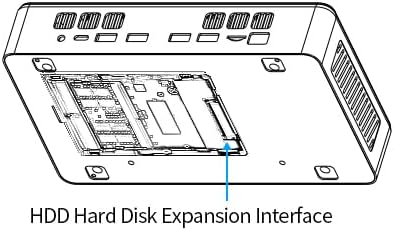
Figure 5.1.2: HDD Hard Disk Expansion Interface. This diagram illustrates the location of the HDD Hard Disk Expansion Interface on the underside of the EVRAIN T8 PRO Mini PC, indicating where additional storage can be installed.
- 2.5" SATA SSD/HDD: You can add a 2.5-inch SATA SSD or HDD (not included) up to 2TB for additional storage.
- M.2 2280 NVMe PCIe/SATA SSD: The device supports adding an M.2 2280 NVMe PCIe or SATA SSD (not included) up to 2TB.
For detailed instructions on installing additional storage, please refer to the technical support section on the EVRAIN webఅర్హత కలిగిన సాంకేతిక నిపుణుడిని సంప్రదించండి లేదా సంప్రదించండి.
6. స్పెసిఫికేషన్లు
Below are the key technical specifications for the EVRAIN T8 PRO Mini PC:
| ఫీచర్ | స్పెసిఫికేషన్ |
|---|---|
| మోడల్ | T8 PRO |
| ప్రాసెసర్ | Intel N95 (4 Cores, 4 Threads, 6MB L3 Cache, 15W TDP, up to 3.40 GHz Burst Frequency) |
| RAM | 8 GB DDR4 |
| అంతర్గత నిల్వ | 128 జీబీ ఎస్ఎస్డి (ఎం.2) |
| ప్రదర్శించు | 8-inch Touch Screen, 1280x800 Resolution |
| గ్రాఫిక్స్ కోప్రాసెసర్ | ఇంటిగ్రేటెడ్ గ్రాఫిక్స్ |
| ఆపరేటింగ్ సిస్టమ్ | Windows 11 ప్రో |
| వైర్లెస్ కనెక్టివిటీ | WiFi 6 (802.11a/b/g/n/ac), Bluetooth 5.2 |
| LAN పోర్ట్లు | Dual Gigabit RJ45 |
| USB పోర్ట్లు | 4x USB 3.0, 2x USB 2.0 |
| వీడియో అవుట్పుట్ | HDMI, DisplayPort (DP), Type-C |
| ఆడియో | 3.5mm ఆడియో జాక్ |
| కార్డ్ రీడర్ | TF-కార్డ్ స్లాట్ |
| కొలతలు (LxWxH) | 8.31 x 51.18 x 1.61 అంగుళాలు |
| బరువు | 2.86 పౌండ్లు |

Figure 6.1.1: Alder Lake-N95 Processor. This image highlights the specifications of the Intel N95 processor, including its 4 cores, 4 threads, 6MB L3 cache, 15W TDP, and 3.40 GHz burst frequency, which powers the EVRAIN T8 PRO Mini PC.
Video 6.1.1: T8 PRO Introduction of Specification. This video provides a visual overview of the EVRAIN T8 PRO Mini PC's key specifications and features, including its various ports and internal components.
7. ట్రబుల్షూటింగ్
7.1. సాధారణ సమస్యలు మరియు పరిష్కారాలు
- శక్తి లేదు:
- పవర్ అడాప్టర్ మినీ పిసి మరియు పనిచేసే పవర్ అవుట్లెట్ రెండింటికీ సురక్షితంగా కనెక్ట్ చేయబడిందని నిర్ధారించుకోండి.
- మరొక పరికరాన్ని ప్లగ్ చేయడం ద్వారా పవర్ అవుట్లెట్ పనిచేస్తుందో లేదో ధృవీకరించండి.
- ప్రదర్శన లేదు:
- If using an external monitor, ensure the HDMI/DP cable is securely connected and the monitor is powered on and set to the correct input source.
- Check the integrated 8-inch touch screen for any signs of power or activity.
- Try restarting the Mini PC.
- ఇంటర్నెట్ కనెక్షన్ లేదు:
- వైర్డ్: ఈథర్నెట్ కేబుల్ కనెక్షన్లు మరియు రౌటర్ స్థితిని తనిఖీ చేయండి.
- వైర్లెస్: Verify WiFi is enabled in Windows settings, ensure you are connected to the correct network, and check router functionality.
- టచ్ స్క్రీన్ స్పందించదు:
- Restart the Mini PC.
- Check for updated display or touch screen drivers in Windows Device Manager.
- నెమ్మదిగా పనితీరు:
- నేపథ్యంలో నడుస్తున్న అనవసరమైన అప్లికేషన్లను మూసివేయండి.
- విండోస్ తాజాగా ఉందని నిర్ధారించుకోండి.
- Check disk space and consider adding more storage if needed (refer to Section 5).
8. నిర్వహణ
- శుభ్రపరచడం: Use a soft, dry cloth to clean the exterior of the Mini PC. For the screen, use a microfiber cloth specifically designed for electronics. Avoid abrasive cleaners or solvents.
- వెంటిలేషన్: Ensure the ventilation openings are clear of dust and obstructions to prevent overheating. Do not block the air vents.
- సాఫ్ట్వేర్ అప్డేట్లు: సరైన పనితీరు, భద్రత మరియు అనుకూలతను నిర్ధారించడానికి Windows 11 Pro మరియు పరికర డ్రైవర్లను క్రమం తప్పకుండా నవీకరించండి.
- డేటా బ్యాకప్: డేటా నష్టాన్ని నివారించడానికి ముఖ్యమైన డేటాను కాలానుగుణంగా బాహ్య డ్రైవ్ లేదా క్లౌడ్ నిల్వకు బ్యాకప్ చేయండి.
9. వారంటీ మరియు మద్దతు
For warranty information, technical support, or service inquiries, please refer to the official EVRAIN webసైట్లో లేదా వారి కస్టమర్ సర్వీస్ను నేరుగా సంప్రదించండి. వారంటీ క్లెయిమ్ల కోసం కొనుగోలు రుజువుగా మీ కొనుగోలు రసీదును ఉంచండి.
ఆన్లైన్ వనరులు: Visit the EVRAIN support page for FAQs, driver downloads, and additional troubleshooting guides.


