1. పరిచయం
Welcome to the user manual for your new ECHO Rainbow Pro S Smartwatch. This elegant and functional smartwatch is designed to enhance your daily life with integrated AI assistance, Bluetooth calling, comprehensive health sensors, and various sports modes. It comes with two interchangeable straps for maximum flexibility and is IP68 waterproof for worry-free use. This manual will guide you through the setup, operation, maintenance, and troubleshooting of your device.
2. పెట్టెలో ఏముంది
అన్ని అంశాలు ఉన్నాయని నిర్ధారించుకోవడానికి దయచేసి ప్యాకేజీలోని విషయాలను తనిఖీ చేయండి:
- ECHO Rainbow Pro S Smartwatch (Rose Gold)
- Silicone Strap (Rose Gold)
- Nylon Strap (Bordeaux)
- మాగ్నెటిక్ ఛార్జింగ్ కేబుల్
- వినియోగదారు మాన్యువల్ (ఈ పత్రం)
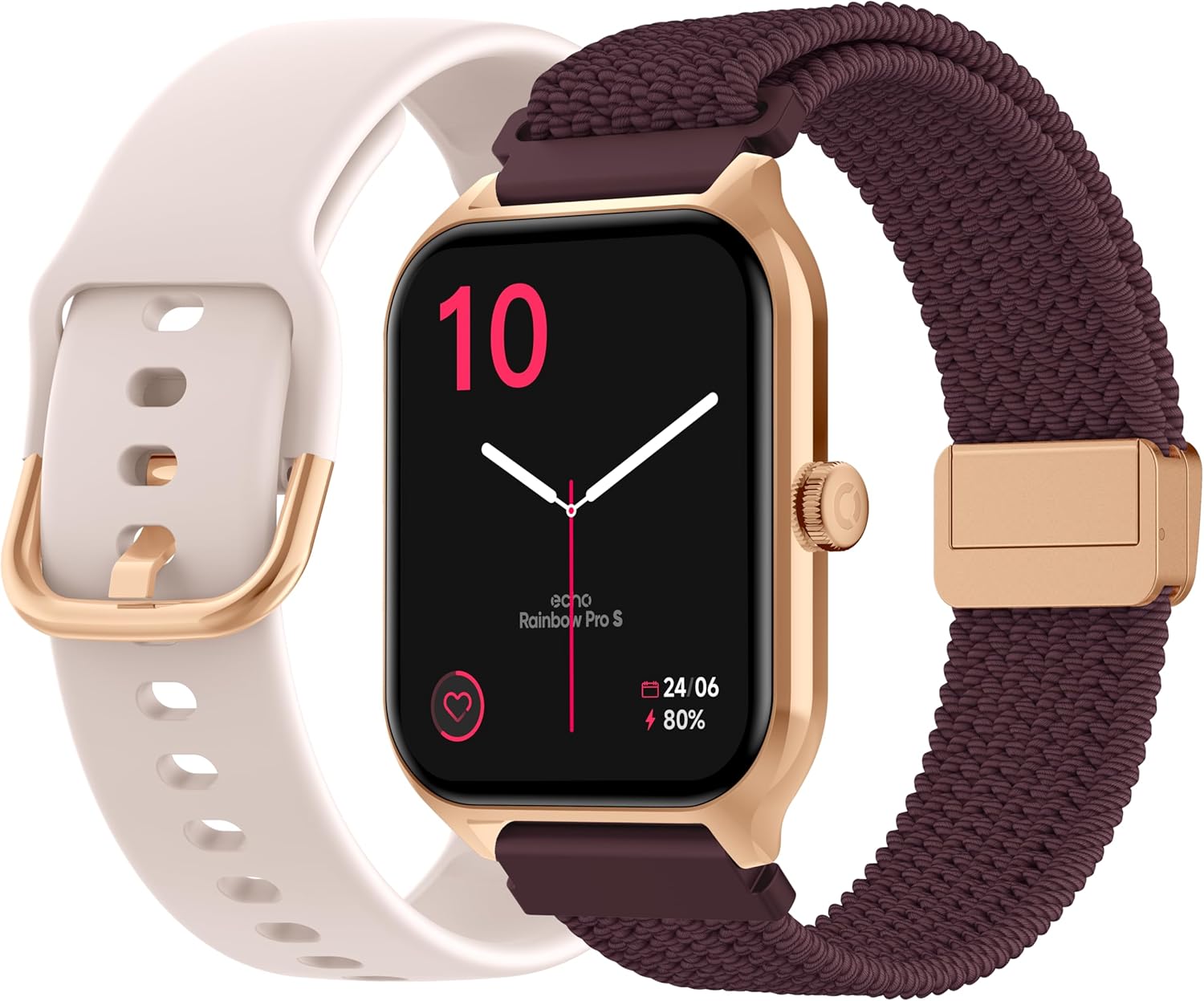
Image: The ECHO Rainbow Pro S Smartwatch, showcasing its rose gold finish, accompanied by both the rose gold silicone strap and the bordeaux nylon strap, along with the magnetic charging cable.
3. సెటప్
3.1 పరికరాన్ని ఛార్జ్ చేస్తోంది
Before first use, fully charge your smartwatch. Connect the magnetic charging cable to the charging points on the back of the watch and plug the USB end into a standard USB power adapter (not included) or a computer's USB port. A full charge takes approximately 2.5 hours.
3.2 డా ఫిట్ యాప్ను ఇన్స్టాల్ చేయడం
The ECHO Rainbow Pro S Smartwatch works with the Da Fit application. Download the Da Fit app from the Apple App Store (for iOS devices) or Google Play Store (for Android devices).
- Scan the QR code in the watch's manual or on the watch screen (if available) or search for "Da Fit" in your app store.
- మీ స్మార్ట్ఫోన్లో అప్లికేషన్ను ఇన్స్టాల్ చేయండి.
3.3 మీ స్మార్ట్ఫోన్తో జత చేయడం
To unlock the full potential of your smartwatch, pair it with the Da Fit app:
- మీ స్మార్ట్ఫోన్లో బ్లూటూత్ ప్రారంభించబడిందని నిర్ధారించుకోండి.
- డా ఫిట్ యాప్ను తెరవండి.
- Follow the on-screen instructions to add a new device. The app will search for your ECHO Rainbow Pro S.
- Select your watch from the list of found devices. Confirm the pairing request on both your phone and the watch.
- Once paired, your watch will synchronize data with the app.

Image: The ECHO Rainbow Pro S Smartwatch, showing the watch body, both the silicone and nylon straps, and the magnetic charging cable, illustrating the components for setup.
4. మీ స్మార్ట్వాచ్ను ఆపరేట్ చేయడం
4.1 ఇంటర్ఫేస్ను నావిగేట్ చేయడం
The ECHO Rainbow Pro S features an intuitive 1.96-inch touchscreen. Swipe left, right, up, or down to access different functions and menus. The side button typically serves as a power button or a return-to-home screen button.
4.2 ఆరోగ్య పర్యవేక్షణ
Your smartwatch is equipped with advanced sensors to track your well-being:
- హృదయ స్పందన రేటు: రోజంతా మీ హృదయ స్పందన రేటును నిరంతరం పర్యవేక్షిస్తుంది.
- రక్త ఆక్సిజన్ (SpO2): Measures the oxygen saturation in your blood.
- రక్తపోటు: మీ రక్తపోటు అంచనాలను అందిస్తుంది.
- నిద్ర ట్రాకింగ్: మీ నిద్ర విధానాలను విశ్లేషిస్తుంది, వాటిలో గాఢమైన మరియు తేలికపాటి నిద్ర కూడా ఉంటుంది.tages.
All health data can be viewed in detail within the Da Fit app, allowing you to track trends and progress over time.

చిత్రం: వెనుక భాగం view of the ECHO Rainbow Pro S Smartwatch, highlighting the optical sensors used for heart rate, SpO2, and blood pressure monitoring.

Image: The ECHO Rainbow Pro S Smartwatch screen showing various health metrics, including heart rate (BPM), SpO2 percentage, and activity data, demonstrating its health tracking capabilities.
4.3 కమ్యూనికేషన్ లక్షణాలు
Stay connected directly from your wrist:
- బ్లూటూత్ కాల్స్: మీ స్మార్ట్ఫోన్కి కనెక్ట్ అయినప్పుడు మీ వాచ్ నుండి నేరుగా కాల్లు చేయండి మరియు స్వీకరించండి.
- నోటిఫికేషన్లు: మీ జత చేసిన స్మార్ట్ఫోన్ నుండి కాల్లు, సందేశాలు మరియు యాప్ నోటిఫికేషన్ల కోసం హెచ్చరికలను స్వీకరించండి.

Image: The ECHO Rainbow Pro S Smartwatch displaying incoming call and message notifications, illustrating its communication features when paired with a smartphone.
4.4 AI అసిస్టెంట్
The ECHO Rainbow Pro S integrates an AI assistant for convenient voice commands and information retrieval. Simply activate the AI feature on your watch and speak your query or command.

Image: The ECHO Rainbow Pro S Smartwatch screen showing the AI assistant interface, ready to receive voice commands or queries.
4.5 Sports Modes & Coaching
With over 100 sports modes and integrated training programs, your smartwatch is an ideal companion for your fitness journey. Select your activity from the watch's menu to track performance metrics such as calories burned, distance, and duration. The Da Fit app provides personalized tracking and allows you to follow your course using your smartphone's GPS.

Image: The ECHO Rainbow Pro S Smartwatch displaying various sports modes and training exercises, with accompanying smartphone app screenshots showing detailed workout plans and GPS tracking.
4.6 అనుకూలీకరణ
మీ స్మార్ట్ వాచ్ అనుభవాన్ని వ్యక్తిగతీకరించండి:
- ముఖాలను చూడండి: Choose from over 100 downloadable watch faces via the Da Fit app to match your style.
- మార్చుకోగల పట్టీలు: Easily swap between the included silicone and nylon straps to suit your activity or outfit.
Image: The ECHO Rainbow Pro S Smartwatch, showcasing its rose gold finish, accompanied by both the rose gold silicone strap and the bordeaux nylon strap, highlighting the interchangeable design.
5. నిర్వహణ
5.1 శుభ్రపరచడం
To keep your smartwatch in optimal condition, clean it regularly. Wipe the screen and body with a soft, lint-free cloth. For stubborn smudges, slightly dampen గుడ్డను నీటితో తడిపివేయండి. కఠినమైన రసాయనాలు లేదా రాపిడి పదార్థాలను ఉపయోగించకుండా ఉండండి.
5.2 నీటి నిరోధకత (IP68)
The ECHO Rainbow Pro S is IP68 rated, meaning it is resistant to water up to 1 meter deep for 30 minutes. This makes it suitable for daily activities like hand washing, rain, or accidental splashes. However, it is not recommended for swimming, diving, or high-pressure water activities. Avoid exposing the watch to hot water, steam, or corrosive liquids.
5.3 బ్యాటరీ లైఫ్
The smartwatch offers up to 5 days of battery life with typical usage. To optimize battery performance:
- స్క్రీన్ ప్రకాశాన్ని తగ్గించండి.
- అవసరం లేకపోతే నిరంతర హృదయ స్పందన రేటు పర్యవేక్షణను నిలిపివేయండి.
- యాప్ నోటిఫికేషన్ల సంఖ్యను పరిమితం చేయండి.
6. ట్రబుల్షూటింగ్
If you encounter any issues with your ECHO Rainbow Pro S Smartwatch, please refer to the following common problems and solutions:
| సమస్య | పరిష్కారం |
|---|---|
| వాచ్ ఆన్ అవ్వడం లేదు | వాచ్ పూర్తిగా ఛార్జ్ అయ్యిందని నిర్ధారించుకోండి. దానిని మాగ్నెటిక్ ఛార్జింగ్ కేబుల్ మరియు పవర్ సోర్స్కి కనీసం 30 నిమిషాలు కనెక్ట్ చేయండి. |
| స్మార్ట్ఫోన్తో జత చేయలేము | 1. మీ ఫోన్లో బ్లూటూత్ ప్రారంభించబడిందని నిర్ధారించుకోండి. 2. Make sure the watch is within range of your phone. 3. వాచ్ మరియు మీ ఫోన్ రెండింటినీ రీస్టార్ట్ చేయండి. 4. Clear Bluetooth cache on your phone (Android) or forget the device and re-pair (iOS/Android). 5. Ensure the Da Fit app has necessary permissions. |
| సరికాని ఆరోగ్య రీడింగులు | 1. గడియారం మీ మణికట్టు మీద గట్టిగా ధరించేలా చూసుకోండి, చాలా గట్టిగా లేదా చాలా వదులుగా ఉండకూడదు. 2. Clean the sensors on the back of the watch. 3. Avoid excessive movement during measurements. 4. Note that these readings are for reference and not for medical diagnosis. |
| నోటిఫికేషన్లు అందలేదు | 1. Ensure the watch is paired and connected to your phone. 2. Check notification settings in the Da Fit app and on your phone (e.g., app permissions, DND mode). 3. Make sure the Da Fit app is running in the background. |
| తక్కువ బ్యాటరీ జీవితం | 1. స్క్రీన్ బ్రైట్నెస్ తగ్గించండి. 2. Disable continuous heart rate monitoring if not needed. 3. Limit background app refresh for the Da Fit app. 4. Ensure no apps are constantly running on the watch. |
7. స్పెసిఫికేషన్లు
| ఫీచర్ | వివరాలు |
|---|---|
| బ్రాండ్ | ECHO |
| మోడల్ | రెయిన్బో ప్రో ఎస్ |
| మోడల్ సంఖ్య | bd279646-58a1-4a95-ab0c-0847dc2ca4e6 |
| రంగు | రోజ్ గోల్డ్ |
| స్క్రీన్ పరిమాణం | 1.96 అంగుళాలు |
| ప్రదర్శన రకం | OLED or LED |
| కనెక్టివిటీ | బ్లూటూత్ |
| అనుకూల పరికరాలు | స్మార్ట్ఫోన్, టాబ్లెట్ |
| బ్యాటరీ కూర్పు | లిథియం-పాలిమర్ |
| బ్యాటరీ లైఫ్ (సాధారణం) | 5 రోజులు |
| ఛార్జింగ్ సమయం | 2.5 గంటలు |
| నీటి నిరోధకత | IP68 (1 నిమిషాలకు 30 మీటర్ వరకు) |
| GPS | GPS లేదు |
| ఆకారం | గుండ్రంగా |
| అనువర్తన అనుకూలత | డా ఫిట్ |
| మూలం దేశం | చైనా |
8. వారంటీ మరియు మద్దతు
8.1 ఉత్పత్తి వారంటీ
Your ECHO Rainbow Pro S Smartwatch is covered by a standard manufacturer's warranty against defects in materials and workmanship. The specific duration and terms of the warranty may vary based on your region and point of purchase. Please refer to your purchase documentation or contact your retailer for detailed warranty information.
8.2 కస్టమర్ మద్దతు
For technical assistance, troubleshooting beyond this manual, or warranty claims, please contact the retailer or manufacturer directly. Have your product model number (bd279646-58a1-4a95-ab0c-0847dc2ca4e6) and proof of purchase ready when contacting support.


