1. పరిచయం
ధన్యవాదాలు, ధన్యవాదాలు.asing the DOYO Wireless Guitar Controller KT602B. This controller is designed to enhance your gaming experience on PlayStation 3, PlayStation 4, and PC platforms, offering wide compatibility with popular music rhythm games. This manual provides essential information for setup, operation, maintenance, and troubleshooting to ensure optimal performance.

Image 1.1: The DOYO Wireless Guitar Controller and its accompanying USB dongle.
2. ఉత్పత్తి ముగిసిందిview
Familiarize yourself with the components and controls of your DOYO Wireless Guitar Controller.

Image 2.1: Labeled diagram of the DOYO Wireless Guitar Controller, highlighting key components such as the strum bar, fret buttons, and power switch.
ముఖ్య భాగాలు:
- Strum Bar: Used for strumming notes.
- 5-Color Fret Buttons: Green, Red, Yellow, Blue, Orange buttons on the neck for playing notes.
- వామీ బార్: For pitch bending effects.
- Tilt Sensor: Activates Star Power or similar in-game abilities by tilting the guitar.
- గేమ్ మోడ్ బటన్: Switches between different game modes or functions.
- Sound Effect Switch: Controls sound effects.
- Arrow Keys (D-Pad): మెనూ నావిగేషన్ కోసం.
- PS/Mode Keys: PlayStation button or mode selection.
- Key (Select/Esc): Select or Escape function.
- Button (Pause/Start): Pause or Start game.
- పవర్ స్విచ్: కంట్రోలర్ను ఆన్/ఆఫ్ చేస్తుంది.
- బ్యాటరీ కంపార్ట్మెంట్: 4 AA బ్యాటరీలను కలిగి ఉంటుంది.
- USB రిసీవర్: Wireless dongle for connecting to your console or PC.
- Detachable Neck: సులభంగా నిల్వ చేయడానికి మరియు రవాణా చేయడానికి అనుమతిస్తుంది.
- Adjustable Strap Buckle: For attaching and adjusting the guitar strap.
3. సెటప్
Follow these steps to set up your DOYO Wireless Guitar Controller.
3.1. అసెంబ్లీ
- Attach the Neck: Carefully slide the guitar neck into the body of the guitar until it clicks securely into place. Ensure the connection is firm.

Image 3.1: Illustration of the detachable guitar neck being assembled into the main body of the controller.
3.2. బ్యాటరీ ఇన్స్టాలేషన్
- Locate the battery compartment on the back of the guitar body.
- బ్యాటరీ కంపార్ట్మెంట్ కవర్ తెరవండి.
- 4 AA బ్యాటరీలను చొప్పించండి, సరైన ధ్రువణతను నిర్ధారిస్తుంది (+/-).
- బ్యాటరీ కంపార్ట్మెంట్ కవర్ను సురక్షితంగా మూసివేయండి.
3.3. మీ పరికరానికి కనెక్ట్ చేస్తోంది
- Plug the USB receiver into an available USB port on your PlayStation 3, PlayStation 4, or PC.
- Flip the Power Switch on the guitar controller to the 'ON' position.
- The controller will automatically connect to the USB receiver. No manual pairing is required.

Image 3.2: Diagram illustrating the wireless connection of the guitar controller to PC, PS4, and PS3 via the USB dongle.
4. ఆపరేటింగ్ సూచనలు
This section details how to use your guitar controller during gameplay.
4.1. ప్రాథమిక గేమ్ప్లే
- Playing Notes: Hold down the corresponding fret button(s) and strum the strum bar.
- వామీ బార్: Use the whammy bar to alter the pitch of sustained notes.
- Star Power/Overdrive: Tilt the guitar upwards to activate in-game special abilities when available.
4.2. నియంత్రణ బటన్లు
- గేమ్ మోడ్ బటన్: Press to cycle through different operational modes if applicable to your game or system.
- Sound Effect Switch: Toggle this switch to enable or disable specific sound effects from the controller.
- PS/Mode Keys: Functions as the PlayStation button on consoles or for mode selection on PC.
- Select/Esc Button: Used for menu selections or to exit certain screens.
- పాజ్/ప్రారంభ బటన్: Used to pause or start gameplay.
4.3. PC Specific Operation
When connected to a Windows 10 or Windows 11 PC, the guitar controller automatically operates in keyboard and mouse mode. This means the fret buttons and other controls are mapped to specific keyboard keys. This allows for compatibility with games like Fortnite and Clone Hero.
గమనిక: Windows 7 is not supported. For PC, the controller typically functions as Player 1. Using a second guitar may require specific in-game settings adjustments, and some games might not fully support two controllers simultaneously in this mode.
5. అనుకూలత
The DOYO Wireless Guitar Controller KT602B offers broad compatibility across various platforms and game titles.
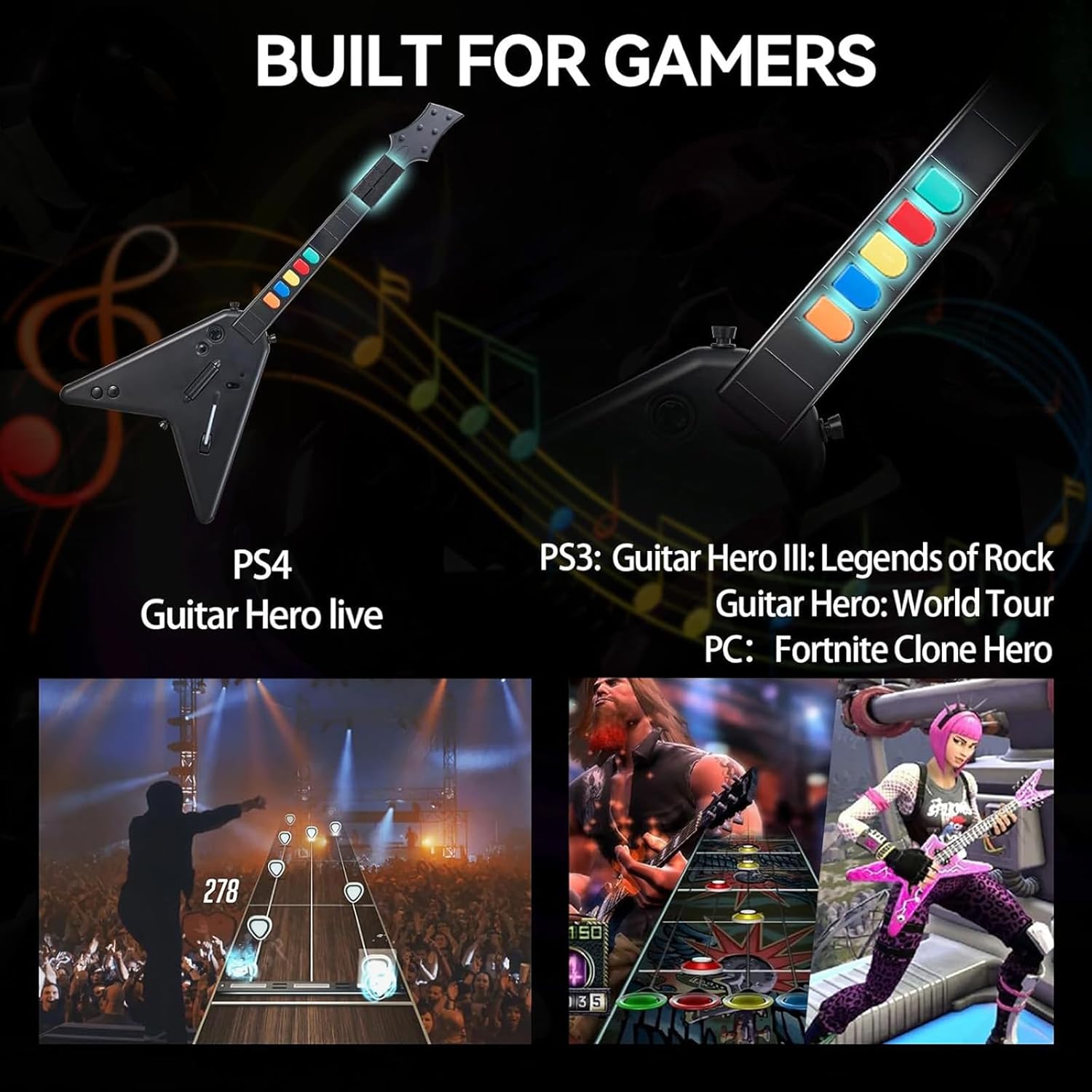
Image 5.1: Visual representation of the guitar controller's compatibility with various games on PS4, PS3, and PC.
- PlayStation 3 (PS3): Compatible with Guitar Hero III: Legends of Rock, Guitar Hero: World Tour, and Rock Band.
- PlayStation 4 (PS4): Supports Guitar Hero Live. Note: Not compatible with Rock Band 4.
- PC (Windows 10/11): Works with games such as Fortnite and Clone Hero.
6. పవర్ మేనేజ్మెంట్
The controller is powered by 4 AA batteries. To conserve battery life, always turn the power switch to the 'OFF' position when not in use. If the controller will not be used for an extended period, it is recommended to remove the batteries.
7. నిర్వహణ
Proper care will extend the life of your guitar controller.
- శుభ్రపరచడం: కంట్రోలర్ ఉపరితలాన్ని శుభ్రం చేయడానికి మృదువైన, పొడి వస్త్రాన్ని ఉపయోగించండి. కఠినమైన రసాయనాలు లేదా రాపిడి పదార్థాలను ఉపయోగించకుండా ఉండండి.
- నిల్వ: When not in use, store the controller in a cool, dry place. The detachable neck feature allows for more compact storage.
- నిర్వహణ: నియంత్రికను వదలడం లేదా బలమైన ప్రభావాలకు గురిచేయడం మానుకోండి.
8. ట్రబుల్షూటింగ్
If you encounter issues with your DOYO Wireless Guitar Controller, refer to the following common problems and solutions.
| సమస్య | సాధ్యమైన కారణం | పరిష్కారం |
|---|---|---|
| కంట్రోలర్ పవర్ ఆన్ చేయదు. | డెడ్ లేదా తప్పుగా చొప్పించిన బ్యాటరీలు. | సరైన ధ్రువణతను నిర్ధారించుకోవడానికి, కొత్త AA బ్యాటరీలతో భర్తీ చేయండి. |
| Controller does not connect to device. | USB receiver not plugged in; controller out of range; interference. | Ensure USB receiver is firmly plugged in. Move controller closer to receiver (within 7 meters). Check for other 2.4Ghz devices causing interference. |
| బటన్లు స్పందించడం లేదు లేదా జిగటగా ఉంటాయి. | Debris under buttons; internal mechanism issue. | Ensure buttons are clean. If issue persists, contact customer support. |
| కంట్రోలర్ తరచుగా డిస్కనెక్ట్ అవుతుంది. | Low batteries; signal interference; distance from receiver. | Replace batteries. Reduce distance to receiver. Minimize other wireless device usage. |
| PC issues (e.g., 'sticky keys' pop-up). | Default keyboard key bindings (e.g., Orange button mapped to 'Left Shift'). | Adjust in-game key bindings if possible. For Windows 'sticky keys', disable the feature in Windows accessibility settings. |
| Second guitar not working on PC. | PC mode often defaults to Player 1; specific game limitations. | Check game settings for multi-controller support. Some games may not support two controllers simultaneously when operating in keyboard emulation mode. |
9. స్పెసిఫికేషన్లు
| ఫీచర్ | వివరాలు |
|---|---|
| మోడల్ సంఖ్య | KT602B |
| కనెక్టివిటీ | 2.4G Wireless (USB Dongle) |
| వైర్లెస్ రేంజ్ | 7 మీటర్ వరకు |
| శక్తి మూలం | 4 x AA బ్యాటరీలు |
| అనుకూలత | ప్లేస్టేషన్ 3, ప్లేస్టేషన్ 4, PC (Windows 10/11) |
| కొలతలు (ప్యాకేజీ) | 18.54 x 14.41 x 3.23 అంగుళాలు |
| వస్తువు బరువు | 2.57 పౌండ్లు |
| తయారీదారు | DOYO |
10. వారంటీ మరియు మద్దతు
DOYO products are designed for reliability and performance. For any questions, concerns, or issues regarding your DOYO Wireless Guitar Controller KT602B, please contact our customer service team. If a product defect is identified, you may be eligible for a refund or replacement according to our warranty policy. Our customer service team aims to process inquiries within 24 hours.
Please refer to your purchase documentation or the official DOYO webనిర్దిష్ట వారంటీ నిబంధనలు మరియు సంప్రదింపు సమాచారం కోసం సైట్.


