1. పరిచయం
This manual provides comprehensive instructions for the DOYO Wireless Gaming Guitar Controller, model KT602. It covers product features, setup procedures, operational guidelines, maintenance tips, and troubleshooting information. Please read this manual thoroughly before using the product to ensure proper function and longevity.
2. ఉత్పత్తి ముగిసిందిview
2.1 భాగాలు
- వైర్లెస్ గిటార్ కంట్రోలర్
- USB Wireless Receiver (Dongle)
- సర్దుబాటు భుజం పట్టీ
2.2 లక్షణాలు
- వైర్లెస్ కనెక్టివిటీ: Utilizes 2.4G RF technology for stable wireless connections up to 7 meters.
- బహుళ-ప్లాట్ఫారమ్ అనుకూలత: Supports PS4, PS3, and PC (Windows 10/11).
- Detachable Neck: Allows for easy assembly, disassembly, and storage.
- ఎర్గోనామిక్ డిజైన్: Lightweight and durable construction with responsive fret buttons.
- విద్యుత్పరివ్యేక్షణ: Operates on 4 AA batteries with an easy-to-use power switch.

చిత్రం 2.2.1: Labeled diagram of the DOYO Wireless Gaming Guitar Controller and its USB receiver. Key components such as the strum bar, fret buttons, game mode button, power switch, and battery compartment are indicated.

చిత్రం 2.2.2: Illustration of the detachable guitar neck mechanism for compact storage and the adjustable guitar strap for user comfort.
3. సెటప్
3.1 బ్యాటరీ ఇన్స్టాలేషన్
- Locate the battery compartment on the back of the guitar controller.
- బ్యాటరీ కంపార్ట్మెంట్ కవర్ తెరవండి.
- 4 AA బ్యాటరీలను చొప్పించండి, సరైన ధ్రువణతను నిర్ధారిస్తుంది (+/-).
- బ్యాటరీ కంపార్ట్మెంట్ కవర్ను సురక్షితంగా మూసివేయండి.
3.2 USB రిసీవర్ను కనెక్ట్ చేస్తోంది
- Plug the USB wireless receiver into an available USB port on your PS4, PS3, or PC.
- Turn on the guitar controller using the power switch.
- The controller should automatically connect to the receiver. No manual pairing is typically required.

చిత్రం 3.2.1: Illustration of the wireless connection setup for the PS4 console, showing the guitar controller, USB receiver, and PS4 unit.

చిత్రం 3.2.2: Illustration of the wireless connection setup for the PS3 console, showing the guitar controller, USB receiver, and PS3 unit.

చిత్రం 3.2.3: Illustration of the wireless connection setup for a PC, showing the guitar controller, USB receiver, and various PC setups (desktop, laptop, iMac).
4. ఆపరేటింగ్ సూచనలు
4.1 గేమ్ అనుకూలత
The DOYO Wireless Gaming Guitar Controller is compatible with various music rhythm games across different platforms:
- PS4: Supports Guitar Hero Live. Note: Not compatible with Rock Band 4.
- PS3: Compatible with Guitar Hero III: Legends of Rock and Guitar Hero: World Tour.
- PC (Windows 10/11): Works with Fortnite Festival and Clone Hero.
The controller also supports a 2-player mode for compatible games.
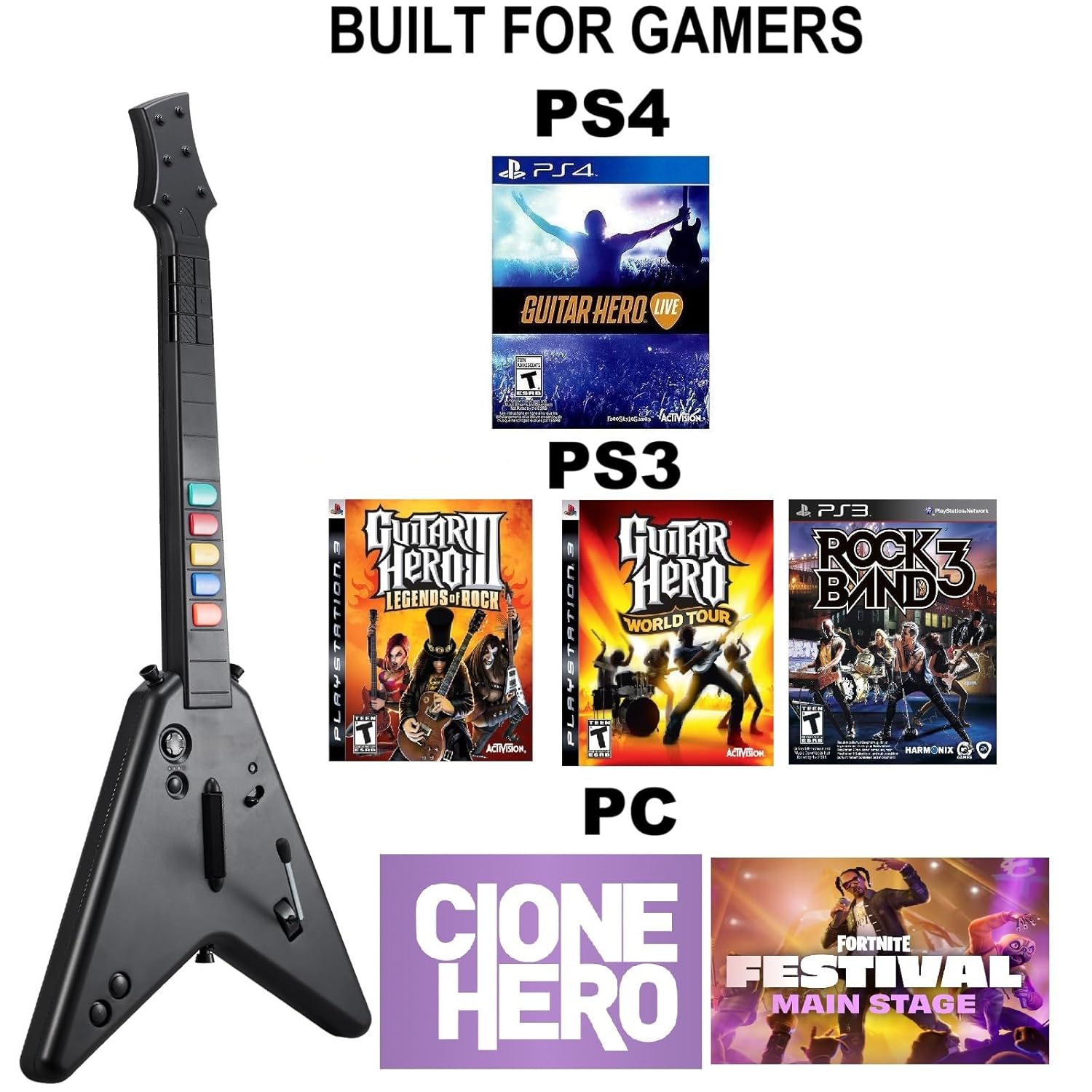
చిత్రం 4.1.1: పైగాview of game compatibility across PS4 (Guitar Hero Live), PS3 (Guitar Hero III, Guitar Hero World Tour, Rock Band 3), and PC (Clone Hero, Fortnite Festival).
4.2 PC Specific Notes
When connected to a PC running Windows 10 or Windows 11, the guitar controller automatically activates a keyboard and mouse mode for game input. Windows 7 is not supported.
5. పవర్ మేనేజ్మెంట్
The guitar controller is powered by 4 AA batteries. To conserve battery life, always turn off the controller using the power switch when not in use. Replace batteries when performance degrades.
6. నిర్వహణ
To maintain your DOYO Wireless Gaming Guitar Controller:
- కంట్రోలర్ను మృదువైన, పొడి గుడ్డతో తుడిచి శుభ్రంగా ఉంచండి.
- Avoid exposing the controller to extreme temperatures, moisture, or direct sunlight.
- Store the controller in a safe place when not in use, ideally disassembled to prevent damage.
- Remove batteries if the controller will not be used for an extended period to prevent leakage.
7. ట్రబుల్షూటింగ్
- కంట్రోలర్ కనెక్ట్ కావడం లేదు:
- Ensure the USB receiver is securely plugged into the console/PC.
- Verify that the guitar controller is powered on and has fresh batteries.
- USB రిసీవర్ని వేరే USB పోర్ట్కి ప్లగ్ చేసి ప్రయత్నించండి.
- Restart the console/PC and the guitar controller.
- Buttons Unresponsive or Lagging:
- బ్యాటరీ స్థాయిలను తనిఖీ చేయండి మరియు అవసరమైతే భర్తీ చేయండి.
- Ensure the controller is within the 7-meter operating range of the USB receiver.
- ఇతర వైర్లెస్ పరికరాల నుండి జోక్యాన్ని తగ్గించండి.
- PC Mouse/Keyboard Interference:
- On PC, the guitar controller may emulate keyboard and mouse inputs. If your mouse or keyboard becomes unresponsive, temporarily disconnect the USB receiver or power off the guitar controller when not actively playing. Reconnecting the mouse/keyboard or restarting the PC may resolve the issue.
8. స్పెసిఫికేషన్లు
| మోడల్ సంఖ్య | KT602 |
| కనెక్టివిటీ | 2.4G RF వైర్లెస్ |
| ఆపరేటింగ్ రేంజ్ | 7 మీటర్ వరకు |
| శక్తి మూలం | 4 x AA బ్యాటరీలు |
| అనుకూల ప్లాట్ఫారమ్లు | PS4, PS3, PC (Windows 10/11) |
| వస్తువు బరువు | 2.86 పౌండ్లు (సుమారు 1.3 కిలోలు) |
| ప్యాకేజీ కొలతలు | 18.15 x 15.16 x 3.27 అంగుళాలు (సుమారు 46.1 x 38.5 x 8.3 సెం.మీ) |
9. వారంటీ మరియు మద్దతు
For warranty information or technical support, please refer to the product packaging or contact DOYO customer service directly through their official webఉత్పత్తిని కొనుగోలు చేసిన సైట్ లేదా రిటైలర్.


