1. పరిచయం
This manual provides detailed instructions for the installation, operation, and maintenance of your VEKOOTO VK5 Wireless RV Backup Camera System. This system is designed to enhance visibility and safety for various vehicles, including RVs, trailers, and trucks, featuring a 5-inch monitor, magnetic camera mount, and solar charging capabilities.
2. ప్యాకేజీ విషయాలు
క్రింద జాబితా చేయబడిన అన్ని అంశాలు మీ ప్యాకేజీలో ఉన్నాయని నిర్ధారించుకోండి:
- 1x 5-అంగుళాల మానిటర్
- 1x మాగ్నెటిక్ సోలార్ రీఛార్జబుల్ కెమెరా
- 1x కార్ ఛార్జర్
- 1x యాంటెన్నా
- 1x సక్షన్ మౌంట్ బ్రాకెట్
- 1x USB-C ఛార్జింగ్ కేబుల్
- 1x వాల్ ఛార్జర్
- 1x యూజర్ మాన్యువల్ (ఈ పత్రం)
3. ఉత్పత్తి ముగిసిందిview
The VEKOOTO VK5 system consists of a wireless camera and a 5-inch monitor, designed for ease of use and reliable performance.

చిత్రం 3.1: పైగాview of the VEKOOTO VK5 Wireless RV Backup Camera System, showing the 5-inch monitor and the magnetic solar-powered camera.
3.1. కెమెరా ఫీచర్లు
- అయస్కాంత మౌంట్: Equipped with 12 strong magnets for tool-free attachment.
- సోలార్ ఛార్జింగ్: Integrated high-efficiency solar panel (up to 400mA) for battery maintenance.
- 15,000mAh బ్యాటరీ: 30 గంటల వరకు నిరంతర ఆపరేషన్ను అందిస్తుంది.
- IP69 జలనిరోధిత: Designed to withstand heavy rain and harsh weather conditions.
- ఐఆర్ నైట్ విజన్: Clear visibility up to 30 feet in complete darkness.
- 2.4GHz Digital Wireless Signal: Stable transmission up to 328ft in open spaces.
3.2. Monitor Features
- 5-అంగుళాల డిస్ప్లే: ఒక స్పష్టమైన అందిస్తుంది view కెమెరా ఫీడ్ యొక్క.
- లూప్ రికార్డింగ్: foo ని నిరంతరం సేవ్ చేస్తుందిtage, పాతదాన్ని ఓవర్రైట్ చేస్తోంది files (supports up to 128GB TF cards, not included).
- ఆటో సింక్: Camera powers on/off automatically with the monitor.
- శక్తి ఎంపికలు: Can be powered via Type-C cable or cigarette lighter.
4. సెటప్ సూచనలు
4.1. కెమెరాను ఛార్జ్ చేయడం
Before initial use, fully charge the camera battery using the provided USB-C charging cable and wall charger. The camera must be manually powered on for the first use after charging.

Figure 4.1: The camera supports both cable charging via USB-C and continuous solar charging.
4.2. కెమెరాను మౌంట్ చేయడం
- ఒక స్థానాన్ని ఎంచుకోండి: Choose a flat, metallic surface on the rear of your vehicle (RV, trailer, truck) that provides a clear view and allows the solar panel to receive adequate sunlight.
- కెమెరాను అటాచ్ చేయండి: The camera features 12 strong magnets. Simply place the camera firmly against the chosen metallic surface. No tools or drilling are required.
- Non-Metallic Surfaces: If your vehicle has an aluminum or fiberglass body, contact VEKOOTO customer support to request a free metal plate accessory for secure mounting.
- కోణాన్ని సర్దుబాటు చేయండి: Once mounted, adjust the camera angle to achieve the desired field of view.
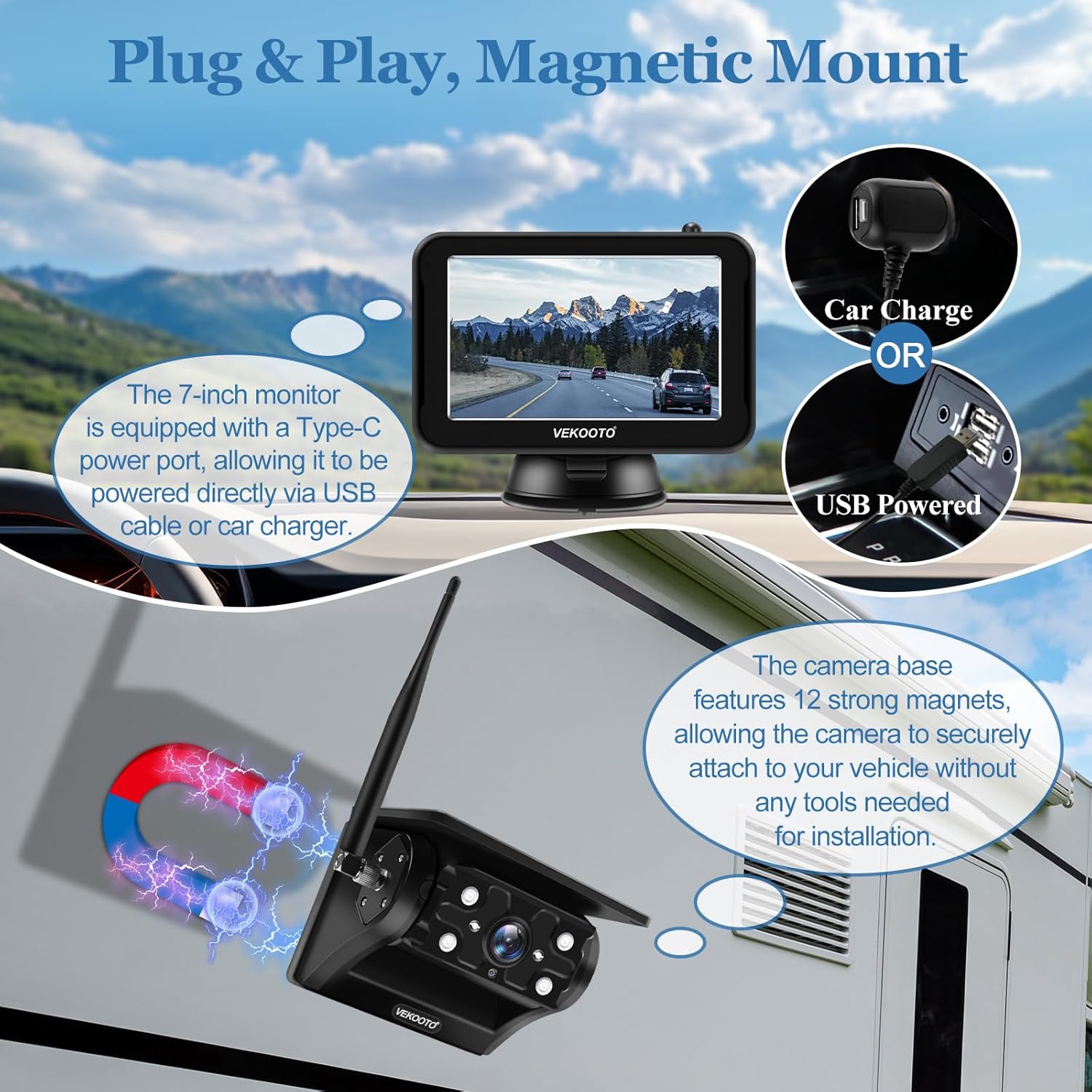
Figure 4.2: The camera utilizes a magnetic base for easy, tool-free attachment to metallic vehicle surfaces.
4.3. మానిటర్ను ఇన్స్టాల్ చేస్తోంది
- సక్షన్ మౌంట్ను అటాచ్ చేయండి: Secure the suction mount bracket to your vehicle's windshield or dashboard.
- మౌంట్ మానిటర్: Attach the 5-inch monitor to the suction mount.
- పవర్ కనెక్షన్: Connect the monitor to power using either the provided car charger (cigarette lighter adapter) or a Type-C cable.
5. ఆపరేటింగ్ సూచనలు
5.1. పవర్ చేయడం ఆన్/ఆఫ్
- మానిటర్: Press the power button on the monitor to turn it on or off.
- Camera Auto Sync: The camera will automatically power on when the monitor is turned on, and power off when the monitor is off. This feature conserves camera battery life.

Figure 5.1: The camera automatically synchronizes its power state with the monitor for convenience and energy saving.
5.2. మానిటర్ సెట్టింగ్లు
Use the buttons on the monitor to navigate through settings. Refer to the on-screen menu for specific options.
- ఆటో-స్లీప్ మోడ్: You can configure the monitor to enter auto-sleep mode after 30s, 60s, or 90s of inactivity, or keep it continuously on.
- లూప్ రికార్డింగ్: The monitor supports loop recording by default. Insert a TF card (up to 128GB, not included) to enable continuous video recording. Older fileలు స్వయంచాలకంగా ఓవర్రైట్ చేయబడతాయి.
- ప్రదర్శన మోడ్లు: The monitor supports full-screen display for a single camera and split-screen display if a second camera is added (sold separately).

Figure 5.2: The 5-inch monitor features loop recording capability and various display modes, including full screen and split screen.
5.3. Wireless Signal
The system uses a 2.4GHz digital wireless signal for stable communication between the camera and monitor, offering a transmission range of up to 328 feet in open environments.

Figure 5.3: Illustration of the 2.4GHz digital wireless signal providing a stable connection between the camera and monitor over distances up to 328 feet.
6. నిర్వహణ
6.1. శుభ్రపరచడం
Wipe the camera lens and monitor screen with a soft, damp cloth. Avoid abrasive cleaners or solvents that could damage the surfaces.
6.2. వాటర్ఫ్రూఫింగ్
The camera is IP69 waterproof, designed to withstand heavy rain and water exposure. Ensure the USB-C charging port cover is securely closed when not charging to maintain water resistance.

Figure 6.1: The camera is built with IP69 waterproofing for durability in various weather conditions and includes infrared night vision for low-light visibility.
6.3. బ్యాటరీ మరియు సోలార్ ఛార్జింగ్
The integrated solar panel helps maintain the camera's 15,000mAh battery charge. For optimal performance, ensure the solar panel is clean and exposed to direct sunlight whenever possible. If the camera battery is low, use the provided USB-C cable for a full charge.
7. ట్రబుల్షూటింగ్
| సమస్య | సాధ్యమైన కారణం | పరిష్కారం |
|---|---|---|
| మానిటర్లో చిత్రం లేదు | Monitor or camera not powered on; signal interference; camera battery low. | Ensure both monitor and camera are powered on. Check camera battery level and charge if necessary. Reduce distance or obstacles between camera and monitor. |
| చిత్ర నాణ్యత తక్కువగా ఉంది | Dirty camera lens; low light conditions; signal interference. | Clean the camera lens. Ensure IR night vision is active in low light. Check for strong signal. |
| Camera not charging via solar | Solar panel is dirty or obstructed; insufficient sunlight. | Clean the solar panel. Reposition the camera to receive direct sunlight. Charge via USB-C cable if solar charging is not feasible. |
| Cigarette adapter USB-C end does not fit monitor | Incompatible adapter or manufacturing variation. | Ensure you are using the provided car charger. If the issue persists, contact VEKOOTO customer support for assistance or an alternative power solution. |
8. స్పెసిఫికేషన్లు
| ఫీచర్ | వివరాలు |
|---|---|
| మోడల్ సంఖ్య | VK5 |
| స్క్రీన్ పరిమాణం | 5 అంగుళాలు |
| ఉత్పత్తి కొలతలు (మానిటర్) | 5.5"లీ x 0.67"వా x 3.5"హ |
| వస్తువు బరువు | 2.65 పౌండ్లు (మొత్తం వ్యవస్థ) |
| Camera Battery Capacity | 15,000mAh లిథియం అయాన్ |
| సోలార్ ప్యానెల్ అవుట్పుట్ | Up to 400mA (Max) |
| జలనిరోధిత రేటింగ్ | IP69 (కెమెరా) |
| నైట్ విజన్ రేంజ్ | 30 అడుగుల వరకు (IR) |
| వైర్లెస్ ఫ్రీక్వెన్సీ | 2.4GHz డిజిటల్ వైర్లెస్ |
| ప్రసార పరిధి | 328 అడుగుల వరకు (బహిరంగ స్థలం) |
| ఫీల్డ్ View | 150 డిగ్రీలు |
| నిల్వ మద్దతు | Up to 128GB TF card (for loop recording, not included) |
| సంస్థాపన రకం | మాగ్నెటిక్ మౌంట్ |
| వాల్యూమ్tage | 5 వోల్ట్లు |
9. వారంటీ మరియు మద్దతు
VEKOOTO products are designed for reliability and performance. For warranty information, technical support, or to request a metal plate accessory for non-metallic vehicle bodies, please contact VEKOOTO customer support.
సంప్రదింపు సమాచారం: Refer to the contact details provided on the VEKOOTO official website or the packaging for the most current support options.


