పరిచయం
The Anlapus C518 Home Security Indoor Camera provides comprehensive surveillance for your indoor spaces. Designed for ease of use and robust performance, this camera offers a 360° panoramic view, intelligent motion detection with auto-tracking, clear 1080p HD video, and two-way audio communication. It supports both 2.4GHz and 5GHz WiFi for stable connectivity and offers flexible local storage options. This manual provides detailed instructions for setting up, operating, and maintaining your Anlapus C518 camera.
ప్యాకేజీ విషయాలు
దయచేసి మీ ప్యాకేజీలో అన్ని అంశాలు ఉన్నాయని ధృవీకరించండి:
- 2 x Anlapus C518 WiFi Camera
- 2 x కెమెరా పవర్ అడాప్టర్
- 2 x Camera Dock
- 2 x మౌంటు స్క్రూ బ్యాగ్
- 2 x మౌంటు మూస
- 1 x క్విక్ స్టార్ట్ గైడ్

Figure 1: Contents included in the Anlapus C518 2-Pack.
ఉత్పత్తి లక్షణాలు
360° Pan/Tilt View & Auto-Tracking
The Anlapus C518 camera offers a full 360° panoramic view, eliminating blind spots in your monitoring area. Its auto-tracking function allows the camera to automatically follow moving subjects, ensuring continuous coverage of important events.

Figure 2: The camera provides a 360-degree all-round view మీ ఇంటి.

Figure 3: Smart auto-tracking feature keeps an eye on moving subjects.
Motion Detection & Alarm Push
Equipped with intelligent motion detection, the camera identifies movement within its field of view and sends instant push notifications to your Anlapus Smart app, keeping you informed of any activity.
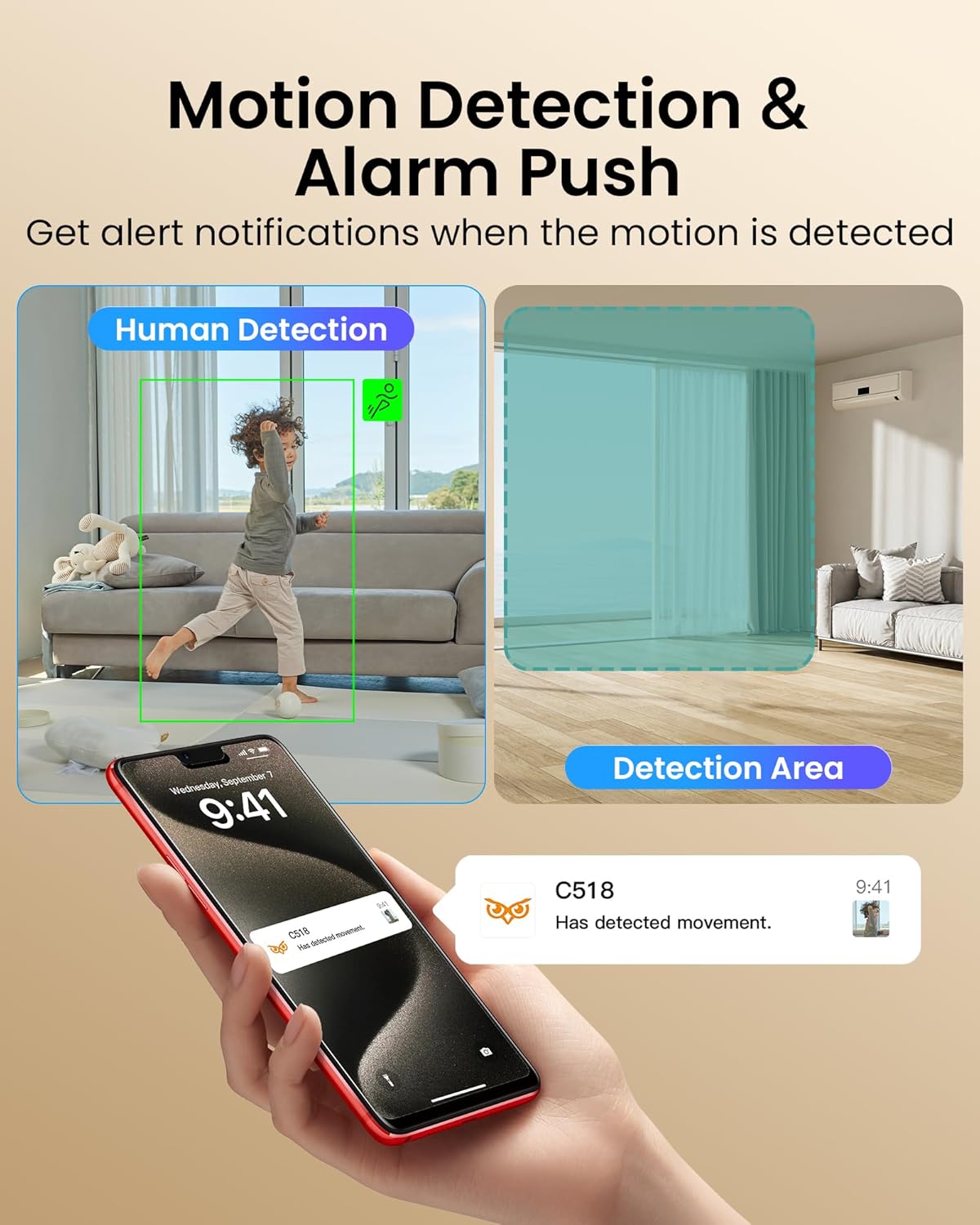
Figure 4: Motion detection sends alerts to your smartphone when movement is detected.
1080p HD Resolution & Clear Night Vision
Experience sharp 1080p HD live streaming and recordings. The built-in infrared night vision provides clear footage up to 10 meters (33 feet) even in complete darkness, ensuring 24/7 security.

Figure 5: Enhanced night vision allows clear viewing up to 33 feet in low light conditions.
Two-Way Audio & Easy Gesture Calling
Communicate in real-time using the camera's built-in microphone and speaker. The unique "Gesture Call" feature allows users to initiate a call by making an "OK" gesture, or by pressing the one-touch call button on the camera.

Figure 6: The camera supports easy call initiation via gesture or button press.

Figure 7: Clear two-way audio enables communication with family members.
2.4GHz/5GHz WiFi Connectivity & Remote Access
The camera supports stable dual-band WiFi connectivity, allowing seamless remote monitoring and access to live footage, alerts, and settings via the Anlapus Smart app from anywhere.
సౌకర్యవంతమైన నిల్వ
వీడియో footage can be stored locally on a micro SD card (up to 256GB, not included), ensuring your recordings are safe and accessible even if the camera is tampతో ered.
అధికారిక ఉత్పత్తి వీడియో
Video 1: Anlapus 2MP Pan/Tilt Indoor C518 camera overview, demonstrating key features like 360-degree view, press-to-call, person detection, two-way audio, night vision, and local storage.
సెటప్ గైడ్
- పవర్ ఆన్: కెమెరాను పవర్ అడాప్టర్కు కనెక్ట్ చేసి, దానిని పవర్ అవుట్లెట్లోకి ప్లగ్ చేయండి. కెమెరా పవర్ ఆన్ చేసి దాని స్టార్టప్ సీక్వెన్స్ను ప్రారంభిస్తుంది.
- అనువర్తనాన్ని డౌన్లోడ్ చేయండి: Download the "Anlapus Smart" app from your device's app store (available for iOS and Android).
- ఖాతాను సృష్టించండి: యాప్ని తెరిచి కొత్త ఖాతా కోసం నమోదు చేసుకోండి లేదా మీకు ఇప్పటికే ఖాతా ఉంటే లాగిన్ అవ్వండి.
- పరికరాన్ని జోడించండి: Follow the in-app instructions to add your Anlapus C518 camera. This typically involves scanning a QR code on the camera or manually selecting the device type and connecting to your WiFi network (supports 2.4GHz and 5GHz).
- మౌంటు (ఐచ్ఛికం): If desired, use the included mounting screws and template to securely mount the camera to a wall or ceiling. Ensure the camera has a clear line of sight to the desired monitoring area.
ఆపరేటింగ్ సూచనలు
- ప్రత్యక్షం View: Open the Anlapus Smart app and select your camera to view ప్రత్యక్ష ఫీడ్.
- పాన్/టిల్ట్ నియంత్రణ: Use the directional controls within the app to remotely pan (horizontal) and tilt (vertical) the camera lens to adjust the viewing కోణం.
- రెండు-మార్గం ఆడియో: Tap the microphone icon in the app to speak through the camera's speaker. Tap again to end. To receive audio, ensure the speaker icon is enabled.
- Gesture/One-Touch Call: Instruct family members to make an "OK" gesture in front of the camera or press the call button on the camera to initiate a call to your app.
- మోషన్ డిటెక్షన్ హెచ్చరికలు: Configure motion detection sensitivity and alert settings in the app. You will receive push notifications when motion is detected.
- రాత్రి దృష్టి: తక్కువ కాంతి ఉన్న పరిస్థితుల్లో కెమెరా స్వయంచాలకంగా నైట్ విజన్ మోడ్కి మారుతుంది.
- స్థానిక నిల్వ: Insert a micro SD card (up to 256GB, not included) into the camera's SD card slot for continuous recording or event-triggered recording. Access recordings via the app's playback feature.
నిర్వహణ
- శుభ్రపరచడం: కెమెరా లెన్స్ మరియు బాడీని శుభ్రం చేయడానికి మృదువైన, పొడి వస్త్రాన్ని ఉపయోగించండి. లిక్విడ్ క్లీనర్లు లేదా ఏరోసోల్లను ఉపయోగించవద్దు.
- ఫర్మ్వేర్ నవీకరణలు: Regularly check the Anlapus Smart app for available firmware updates to ensure optimal performance and security.
- ప్లేస్మెంట్: Avoid placing the camera in direct sunlight, near heat sources, or in areas with high humidity.
ట్రబుల్షూటింగ్
| సమస్య | పరిష్కారం |
|---|---|
| కెమెరా ఆఫ్లైన్ | Check WiFi connection, ensure camera is powered on, and restart the camera if necessary. Verify router settings for 2.4GHz/5GHz compatibility. |
| చలన గుర్తింపు హెచ్చరికలు లేవు | Adjust motion detection sensitivity in the app. Ensure detection area is properly configured. Check app notification settings on your phone. |
| పేలవమైన వీడియో నాణ్యత | Ensure strong WiFi signal. Switch to HD mode in the app if currently in SD. Clean the camera lens. |
| రెండు-మార్గం ఆడియో పని చేయడం లేదు | Check microphone and speaker settings in the app. Ensure volume is not muted on either end. |
| SD కార్డ్ రికార్డ్ కావడం లేదు | Ensure SD card is inserted correctly and is not full. Format the SD card via the app. Check recording settings (continuous vs. event-triggered). |
స్పెసిఫికేషన్లు
- మోడల్: C518
- ఇండోర్/అవుట్డోర్ వినియోగం: ఇండోర్
- వీడియో క్యాప్చర్ రిజల్యూషన్: 1080p
- కనెక్టివిటీ ప్రోటోకాల్: వై-ఫై (2.4GHz/5GHz)
- ప్రత్యేక ఫీచర్: Night Vision, Motion Detection, Two-Way Audio, Pan/Tilt, Auto-Tracking, One-Touch Call
- శక్తి మూలం: కార్డెడ్ ఎలక్ట్రిక్
- మౌంటు రకం: Tabletop Mount (Wall/Ceiling mountable with included accessories)
- అంశం కొలతలు (L x W x H): 4 x 4 x 7 అంగుళాలు
- వస్తువు బరువు: 1.74 పౌండ్లు
- Max SD Card Support: 256GB (చేర్చబడలేదు)
వారంటీ మరియు మద్దతు
Anlapus is committed to providing high-quality products and hassle-free support. For any questions, technical assistance, or warranty inquiries, please refer to the contact information provided in your Quick Start Guide or visit the official Anlapus webమద్దతు వనరుల కోసం సైట్.
All video data is encrypted end-to-end using 2048-bit RSA, 128-bit AES-GCM, and TLS protocols to ensure maximum security and privacy.


