1. పరిచయం
Thank you for choosing the Ozeri ZB21-W WeightMaster Digital Bath Scale. This scale is designed to provide accurate weight measurements, calculate Body Mass Index (BMI), and track weight changes over time. It features a color-alert LCD display for intuitive feedback on weight trends and supports up to 5 unique user profiles. Please read this manual thoroughly before use to ensure proper operation and to maximize the benefits of your new scale.
2. భద్రతా సమాచారం
- స్కేల్ను ఎల్లప్పుడూ గట్టి, చదునైన ఉపరితలంపై ఉంచండి. కార్పెట్ వంటి మృదువైన ఉపరితలాలపై దీన్ని ఉపయోగించడం ఖచ్చితత్వాన్ని ప్రభావితం చేయవచ్చు.
- స్కేల్ ఉపరితలం టెంపర్డ్ గ్లాస్తో తయారు చేయబడింది. తడిగా ఉన్నప్పుడు జారే అవకాశం ఉంది. అడుగు పెట్టే ముందు ఉపరితలం పొడిగా ఉందని నిర్ధారించుకోండి.
- స్కేల్ పైకి దూకవద్దు లేదా దానిపై బరువైన వస్తువులను పడవేయవద్దు, ఎందుకంటే ఇది గాజు లేదా అంతర్గత భాగాలను దెబ్బతీస్తుంది.
- ఈ స్కేల్ గృహ వినియోగం కోసం మాత్రమే మరియు వైద్య నిర్ధారణ లేదా చికిత్స కోసం ఉద్దేశించబడలేదు.
- స్కేల్ను విపరీతమైన ఉష్ణోగ్రతలు మరియు తేమ నుండి దూరంగా ఉంచండి.
- Do not attempt to disassemble or repair the scale yourself. This will void the warranty.
3. ప్యాకేజీ విషయాలు
దయచేసి ఈ క్రింది అంశాల కోసం పెట్టెను ఎంచుకోండి:
- Ozeri ZB21-W WeightMaster Digital Bath Scale
- AAA బ్యాటరీలు (3 చేర్చబడ్డాయి)
- వినియోగదారు మాన్యువల్ (ఈ పత్రం)
4. ఉత్పత్తి ముగిసిందిview
The Ozeri ZB21-W WeightMaster scale combines advanced features with a sleek design to help you monitor your weight and health trends effectively.

మూర్తి 1: టాప్ view of the Ozeri ZB21-W WeightMaster Digital Bath Scale, showing the display and Ozeri logo.
ముఖ్య లక్షణాలు:
- Weight Change Detection: Displays your current weight, the change from your last measurement, and changes from 3-day and 7-day averages.
- BMI గణన: Provides your Body Mass Index.
- Color Alert Technology: The LCD display illuminates green for weight loss and red for weight gain, offering immediate visual feedback.
- వినియోగదారు గుర్తింపు: Automatically identifies up to 5 unique users.
- StepOn Technology: Instantaneous readings upon stepping on the scale, no tapping required.
- అధిక సామర్థ్యం: 400 పౌండ్లు (180 కిలోలు) వరకు బరువులను తట్టుకుంటుంది.
- మన్నికైన నిర్మాణం: Made with impact-resistant tempered glass and non-slip, scratch-resistant feet.

చిత్రం 2: సైడ్ ప్రోfile of the scale, illustrating its slim design.
5. సెటప్
5.1. బ్యాటరీ ఇన్స్టాలేషన్
- స్కేల్ యొక్క దిగువ భాగంలో బ్యాటరీ కంపార్ట్మెంట్ను గుర్తించండి.
- బ్యాటరీ కంపార్ట్మెంట్ కవర్ తెరవండి.
- సరైన ధ్రువణతను (+ మరియు -) నిర్ధారించుకుని, 3 AAA బ్యాటరీలను చొప్పించండి.
- బ్యాటరీ కంపార్ట్మెంట్ కవర్ను మూసివేయండి.
5.2. ప్రారంభ నియామకం
స్కేల్ను గట్టి, చదునైన మరియు స్థిరమైన ఉపరితలంపై ఉంచండి. కార్పెట్లు లేదా అసమాన ఫ్లోరింగ్ను నివారించండి, ఎందుకంటే ఇది కొలత ఖచ్చితత్వాన్ని ప్రభావితం చేస్తుంది.
5.3. Unit Selection (lbs/kg)
On the underside of the scale, near the battery compartment, you will find a small button or switch to toggle between pounds (lb) and kilograms (kg). Select your preferred unit before first use.
5.4. వినియోగదారు ప్రోfile సెటప్
ఈ స్కేల్ 5 మంది వినియోగదారుల వరకు డేటాను నిల్వ చేయగలదు. యూజర్ ప్రోని సెటప్ చేయడానికిfile:
- Step onto the scale. It will display your weight.
- Press the 'SET' button located on the display area. The user number (e.g., 'U1') will flash.
- Use the arrow buttons (left/right) to select a user number (U1-U5).
- Press 'SET' again to confirm the user number.
- The scale will then prompt for height. Use the arrow buttons to adjust your height and press 'SET'.
- The scale will then prompt for age. Use the arrow buttons to adjust your age and press 'SET'.
- ప్రోfile is now saved. The scale will automatically recognize you based on your weight when you step on it in the future.

Figure 3: The scale display during user profile setup, showing BMI and user selection.
6. ఆపరేటింగ్ సూచనలు
6.1. కొలత తీసుకోవడం
- స్కేల్ గట్టి, చదునైన ఉపరితలంపై ఉందని నిర్ధారించుకోండి.
- Step onto the scale with bare feet. Stand still and centered on the scale.
- The scale will automatically turn on and display your weight.
- After a few seconds, the display will cycle through your current weight, weight change from previous measurement, 3-day average change, 7-day average change, and BMI.
- కొన్ని సెకన్ల నిష్క్రియ తర్వాత స్కేల్ స్వయంచాలకంగా ఆపివేయబడుతుంది.
6.2. Understanding the Color Alert Display
The Ozeri WeightMaster features a unique color-alert LCD display to provide immediate visual feedback on your weight trends:
- Green Illumination: Indicates a weight loss compared to your previous measurement.
- Red Illumination: Indicates a weight gain compared to your previous measurement.
- No Color Illumination (Blue/White): Indicates no significant change or the first measurement.

Figure 4: Illustration of the color alert system: Red indicates weight gain, Green indicates weight loss.
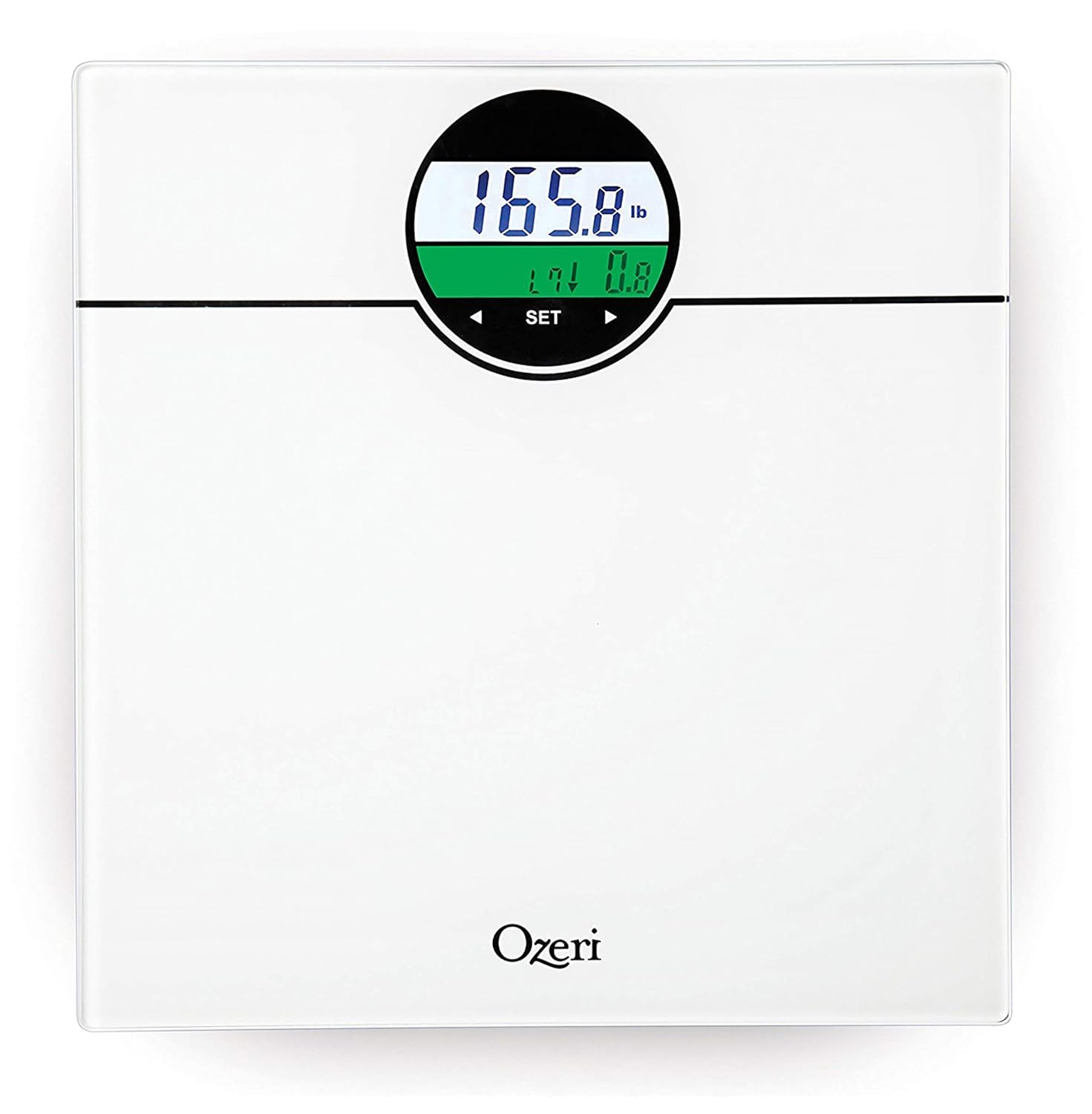
Figure 5: The scale display showing green illumination, indicating weight loss.
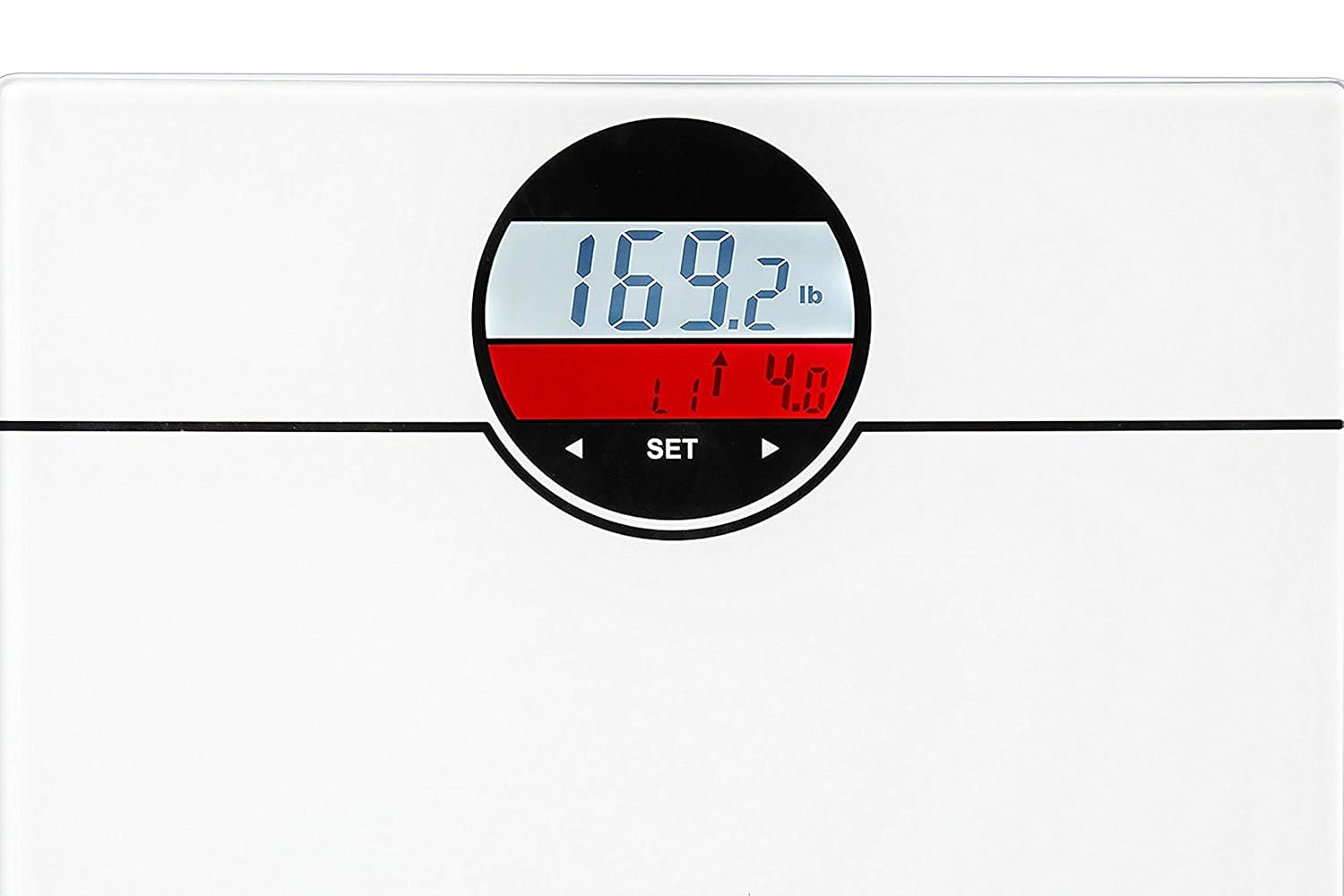
Figure 6: The scale display showing red illumination, indicating weight gain.
7. నిర్వహణ మరియు సంరక్షణ
- ప్రకటనతో స్కేల్ను శుభ్రం చేయండిamp వస్త్రం మరియు తేలికపాటి డిటర్జెంట్. రాపిడి క్లీనర్లను ఉపయోగించవద్దు లేదా స్కేల్ను నీటిలో ముంచవద్దు.
- స్కేల్ను చల్లని, పొడి ప్రదేశంలో నిల్వ చేయండి.
- If the scale is not used for an extended period, remove the batteries to prevent leakage.
- డిస్ప్లేలో తక్కువ బ్యాటరీ సూచిక కనిపించినప్పుడు బ్యాటరీలను మార్చండి.
8. ట్రబుల్షూటింగ్
| సమస్య | సాధ్యమైన కారణం | పరిష్కారం |
|---|---|---|
| స్కేల్ ఆన్ చేయబడదు. | బ్యాటరీలు డెడ్ లేదా తప్పుగా ఇన్స్టాల్ చేయబడ్డాయి. | బ్యాటరీ ధ్రువణతను తనిఖీ చేయండి లేదా కొత్త AAA బ్యాటరీలతో భర్తీ చేయండి. |
| సరికాని రీడింగ్లు. | Scale is on an uneven or soft surface; scale needs recalibration. | Place scale on a hard, flat surface. Step off, wait for it to turn off, then step on again for recalibration. |
| "లో" లేదా "తప్పు" ప్రదర్శించబడింది. | Low battery or overload. | బ్యాటరీలను మార్చండి. బరువు 400 పౌండ్లు (180 కిలోలు) మించకుండా చూసుకోండి. |
| వినియోగదారు ప్రోfile గుర్తుపట్టలేదు. | Significant weight change or multiple users with similar weight. | Manually select your user profile using the 'SET' and arrow buttons. |
9. స్పెసిఫికేషన్లు
- మోడల్: ZB21-W
- సామర్థ్యం: 400 పౌండ్లు / 180 కిలోలు
- కొలత యూనిట్లు: పౌండ్లు (lb), కిలోగ్రాములు (kg)
- ప్రదర్శన: LCD with Color Alert Technology
- వినియోగదారు ప్రోfiles: గరిష్టంగా 5 మంది వినియోగదారులు
- శక్తి మూలం: 3 x AAA బ్యాటరీలు (చేర్చబడినవి)
- మెటీరియల్: టెంపర్డ్ గ్లాస్
- ఉత్పత్తి కొలతలు: సుమారు 31 x 30 x 2.3 సెం.మీ (12.2 x 11.8 x 0.9 అంగుళాలు)
- ఉత్పత్తి బరువు: సుమారు 1.6 కిలోలు (3.5 పౌండ్లు)
10. వారంటీ మరియు మద్దతు
Ozeri products are manufactured to high-quality standards. For warranty information, technical support, or customer service inquiries, please refer to the warranty card included with your product or visit the official Ozeri website. Please have your model number (ZB21-W) and purchase details ready when contacting support.


