పరిచయం
The USKEYVISION VLOG K5 is an upgraded vlogging kit designed for content creators using smartphones. It provides essential tools for enhancing video and audio quality for various applications such as interviews, online meetings, teaching, podcasts, blogging, and live broadcasts. This comprehensive kit includes an extendable tripod, a wireless lavalier microphone, an adjustable LED fill light, an automatic switch phone clamp, and a remote control, offering versatility and convenience for both indoor and outdoor shooting scenarios.
ఉత్పత్తి భాగాలు
The VLOG K5 kit includes the following items:
- 1x Extendable Tripod
- 1x Tabletop Stand (Mini Tablet Tripod with Ballhead)
- 1x Tri-color LED Light
- 1x Wireless Lavalier Microphone (1TX+1RX)
- 1x Auto-switching Phone Clamp
- 1x Microphone Ball Head Mount
- 1x Storage Case for the Microphone
- 1x నిల్వ పర్సు
- 1x USB-C ఛార్జింగ్ కేబుల్
- 1x రిమోట్ కంట్రోల్
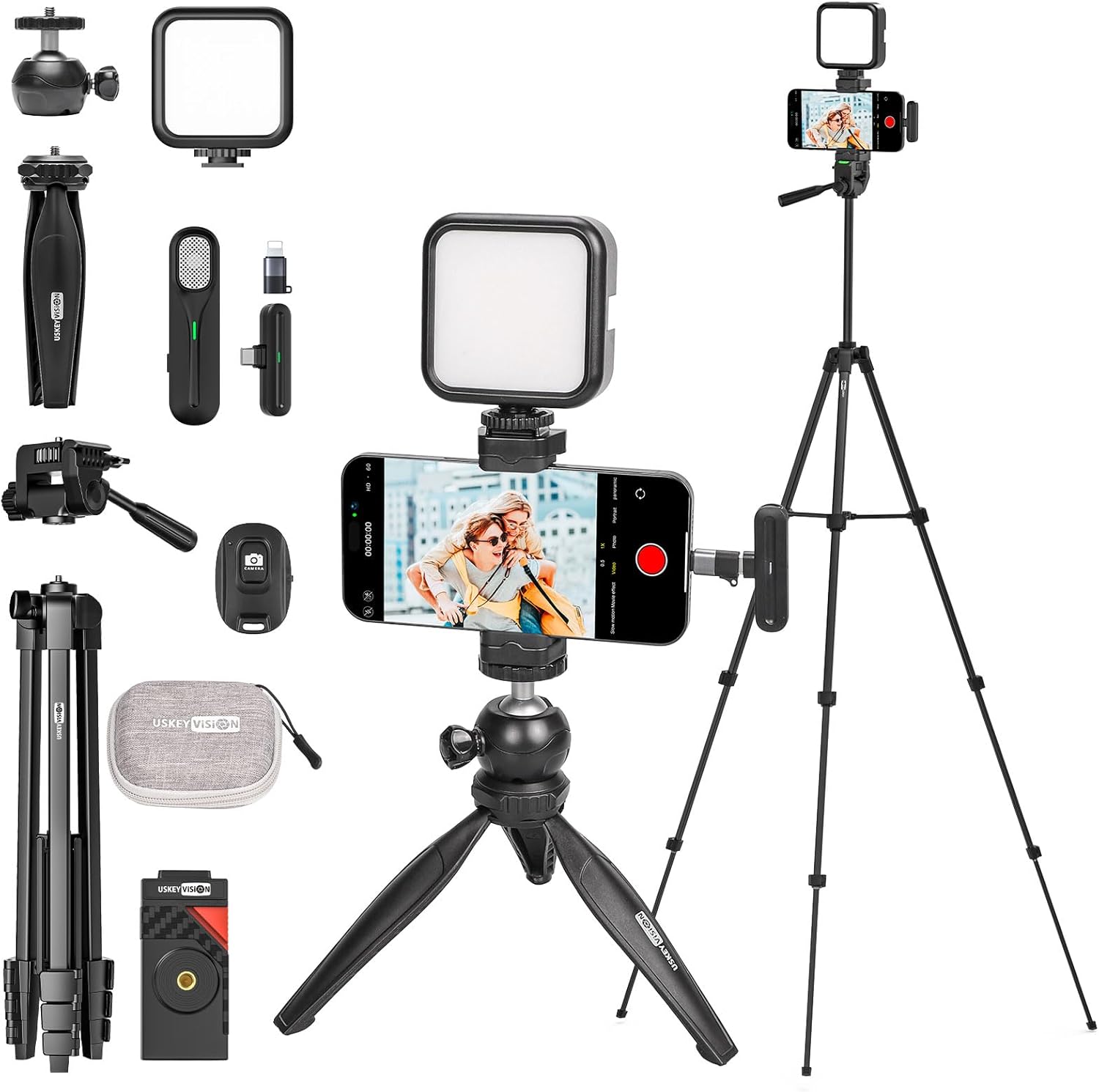
చిత్రం 1: పైగాview of all VLOG K5 kit components.
సెటప్ సూచనలు
Follow these steps to set up your USKEYVISION VLOG K5 kit for optimal performance.
1. పరికరాలను ఛార్జ్ చేయడం
Ensure the Tri-color LED Light and Wireless Lavalier Microphone are fully charged before use. Use the provided USB-C charging cable for the LED light. The microphone receiver (RX) is powered by your mobile device, while the transmitter (TX) has a built-in rechargeable battery.
2. Assembling the Tripod and Phone Clamp
- విస్తరించదగిన ట్రైపాడ్: Unfold the legs of the extendable tripod. Adjust the height using the 3 adjustable quick-rotating leg locks. The tripod can extend from 17.2 inches to 59 inches. Ensure the tripod is stable on a flat surface.
- టేబుల్టాప్ స్టాండ్: For desktop use, unfold the legs of the mini tabletop stand. It features a 360° rotating ball head for flexible positioning.
- Attaching Phone Clamp: Screw the automatic switch phone clamp onto the top of either the extendable tripod or the tabletop stand. The phone clamp is designed to securely hold smartphones of various sizes (56mm / 2.2in to 88mm / 3.46in).

Figure 2: Extendable tripod setup for floor stand mode.

Figure 3: Tabletop stand setup for desktop mode.

Figure 4: Automatic switch phone clamp వాడుకలో ఉంది.
3. Connecting the Wireless Lavalier Microphone
The wireless lavalier microphone connects automatically without the need for additional apps. Simply plug the receiver (RX) into your smartphone's charging port (compatible with iPhone 16/15/14, smartphones, iPads, and more, including USB-C and Lightning conversion heads). Power on the transmitter (TX). The microphone will automatically pair with the receiver, indicated by a solid light on both units.

Figure 5: Wireless Lavalier Microphone setup.
4. Attaching the Tri-color LED Light
Mount the tri-color LED light onto the cold shoe mount of the phone clamp or tripod. Power on the light. It offers adjustable brightness and color temperature (3000K to 7000K) to suit different lighting conditions.

Figure 6: Tri-color LED Light operation.
ఆపరేటింగ్ సూచనలు
Using the Wireless Lavalier Microphone
Once paired, clip the microphone transmitter to your clothing, ensuring it is close to your mouth for clear audio capture. The receiver remains plugged into your smartphone. The microphone provides clear reception up to 20 meters (787 inches).
Adjusting the Tri-color LED Light
Press the power button to turn the light on/off. Use the control buttons on the light to cycle through color temperatures (warm light, warm white light, cold light) and adjust brightness levels from 0-100%. This allows for optimal illumination in various environments.
Utilizing the Remote Control
Pair the remote control with your smartphone via Bluetooth. Once paired, you can remotely start and stop video recording or capture photos, providing convenience for solo content creation or group shots. The remote control has a long-distance range of up to 20 meters (787 inches).

Figure 7: Remote control in action for floor stand mode.
మోడ్ల మధ్య మారుతోంది
The kit supports various shooting modes:
- Floor Stand Mode: Use the extendable tripod for full-height shooting, ideal for standing vlogs or interviews.
- డెస్క్టాప్ మోడ్: Utilize the tabletop stand for stable, low-angle shots on desks or other surfaces.
- హ్యాండ్హెల్డ్ మోడ్: Detach the phone clamp and mini tripod for portable, on-the-go recording.
నిర్వహణ
To ensure the longevity and optimal performance of your VLOG K5 kit, follow these maintenance guidelines:
- శుభ్రపరచడం: Use a soft, dry cloth to wipe down all components. Avoid using abrasive cleaners or solvents, which may damage the surfaces.
- నిల్వ: Store all components in the provided storage pouch and microphone case when not in use. Keep the kit in a cool, dry place away from direct sunlight and extreme temperatures.
- బ్యాటరీ సంరక్షణ: For rechargeable components (LED light, microphone transmitter), avoid fully discharging the batteries frequently. Charge them regularly, even if not in constant use, to maintain battery health.
- నిర్వహణ: Handle the tripod and phone clamp with care. Avoid excessive force when adjusting parts to prevent damage to the locking mechanisms.
ట్రబుల్షూటింగ్
If you encounter any issues with your VLOG K5 kit, refer to the following common troubleshooting tips:
| సమస్య | సాధ్యమైన కారణం | పరిష్కారం |
|---|---|---|
| Microphone not connecting/poor audio. | Low battery on transmitter, receiver not properly plugged in, out of range, interference. | Ensure transmitter is charged. Verify receiver is fully inserted into smartphone. Stay within 20m range. Minimize other wireless devices nearby. |
| LED Light not turning on/dim. | Low battery, incorrect operation. | Charge the LED light. Press and hold the power button to turn on/off. Adjust brightness using control buttons. |
| Remote Control not pairing. | Bluetooth not enabled on phone, remote battery low, remote not in pairing mode. | Ensure Bluetooth is on. Check remote battery. Refer to remote instructions for pairing mode (usually holding a button). |
| Tripod unstable at full extension. | Leg locks not fully secured, uneven surface, excessive weight. | Ensure all leg locks are firmly tightened. Use on a flat, stable surface. Avoid placing overly heavy devices on the tripod. |
| ఫోన్ clamp ఫోన్ను సురక్షితంగా పట్టుకోకపోవడం. | Phone size outside specified range, clamp not fully tightened. | Verify phone dimensions are within 56mm-88mm. Ensure the clamp is fully extended and then tightened around the phone. |
If problems persist, please contact USKEYVISION customer support for further assistance.
స్పెసిఫికేషన్లు
| ఫీచర్ | వివరాలు |
|---|---|
| మోడల్ సంఖ్య | VLOGK5 |
| బ్రాండ్ | USKEYVISION |
| ప్యాకేజీ కొలతలు | 17.28 x 9.21 x 3.31 అంగుళాలు |
| వస్తువు బరువు | 2.77 పౌండ్లు |
| బ్యాటరీలు | 1 లిథియం అయాన్ బ్యాటరీలు అవసరం (చేర్చబడినవి) |
| LED లేత రంగు ఉష్ణోగ్రత | 3000K నుండి 7000K (సర్దుబాటు) |
| LED కాంతి ప్రకాశం | సర్దుబాటు (0-100%) |
| Wireless Microphone Range | 20 మీటర్లు (787 అంగుళాలు) వరకు |
| Tripod Extension Height | 17.2 అంగుళాల నుండి 59 అంగుళాలు |
| ఫోన్ Clamp అనుకూలత | 56mm / 2.2in to 88mm / 3.46in wide |
| నీటి నిరోధక స్థాయి | వాటర్ రెసిస్టెంట్ కాదు |
| మూలం దేశం | చైనా |
వారంటీ మరియు మద్దతు
USKEYVISION products are designed for reliability and performance. For any product-related inquiries, technical support, or warranty claims, please contact USKEYVISION directly through their official channels or the platform where the product was purchased. Keep your purchase receipt as proof of purchase for warranty purposes.
You can visit the official USKEYVISION store on Amazon for more information and support: USKEYVISION Amazon Store.


