1. ముఖ్యమైన భద్రతా సూచనలు
ఉపకరణాన్ని ఉపయోగించే ముందు దయచేసి అన్ని సూచనలను జాగ్రత్తగా చదవండి మరియు భవిష్యత్తు సూచన కోసం వాటిని ఉంచండి. ఈ సూచనలను పాటించడంలో విఫలమైతే విద్యుత్ షాక్, అగ్ని ప్రమాదం లేదా తీవ్రమైన గాయం సంభవించవచ్చు.
- విద్యుత్ భద్రత: వాల్యూమ్ నిర్ధారించుకోండిtagఉపకరణంలో సూచించిన మీ స్థానిక మెయిన్స్ వాల్యూమ్కి అనుగుణంగా ఉంటుందిtage before connecting. Do not immerse the cord, plug, or appliance in water or other liquids. Do not operate the appliance with a damaged cord or plug.
- వేడి ఉపరితలాలు: Surfaces become hot during use. Always use oven mitts when handling hot components. Do not touch hot surfaces directly.
- వెంటిలేషన్: Do not block any ventilation openings. Allow at least 10 cm of free space on the back and sides, and 10 cm above the appliance.
- ప్లేస్మెంట్: ఉపకరణాన్ని గోడలు మరియు ఇతర ఉష్ణ-సున్నితమైన పదార్థాలకు దూరంగా, స్థిరమైన, వేడి-నిరోధక ఉపరితలంపై ఉంచండి.
- పిల్లలు: ఈ ఉపకరణం పిల్లలు ఉపయోగించడానికి ఉద్దేశించబడలేదు. పిల్లల దగ్గర ఏదైనా ఉపకరణాన్ని ఉపయోగించినప్పుడు దగ్గరి పర్యవేక్షణ అవసరం.
- వాడుక: Do not use the appliance for purposes other than those described in this manual. Do not leave the appliance unattended during operation.
- నిర్వహణ: Unplug the appliance from the outlet when not in use and before cleaning. Allow it to cool down completely before handling or cleaning.
2. ఉత్పత్తి ముగిసిందిview
The LEHMANN 9L XXL Dual Basket Air Fryer is designed for efficient and healthy cooking. It features two independent cooking zones, a powerful 2400W heating system, 12 preset programs, and WiFi connectivity for smart control.

మూర్తి 2.1: ముందు view of the LEHMANN Dual Basket Air Fryer with included paper liners.
2.1 ముఖ్య లక్షణాలు
- Dual Independent Baskets: Cook two different foods at different temperatures and times simultaneously.
- 9L XXL Capacity: Large total capacity suitable for family-sized meals.
- 2400W పవర్: వేగవంతమైన వేడిని మరియు సమర్థవంతమైన వంటను నిర్ధారిస్తుంది.
- 12 ప్రీసెట్ ప్రోగ్రామ్లు: One-touch cooking for popular dishes.
- సర్దుబాటు ఉష్ణోగ్రత: Range from 80°C to 200°C.
- టచ్ స్క్రీన్ నియంత్రణ: Intuitive digital display for easy operation.
- వైఫై కనెక్టివిటీ: Control and monitor cooking via a smartphone app.
2.2 కంట్రోల్ ప్యానెల్ ఓవర్view

మూర్తి 2.2: వివరంగా view of the control panel with key functions highlighted.
- Time/Temperature Adjustment: Use '+' and '-' buttons to set cooking time and temperature.
- ఆరంభ కార్యక్రమాలు: Icons representing various food types for quick selection.
- పవర్ బటన్: ఉపకరణాన్ని ఆన్/ఆఫ్ చేస్తుంది.
- WiFi సూచిక: కనెక్షన్ స్థితిని చూపుతుంది.
- లైట్ బటన్: Activates the internal basket light.
- షేక్ రిమైండర్: Icon indicates when to shake the basket for even cooking.
- SYNC Function: Synchronizes the finish time of both baskets.
- DUAL COOK Function: Applies the settings of one basket to the other.
- ప్రారంభం/ఆపు బటన్: వంట ప్రక్రియను ప్రారంభిస్తుంది లేదా పాజ్ చేస్తుంది.
3. మొదటి ఉపయోగం ముందు
3.1 అన్ప్యాకింగ్ మరియు ప్రారంభ శుభ్రపరచడం
- ఉపకరణం నుండి అన్ని ప్యాకేజింగ్ పదార్థాలు, స్టిక్కర్లు మరియు లేబుల్లను తీసివేయండి.
- Wash the baskets and crisper plates thoroughly with hot water, dish soap, and a non-abrasive sponge. Rinse and dry completely.
- ప్రకటనతో ఉపకరణం లోపల మరియు వెలుపల తుడవండిamp వస్త్రం. ప్రధాన యూనిట్ను నీటిలో ముంచవద్దు.
- ఉపకరణాన్ని ప్లగ్ చేసే ముందు అన్ని భాగాలు పొడిగా ఉన్నాయని నిర్ధారించుకోండి.
3.2 ప్లేస్మెంట్
- ఎయిర్ ఫ్రయ్యర్ను స్థిరమైన, స్థాయి మరియు వేడి-నిరోధక ఉపరితలంపై ఉంచండి.
- Ensure there is adequate air circulation around the appliance (at least 10 cm clearance on all sides).
- మండే పదార్థాలు లేదా ఉష్ణ వనరుల దగ్గర ఉపకరణాన్ని ఉంచవద్దు.
4. ఆపరేటింగ్ సూచనలు
4.1 ప్రాథమిక ఆపరేషన్
- Place the crisper plate into the basket and then insert the basket into the main unit.
- Add your ingredients to the basket. Do not overfill.
- Plug the power cord into a grounded wall outlet. The appliance will beep, and the display will illuminate.
- పవర్ బటన్ నొక్కండి (3) ఎయిర్ ఫ్రైయర్ ఆన్ చేయడానికి.
- Select the desired basket (1 or 2) if not already selected.
- Adjust the temperature using the '+' and '-' buttons for temperature.
- Adjust the cooking time using the '+' and '-' buttons for time.
- వంట ప్రారంభించడానికి స్టార్ట్/స్టాప్ బటన్ను నొక్కండి.
4.2 ప్రీసెట్ ప్రోగ్రామ్లను ఉపయోగించడం

Figure 4.1: The control panel showing various preset cooking program icons.
The air fryer comes with 12 preset programs for common foods. To use a preset program:
- After turning on the appliance, select the desired basket.
- Tap the icon corresponding to your desired food (e.g., fries, chicken, fish). The display will show the default time and temperature for that program.
- You can adjust the time and temperature manually if needed.
- వంట ప్రారంభించడానికి స్టార్ట్/స్టాప్ బటన్ను నొక్కండి.
4.3 Dual Zone Cooking
The dual basket design allows for versatile cooking. You can cook two different foods or larger quantities of one food.
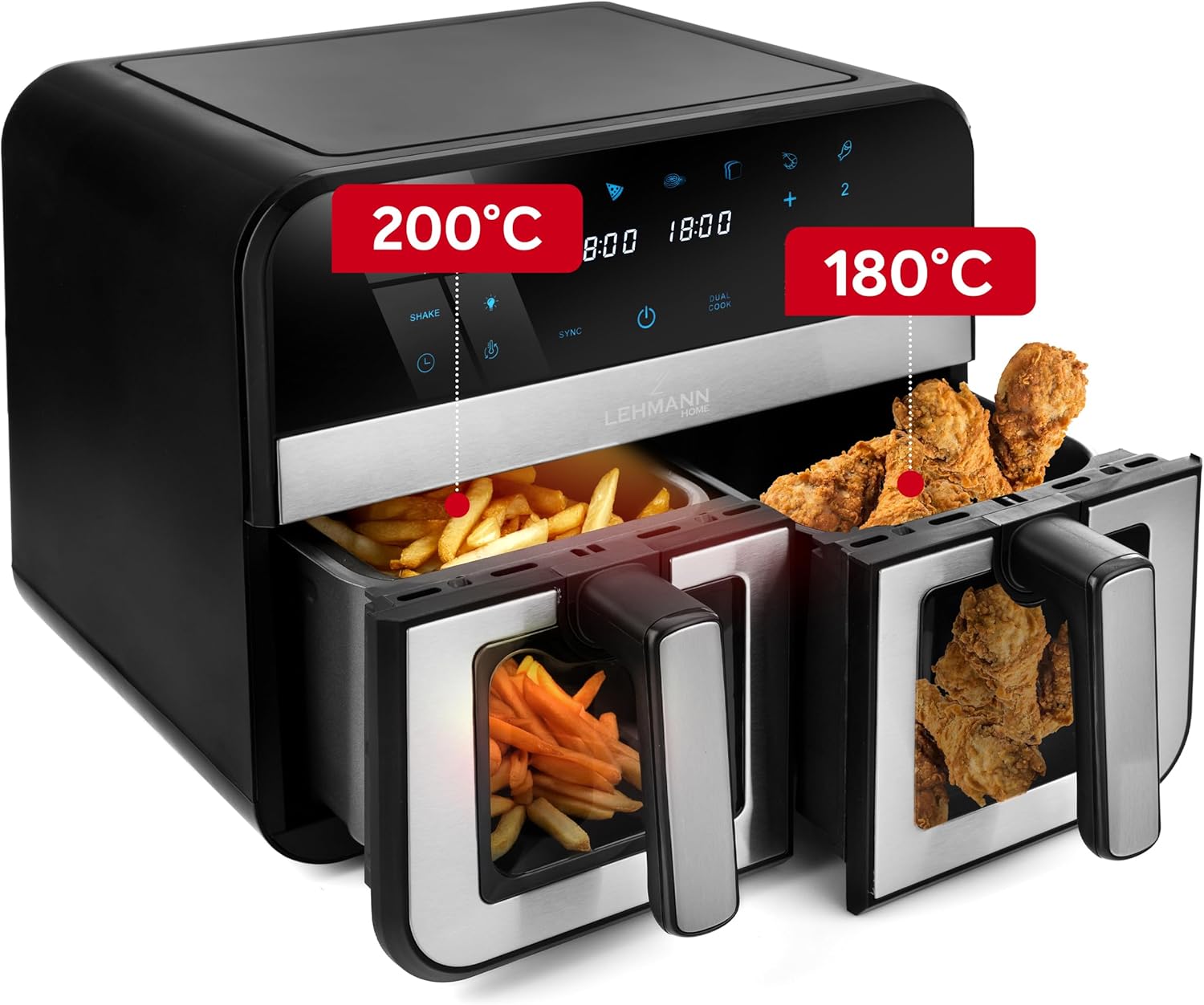
చిత్రం 4.2: ఉదాample of dual zone cooking with different foods and temperature settings.
- SYNC Function: To ensure both baskets finish cooking at the same time, set the cooking parameters for each basket. Then, press the SYNC button. The air fryer will automatically adjust the cooking times to synchronize completion.
- DUAL COOK Function: If you want to cook the same food in both baskets with identical settings, set the parameters for one basket, then press the DUAL COOK button. This will copy the settings to the second basket.
4.4 వైఫై కనెక్టివిటీ
Control your air fryer remotely using the dedicated smartphone app.

Figure 4.3: Controlling the air fryer via the smartphone application.
- Download the LEHMANN Home app from your smartphone's app store.
- Follow the in-app instructions to pair your air fryer with your device. Ensure your air fryer is powered on and your phone is connected to a 2.4GHz WiFi network.
- Once connected, you can remotely start, stop, adjust settings, and monitor the cooking process.
5. వంట చిట్కాలు
- ముందుగా వేడి చేయడం: ఉత్తమ ఫలితాల కోసం, ఆహారాన్ని జోడించే ముందు ఎయిర్ ఫ్రైయర్ను 3-5 నిమిషాలు వేడి చేయండి.
- వణుకు: For even cooking and crispiness, shake the baskets halfway through the cooking time, especially for smaller items like fries or nuggets. The air fryer may have a built-in 'Shake' reminder.
- నూనె: While air frying requires little to no oil, a small amount of oil (1 tablespoon) can enhance crispiness for some foods.
- ఆహార స్థానం: Arrange food in a single layer in the basket to allow hot air to circulate effectively. Avoid overcrowding.
- Doneness: Cooking times may vary based on food type, quantity, and desired crispiness. Always check food for doneness.

Figure 5.1: Illustration of the rapid hot air circulation technology for even cooking.
6. శుభ్రపరచడం మరియు నిర్వహణ
క్రమం తప్పకుండా శుభ్రపరచడం వల్ల మీ ఎయిర్ ఫ్రైయర్ యొక్క జీవితకాలం పెరుగుతుంది మరియు దాని పనితీరును మెరుగుపరుస్తుంది.
6.1 బుట్టలు మరియు క్రిస్పర్ ప్లేట్లను శుభ్రపరచడం
- ఎయిర్ ఫ్రయ్యర్ను అన్ప్లగ్ చేసి, శుభ్రపరిచే ముందు పూర్తిగా చల్లబరచడానికి అనుమతించండి.
- Remove the baskets and crisper plates. They are dishwasher safe, or you can wash them by hand with hot water, dish soap, and a non-abrasive sponge.
- For stubborn food residue, soak the baskets in warm, soapy water for about 10 minutes before cleaning.
- తిరిగి అమర్చడానికి లేదా నిల్వ చేయడానికి ముందు అన్ని భాగాలు పూర్తిగా పొడిగా ఉన్నాయని నిర్ధారించుకోండి.
6.2 ప్రధాన యూనిట్ శుభ్రపరచడం
- ప్రకటనతో ఎయిర్ ఫ్రైయర్ యొక్క బాహ్య భాగాన్ని తుడవండిamp గుడ్డ. రాపిడి క్లీనర్లు లేదా స్కౌరింగ్ ప్యాడ్లను ఉపయోగించవద్దు.
- ప్రకటనతో ఉపకరణం లోపలి భాగాన్ని శుభ్రం చేయండిamp cloth. If necessary, a mild detergent can be used.
- ప్రధాన యూనిట్ను నీటిలో లేదా మరే ఇతర ద్రవంలోనూ ముంచవద్దు.
7. ట్రబుల్షూటింగ్
మీ ఎయిర్ ఫ్రైయర్తో మీకు ఏవైనా సమస్యలు ఎదురైతే, సాధారణ సమస్యలు మరియు పరిష్కారాల కోసం క్రింది పట్టికను చూడండి.
| సమస్య | సాధ్యమైన కారణం | పరిష్కారం |
|---|---|---|
| ఉపకరణం ఆన్ చేయబడలేదు. | ప్లగిన్ చేయబడలేదు; పవర్ అవుట్లెట్ సమస్య. | పవర్ కార్డ్ పని చేసే అవుట్లెట్లో సురక్షితంగా ప్లగ్ చేయబడిందని నిర్ధారించుకోండి. |
| ఆహారం సమానంగా వండరు. | బుట్టలు కిక్కిరిసిపోయాయి; ఆహారం కదిలించబడలేదు. | Do not overcrowd baskets. Shake food halfway through cooking. |
| ఆహారం క్రిస్పీగా ఉండదు. | (కొన్ని ఆహారాలకు) తగినంత నూనె లేదు; ఉష్ణోగ్రత చాలా తక్కువగా ఉంది; వంట సమయం చాలా తక్కువ. | ఆహారాన్ని తేలికగా నూనెతో రుద్దండి. ఉష్ణోగ్రత లేదా వంట సమయాన్ని పెంచండి. |
| ఉపకరణం నుండి వచ్చే తెల్ల పొగ. | గతంలో ఉపయోగించిన గ్రీజు అవశేషాలు; కొవ్వు పదార్థాలు కలిగిన ఆహారం. | బుట్టలు మరియు క్రిస్పర్ ప్లేట్లను పూర్తిగా శుభ్రం చేయండి. ఆహారం నుండి అదనపు కొవ్వును తొలగించండి. |
| WiFi connection fails. | Incorrect network; app issue. | Ensure your phone is on a 2.4GHz WiFi network. Restart the app and air fryer. Refer to the app's help section. |
8. సాంకేతిక లక్షణాలు
Detailed specifications for the LEHMANN 9L XXL Dual Basket Air Fryer.

Figure 8.1: Product dimensions of the air fryer.
| స్పెసిఫికేషన్ | విలువ |
|---|---|
| బ్రాండ్ | లెమాన్ |
| మోడల్ | LHODF-2811 |
| కెపాసిటీ | 9 లీటర్లు |
| వాట్tage | 2400 వాట్స్ |
| వాల్యూమ్tage | 230 వోల్ట్లు |
| ఉష్ణోగ్రత పరిధి | 80°C - 200°C |
| కొలతలు (L x W x H) | 40.5 x 40.5 x 38.5 సెం.మీ |
| బరువు | 7.3 కిలోలు |
| మెటీరియల్ | మెటల్, ప్లాస్టిక్ |
| ప్రత్యేక లక్షణాలు | Temperature Control, Dual Zone Functionality, Non-stick Coating, Timer, WiFi Control |
9. వారంటీ మరియు కస్టమర్ మద్దతు
LEHMANN ఉత్పత్తులు అధిక-నాణ్యత ప్రమాణాలకు అనుగుణంగా తయారు చేయబడతాయి. వారంటీ కవరేజ్ గురించి సమాచారం కోసం, దయచేసి మీ కొనుగోలుతో చేర్చబడిన వారంటీ కార్డును చూడండి లేదా అధికారిక LEHMANN ని సందర్శించండి. webసైట్.
If you have any questions, require technical assistance, or need to report an issue, please contact LEHMANN customer support through the contact information provided in your product packaging or on the official LEHMANN website. Please have your model number (LHODF-2811) and purchase details ready when contacting support.


