ఉత్పత్తి ముగిసిందిview
The Karma Dual Lightning Microphone is a wireless audio solution designed for vloggers and content creators. It features two wireless microphones and a Lightning receiver, enabling high-quality audio capture directly to compatible Apple devices.
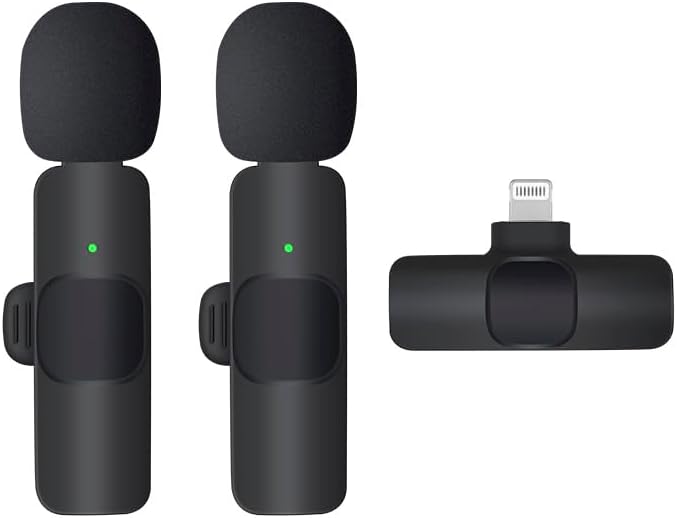
This image displays the complete Karma Dual Lightning Microphone system, including two wireless microphone transmitters and one Lightning receiver. The microphones are compact, black, and feature foam windscreens, with a small green indicator light visible on each. The receiver is also black and designed to plug directly into a Lightning port.
ప్యాకేజీ విషయాలు
ప్యాకేజీలో అన్ని అంశాలు ఉన్నాయని నిర్ధారించుకోండి:
- 2 x వైర్లెస్ మైక్రోఫోన్ ట్రాన్స్మిటర్లు
- 1 x మెరుపు రిసీవర్
- 1 x Charging Cable (USB-A to USB-C, typically)
- 1 x యూజర్ మాన్యువల్ (ఈ పత్రం)
సెటప్ గైడ్
- Charge Microphones: Before first use, fully charge both wireless microphone transmitters using the provided charging cable. A red indicator light typically signifies charging, turning off or green when fully charged.
- రిసీవర్ను కనెక్ట్ చేయండి: Plug the Lightning receiver directly into the Lightning port of your iPhone or iPad. Ensure it is securely seated.
- మైక్రోఫోన్లను పవర్ ఆన్ చేయండి: Press and hold the power button on each microphone transmitter until the indicator light turns green, indicating they are powered on and ready to pair.
- స్వయంచాలక జత చేయడం: The microphones and receiver should automatically pair. A solid green light on the microphones indicates a successful connection. If the light flashes, pairing is in progress or has failed.
- స్థానం మైక్రోఫోన్లు: Clip the microphone transmitters to the collar or clothing of the speaker, ensuring the microphone head is facing towards the mouth for optimal sound capture.
ఆపరేటింగ్ సూచనలు
రికార్డింగ్ ఆడియో
- Ensure microphones are paired and connected (solid green light).
- Open your preferred audio or video recording application on your iOS device (e.g., Camera app, Voice Memos, third-party recording apps).
- Start recording. The audio input will automatically switch to the connected wireless microphones.
- Monitor audio levels if your application allows, to prevent clipping or distortion.
మ్యూట్ ఫంక్షన్
Some models may feature a mute button on the microphone transmitter. Pressing this button typically toggles the microphone's audio output on or off. Refer to the specific product design for button location and indicator light behavior for mute status.
నిర్వహణ మరియు సంరక్షణ
- శుభ్రపరచడం: మైక్రోఫోన్లు మరియు రిసీవర్ను శుభ్రం చేయడానికి మృదువైన, పొడి వస్త్రాన్ని ఉపయోగించండి. ద్రవ క్లీనర్లను లేదా ద్రావకాలను ఉపయోగించవద్దు.
- నిల్వ: పరికరాన్ని ప్రత్యక్ష సూర్యకాంతి మరియు తీవ్రమైన ఉష్ణోగ్రతలు లేకుండా చల్లని, పొడి ప్రదేశంలో నిల్వ చేయండి.
- బ్యాటరీ లైఫ్: To prolong battery life, fully charge the microphones before long periods of inactivity. Avoid completely draining the battery frequently.
- నిర్వహణ: Handle the devices with care. Avoid dropping or subjecting them to strong impacts.
ట్రబుల్షూటింగ్
| సమస్య | సాధ్యమైన కారణం | పరిష్కారం |
|---|---|---|
| శబ్దం రికార్డ్ కాలేదు. | Microphones not powered on or paired. Receiver not properly connected. App settings. | Ensure microphones have a solid green light. Re-plug the receiver. Check audio input settings in your recording app. |
| ఆడియో నాణ్యత పేలవంగా ఉంది/స్టాటిక్. | Interference. Microphone too far from source. Low battery. | Move away from other wireless devices. Ensure microphone is close to the speaker. Charge microphones fully. |
| Microphones not pairing. | బ్యాటరీ తక్కువగా ఉంది. పరిధిలో లేదు. అంతరాయం. | Charge microphones. Ensure microphones are within 20 meters of the receiver. Restart both microphones and receiver. |
స్పెసిఫికేషన్లు
- మోడల్: B0DM23FX7X
- రకం: డ్యూయల్ వైర్లెస్ మైక్రోఫోన్ సిస్టమ్
- కనెక్టివిటీ: Lightning (Receiver)
- అనుకూలత: iOS devices with Lightning port
- ప్యాకేజీ కొలతలు: 7.87 x 7.87 x 7.87 అంగుళాలు
- వస్తువు బరువు: 3.53 ఔన్సులు
- తయారీదారు: కర్మ
- మొదట అందుబాటులో ఉన్నవి: జూలై 17, 2025
వారంటీ సమాచారం
This Karma product is covered by a standard manufacturer's warranty. Please refer to the warranty card included in your product packaging or visit the official Karma website for detailed terms and conditions regarding warranty coverage, duration, and claims process. Keep your purchase receipt as proof of purchase.
కస్టమర్ మద్దతు
For technical assistance, troubleshooting not covered in this manual, or warranty inquiries, please contact Karma customer support through the following channels:
- Webసైట్: Visit the Karma Store on Amazon
- ఇమెయిల్: ఉత్పత్తి ప్యాకేజింగ్ లేదా అధికారిక ప్యాకేజింగ్ను చూడండి website for specific email contact.
- ఫోన్: ఉత్పత్తి ప్యాకేజింగ్ లేదా అధికారిక ప్యాకేజింగ్ను చూడండి website for specific phone contact.
When contacting support, please have your product model number (B0DM23FX7X) and purchase date ready.


