పరిచయం
The Beatfoxx CDB-1016U Boombox is a versatile audio system designed for both home and portable use. It combines classic audio formats with modern connectivity options, offering a comprehensive listening experience. This manual provides detailed instructions for setting up, operating, and maintaining your device.

మూర్తి 1: ముందు view of the Beatfoxx CDB-1016U BK Boombox, showing the speakers, control panel, and carrying handle.
సెటప్
పరికరాన్ని శక్తివంతం చేస్తోంది
The Beatfoxx CDB-1016U Boombox can be powered using the included AC power cable or by batteries for portable use.
- AC పవర్: Insert the AC power cable into the AC IN jack on the back of the unit and plug the other end into a standard wall outlet (AC 230V ~ 50Hz).
- బ్యాటరీ శక్తి: For portable operation, open the battery compartment on the bottom of the unit. Insert six (6) Type C (UM-2) batteries, ensuring correct polarity (+/-). Close the battery compartment securely.

Figure 2: The boombox operating on AC power, with an illustration of the required Type C batteries for portable use.
ఆపరేటింగ్ సూచనలు
పైగా నియంత్రణలుview
Familiarize yourself with the main controls located on the top and front of the boombox.

మూర్తి 3: వివరంగా view of the boombox's control panel, cassette compartment, carrying handle, and CD compartment.
- పవర్ బటన్: యూనిట్ ఆన్/ఆఫ్ చేస్తుంది.
- మోడ్ బటన్: Switches between CD, USB, Bluetooth, Radio (FM/AM), and AUX modes.
- వాల్యూమ్ నాబ్: ఆడియో అవుట్పుట్ స్థాయిని సర్దుబాటు చేస్తుంది.
- ట్యూనింగ్ నాబ్: Used for manual tuning in Radio mode.
- ప్లే/పాజ్ బటన్: ప్లేబ్యాక్ను ప్రారంభిస్తుంది లేదా పాజ్ చేస్తుంది.
- STOP/EJECT బటన్: Stops playback and opens the CD compartment or ejects cassette.
- SKIP/SEARCH Buttons (<< / >>): ట్రాక్లను దాటవేస్తుంది లేదా వేగంగా ముందుకు/రివైండ్ చేస్తుంది.
- రిపీట్/ప్రోగ్ బటన్: Repeats current track/all tracks or programs CD/USB playback order.
- FOLDER Button: Navigates through folders on USB.
- REC బటన్: Initiates recording to cassette.
Selecting Playback Sources
The boombox supports multiple audio sources. Use the మోడ్ వాటి ద్వారా సైకిల్ చేయడానికి బటన్.

Figure 4: Visual representation of the seven available playback sources on the boombox.
CD ప్లేబ్యాక్
- నొక్కండి మోడ్ CD మోడ్ను ఎంచుకోవడానికి బటన్.
- నొక్కండి STOP/EJECT CD కంపార్ట్మెంట్ తెరవడానికి బటన్.
- Place a CD (CD, CD-R, CD-RW, MP3 CD) onto the spindle with the label side facing up.
- Close the CD compartment. The display will show "READING" and then the total number of tracks.
- నొక్కండి ప్లే/పాజ్ చేయండి ప్లేబ్యాక్ ప్రారంభించడానికి బటన్.
- ఉపయోగించండి స్కిప్ / సెర్చ్ ట్రాక్ల మధ్య నావిగేట్ చేయడానికి బటన్లు.
- నొక్కండి పునరావృతం చేయండి ప్రస్తుత ట్రాక్ లేదా అన్ని ట్రాక్లను పునరావృతం చేయడానికి.
Cassette Playback and Recording
The boombox features a built-in cassette player and recorder.

Figure 5: The cassette compartment of the boombox shown open, ready for tape insertion.
ప్లేబ్యాక్:
- క్యాసెట్ కంపార్ట్మెంట్ని తెరవండి.
- క్యాసెట్ టేప్ను చొప్పించండి.
- కంపార్ట్మెంట్ మూసివేయండి.
- నొక్కండి ఆడండి button on the cassette controls to start playback.
- ఉపయోగించండి FWD or REW ఫాస్ట్ ఫార్వర్డ్ లేదా రివైండ్ కోసం.
- నొక్కండి STOP/EJECT ప్లేబ్యాక్ ఆపివేసి టేప్ను బయటకు తీయడానికి.
రికార్డింగ్:
You can record from CD, USB, Radio, or AUX input to a cassette tape.
- కంపార్ట్మెంట్లోకి ఖాళీ లేదా రికార్డ్ చేయగల క్యాసెట్ టేప్ను చొప్పించండి.
- Select the desired source (CD, USB, Radio, or AUX) using the మోడ్ బటన్.
- సోర్స్ లో ప్లేబ్యాక్ ప్రారంభించండి (ఉదా. CD ప్లే చేయండి, రేడియో స్టేషన్ కి ట్యూన్ చేయండి).
- నొక్కండి REC button on the cassette controls. The unit will automatically start recording the audio from the selected source onto the cassette.
- నొక్కండి ఆపు on the cassette controls to end recording.
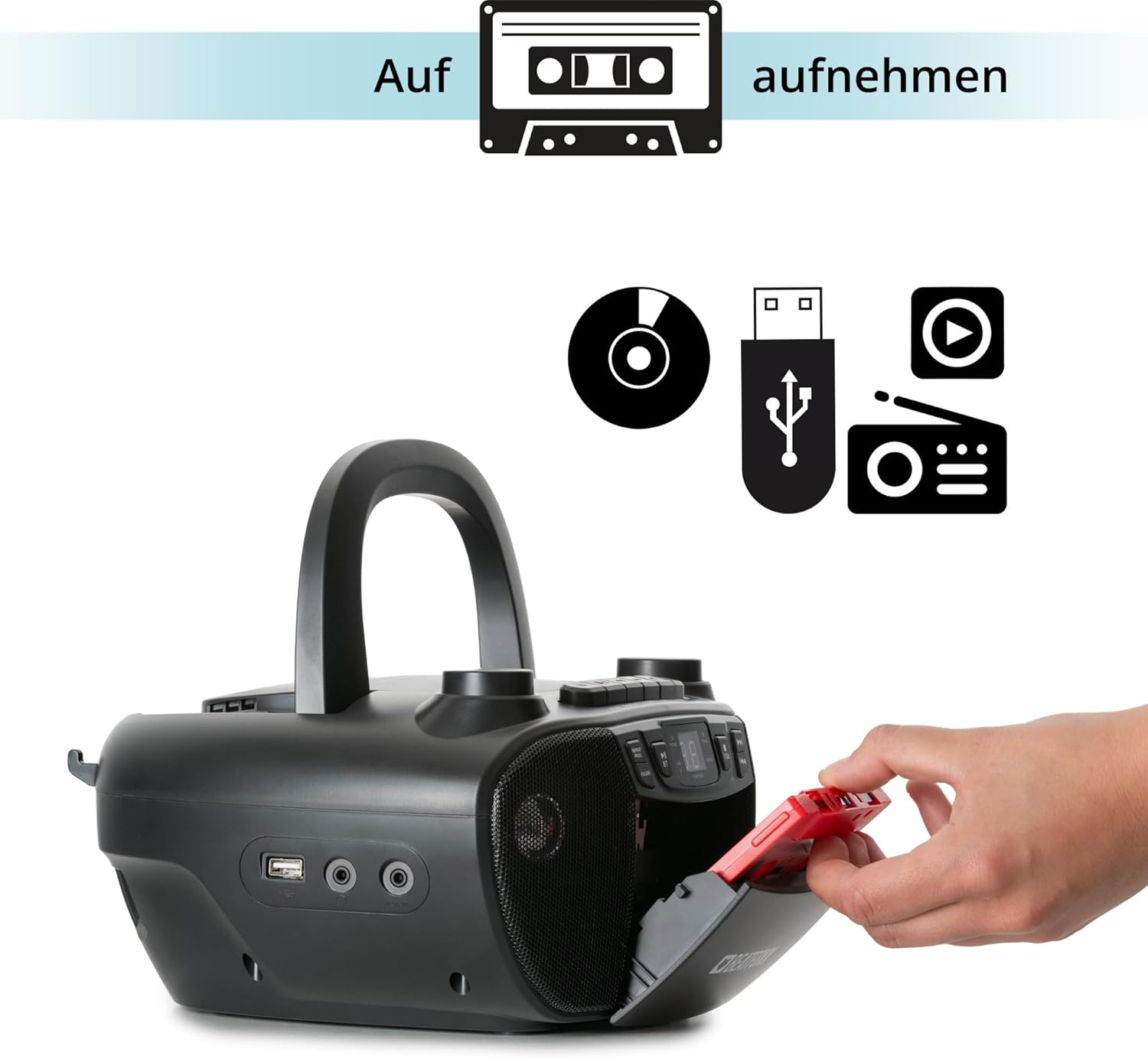
Figure 6: Illustration of the boombox's recording capability, showing a cassette tape being inserted for recording from CD, USB, or radio.
రేడియో (FM/AM)
- Extend the telescopic antenna for better FM reception.
- నొక్కండి మోడ్ button to select Radio mode (FM or AM).
- ఉపయోగించండి ట్యూనింగ్ మీకు కావలసిన రేడియో స్టేషన్కి మాన్యువల్గా ట్యూన్ చేయడానికి నాబ్.
బ్లూటూత్ కనెక్టివిటీ
- నొక్కండి మోడ్ button to select Bluetooth mode. The display will show "BT" and flash, indicating it's in pairing mode.
- మీ బ్లూటూత్-ప్రారంభించబడిన పరికరంలో (స్మార్ట్ఫోన్, టాబ్లెట్), బ్లూటూత్ను ప్రారంభించి, అందుబాటులో ఉన్న పరికరాల కోసం శోధించండి.
- Select "Beatfoxx CDB-1016U" from the list of devices.
- Once paired, the "BT" indicator on the boombox will stop flashing and remain solid.
- You can now stream audio wirelessly from your device to the boombox.
USB ప్లేబ్యాక్
- MP3 ఆడియో ఉన్న USB ఫ్లాష్ డ్రైవ్ను చొప్పించండి fileUSB పోర్ట్లోకి s.
- నొక్కండి మోడ్ button to select USB mode. The unit will automatically start playing the first track.
- ఉపయోగించండి స్కిప్ / సెర్చ్ ట్రాక్ల మధ్య నావిగేట్ చేయడానికి బటన్లు.
- ఉపయోగించండి ఫోల్డర్ button to navigate through folders on the USB drive.

మూర్తి 7: వివరంగా view of the boombox's connectivity options, including the USB port, headphone output, and AUX input.
AUX ఇన్పుట్
Connect external audio devices (e.g., MP3 players, smartphones without Bluetooth) to the boombox using a 3.5mm audio cable (not included).
- Connect one end of the 3.5mm audio cable to the AUX IN jack on the boombox.
- మరొక చివరను మీ బాహ్య పరికరం యొక్క హెడ్ఫోన్ జాక్ లేదా ఆడియో అవుట్పుట్కు కనెక్ట్ చేయండి.
- నొక్కండి మోడ్ AUX మోడ్ని ఎంచుకోవడానికి బటన్.
- Play audio from your external device. The sound will be output through the boombox speakers.
హెడ్ఫోన్ అవుట్పుట్
For private listening, connect standard 3.5mm headphones to the HEADPHONE jack. Audio will automatically mute from the speakers when headphones are connected.
నిర్వహణ
క్లీనింగ్
- శుభ్రపరిచే ముందు ఎల్లప్పుడూ పవర్ సోర్స్ నుండి యూనిట్ను అన్ప్లగ్ చేయండి.
- బయటి ఉపరితలాలను శుభ్రం చేయడానికి మృదువైన, పొడి వస్త్రాన్ని ఉపయోగించండి.
- రాపిడి క్లీనర్లు, మైనపులు లేదా ద్రావకాలను ఉపయోగించవద్దు ఎందుకంటే అవి ముగింపును దెబ్బతీస్తాయి.
- CD లెన్స్ కోసం, ప్రత్యేకమైన CD లెన్స్ క్లీనర్ను ఉపయోగించండి.
- For the cassette head, use a cassette head cleaning kit.
బ్యాటరీ సంరక్షణ
- లీకేజీని నివారించడానికి యూనిట్ ఎక్కువ కాలం ఉపయోగించబడకపోతే బ్యాటరీలను తీసివేయండి.
- పాత మరియు కొత్త బ్యాటరీలు లేదా వివిధ రకాల బ్యాటరీలను కలపవద్దు.
- స్థానిక నిబంధనల ప్రకారం ఉపయోగించిన బ్యాటరీలను బాధ్యతాయుతంగా పారవేయండి.
ట్రబుల్షూటింగ్
| సమస్య | సాధ్యమైన కారణం | పరిష్కారం |
|---|---|---|
| శక్తి లేదు | పవర్ కేబుల్ కనెక్ట్ చేయబడలేదు; బ్యాటరీలు అయిపోయాయి లేదా తప్పుగా చొప్పించబడ్డాయి. | Ensure AC cable is securely plugged in. Check battery polarity and replace if necessary. |
| శబ్దం లేదు | వాల్యూమ్ చాలా తక్కువగా ఉంది; తప్పు మోడ్ ఎంచుకోబడింది; హెడ్ఫోన్లు కనెక్ట్ చేయబడ్డాయి. | Increase volume. Press MODE button to select correct source. Disconnect headphones. |
| CD స్కిప్ అవుతోంది లేదా ప్లే కావడం లేదు | CD మురికిగా లేదా గీతలుగా ఉంది; CD తప్పుగా చొప్పించబడింది. | Clean CD with a soft cloth. Re-insert CD correctly. Try another CD. |
| బ్లూటూత్ జత చేయడం లేదు | Boombox not in pairing mode; Device too far; Bluetooth disabled on device. | Ensure boombox is in BT mode and "BT" is flashing. Move device closer. Enable Bluetooth on your device. |
| పేలవమైన రేడియో రిసెప్షన్ | యాంటెన్నా విస్తరించబడలేదు; సిగ్నల్ బలహీనంగా ఉంది. | Fully extend the telescopic antenna. Adjust antenna position. Try tuning to a stronger station. |
స్పెసిఫికేషన్లు
| ఫీచర్ | వివరాలు |
|---|---|
| బ్రాండ్ | Beatfoxx |
| మోడల్ సంఖ్య | CDB-1016U (Manufacturer Ref: 00104749) |
| రంగు | నలుపు |
| కనెక్టివిటీ టెక్నాలజీ | ఆక్సిలరీ, USB, బ్లూటూత్ |
| అనుకూల పరికరాలు | Portable audio devices, MP3 players, Smartphones, Tablets |
| స్పీకర్ రకం | స్టీరియో |
| శక్తి మూలం | AC Power Cable, 6 x Type C Batteries |
| ఆడియో అవుట్పుట్ పవర్ | 2 x 1.2 W |
| మద్దతు ఉన్న ఫార్మాట్లు | CD, MP3, CD-R, CD-RW, Cassette, FM/AM Radio, Bluetooth, USB |
| వస్తువు బరువు | 1.6 కిలోలు |
| కొలతలు (W x H x D) | 24 x 13 x 22.5 సెం.మీ (సుమారుగా) |
వారంటీ మరియు మద్దతు
This Beatfoxx product comes with a standard manufacturer's warranty. Please refer to the warranty card included in your product packaging for specific terms and conditions.
For technical support, troubleshooting assistance, or warranty claims, please contact Beatfoxx customer service through their official webఉత్పత్తిని కొనుగోలు చేసిన సైట్ లేదా రిటైలర్. వారంటీ ధ్రువీకరణ కోసం మీ కొనుగోలు రుజువును ఉంచండి.


