1. పరిచయం
This manual provides essential information for the installation, operation, and maintenance of the Cisco IE-3400-8T2S-E Catalyst IE3400 Rugged Series Network Essential Switch. This device is designed for industrial environments, offering robust network connectivity. Please read this manual thoroughly before operating the device.
2. భద్రతా సమాచారం
పరికరానికి గాయం మరియు నష్టాన్ని నివారించడానికి ఈ క్రింది భద్రతా జాగ్రత్తలను గమనించండి:
- పరికరం యొక్క సరైన గ్రౌండింగ్ నిర్ధారించుకోండి.
- ఏదైనా నిర్వహణ లేదా సంస్థాపనా విధానాలను నిర్వహించడానికి ముందు విద్యుత్తును డిస్కనెక్ట్ చేయండి.
- Operate the switch within the specified environmental conditions (temperature, humidity).
- అర్హత కలిగిన సిబ్బంది మాత్రమే ఈ పరికరాన్ని ఇన్స్టాల్ చేసి సర్వీస్ చేయాలి.
- పరికరాన్ని తేమ లేదా విపరీతమైన ఉష్ణోగ్రతలకు బహిర్గతం చేయకుండా ఉండండి.
3. ప్యాకేజీ విషయాలు
మీ ప్యాకేజీ కింది అంశాలను కలిగి ఉందని ధృవీకరించండి:
- Cisco IE-3400-8T2S-E Catalyst IE3400 Rugged Series Network Essential Switch
- డాక్యుమెంటేషన్ (త్వరిత ప్రారంభ మార్గదర్శి, భద్రతా సమాచారం)
- Mounting hardware (if included with specific model variant)
- Power connector terminal blocks
If any items are missing or damaged, contact your supplier immediately.
4. భౌతిక ఓవర్view
The following diagram illustrates the front panel components of the Cisco IE-3400-8T2S-E switch.
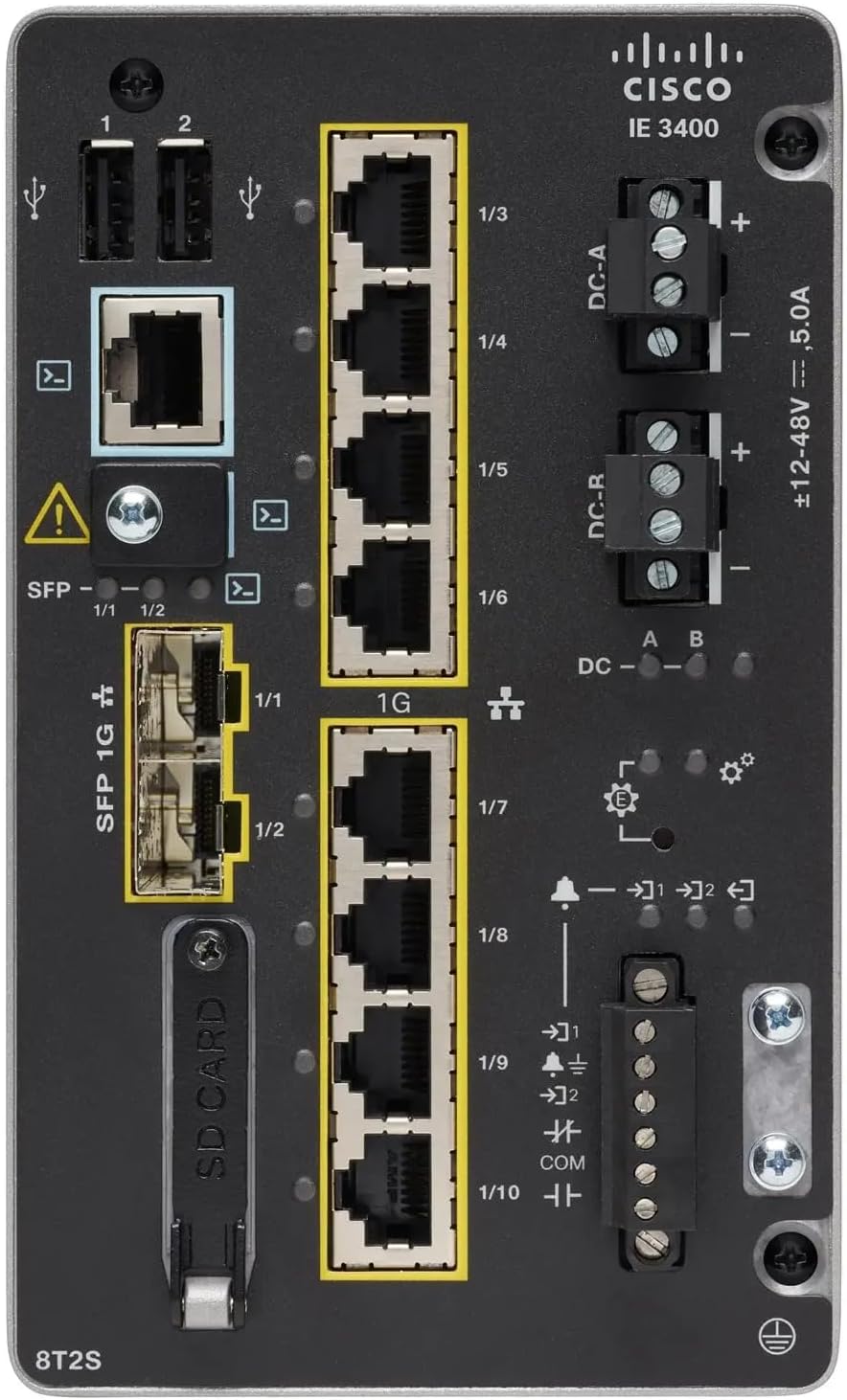
మూర్తి 1: Front Panel Layout of the Cisco IE-3400-8T2S-E Switch
4.1. Front Panel Components Description
- USB Ports (1, 2): Two USB ports for connecting external devices or for configuration.
- కన్సోల్ పోర్ట్: An RJ45 console port for local management and initial configuration.
- SFP 1G Ports (1/1, 1/2): Two Small Form-Factor Pluggable (SFP) ports supporting 1 Gigabit Ethernet for fiber optic connections.
- 1G Ethernet Ports (1/3 - 1/10): Eight 1 Gigabit Ethernet RJ45 ports for standard network connections.
- DC Power Inputs (DC-A, DC-R): Redundant DC power input terminals, supporting a voltage range of ±12-48V at 5.0A.
- గ్రౌండింగ్ స్క్రూ: Terminal for connecting the chassis to earth ground.
- SD కార్డ్ స్లాట్: Slot for an SD card, typically used for configuration backup or software storage.
- Alarm/Relay Ports (1/9, 1/10): Terminals for connecting external alarm systems or relay controls.
- LED సూచికలు: Various LEDs indicating power status (DC A/B), system status, link/activity for ports, and alarm status.
5. సెటప్
5.1. స్విచ్ మౌంట్ చేయడం
The IE3400 series switches are designed for industrial environments and typically support DIN rail or wall mounting. Refer to the specific mounting instructions provided with your mounting kit for detailed steps.
5.2. కనెక్ట్ పవర్
- కనెక్ట్ చేసే ముందు పవర్ సోర్స్ ఆఫ్లో ఉందని నిర్ధారించుకోండి.
- Connect the DC power cables to the DC-A and/or DC-R terminal blocks, observing polarity (+ and -). The switch supports redundant power inputs.
- Connect the grounding wire to the grounding screw on the front panel.
- Once all connections are secure, apply power to the switch. The DC-A and/or DC-B LEDs should illuminate.
5.3. నెట్వర్క్ కనెక్షన్లు
- ఈథర్నెట్ పోర్ట్లు: Connect standard RJ45 Ethernet cables from your network devices to the 1G Ethernet ports (1/3 - 1/10).
- SFP పోర్ట్లు: Insert compatible SFP transceivers into the SFP 1G ports (1/1, 1/2) and connect fiber optic cables as required.
- కన్సోల్ పోర్ట్: For initial configuration, connect a console cable from your management workstation to the RJ45 console port.
6. ఆపరేటింగ్ సూచనలు
6.1. ప్రారంభ పవర్-అప్
Upon applying power, the switch will perform a power-on self-test (POST). The system LED will indicate the boot status. Once the boot process is complete, the switch will be ready for configuration.
6.2. Configuration Access
The switch can be configured via the console port using a terminal emulator or remotely via Telnet/SSH once an IP address is assigned. Refer to the Cisco IOS documentation for detailed configuration commands and procedures.
6.3. LED సూచికలు
Monitor the LED indicators on the front panel to understand the switch's operational status:
- DC-A/DC-B LEDs: Indicate the status of the primary and redundant DC power inputs.
- సిస్టమ్ LED: Indicates the overall operational status of the switch (e.g., green for normal operation, amber for warning, red for fault).
- లింక్/కార్యాచరణ LED లు (ఒక్కో పోర్ట్కు): Indicate network link status and data activity on each Ethernet and SFP port.
- అలారం LED: Illuminates when a critical system alarm is triggered.
7. నిర్వహణ
7.1. శుభ్రపరచడం
స్విచ్ యొక్క బాహ్య భాగాన్ని మెత్తటి, పొడి వస్త్రంతో కాలానుగుణంగా శుభ్రం చేయండి. ద్రవ లేదా ఏరోసోల్ క్లీనర్లను ఉపయోగించవద్దు. వెంటిలేషన్ ఓపెనింగ్లు దుమ్ము మరియు శిధిలాలు లేకుండా చూసుకోండి.
7.2. ఫర్మ్వేర్ నవీకరణలు
Regularly check the Cisco support website for the latest firmware updates. Applying updates can improve performance, add features, and address security vulnerabilities. Follow Cisco's official procedures for firmware upgrades.
7.3. పర్యావరణ పరిగణనలు
Ensure the switch operates within its specified temperature and humidity ranges. Proper airflow around the device is crucial for heat dissipation.
8. ట్రబుల్షూటింగ్
ఈ విభాగం సాధారణ సమస్యలకు ప్రాథమిక ట్రబుల్షూటింగ్ దశలను అందిస్తుంది.
8.1. పవర్ లేదు
- Verify that the power source is active and the power cables are securely connected to the DC-A/DC-R terminals.
- Check the DC-A/DC-B LEDs. If they are off, there is no power or a power supply issue.
8.2. No Network Link
- Ensure Ethernet or fiber optic cables are properly connected to both the switch port and the connected device.
- Check the Link/Activity LED for the specific port. If it is off, there is no link.
- కనెక్ట్ చేయబడిన పరికరం ఆన్ చేయబడి సరిగ్గా పనిచేస్తుందని ధృవీకరించండి.
8.3. System Alarm
- If the Alarm LED is illuminated, consult the Cisco IOS documentation for specific alarm codes and their meanings.
- Check system logs via the console or network management interface for detailed error messages.
9. స్పెసిఫికేషన్లు
| ఫీచర్ | స్పెసిఫికేషన్ |
|---|---|
| మోడల్ | IE-3400-8T2S-E |
| తయారీదారు | సిస్కో |
| ఈథర్నెట్ పోర్ట్స్ | 8 x 1 Gigabit RJ45 |
| SFP పోర్ట్లు | 2 x 1 Gigabit SFP |
| ఇంటర్ఫేస్ రకం | RJ45, SFP, PoE, PoE+ (model dependent) |
| పవర్ ఇన్పుట్ | ±12-48V DC, 5.0A (Redundant) |
| ఉత్పత్తి కొలతలు | 36 x 9 x 55 సెం.మీ |
| వస్తువు బరువు | 2.28 కిలోలు |
| అనుకూల పరికరాలు | డెస్క్టాప్, ల్యాప్టాప్, ప్రింటర్ |
| UPC | 703670760433 |
10. వారంటీ మరియు మద్దతు
This product is offered as an Amazon Renewed item. Warranty and return policies are typically managed by the reseller (Amazon Renewed) for a specified period. Please refer to your purchase documentation or contact Amazon Renewed support for details regarding your specific warranty coverage.
For technical documentation, software downloads, and advanced support for the Cisco IE-3400-8T2S-E switch, please visit the official Cisco support website and search for your specific model.


