1. పరిచయం
Welcome to the CUBOT GT1 Smartwatch user manual. This guide provides essential information for setting up, operating, maintaining, and troubleshooting your new smartwatch. The CUBOT GT1 is designed for outdoor enthusiasts, featuring a durable zinc alloy casing, high-precision dual-frequency GPS, a 1.43-inch HD AMOLED display, and comprehensive health monitoring capabilities.
2. సెటప్
2.1 ప్యాకేజీ విషయాలు
- CUBOT GT1 Smartwatch
- ఛార్జింగ్ కేబుల్
- వినియోగదారు మాన్యువల్ (ఈ పత్రం)
2.2 ప్రారంభ ఛార్జింగ్
Before first use, fully charge your CUBOT GT1 Smartwatch. Connect the provided charging cable to the charging port on the back of the watch and to a standard USB power adapter (not included). The watch will display a charging indicator. A full charge can take approximately 2-3 hours.
Note: The watch features a 480 mAh high-voltage polymer battery. A single charge can last up to 90 days in standby mode, 20-30 days with normal daily use, and up to 22 hours with continuous GPS activation.
2.3 మీ స్మార్ట్ఫోన్తో జత చేయడం
- Download the official CUBOT smartwatch application from your smartphone's app store (compatible with Android 9.0+ and iOS 9.0+).
- మీ స్మార్ట్ఫోన్లో బ్లూటూత్ ప్రారంభించబడిందని నిర్ధారించుకోండి.
- Open the CUBOT app and follow the on-screen instructions to create an account or log in.
- యాప్లో 'పరికరాన్ని జోడించు' లేదా 'కొత్త పరికరాన్ని జత చేయి' ఎంచుకోండి.
- The app will search for your CUBOT GT1. Select it from the list of available devices.
- మీ స్మార్ట్ఫోన్ మరియు స్మార్ట్వాచ్ రెండింటిలోనూ జత చేసే అభ్యర్థనను నిర్ధారించండి.
Once paired, the watch will synchronize data and notifications with your smartphone.
3. ఆపరేటింగ్ సూచనలు
3.1 ప్రాథమిక నియంత్రణలు
The CUBOT GT1 features a 1.43-inch HD AMOLED touchscreen and two physical buttons:
- టచ్స్క్రీన్: Swipe to navigate menus, tap to select, swipe down for quick settings, swipe up for notifications.
- పవర్ బటన్: Press to wake the screen, return to the main watch face, or access the main menu.
- కస్టమ్ బటన్: Configurable for quick access to a specific function (e.g., sport mode). Long press for stopwatch.
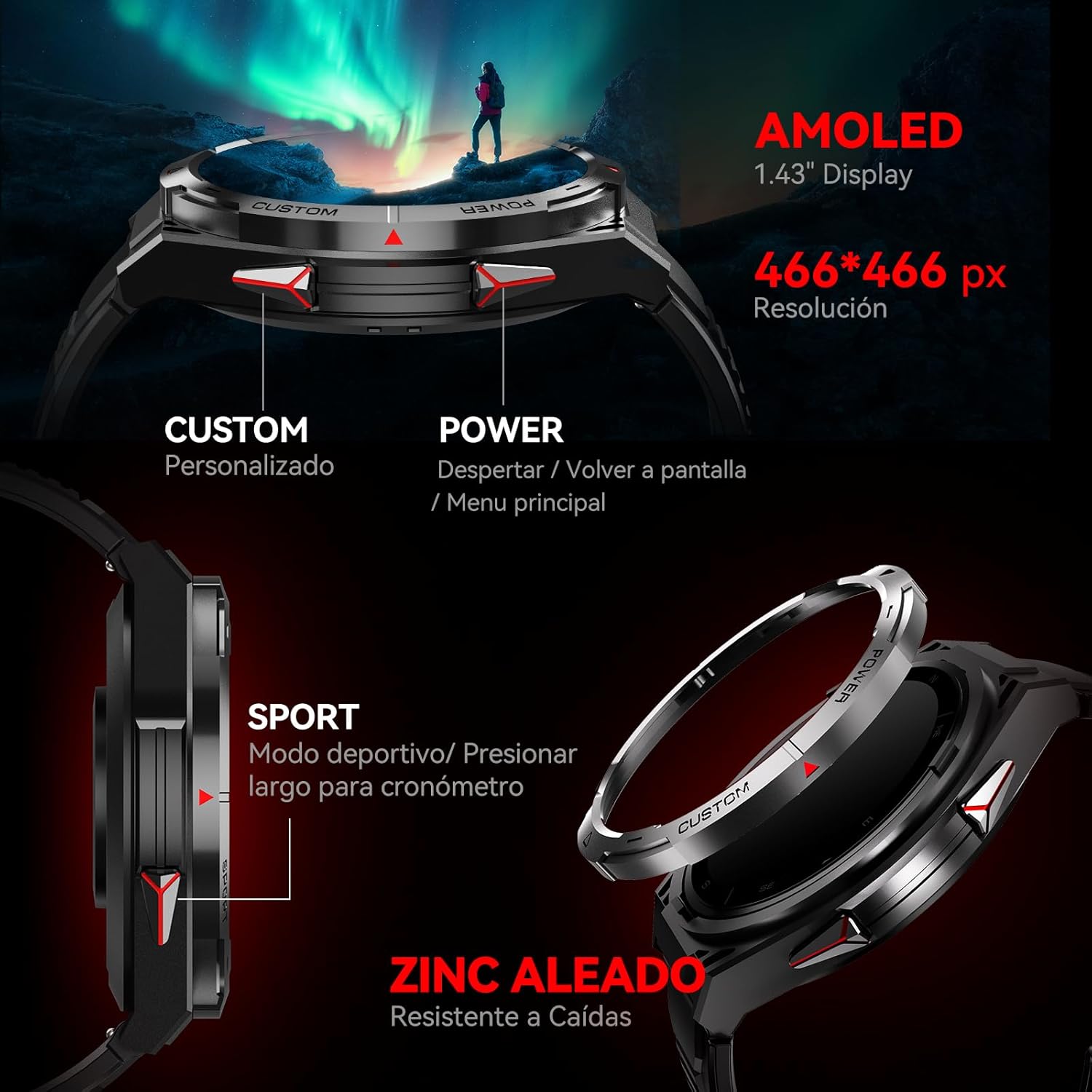
చిత్రం: వైపు view of the CUBOT GT1 Smartwatch, highlighting the 'CUSTOM' and 'POWER' buttons and indicating the 1.43-inch AMOLED display with 466x466 pixel resolution.
3.2 GPS పనితనం
The smartwatch integrates a dual-frequency L1+L5 GPS system for high-precision positioning. This system supports features such as:
- రియల్ టైమ్ ట్రాకింగ్: Calibrates exercise routes and distances.
- Return-to-Start: Guides you back to your starting point via the same path or a straight line.
- Environmental Resilience: Provides reliable positioning in various environments.

Image: The CUBOT GT1 Smartwatch displaying a GPS tracking map on its screen, with satellites in the background, illustrating its dual-frequency GPS precision for navigation.
3.3 స్పోర్ట్ మోడ్లు
The GT1 offers over 150 built-in sport modes. It utilizes the professional Savy sports algorithm and can automatically recognize 6 common sport modes. Each mode provides detailed exercise data to help users train scientifically.
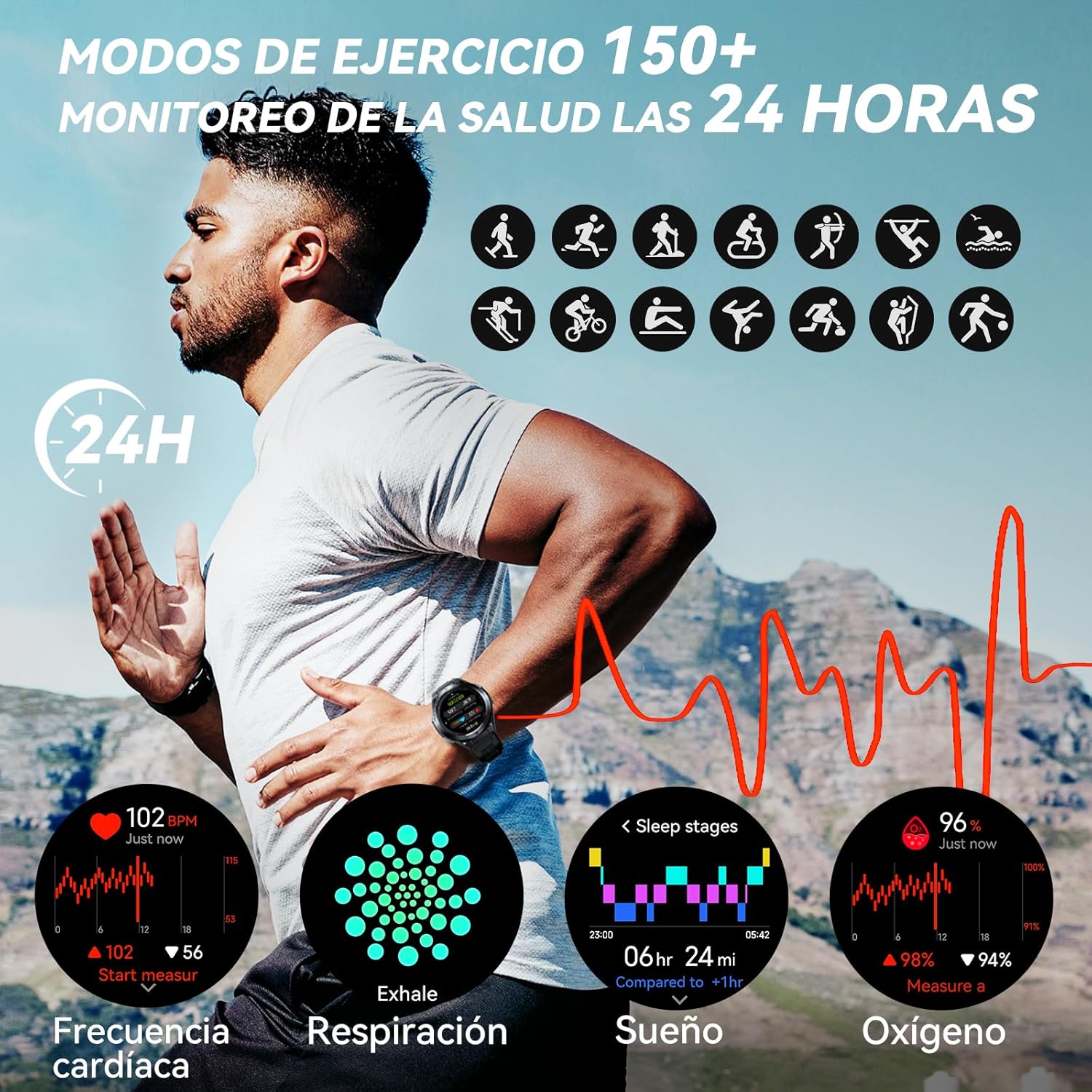
Image: A visual representation of various sport modes icons and health monitoring graphs for heart rate, respiration, sleep, and blood oxygen, indicating 24-hour tracking.
3.4 ఆరోగ్య పర్యవేక్షణ
The smartwatch provides comprehensive 24-hour health monitoring through scientific algorithms, including:
- హృదయ స్పందన రేటు పర్యవేక్షణ
- Blood Oxygen Saturation (SpO2) tracking
- Sleep Data analysis
- Real-time Pressure detection
3.5 నోటిఫికేషన్లు మరియు కాల్లు
Connect your smartwatch to your smartphone via the app to receive real-time notifications for incoming calls, text messages, and social media alerts (e.g., Facebook, Instagram, Twitter). You can answer or reject calls directly from the watch.

Image: The CUBOT GT1 Smartwatch displaying various communication features, including WhatsApp notifications, AI assistant interaction, Bluetooth call handling, and an SOS call screen.
3.6 అదనపు ఫీచర్లు
The CUBOT GT1 offers several other convenient functions:
- సంగీత నియంత్రణ: మీ స్మార్ట్ఫోన్లో మ్యూజిక్ ప్లేబ్యాక్ని నియంత్రించండి.
- కెమెరా రిమోట్: మీ స్మార్ట్ఫోన్ కెమెరాను రిమోట్గా ట్రిగ్గర్ చేయండి.
- వాతావరణ సూచన: View ప్రస్తుత వాతావరణ పరిస్థితులు.
- నిశ్చల హెచ్చరిక: నిష్క్రియాత్మక కాలాల తర్వాత కదలమని మీకు గుర్తు చేస్తుంది.
- SOS బటన్: For emergency situations (refer to app settings for configuration).
- పర్యావరణ సెన్సార్లు: Includes atmospheric pressure, altitude, and compass.

Image: A collage of various smartwatch functions, including an 'All In One Smartwatch' screen showing app icons, music control, sedentary alert, camera control, and weather display.
4. నిర్వహణ
4.1 నీటి నిరోధకత
The CUBOT GT1 is water-resistant up to 5 ATM (50 meters), making it suitable for swimming. However, it is crucial to follow these guidelines:
- After exposure to water, especially deep water or corrosive liquids like seawater, activate the drainage function on the watch. This function vibrates the watch to expel water from the speaker and microphone holes.
- Always drain and dry the device thoroughly after use in water.
- Store the watch in a dry place to prolong its lifespan.
- గడియారాన్ని వేడి నీరు, ఆవిరి లేదా అధిక పీడన నీటి జెట్లకు గురిచేయకుండా ఉండండి.

Image: The CUBOT GT1 Smartwatch submerged in water, illustrating its 5 ATM water resistance. Additional icons show IP69K dustproof rating and resistance to drops, along with atmospheric pressure, altitude, and compass features.
4.2 శుభ్రపరచడం
Regularly clean your smartwatch and strap to prevent skin irritation and maintain functionality:
- గడియారం మరియు పట్టీని మృదువైన, d వస్త్రంతో తుడవండి.amp, మెత్తటి వస్త్రం.
- కఠినమైన రసాయనాలు, రాపిడి క్లీనర్లు లేదా ద్రావకాలను ఉపయోగించవద్దు.
- ఛార్జింగ్ చేసే ముందు ఛార్జింగ్ కాంటాక్ట్లు శుభ్రంగా మరియు పొడిగా ఉన్నాయని నిర్ధారించుకోండి.
4.3 బ్యాటరీ సంరక్షణ
- బ్యాటరీ జీవితకాలం క్షీణించే తీవ్రమైన ఉష్ణోగ్రతలను నివారించండి.
- గడియారాన్ని ఎక్కువసేపు పూర్తిగా డిస్చార్జ్ చేసి ఉంచవద్దు.
- If the watch will not be used for a long time, charge it to about 50% before storing.

Image: The back of the CUBOT GT1 Smartwatch showing the heart rate sensor and charging contacts, with text detailing battery life: 90 days standby, 25 days daily, 22 hours continuous GPS, and 10 days frequent use, powered by a 480mAh battery.
5. ట్రబుల్షూటింగ్
- గడియారం ఆన్ కావడం లేదు: వాచ్ పూర్తిగా ఛార్జ్ అయ్యిందని నిర్ధారించుకోండి. దానిని ఛార్జింగ్ కేబుల్ మరియు పవర్ సోర్స్కి కనెక్ట్ చేయండి.
- స్మార్ట్ఫోన్తో జత చేయలేము:
- మీ ఫోన్ మరియు వాచ్లో బ్లూటూత్ ప్రారంభించబడిందని నిర్ధారించుకోండి.
- Make sure the CUBOT app is installed and running.
- వాచ్ మరియు మీ స్మార్ట్ఫోన్ రెండింటినీ రీస్టార్ట్ చేయండి.
- వాచ్ ఇప్పటికే మరొక పరికరంతో జత చేయబడిందో లేదో తనిఖీ చేయండి.
- సరికాని ఆరోగ్య డేటా: మీ మణికట్టు మీద వాచ్ గట్టిగా ధరించేలా చూసుకోండి, మరీ బిగుతుగా లేదా మరీ వదులుగా ఉండకూడదు. వాచ్ వెనుక ఉన్న సెన్సార్ను శుభ్రం చేయండి.
- GPS సిగ్నల్ సమస్యలు: మీరు స్పష్టమైన వాతావరణం ఉన్న బహిరంగ ప్రదేశంలో ఉన్నారని నిర్ధారించుకోండి view of the sky. GPS performance can be affected by buildings, dense foliage, or adverse weather.
- స్క్రీన్ స్పందించడం లేదు: Try restarting the watch by long-pressing the power button. If unresponsive, allow the battery to fully drain and then recharge.
- Water damage after swimming: Although the watch is water-resistant, improper drainage or exposure to corrosive liquids can cause issues. Always activate the drainage function and dry thoroughly after water exposure. If issues persist, contact support.
6. స్పెసిఫికేషన్లు
| ఫీచర్ | స్పెసిఫికేషన్ |
|---|---|
| బ్రాండ్ | CUBOT |
| మోడల్ | GT1 |
| ప్రదర్శన పరిమాణం | 1.43 అంగుళాలు |
| ప్రదర్శన రకం | AMOLED |
| RAM | 256 MB |
| బ్యాటరీ కెపాసిటీ | 480 మిల్లీamp గంటలు |
| సగటు బ్యాటరీ జీవితం | 7 days (normal use), up to 90 days (standby), 22 hours (continuous GPS) |
| కనెక్టివిటీ | బ్లూటూత్ |
| GPS | Integrated GPS (Dual-frequency L1+L5) |
| నీటి నిరోధకత | 5 ATM (50 మీటర్లు) |
| ప్రత్యేక లక్షణాలు | SOS Button, GPS, Phone Calls, Notifications, Music Player, Touchscreen |
| అనుకూల పరికరాలు | స్మార్ట్ఫోన్ (ఆండ్రాయిడ్ 9.0+, iOS 9.0+) |
| మౌంటు ఉపకరణాలు | ఛార్జింగ్ కేబుల్ |
7. వారంటీ మరియు మద్దతు
7.1 వారంటీ సమాచారం
For detailed warranty information, please refer to the warranty card included with your product packaging or the purchase documentation provided by your retailer. Keep your proof of purchase for any warranty claims.
7.2 కస్టమర్ మద్దతు
If you encounter any issues or have questions not covered in this manual, please visit the official CUBOT website or contact their customer support through the contact information provided on their webసైట్ లేదా మీ కొనుగోలు వేదిక.


