పరిచయం
Thank you for choosing the HIFIMAN GOLDENWAVE GA-10 Desktop Tube Headphone Amplifier. This manual provides essential information for the proper setup, operation, and maintenance of your device. Please read it thoroughly before use to ensure optimal performance and longevity.
The GA-10 is designed to deliver a delicate and clear sound experience, utilizing carefully selected vacuum tubes and components. It features a SEPP architecture and incorporates world-renowned ECC83/12AX7 and EL84 vacuum tubes. Its robust power supply, including a shielded 120W transformer and independent low-noise voltage regulator circuits, contributes to its exceptional clarity.
ముఖ్యమైన భద్రతా సమాచారం
To prevent accidents and choking hazards, ensure that the product, accessories, and packaging parts are kept beyond the reach of children and pets.
This product contains magnetic components and generates magnetic fields which may interfere with pacemakers and implanted defibrillators. Consult a medical professional if you have such devices and concerns.
Always disconnect the power cord before cleaning or servicing the unit. Do not expose the unit to moisture or extreme temperatures.
ప్యాకేజీ విషయాలు
దయచేసి ఈ క్రింది అంశాల కోసం ప్యాకేజీని తనిఖీ చేయండి:
- HIFIMAN GOLDENWAVE GA-10 Headphone Ampజీవితకాలం
- పవర్ కేబుల్
- వినియోగదారు మాన్యువల్ (ఈ పత్రం)
If any items are missing or damaged, please contact your retailer or HIFIMAN customer support.
ఉత్పత్తి ముగిసిందిview
ముందు ప్యానెల్
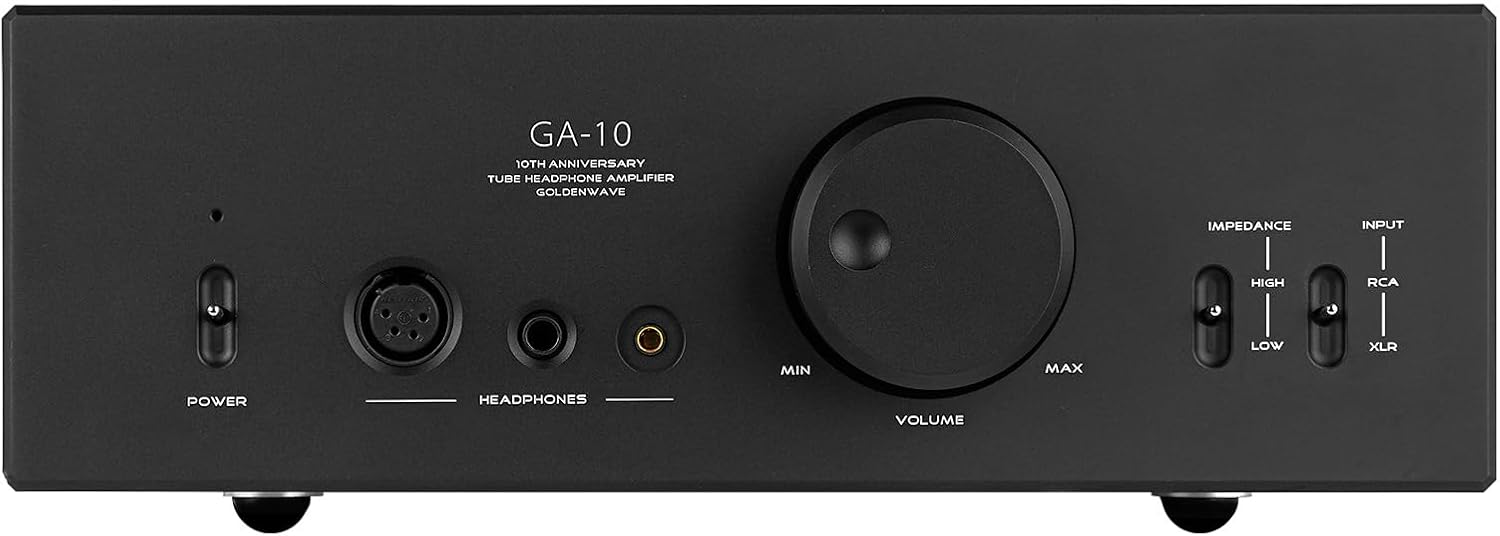
చిత్ర వివరణ: ఒక ఫ్రంట్ view of the HIFIMAN GOLDENWAVE GA-10 desktop tube headphone amplifier. The front panel is black with white text. From left to right, it features a power toggle switch, an XLR 4-Pin balanced output, a 6.35mm single-ended output, a 4.4mm balanced output, a large central volume control knob, and two toggle switches on the right for impedance matching (High/Low) and input selection (RCA/XLR).
- పవర్ స్విచ్: టోగుల్ చేస్తుంది ampజీవితకాలం ఆన్ లేదా ఆఫ్.
- XLR 4-Pin Balanced Output: For connecting headphones with a 4-pin XLR balanced connector.
- 6.35mm సింగిల్-ఎండ్ అవుట్పుట్: For connecting headphones with a standard 6.35mm (1/4 inch) single-ended connector.
- 4.4mm సమతుల్య అవుట్పుట్: For connecting headphones with a 4.4mm balanced connector.
- వాల్యూమ్ నియంత్రణ: అవుట్పుట్ వాల్యూమ్ స్థాయిని సర్దుబాటు చేస్తుంది.
- Output Impedance Matching Switch (High/Low): Selects the appropriate impedance setting for your headphones.
- Input Selector Switch (RCA/XLR): Selects between RCA and XLR input sources.
వెనుక ప్యానెల్

చిత్ర వివరణ: ఒక వెనుక view of the HIFIMAN GOLDENWAVE GA-10 desktop tube headphone amplifier. The rear panel is black. On the left, there are two XLR input ports (L and R) and two RCA input ports (L and R). On the right, there is an IEC power inlet with an integrated fuse holder and a main power rocker switch. Text indicates voltage selection (110-115V AC 50/60Hz and 220V AC 50/60Hz) and safety warnings.
- Signal Input (XLR L/R): Balanced audio input ports.
- Signal Input (RCA L/R): Unbalanced audio input ports.
- Power Plug/Switch: IEC power inlet for connecting the power cable and main power rocker switch.
- వాల్యూమ్tagఇ సెలెక్టర్: Allows selection between 110-115V and 220V AC power. Ensure this is set correctly for your region before connecting power.
సెటప్ సూచనలు
- అన్ప్యాకింగ్: Carefully remove the GA-10 amplifier from its packaging. Retain all packaging materials for future transport or storage.
- ప్లేస్మెంట్: ఉంచండి amplifier on a stable, level surface with adequate ventilation. Avoid placing it near heat sources or in direct sunlight.
- వాల్యూమ్tagఇ ఎంపిక: పవర్ కేబుల్ను కనెక్ట్ చేయడానికి ముందు, వాల్యూమ్ను ధృవీకరించండిtage selector on the rear panel is set to the correct voltage for your region (110-115V or 220V). Incorrect voltage ఎంపిక యూనిట్కు హాని కలిగించవచ్చు.
- ఆడియో మూలాన్ని కనెక్ట్ చేయండి:
- For RCA input: Connect your audio source (e.g., DAC, preamplifier) to the RCA L/R input jacks on the rear panel using high-quality RCA cables.
- For XLR input: Connect your audio source to the XLR L/R input jacks on the rear panel using high-quality XLR cables.
- పవర్ కనెక్ట్ చేయండి: Insert the provided power cable into the IEC power inlet on the rear panel, then plug the other end into a suitable AC power outlet. Ensure the main power rocker switch on the rear is in the OFF position before plugging into the wall.
- ప్రారంభ పవర్ ఆన్: Flip the main power rocker switch on the rear panel to the ON position. Then, press the front panel power button. The amplifier will undergo a brief warm-up period.
ఆపరేటింగ్ సూచనలు
- హెడ్ఫోన్లను కనెక్ట్ చేయండి: Plug your headphones into one of the front panel output jacks (XLR 4-Pin, 6.35mm, or 4.4mm balanced). Ensure the volume knob is set to minimum before connecting headphones.
- ఇన్పుట్ని ఎంచుకోండి: Use the Input Selector switch on the front panel to choose between RCA or XLR input, matching your connected audio source.
- Set Impedance Matching: Use the Output Impedance Matching switch (High/Low) to select the appropriate setting for your headphones. Refer to your headphone's specifications for guidance. Generally, higher impedance headphones benefit from the "High" setting.
- వాల్యూమ్ సర్దుబాటు: Slowly turn the Volume Control knob clockwise to increase the sound level to your desired listening volume. Avoid excessively high volumes to prevent hearing damage.
- సన్నాహక కాలం: For optimal sound quality, allow the amplifier to warm up for approximately 15-30 minutes after powering on. Tube amplifiers often sound best after reaching their operating temperature.
- పవర్ ఆఫ్: When finished listening, turn the Volume Control knob to minimum, then press the front panel power button to turn off the amplifier. For extended periods of non-use, also flip the main power rocker switch on the rear panel to OFF and disconnect the power cable.
నిర్వహణ
- శుభ్రపరచడం: వెలుపలి భాగాన్ని శుభ్రం చేయడానికి మృదువైన, పొడి వస్త్రాన్ని ఉపయోగించండి amplifier. Do not use liquid cleaners, aerosols, or abrasive materials, as these can damage the finish or internal components.
- ట్యూబ్ ప్రత్యామ్నాయం: The vacuum tubes (ECC83/12AX7 and EL84) have a finite lifespan. If you notice a degradation in sound quality or tube failure, contact HIFIMAN support for guidance on replacement. Tube replacement should only be performed by qualified personnel or with explicit instructions from the manufacturer.
- వెంటిలేషన్: Ensure that the ventilation slots on the ampవేడెక్కకుండా నిరోధించడానికి లైఫైయర్లు అడ్డుపడవు.
- ఫ్యూజ్ ప్రత్యామ్నాయం: The power inlet on the rear panel contains a fuse. If the unit does not power on, check the fuse. Always replace with a fuse of the same type and rating (e.g., 2A). Disconnect power before attempting fuse replacement.
ట్రబుల్షూటింగ్
| సమస్య | సాధ్యమైన కారణం | పరిష్కారం |
|---|---|---|
| శక్తి లేదు |
|
|
| శబ్దం లేదు |
|
|
| వక్రీకరించిన ధ్వని |
|
|
స్పెసిఫికేషన్లు
| మోడల్ | GA-10 |
| ఫ్రీక్వెన్సీ రెస్పాన్స్ | 20-24KHz, ±0.5dB@1KHz |
| THD+N | 0.001%@1kHz/300Ω |
| పవర్ అవుట్పుట్ | 3000mW/300Ω; 600mW/32Ω @1KHz |
| మొత్తం విద్యుత్ వినియోగం | 70W |
| Dimensions (L*H*W) | 330x110x380mm (protrusions not included) |
| Product Dimensions (US) | 12.99 x 14.96 x 4.33 అంగుళాలు |
| వస్తువు బరువు | 26.2 పౌండ్లు |
| తయారీదారు | హిఫిమాన్ |
వారంటీ మరియు మద్దతు
For warranty information and technical support, please refer to the official HIFIMAN webసైట్ లేదా మీ స్థానిక పంపిణీదారుని సంప్రదించండి. వారంటీ క్లెయిమ్ల కోసం కొనుగోలు రుజువుగా మీ కొనుగోలు రసీదును ఉంచండి.
తయారీదారు: హిఫిమాన్ ఎలక్ట్రానిక్స్ కార్పొరేషన్
చిరునామా: 2602 బెల్tagh Ave, New York Bellmore 11710
ఇమెయిల్: service@hifiman.com
ఫోన్: +12014434626
For EU/UK support, please refer to the contact details provided on the product packaging or official webసైట్.


