1. పరిచయం
Welcome to the ShiftCam SnapStand Max instruction manual. This guide provides essential information for setting up, operating, and maintaining your magnetic selfie stick and tripod. The SnapStand Max is designed to enhance your smartphone photography and videography with its versatile features and compact design.

Image: The SnapStand Max offers a seamless transition between handheld and hands-free use.
2. ఉత్పత్తి ముగిసిందిview
The ShiftCam SnapStand Max is a multi-functional accessory for smartphones, combining the utility of a selfie stick with the stability of a tripod. Its key features include:
- Compact & Extendable: Folds to 11 inches for portability and extends up to 70 inches for wide shots.
- Versatile Dual-Function Design: Functions as both a stable stand for live streaming, video calls, and time-lapse photography, and as an extendable selfie stick for group photos.
- Effortless Magnetic & Secure Clip Mount: Features a seamless magnetic mount for MagSafe-enabled devices and includes a silicone SnapClamp for enhanced stability.
- Removable Bluetooth Remote: A detachable remote allows for easy photo and video capture from a distance.
- Versatile Tilt Head: A built-in 200-degree tilt head provides flexible angle adjustments for various shooting perspectives.
- Expandable SnapSeries Ecosystem: Compatible with other ShiftCam SnapSeries accessories for expanded creative potential.

Image: The SnapStand Max in selfie stick configuration, holding a smartphone.

Image: The SnapStand Max is designed for compact and portable storage.
3. భాగాలు
The ShiftCam SnapStand Max package includes the following items:
- ShiftCam SnapStand Max (Selfie Stick & Tripod)
- Removable Bluetooth Remote
- Silicone SnapClamp (for added phone stability)
Note: A USB-C charger is required for the SnapStudio Light (if purchased separately) and is not included with the SnapStand Max.

Image: The items included in the SnapStand Max package.
4. సెటప్
4.1 Unfolding and Extending
- To unfold the SnapStand Max, gently pull the magnetic phone mount away from the handle until it locks into position.
- To extend the selfie stick, pull the telescopic pole upwards from the handle. The SnapStand Max can extend up to 70 inches.
- To deploy the tripod legs, push the button located at the base of the handle. The legs will spring open, providing a stable base.
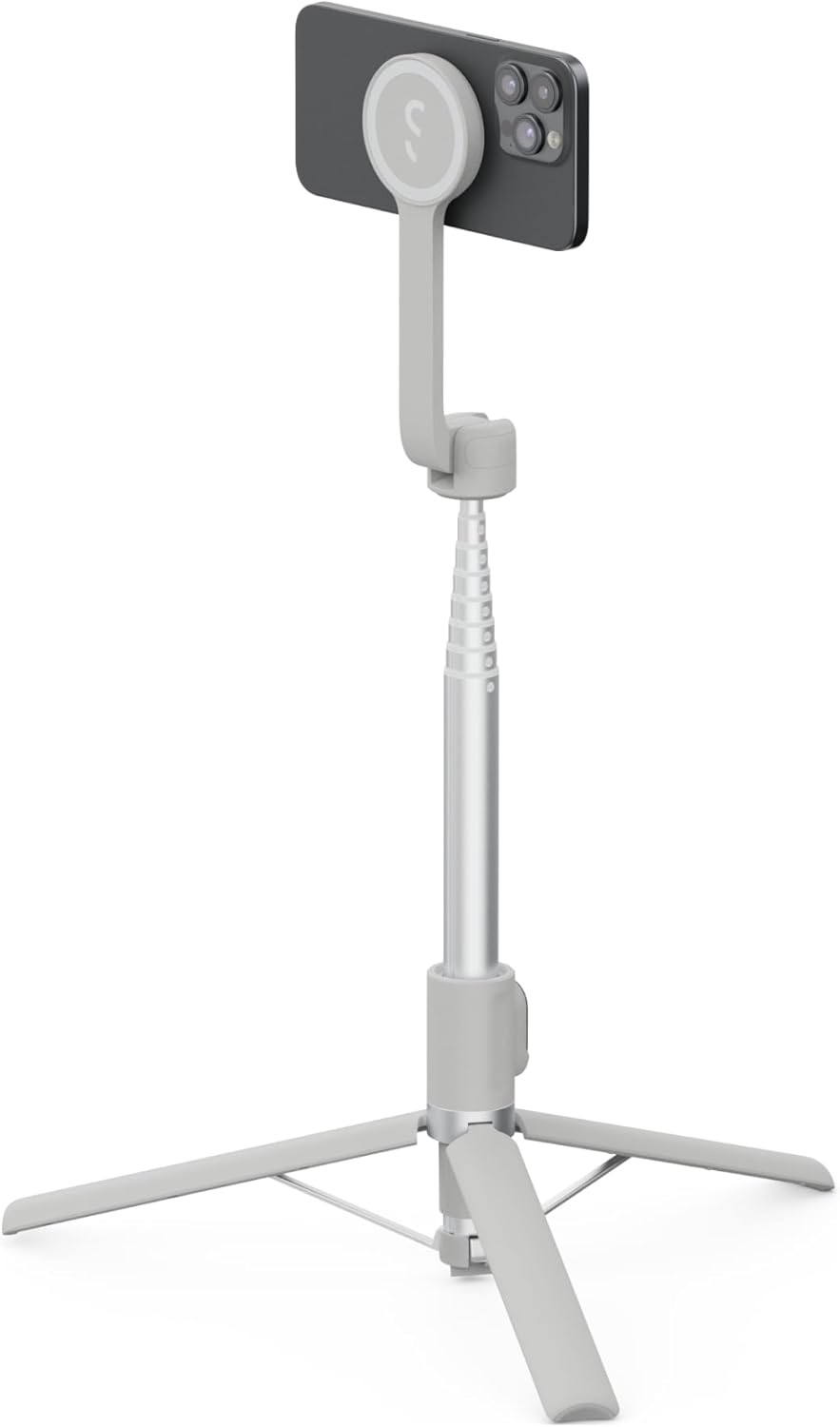
Image: The SnapStand Max fully extended and set up as a tripod.
4.2 మీ స్మార్ట్ఫోన్ను అటాచ్ చేయడం
- Magnetic Attachment (MagSafe compatible): Align your MagSafe-enabled smartphone or MagSafe case with the magnetic mount on the SnapStand Max. The magnets will securely hold your phone in place.
- Using the SnapClamp: For additional security or with non-MagSafe devices, attach the silicone SnapClamp around your phone and the magnetic mount. This provides a firm grip, especially during active use.

Image: Securely attaching a smartphone using the magnetic mount.

Image: The MagSafe attachment allows for instant phone readiness.
4.3 బ్లూటూత్ రిమోట్ను జత చేయడం
- Remove the Bluetooth remote from its slot in the SnapStand Max handle.
- Turn on the remote by pressing and holding the button until the indicator light flashes.
- On your smartphone, go to Bluetooth settings and select "ShiftCam Remote" (or similar name) to pair.
- Once paired, the indicator light will stop flashing. You can now use the remote to trigger your phone's camera shutter.

Image: The removable Bluetooth remote integrated into the handle.

Image: The Bluetooth remote enables hands-free photo and video capture.
5. ఆపరేటింగ్ సూచనలు
5.1 సెల్ఫీ స్టిక్ గా ఉపయోగించడం
With your smartphone securely attached and the pole extended, hold the SnapStand Max by its handle. Use the Bluetooth remote to capture photos or start/stop video recording. The extendable length is ideal for capturing wider angles or group shots.

Image: The SnapStand Max is perfect for capturing solo or group selfies.
5.2 ట్రైపాడ్గా ఉపయోగించడం
Deploy the tripod legs and place the SnapStand Max on a flat, stable surface. Adjust the pole height and the tilt head to achieve your desired camera angle. This mode is suitable for stable video recording, live streaming, video calls, or time-lapse photography.

Image: The SnapStand Max provides a stable tripod for steady shots anywhere.

Image: The aluminum crossbars provide a strong, stable base.
5.3 Adjusting the Tilt Head
The SnapStand Max features a 200-degree tilt head. Gently adjust the angle of your smartphone by tilting the mount to achieve the desired perspective for your photos or videos.

Image: The versatile tilt head allows for precise angle adjustments.
6. నిర్వహణ మరియు సంరక్షణ
- శుభ్రపరచడం: Wipe the SnapStand Max with a soft, dry cloth. Avoid using harsh chemicals or abrasive materials.
- నిల్వ: When not in use, fold the SnapStand Max to its compact size and store it in a dry, cool place away from direct sunlight.
- Battery Care (Bluetooth Remote): Ensure the Bluetooth remote is charged regularly to maintain optimal performance.
7. ట్రబుల్షూటింగ్
- Bluetooth Remote Not Pairing:
- Ensure the remote is charged and turned on.
- Check your phone's Bluetooth settings to ensure it's discoverable.
- మీ ఫోన్ బ్లూటూత్ సెట్టింగ్లలో పరికరాన్ని మర్చిపోయి, తిరిగి జత చేయడానికి ప్రయత్నించండి.
- Ensure the remote is within range of your phone (typically 10 meters).
- Phone Not Securely Attached:
- For MagSafe, ensure your phone or case is MagSafe compatible.
- Always use the included SnapClamp for extra security, especially during movement or in windy conditions.
- Verify that no debris is obstructing the magnetic connection.
- త్రిపాద అస్థిరత:
- Ensure the tripod legs are fully extended and locked into position on a flat surface.
- Avoid placing the tripod on uneven or slippery ground.
8. స్పెసిఫికేషన్లు
| ఫీచర్ | వివరాలు |
|---|---|
| బ్రాండ్ | షిఫ్ట్క్యామ్ |
| మోడల్ సంఖ్య | S-AB |
| వస్తువు బరువు | 1.21 పౌండ్లు |
| ప్యాకేజీ కొలతలు | 11.61 x 3.94 x 2.36 అంగుళాలు |
| విస్తరించిన పొడవు (గరిష్టంగా) | 70 అంగుళాలు (సుమారు 178 సెం.మీ.) |
| మడత పొడవు | 11 అంగుళాలు (సుమారు 28 సెం.మీ.) |
| Tilt Head Rotation | 200 డిగ్రీలు |
| మౌంటు రకం | Magnetic (MagSafe compatible) with optional SnapClamp |
| కనెక్టివిటీ | బ్లూటూత్ (రిమోట్ కోసం) |
| అనుకూల పరికరాలు | Smartphones (Universal) |

Image: The SnapStand Max extends to 70 inches for versatile shooting.
9. వారంటీ మరియు మద్దతు
For warranty information, product support, or to contact customer service, please visit the official ShiftCam webసైట్ లేదా మీ ఉత్పత్తితో చేర్చబడిన వారంటీ కార్డ్ని చూడండి.
Official ShiftCam Store: అమెజాన్లో ShiftCam స్టోర్


