1. ఉత్పత్తి ముగిసిందిview
ది బ్లాక్view BV7300 is a rugged smartphone designed for durability and performance in challenging environments. It features dual super-bright camping lights, a large capacity battery, advanced camera systems including night vision, and robust protection against water, dust, and shocks.

చిత్రం 1.1: ముందు మరియు వెనుక view నల్లజాతికి చెందినview BV7300 Rugged Smartphone, showcasing its robust design and dual camping లైట్లు.
ముఖ్య లక్షణాలు:
- కఠినమైన డిజైన్: IP68, IP69K, and MIL-STD-810H certified for water, dust, and shock resistance.
- Dual Super-Bright Campలైట్లలో: Integrated 800 LM lights with up to 5.8 hours of continuous illumination.
- అధునాతన కెమెరా వ్యవస్థ: 50MP ISOCELL JN1 main camera, 20MP night vision camera, and 32MP front camera. Supports underwater photography and 1080p video recording.
- Massive Battery: 15000mAh battery with 45W super fast charging and 7W reverse charging capabilities.
- లీనమయ్యే ప్రదర్శన: 6.67-inch HD+ IPS display with 90Hz dynamic refresh rate and Corning Gorilla Glass 5 protection.
- శక్తివంతమైన పనితీరు: Octa-core MediaTek Helio G81 processor, ARM Mali-G52 GPU, up to 18GB RAM (6GB + 12GB expansion), and 256GB ROM with up to 2TB TF card expansion.
- కనెక్టివిటీ: Wi-Fi, Bluetooth 5.3, GSM/3G/4G LTE, GPS+GLONASS+Beidou+Galileo, NFC, OTG, USB Type-C.
- అదనపు ఫీచర్లు: Glove Mode 2.0, Face Unlock, Fingerprint Unlock, operates in extreme temperatures (-20°C to +60°C).
2. సెటప్ గైడ్
2.1 ప్యాకేజీ విషయాలు
మీరు ప్రారంభించడానికి ముందు, దయచేసి మీ ప్యాకేజీలో అన్ని అంశాలు ఉన్నాయని నిర్ధారించుకోండి:
- నలుపుview BV7300 Rugged Smartphone x1
- Separate Protective Film x1
- పవర్ అడాప్టర్ x1
- USB కేబుల్ x1
2.2 SIM కార్డ్ మరియు TF కార్డ్ ఇన్స్టాలేషన్
ది బ్లాక్view BV7300 supports either two SIM cards or one SIM card and one TF (microSD) card for expanded storage.
- పరికరం వైపున SIM కార్డ్ ట్రేని గుర్తించండి.
- ట్రేని తెరవడానికి అందించిన SIM ఎజెక్టర్ సాధనాన్ని ఉపయోగించండి.
- Carefully place your Nano-SIM card(s) and/or TF card into the designated slots on the tray. Ensure the gold contacts are facing down.
- Gently push the tray back into the device until it is flush with the body.
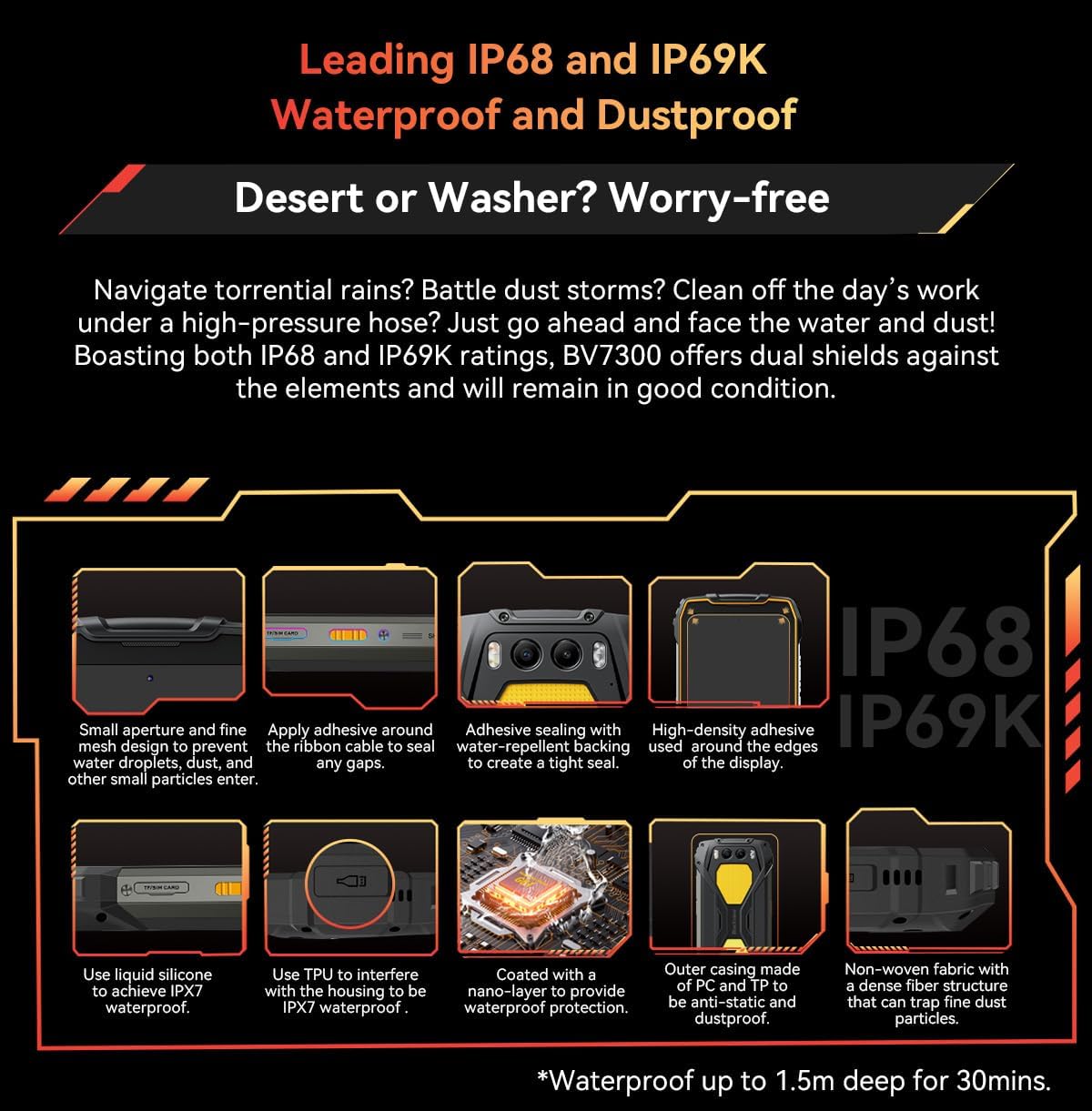
Figure 2.1: Illustration of the SIM/TF card slot and various waterproof sealing points on the Blackview BV7300.
2.3 ప్రారంభ ఛార్జింగ్
Before first use, it is recommended to fully charge your Blackview BV7300.
- USB కేబుల్ను పవర్ అడాప్టర్కు కనెక్ట్ చేయండి.
- Plug the USB Type-C end of the cable into the charging port at the bottom of the phone.
- పవర్ అడాప్టర్ను వాల్ అవుట్లెట్లోకి ప్లగ్ చేయండి.
- The charging indicator will appear on the screen. The device supports 45W super fast charging.
2.4 పవర్ చేయడం ఆన్/ఆఫ్
- పవర్ ఆన్ చేయడానికి: Press and hold the Power button (located on the right side) until the Blackview లోగో కనిపిస్తుంది.
- పవర్ ఆఫ్ చేయడానికి: పవర్ ఆప్షన్స్ మెనూ కనిపించే వరకు పవర్ బటన్ను నొక్కి పట్టుకోండి, ఆపై 'పవర్ ఆఫ్' ఎంచుకోండి.
- పునఃప్రారంభించడానికి: పవర్ ఆప్షన్స్ మెనూ కనిపించే వరకు పవర్ బటన్ను నొక్కి పట్టుకోండి, ఆపై 'పునఃప్రారంభించు' ఎంచుకోండి.
3. ఆపరేటింగ్ సూచనలు
3.1 ప్రాథమిక ఫోన్ విధులు
- కాల్స్ చేయడం: ఫోన్ యాప్ను తెరిచి, నంబర్ను నమోదు చేసి, కాల్ చిహ్నాన్ని నొక్కండి.
- సందేశాలు పంపడం: మెసేజెస్ యాప్ తెరిచి, 'చాట్ ప్రారంభించు' నొక్కండి, గ్రహీత మరియు సందేశాన్ని నమోదు చేసి, ఆపై పంపండి.
- ఇంటర్నెట్ సదుపాయం: సెట్టింగ్లు > నెట్వర్క్ & ఇంటర్నెట్ > Wi-Fi ద్వారా Wi-Fiకి కనెక్ట్ అవ్వండి లేదా సెట్టింగ్లు > నెట్వర్క్ & ఇంటర్నెట్ > మొబైల్ నెట్వర్క్ ద్వారా మొబైల్ డేటాను ప్రారంభించండి.
3.2 కెమెరా వినియోగం
The BV7300 features a versatile camera system for various scenarios.
- ప్రామాణిక ఫోటోగ్రఫీ: Open the Camera app. Use the 50MP main camera for high-resolution photos. Tap to focus, pinch to zoom.
- నైట్ విజన్ కెమెరా: Switch to the 20MP Night Vision mode within the Camera app to capture clear images in low-light or total darkness.

Figure 3.1: The 50MP Samsung ISOCELL JN1 main camera, featuring 4-in-1 Pixel Binning and Inter-scene HDR for enhanced image quality.

చిత్రం 3.2: ఉదాamples of images captured with the 20MP Night Vision Camera, demonstrating its capability in dark environments for wildlife observation, terrain features, and campsite safety checks.
- నీటి అడుగున కెమెరా: The BV7300 supports underwater photography. Ensure all ports are securely sealed before submerging the device. Use the volume buttons to control the camera functions underwater.
- వీడియో రికార్డింగ్: Select video mode in the Camera app. The phone supports super clear 1080p video recording.
3.3 Dual Camping లైట్లు
The BV7300 is equipped with two powerful 800 LM camping లైట్లు.
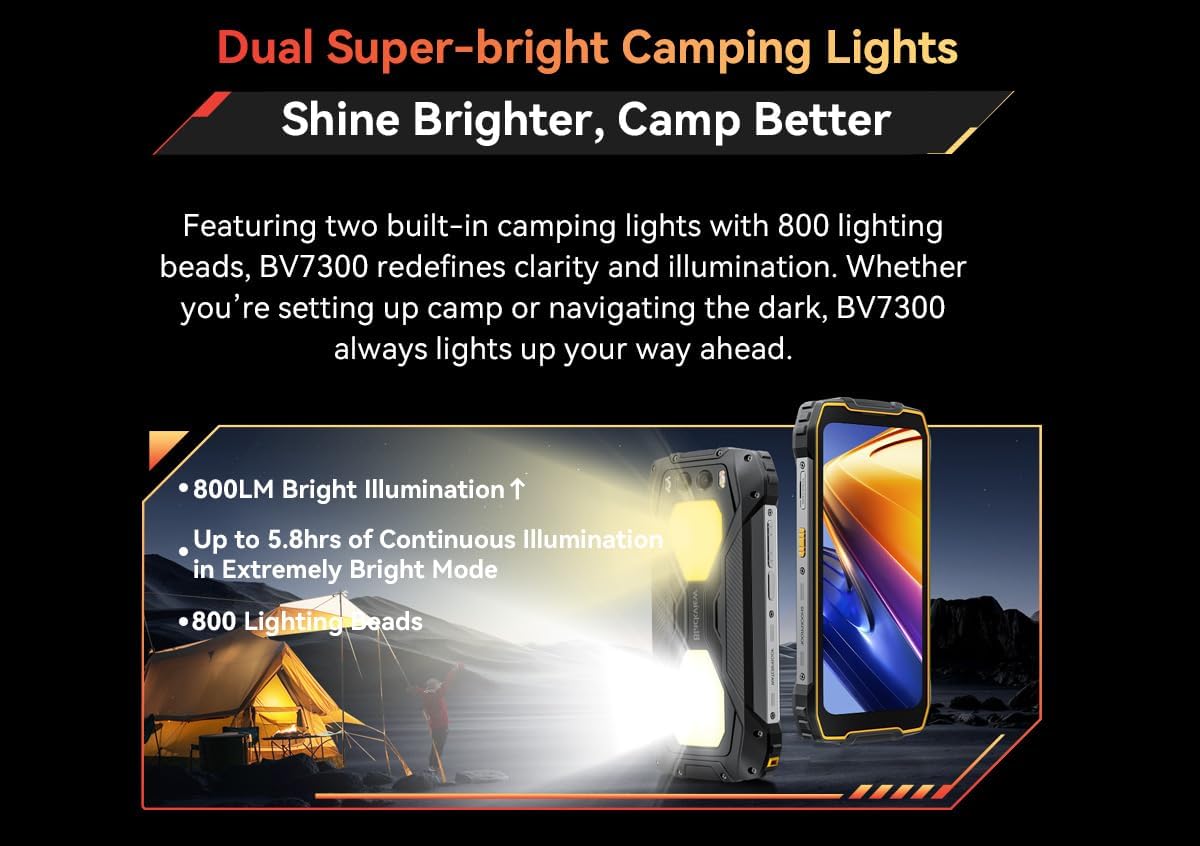
Figure 3.3: The Blackview BV7300 demonstrating its dual super-bright camping lights, providing powerful illumination for outdoor activities.
- Activating Lights: సిamping lights can typically be activated via a dedicated button or a quick setting toggle in the notification panel. Refer to your phone's specific software interface for exact controls.
- వాడుక: Ideal for illuminating campsites, navigating in darkness, or as an emergency light source.
3.4 NFC కార్యాచరణ
NFC (Near Field Communication) allows for quick data exchange and mobile payments.
- NFC ని ప్రారంభించండి: Go to Settings > Connected devices > Connection preferences > NFC and toggle it on.
- వాడుక: Tap your phone to compatible NFC tags or payment terminals to initiate actions or make payments.
3.5 భద్రతా లక్షణాలు
- వేలిముద్ర అన్లాక్: Register your fingerprints in Settings > Security & privacy > Device unlock > Fingerprint.
- ఫేస్ అన్లాక్: Set up face recognition in Settings > Security & privacy > Device unlock > Face unlock.
3.6 Glove Mode 2.0
This feature enhances touch sensitivity, allowing you to operate the screen even while wearing gloves.
- Activating Glove Mode: Look for 'Glove Mode' or 'Touch sensitivity' in your phone's display or accessibility settings.
4. నిర్వహణ
4.1 మన్నిక మరియు శుభ్రపరచడం
The BV7300 is built to be rugged, but proper care ensures its longevity.
- నీరు మరియు ధూళి నిరోధకత: The device is IP68, IP69K, and MIL-STD-810G certified. This means it can withstand immersion in water up to 1.5 meters for 30 minutes, high-pressure water jets, and dust ingress.
- Post-Exposure Care: After exposure to water, especially saltwater, rinse the phone with clean fresh water and ensure all ports are dry before charging or using accessories. Do not use high-pressure air to dry the ports.
- శుభ్రపరచడం: ఒక మృదువైన ఉపయోగించండి, డిamp పరికరాన్ని శుభ్రం చేయడానికి వస్త్రం. కఠినమైన రసాయనాలు లేదా రాపిడి పదార్థాలను నివారించండి.
4.2 బ్యాటరీ సంరక్షణ
The 15000mAh battery is designed for extended use.

Figure 4.1: The 15000mAh mega battery of the Blackview BV7300, illustrating its long-lasting power for various activities like gaming, video playback, web browsing, calls, music, and standby.
- ఛార్జింగ్: Use the original 45W fast charger for optimal charging speed and battery health. Avoid using non-certified chargers.
- రివర్స్ ఛార్జింగ్: The 7W reverse charging feature allows you to use your BV7300 as a power bank for other devices. Connect the devices using an OTG cable.
- ఉష్ణోగ్రత: Avoid exposing the phone to extreme temperatures for prolonged periods, as this can affect battery life. The phone is designed to operate between -20°C and +60°C.
4.3 సాఫ్ట్వేర్ నవీకరణలు
Regular software updates provide new features, security patches, and performance improvements.
- నవీకరణల కోసం తనిఖీ చేయండి: Go to Settings > System > System update to check for and install available updates. Ensure you have a stable internet connection and sufficient battery life before updating.
5. ట్రబుల్షూటింగ్
This section addresses common issues you might encounter with your Blackview BV7300.
5.1 సాధారణ సమస్యలు మరియు పరిష్కారాలు
- ఫోన్ ఆన్ చేయడం లేదు:
- బ్యాటరీ ఛార్జ్ అయ్యిందని నిర్ధారించుకోండి. కనీసం 10 నిమిషాలు ఛార్జర్కు కనెక్ట్ చేయండి.
- రీస్టార్ట్ చేయమని బలవంతం చేయడానికి పవర్ బటన్ను 10-15 సెకన్ల పాటు నొక్కి పట్టుకోండి.
- ఛార్జింగ్ సమస్యలు:
- Check if the charging cable and adapter are securely connected and undamaged.
- వేరే పవర్ అవుట్లెట్ని ప్రయత్నించండి.
- ఛార్జింగ్ పోర్ట్ శుభ్రంగా మరియు చెత్త లేకుండా ఉందని నిర్ధారించుకోండి.
- Network Connectivity Problems (No Signal/Wi-Fi):
- ఎయిర్ప్లేన్ మోడ్ను ఆన్ మరియు ఆఫ్ టోగుల్ చేయండి.
- ఫోన్ని రీస్టార్ట్ చేయండి.
- For mobile network, ensure your SIM card is correctly inserted and active.
- For Wi-Fi, forget the network and reconnect, or restart your Wi-Fi router.
- యాప్లు క్రాష్ అవుతున్నాయి/స్తంభింపజేస్తున్నాయి:
- యాప్ను మూసివేసి తిరిగి తెరవండి.
- Clear the app's cache and data in Settings > Apps > [App Name] > Storage & cache.
- యాప్ తాజా వెర్షన్కి అప్డేట్ చేయబడిందని నిర్ధారించుకోండి.
5.2 ఫ్యాక్టరీ రీసెట్
నిరంతరం సమస్యలు సంభవిస్తే, ఫ్యాక్టరీ రీసెట్ వాటిని పరిష్కరించగలదు. హెచ్చరిక: ఇది మీ ఫోన్లోని మొత్తం డేటాను తొలగిస్తుంది. కొనసాగే ముందు ముఖ్యమైన డేటాను బ్యాకప్ చేయండి.
- సెట్టింగ్లు > సిస్టమ్ > రీసెట్ ఎంపికలకు వెళ్లండి.
- 'మొత్తం డేటాను తొలగించు (ఫ్యాక్టరీ రీసెట్)' ఎంచుకోండి.
- మీ నిర్ణయాన్ని నిర్ధారించండి మరియు ప్రాంప్ట్ చేయబడితే మీ పిన్/నమూనా/పాస్వర్డ్ను నమోదు చేయండి.
- ఫోన్ పునఃప్రారంభించబడుతుంది మరియు రీసెట్ ప్రక్రియ ప్రారంభమవుతుంది.
6. స్పెసిఫికేషన్లు
Detailed technical specifications for the Blackview BV7300 Rugged Smartphone.
| వర్గం | స్పెసిఫికేషన్ |
|---|---|
| మోడల్ పేరు | BV7300 |
| ఆపరేటింగ్ సిస్టమ్ | ఆండ్రాయిడ్ 14 |
| కొలతలు | 186.2 x 85 x 23.5 మిమీ |
| బరువు | 528 గ్రా |
| ప్రదర్శించు | 6.67 inches HD+ IPS, 720 x 1604 resolution |
| రిఫ్రెష్ రేట్ | 90 Hz Dynamic |
| ప్రదర్శన రక్షణ | కార్నింగ్ గొరిల్లా గ్లాస్ 5 |
| ప్రాసెసర్ | Octa-Core MediaTek Helio G81, up to 2.0 GHz |
| GPU | ARM మాలి- G52 |
| RAM | 6GB RAM + 12GB Virtual RAM (up to 18GB total) |
| అంతర్గత నిల్వ (ROM) | 256GB |
| విస్తరించదగిన నిల్వ | Supports up to 2TB TF card |
| వెనుక కెమెరా | 50MP (ISOCELL JN1) Main Camera |
| నైట్ విజన్ కెమెరా | 20MP |
| ఫ్రంట్ కెమెరా | 32MP |
| వీడియో రికార్డింగ్ | 1080p Super Clear |
| బ్యాటరీ కెపాసిటీ | 15000 mAh |
| ఛార్జింగ్ | 45W Super Fast Charge |
| రివర్స్ ఛార్జింగ్ | 7W |
| స్టాండ్బై సమయం | 1368 గంటల వరకు |
| Wi-Fi | 802.11 a/b/g/n/ac |
| బ్లూటూత్ | BT 5.3 |
| సెల్యులార్ నెట్వర్క్లు | GSM/3G/4G LTE (Dual 4G Support) |
| నావిగేషన్ | GPS + GLONASS + Beidou + Galileo |
| USB పోర్ట్ | TYPE-C |
| NFC | అవును |
| OTG | అవును |
| మన్నిక రేటింగ్లు | IP68, IP69K, MIL-STD-810G |
| ఆపరేటింగ్ ఉష్ణోగ్రత | -20°C నుండి +60°C |
7. వారంటీ మరియు మద్దతు
7.1 వారంటీ సమాచారం
Please refer to the warranty card included with your product or contact your point of purchase for specific warranty terms and conditions. General warranty information is typically provided by the manufacturer or seller at the time of purchase.
7.2 కస్టమర్ మద్దతు
For technical assistance, troubleshooting beyond this manual, or service inquiries, please contact Blackview customer support through their official webమీరు పరికరాన్ని కొనుగోలు చేసిన సైట్ లేదా రిటైలర్.
You can visit the official Blackview store on Amazon for more information: నలుపుview అమెజాన్ స్టోర్


