పరిచయం
Thank you for choosing the GOBOULT Mustang Torq Wireless Earbuds. These earbuds combine iconic design with advanced audio technology, offering an exhilarating sound experience with features like 60 hours of playtime, Quad Mic ENC for clear calls, 45ms ultra-low latency for gaming, and comprehensive app support. This manual provides detailed instructions to help you get the most out of your device.

Brand Update: Please note that Boult is now GOBOULT. The product you receive may feature either logo on its packaging, but the product itself remains the same high quality.
పెట్టెలో ఏముంది
Your GOBOULT Mustang Torq Wireless Earbuds package includes the following items:
- Mustang Torq Charging Case
- Mustang Silver Earbuds (Left and Right)
- Extra Pair of Eartips (various sizes for optimal fit)
- Type-C Fast Charging Cable
- వినియోగదారు మాన్యువల్ (ఈ పత్రం)
- వారంటీ కార్డ్
- Exclusive Mustang Collectibles (5 stickers, Mustang artwork, Founders note)

ప్యాకేజీ విషయాలు: All items included in the GOBOULT Mustang Torq Earbuds retail box.
సెటప్
ప్రారంభ ఛార్జింగ్
Before first use, fully charge your GOBOULT Mustang Torq Earbuds and their charging case. Connect the provided Type-C Fast Charging Cable to the charging port on the case and a compatible USB power source. The LED indicators on the case will show the charging status. A full charge takes approximately 100 minutes.
Pairing with Your Device (Blink & Pair)
- ఛార్జింగ్ కేస్ను తెరవండి. ఇయర్బడ్లు ఆటోమేటిక్గా జత చేసే మోడ్లోకి ప్రవేశిస్తాయి.
- మీ స్మార్ట్ఫోన్, టాబ్లెట్ లేదా ఇతర బ్లూటూత్-ప్రారంభించబడిన పరికరంలో, బ్లూటూత్ సెట్టింగ్లకు వెళ్లండి.
- కోసం వెతకండి available devices and select "GOBOULT Mustang Torq" (or similar name like "Airbass Earbuds") from the list.
- Once selected, the earbuds will connect automatically. A voice prompt will confirm successful pairing.
Thanks to Bluetooth 5.4 with Blink & Pair technology, subsequent connections will be instant and stable.

Blink & Pair: Enjoy instant and stable connectivity with Bluetooth 5.4.
Amp అనువర్తన కనెక్టివిటీ
For enhanced control and customization, download the dedicated Amp App. The app allows you to:
- Customize EQ modes to tailor your audio experience.
- Adjust gesture controls for personalized interaction.
- Access Quick Cleanup for optimized performance.
- Rename your earbuds.
- Utilize widget support for your home screen.

Amp యాప్ ఫీచర్లు: Customize your listening experience with the dedicated mobile application.
ఆపరేటింగ్ సూచనలు
టచ్ కంట్రోల్స్
The GOBOULT Mustang Torq Earbuds feature intuitive touch controls for various functions. Specific gestures can be customized via the Amp యాప్.
- సంగీతం ప్లేబ్యాక్: ప్లే చేయడానికి/పాజ్ చేయడానికి నొక్కండి, తదుపరి ట్రాక్ కోసం రెండుసార్లు నొక్కండి, మునుపటి ట్రాక్ కోసం మూడుసార్లు నొక్కండి.
- కాల్ నిర్వహణ: Tap to answer/end calls, long press to reject calls.
- వాల్యూమ్ నియంత్రణ: Specific gestures for volume adjustment can be set in the Amp యాప్.
- వాయిస్ అసిస్టెంట్: Long press to activate your device's AI Voice Assistant (Siri, Google Assistant, Amazon Alexa).
Gaming Mode (45ms Ultra-Low Latency)
Activate Gaming Mode for a competitive edge with ultra-low latency of 45ms, ensuring real-time audio synchronization for gaming and seamless media playback. This mode can typically be activated via the Amp App or a specific touch gesture.
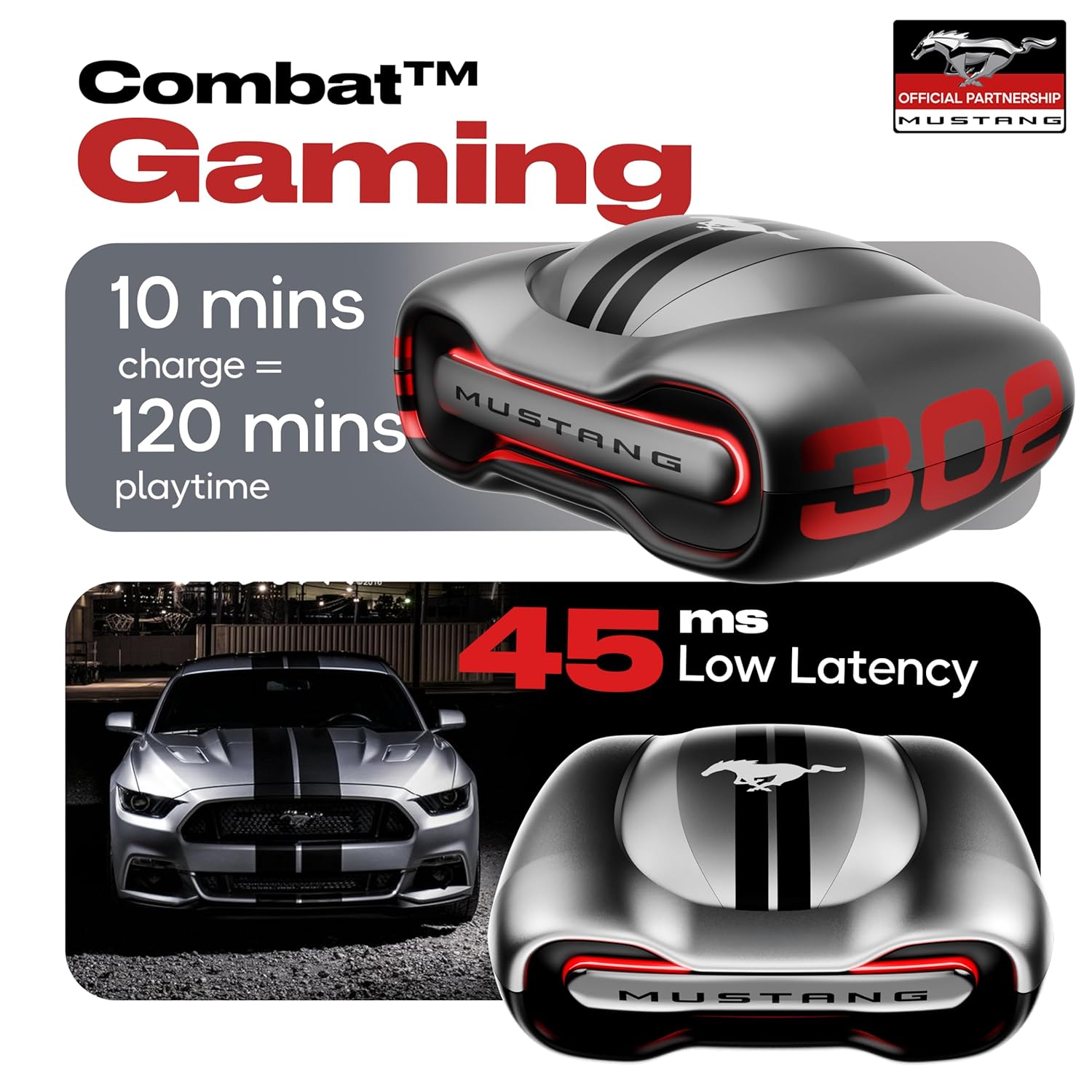
Combat Gaming: Experience audio with minimal delay for an immersive gaming experience.
Zen Quad Mic ENC (Environmental Noise Cancellation)
The earbuds are equipped with four precision microphones and Environmental Noise Cancellation (ENC) technology. This ensures ultra-clear calls by isolating your voice and reducing ambient noise, making your conversations crisp and clear in any environment.

క్లియర్ కమ్యూనికేషన్: Zen Quad Mic ENC ensures superior voice isolation for calls.
నిర్వహణ
నీటి నిరోధకత (IPX5)
The GOBOULT Mustang Torq Earbuds are IPX5 water resistant, meaning they can withstand splashes of water from any direction. This makes them suitable for workouts and light rain. However, they are not designed for submersion in water. Avoid exposing them to strong jets of water or prolonged immersion.
శుభ్రపరచడం మరియు నిల్వ చేయడం
- ఇయర్బడ్లు మరియు ఛార్జింగ్ కేసును మృదువైన, పొడి, మెత్తటి బట్టతో క్రమం తప్పకుండా శుభ్రం చేయండి.
- Remove eartips and clean them separately with mild soap and water if necessary, ensuring they are completely dry before reattaching.
- రాపిడి క్లీనర్లు లేదా ద్రావణాలను ఉపయోగించడం మానుకోండి.
- ఇయర్బడ్లను రక్షించడానికి మరియు వాటిని ఛార్జ్లో ఉంచడానికి ఉపయోగంలో లేనప్పుడు వాటి ఛార్జింగ్ కేస్లో నిల్వ చేయండి.
- పరికరాన్ని తీవ్రమైన ఉష్ణోగ్రతలు మరియు ప్రత్యక్ష సూర్యకాంతి నుండి దూరంగా ఉంచండి.
ట్రబుల్షూటింగ్
If you encounter any issues with your GOBOULT Mustang Torq Earbuds, please refer to the following common solutions:
- శబ్దం లేదు/తక్కువ వాల్యూమ్: Ensure earbuds are charged, connected properly, and volume is turned up on both the earbuds and your connected device. Check for debris in the earbud nozzles.
- జత చేయడం సమస్యలు: Make sure Bluetooth is enabled on your device. Place earbuds back in the case, close it, then open it again to re-enter pairing mode. Forget the device from your phone's Bluetooth list and try pairing again.
- ఒక ఇయర్బడ్ పని చేయడం లేదు: Ensure both earbuds are charged. Try resetting the earbuds (refer to the Amp App or online support for specific reset instructions).
- కాల్ నాణ్యత సమస్యలు: Ensure the microphones are not obstructed. The Zen Quad Mic ENC should provide clear calls, but strong background noise might still affect clarity.
- టచ్ నియంత్రణలు స్పందించడం లేదు: మీ వేళ్లు శుభ్రంగా మరియు పొడిగా ఉన్నాయని నిర్ధారించుకోండి. ఇయర్బడ్లను కేస్లో ఉంచి, వాటిని బయటకు తీయడం ద్వారా వాటిని పునఃప్రారంభించడానికి ప్రయత్నించండి.
- యాప్ కనెక్టివిటీ సమస్యలు: నిర్ధారించండి Amp App is updated to the latest version. Check your device's internet connection.
For further assistance, please contact GOBOULT customer support.
స్పెసిఫికేషన్లు
| ఫీచర్ | స్పెసిఫికేషన్ |
|---|---|
| మోడల్ పేరు | Airbass Earbuds |
| కనెక్టివిటీ టెక్నాలజీ | బ్లూటూత్ 5.4, వైర్లెస్ |
| వైర్లెస్ కమ్యూనికేషన్ టెక్నాలజీ | బ్లూటూత్, వై-ఫై |
| నాయిస్ కంట్రోల్ | పర్యావరణ శబ్దం రద్దు (ENC) |
| ఆడియో డ్రైవర్ పరిమాణం | 13 మిల్లీమీటర్లు |
| ఆడియో డ్రైవర్ రకం | డైనమిక్ డ్రైవర్ |
| ఫ్రీక్వెన్సీ రెస్పాన్స్ | 20 Hz |
| సున్నితత్వం | 115 డిబి |
| ఇంపెడెన్స్ | 32 ఓం |
| ఆడియో లాటెన్సీ | 45 మిల్లీసెకన్లు |
| బ్యాటరీ లైఫ్ (ఇయర్బడ్స్) | Up to 48 Hours (with case) |
| కేస్ బ్యాటరీని మోసుకెళ్లే సగటు జీవితకాలం | 60 Hours (total playtime with case) |
| ఛార్జింగ్ సమయం | 100 నిమిషాలు |
| హెడ్ఫోన్స్ జాక్ | Type-C Fast Charging Jack |
| నియంత్రణ రకం | Call Control, Touch Control, Volume Control |
| కంట్రోలర్ రకం | Amazon Alexa, Google Assistant, Siri, Touch Controls |
| నీటి నిరోధక స్థాయి | IPX5 (వాటర్ రెసిస్టెంట్) |
| వస్తువు బరువు | 61 గ్రాములు |
| ఉత్పత్తి కొలతలు | 56.3 x 29 x 50.4 సెం.మీ |
| అనుకూల పరికరాలు | Cellphones, Desktops, Gaming Consoles, Laptops, Tablets |
| మెటీరియల్ | రబ్బరు |
| మూలం దేశం | భారతదేశం |
వారంటీ & మద్దతు
తయారీదారు వారంటీ
Your GOBOULT Mustang Torq Wireless Earbuds come with a 1-సంవత్సరాల తయారీదారు వారంటీ from the date of purchase. This warranty covers manufacturing defects and ensures peace of mind regarding the quality and performance of your product.
Please retain your purchase receipt or proof of purchase for warranty claims.
కస్టమర్ మద్దతు
For any technical assistance, warranty claims, or product-related inquiries, please visit the official Boult (now GOBOULT) website or contact their customer support channels. Refer to the warranty card included in your package for specific contact details.


