1. పరిచయం
This manual provides instructions for the safe and effective use of your iJoy Disney Stitch Disco Party Bluetooth Over-Ear Headphones. Please read this manual thoroughly before operating the device and retain it for future reference.

చిత్రం 1.1: ముందు view of the iJoy Disney Stitch Disco Party Bluetooth Over-Ear Headphones.
2. ప్యాకేజీ విషయాలు
ప్యాకేజీలో అన్ని అంశాలు ఉన్నాయని నిర్ధారించుకోండి:
- iJoy Disney Stitch Disco Party Bluetooth Over-Ear Headphones
- USB ఛార్జింగ్ కేబుల్
- సహాయక ఆడియో కేబుల్
- ప్రొటెక్టివ్ క్యారీయింగ్ కేస్
- వినియోగదారు మాన్యువల్
3. ఉత్పత్తి ముగిసిందిview
హెడ్ఫోన్ భాగాలు మరియు నియంత్రణలతో మిమ్మల్ని మీరు పరిచయం చేసుకోండి.
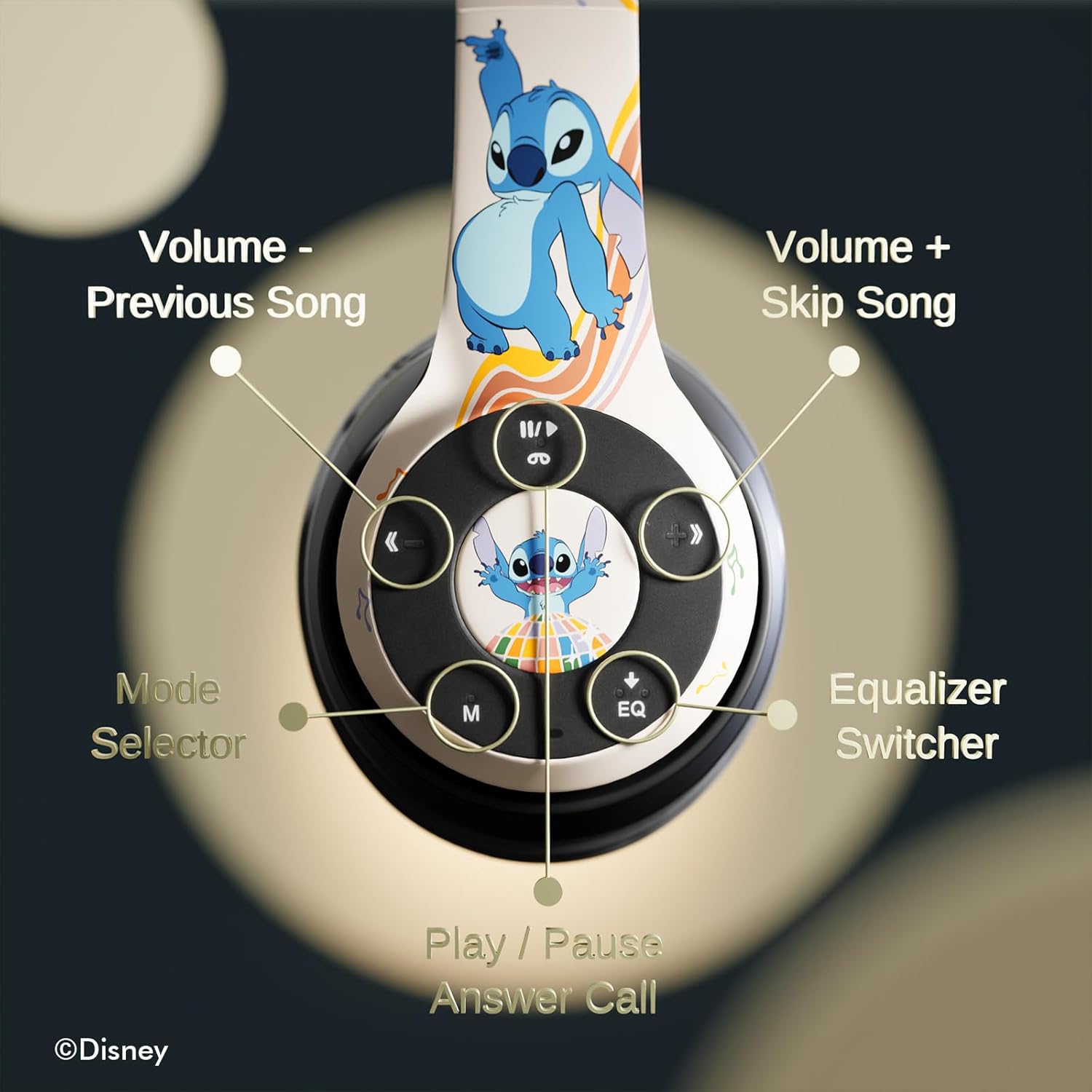
చిత్రం 3.1: వివరణాత్మకమైనది view of the control buttons on the right earcup.
నియంత్రణ విధులు:
- వాల్యూమ్ - / మునుపటి పాట: వాల్యూమ్ తగ్గించడానికి షార్ట్ ప్రెస్ చేయండి, మునుపటి ట్రాక్ కోసం లాంగ్ ప్రెస్ చేయండి.
- Volume + / Skip Song: వాల్యూమ్ పెంచడానికి షార్ట్ ప్రెస్ చేయండి, తదుపరి ట్రాక్ కోసం లాంగ్ ప్రెస్ చేయండి.
- Play / Pause / Answer Call: Short press to play/pause music or answer/end a call. Long press to reject a call.
- Mode Selector (M): Press to switch between Bluetooth, Micro SD, and FM Radio modes.
- Equalizer Switcher (EQ): Press to cycle through available equalizer presets.
- LED సూచిక: Displays power, charging, and Bluetooth connection status.
- అంతర్నిర్మిత మైక్రోఫోన్: హ్యాండ్స్-ఫ్రీ కాలింగ్ కోసం.
- మైక్రో SD కార్డ్ స్లాట్: For direct audio playback from a Micro SD card.
4. సెటప్
4.1. హెడ్ఫోన్లను ఛార్జ్ చేయడం
Before initial use, fully charge the headphones. Connect the supplied USB charging cable to the charging port on the headphones and to a USB power source (e.g., computer USB port, wall adapter). The LED indicator will illuminate during charging and change color or turn off when charging is complete. A full charge provides approximately 15 hours of playtime.

Image 4.1: The headphones offer up to 15 hours of audio playback on a single charge.
4.2. బ్లూటూత్ పెయిరింగ్
- హెడ్ఫోన్లు ఛార్జ్ చేయబడి, పవర్ ఆఫ్ చేయబడి ఉన్నాయని నిర్ధారించుకోండి.
- జత చేసే మోడ్ను సూచిస్తూ, LED సూచిక వెలుగుతున్నంత వరకు పవర్ బటన్ను నొక్కి పట్టుకోండి.
- మీ పరికరంలో (స్మార్ట్ఫోన్, టాబ్లెట్, మొదలైనవి), బ్లూటూత్ను ప్రారంభించి, అందుబాటులో ఉన్న పరికరాల కోసం శోధించండి.
- Select "iJoy Stitch Headphones" from the list of found devices.
- కనెక్ట్ చేసిన తర్వాత, LED సూచిక ఫ్లాషింగ్ ఆగిపోతుంది మరియు దృఢంగా ఉంటుంది.

Image 4.2: The headphones are compatible with various Bluetooth-enabled devices.
4.3. Micro SD Card Usage
Insert a Micro SD card (not included) into the Micro SD card slot on the headphones. The headphones will automatically switch to Micro SD mode and begin playing audio files from the card. Use the Mode button to switch to this mode if already in another mode.
5. ఆపరేటింగ్ సూచనలు
5.1. పవర్ ఆన్/ఆఫ్
- పవర్ ఆన్: Press and hold the Power button until the LED indicator illuminates.
- పవర్ ఆఫ్: LED సూచిక ఆఫ్ అయ్యే వరకు పవర్ బటన్ను నొక్కి పట్టుకోండి.
5.2. మ్యూజిక్ ప్లేబ్యాక్
- ప్లే/పాజ్: ప్లే/పాజ్ బటన్ను నొక్కండి.
- తదుపరి ట్రాక్: వాల్యూమ్ + బటన్ను ఎక్కువసేపు నొక్కండి.
- మునుపటి ట్రాక్: వాల్యూమ్ - బటన్ను ఎక్కువసేపు నొక్కండి.
- ధ్వని పెంచు: వాల్యూమ్ + బటన్ను చిన్నగా నొక్కండి.
- వాల్యూమ్ డౌన్: వాల్యూమ్ - బటన్ను చిన్నగా నొక్కండి.
5.3. కాల్ నిర్వహణ
- సమాధానం/ముగింపు కాల్: ప్లే/పాజ్ బటన్ను నొక్కండి.
- కాల్ని తిరస్కరించండి: ప్లే/పాజ్ బటన్ను ఎక్కువసేపు నొక్కండి.
5.4. FM రేడియో ఫంక్షన్
In FM Radio mode (selected via the Mode button), the headphones can scan and play FM radio stations. Use the Volume +/- buttons to change stations or adjust volume.
5.5. Equalizer Function
Press the EQ button to cycle through different audio equalizer presets, adjusting the sound profile మీ అభిరుచికి.
6. నిర్వహణ
6.1. శుభ్రపరచడం
Wipe the headphones with a soft, dry cloth. Do not use abrasive cleaners or solvents. Avoid exposing the headphones to excessive moisture.
6.2. నిల్వ
When not in use, store the headphones in the provided protective carrying case. The foldable design allows for compact storage, protecting them from damage.
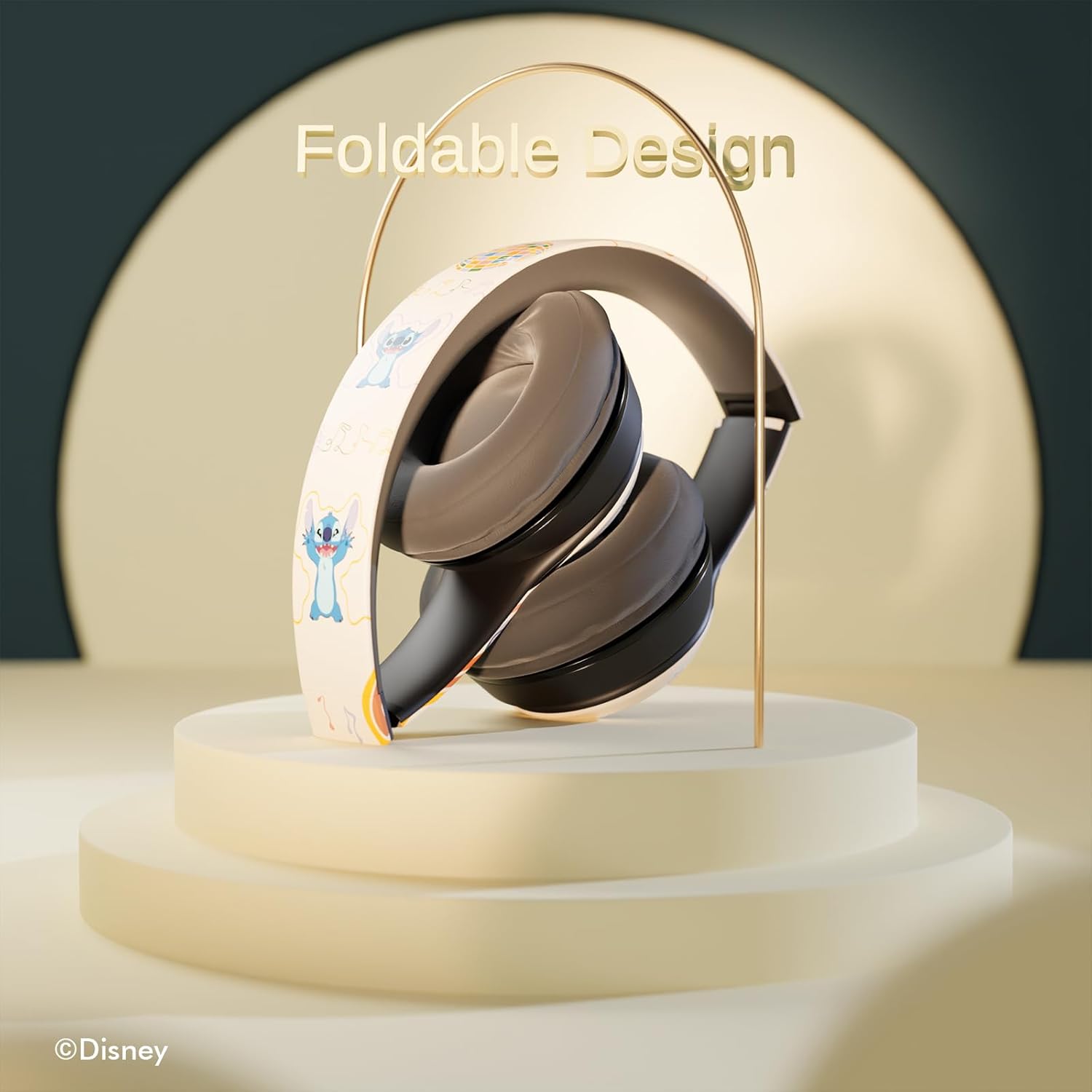
Image 6.1: The headphones feature a foldable design for easy storage and portability.
7. ట్రబుల్షూటింగ్
మీ హెడ్ఫోన్లతో మీకు సమస్యలు ఎదురైతే, ఈ క్రింది సాధారణ సమస్యలు మరియు పరిష్కారాలను చూడండి:
- శక్తి లేదు: హెడ్ఫోన్లు పూర్తిగా ఛార్జ్ అయ్యాయని నిర్ధారించుకోండి. పవర్ సోర్స్కి కనెక్ట్ చేసి, LED ఇండికేటర్ను తనిఖీ చేయండి.
- బ్లూటూత్ ద్వారా జత చేయడం సాధ్యం కాదు:
- Ensure the headphones are in pairing mode (LED flashing).
- మీ పరికరంలో బ్లూటూత్ ప్రారంభించబడిందని ధృవీకరించండి.
- హెడ్ఫోన్లను మీ పరికరానికి దగ్గరగా తరలించండి.
- Turn off and on both the headphones and your device, then attempt pairing again.
- ధ్వని లేదు:
- హెడ్ఫోన్లు మరియు మీ కనెక్ట్ చేయబడిన పరికరం రెండింటిలోనూ వాల్యూమ్ స్థాయిని తనిఖీ చేయండి.
- Ensure the headphones are correctly paired or the audio cable is fully inserted.
- If using a Micro SD card, ensure it contains compatible audio files and is inserted correctly.
- పేలవమైన ధ్వని నాణ్యత:
- జోక్యాన్ని తగ్గించడానికి మీ బ్లూటూత్ పరికరానికి దగ్గరగా వెళ్లండి.
- హెడ్ఫోన్లు మరియు మీ పరికరం మధ్య ఎటువంటి అడ్డంకులు లేవని నిర్ధారించుకోండి.
- వేరే ఆడియో సోర్స్ని ప్రయత్నించండి లేదా file.
8. స్పెసిఫికేషన్లు
| మోడల్ పేరు | Disney Stitch Disco Party |
| అంశం మోడల్ సంఖ్య | 810146469544 |
| కనెక్టివిటీ టెక్నాలజీ | వైర్లెస్ (బ్లూటూత్) |
| వైర్లెస్ కమ్యూనికేషన్ టెక్నాలజీ | బ్లూటూత్ |
| వయస్సు పరిధి (వివరణ) | పెద్దలు, పిల్ల |
| నియంత్రణ రకం | వాల్యూమ్ నియంత్రణ, టచ్ |
| ప్రత్యేక లక్షణాలు | Built-in Radio Receiver, Foldable and Adjustable headband, Micro SD Card Plug-in, Microphone Included |
| వస్తువు బరువు | 0.26 కిలోగ్రాములు (9.1 ఔన్సులు) |
| బ్యాటరీలు | 1 లిథియం పాలిమర్ బ్యాటరీ (చేర్చబడింది) |
| ఫ్రీక్వెన్సీ రేంజ్ | 20 హెర్ట్జ్ - 20,000 హెర్ట్జ్ |
| నీటి నిరోధక స్థాయి | వాటర్ రెసిస్టెంట్ కాదు |
| చెవి ప్లేస్మెంట్ | ఓవర్ చెవి |
| నాయిస్ కంట్రోల్ | సౌండ్ ఐసోలేషన్ |

Image 8.1: The headphones feature sound isolation and include an auxiliary cable for wired connection.
9. భద్రతా సమాచారం
Observe the following safety guidelines to prevent damage to the device or personal injury:
- Do not expose the headphones to extreme temperatures, direct sunlight, or excessive moisture.
- హెడ్ఫోన్లను బలమైన ప్రభావాలకు గురిచేయడం లేదా పడవేయడం మానుకోండి.
- హెడ్ఫోన్లను మీరే విడదీయవద్దు లేదా రిపేర్ చేయడానికి ప్రయత్నించవద్దు. ఇది వారంటీని రద్దు చేసి నష్టాన్ని కలిగించవచ్చు.
- వినికిడి దెబ్బతినకుండా ఉండటానికి వాల్యూమ్ను ఒక మోస్తరు స్థాయికి సర్దుబాటు చేయండి. ఎక్కువసేపు బిగ్గరగా శబ్దాలకు గురికావడం వల్ల శాశ్వత వినికిడి లోపం ఏర్పడుతుంది.
- Do not use headphones while driving, cycling, or in situations where inability to hear ambient sounds could be dangerous.
10. వారంటీ మరియు మద్దతు
This product is covered by a manufacturer's warranty. For specific warranty details, please refer to the documentation included with your purchase or contact iJoy customer support. For technical assistance or inquiries, please visit the official iJoy webసైట్ లేదా వారి కస్టమర్ సేవా విభాగాన్ని సంప్రదించండి.


