1. పరిచయం
This manual provides essential information for the safe and efficient operation of your FLASHFORGE AD5X Multi-Color 3D Printer. Please read this manual thoroughly before using the printer and retain it for future reference. The FLASHFORGE AD5X is designed for multi-color 3D printing with advanced features such as an Intelligent Filament System (IFS), high-speed printing capabilities, and a high-temperature direct extruder.

Figure 1: FLASHFORGE AD5X Multi-Color 3D Printer.
2. ఉత్పత్తి లక్షణాలు
2.1 Intelligent Filament System (IFS) for 4-Color Printing
The AD5X features an Intelligent Filament System (IFS) that enables printing in up to four colors simultaneously. This system supports various filament combinations and includes automatic filament loading/unloading and an auto-refill function for up to 4kg of filament, reducing manual material changes.

Figure 2: Intelligent Filament System (IFS) overview.
2.2 High-Speed and Stable Printing
The AD5X is engineered for rapid printing with a travel speed of up to 600mm/s and an acceleration of 20m/s². Its CoreXY all-metal design contributes to stable print quality even at high speeds.

Figure 3: High-speed printing capabilities.
2.3 Multi-Filament Compatibility with High-Temperature Extruder
Equipped with a 300°C high-temperature nozzle and a 32mm³/s large-flow hotend, the AD5X supports a wide range of filaments including flexible TPU, carbon fiber reinforced filaments (PLA-CF, PETG-CF), standard PLA, and PETG. This high-temperature capability reduces printing wait times.
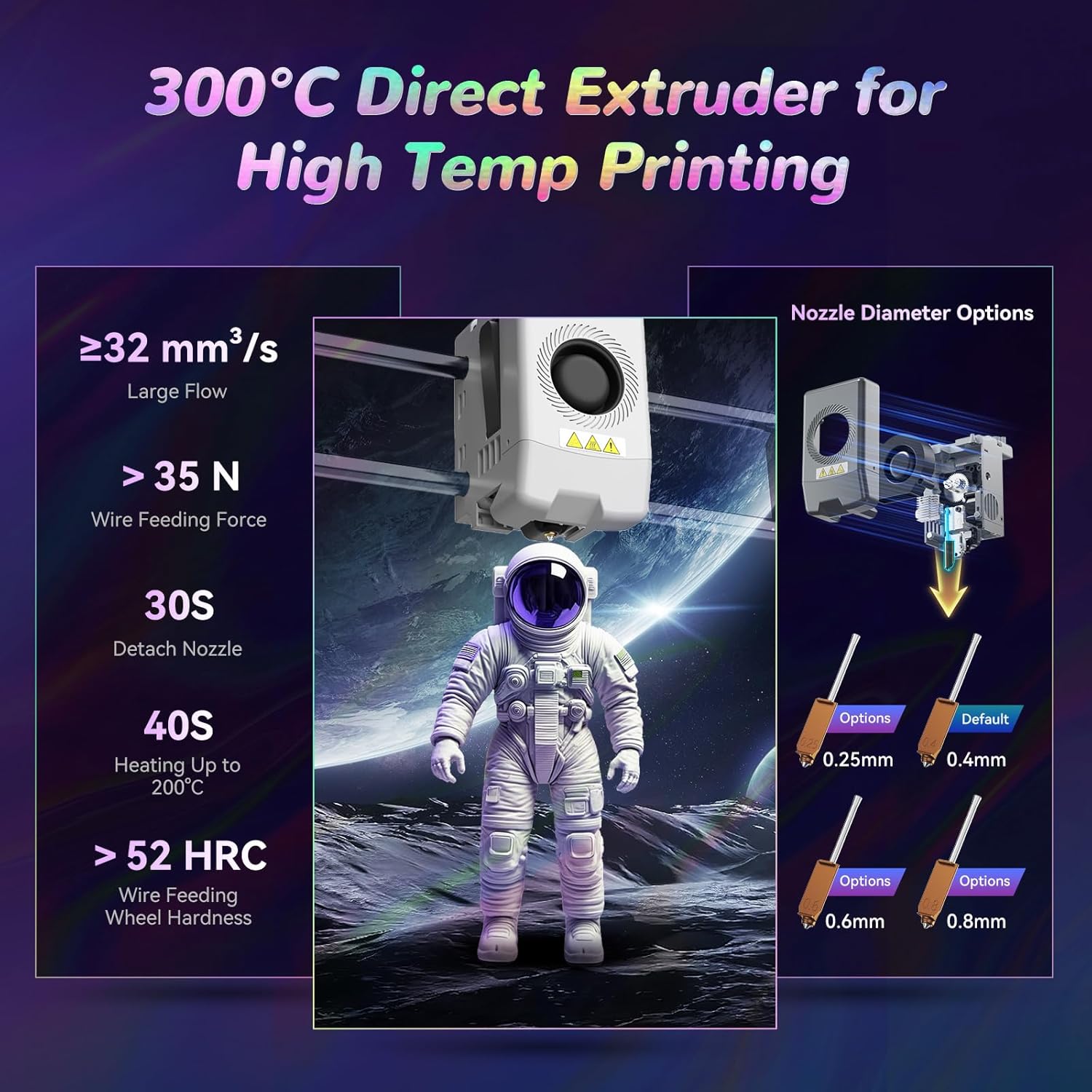
Figure 4: High-temperature direct extruder details.
2.4 Enhanced Printing Functions
- One-Click Auto Leveling: The print bed automatically calibrates before each print, eliminating the need for manual Z-offset adjustments.
- వైబ్రేషన్ పరిహారం: Intelligent detection and adjustment of vibration frequencies prevent ringing issues, ensuring smooth and high-quality prints.
- 4.3-inch Colorful Touchscreen: Provides an intuitive interface for printer control and monitoring.
- రెజ్యూమ్ ప్రింటింగ్: Automatically resumes printing after a power interruption, minimizing material waste.
- ఫిలమెంట్ డిటెక్షన్: Alerts users to filament run-out or errors, improving print success rates.

Figure 5: Auto-leveling and heated bed.

చిత్రం 6: పైగాview of smart features.
2.5 Multi-Device Management
Utilizing Flash Maker and Orca-Flashforge software, users can remotely manage multiple printers, monitor print progress in real-time (requires an additional camera kit), adjust parameters, and receive alerts. This system provides flexibility in managing filament colors and types across devices.

Figure 7: Remote management interface.
3. సెటప్ గైడ్
ఈ విభాగం సాధారణ ఓవర్ను అందిస్తుందిview of the setup process. For detailed, step-by-step instructions, please refer to the official PDF user manual linked in the Support section.
- అన్బాక్సింగ్: ప్యాకేజింగ్ నుండి అన్ని భాగాలను జాగ్రత్తగా తొలగించండి. ఏదైనా నష్టం జరిగిందో లేదో తనిఖీ చేయండి.
- అసెంబ్లీ: Follow the quick start guide to assemble any detached components, such as the display screen, spool holders, and IFS module.
- పవర్ కనెక్షన్: Connect the power cable to the printer and a suitable power outlet.
- ఫిలమెంట్ లోడ్ అవుతోంది: Load the desired filaments into the IFS module according to the instructions. The system supports automatic loading.
- ప్రారంభ క్రమాంకనం: Power on the printer. The AD5X features one-click auto-leveling, which will calibrate the print bed automatically.
- సాఫ్ట్వేర్ ఇన్స్టాలేషన్: Install Flash Maker or Orca-Flashforge slicing software on your computer for preparing print files.
4. ఆపరేటింగ్ సూచనలు
This section outlines the basic steps for operating your 3D printer. For advanced operations and specific settings, consult the comprehensive user manual.
- 3D మోడల్ను సిద్ధం చేయండి: Use slicing software (Flash Maker or Orca-Flashforge) to convert your 3D model (.STL, .OBJ, etc.) into a printable G-code file. Configure print settings such as layer height, infill, and support structures. Ensure filament types and colors in the software match those loaded in the printer.
- బదిలీ జి-కోడ్: G- కోడ్ను బదిలీ చేయండి file to the printer via USB, Wi-Fi, or Ethernet.
- Select Print Job: On the printer's 4.3-inch touchscreen, select the desired G-code file.
- ముద్రణ ప్రారంభించండి: Initiate the print job. The printer will perform auto-leveling and begin heating the nozzle and print bed.
- పురోగతిని పర్యవేక్షించండి: Monitor the printing process. For remote monitoring, an optional camera kit can be integrated with Flash Maker or Orca-Flashforge.
- ముద్రణను తీసివేయి: Once printing is complete and the print bed has cooled, carefully remove the printed object.
5. నిర్వహణ
Regular maintenance ensures optimal performance and extends the lifespan of your FLASHFORGE AD5X 3D Printer.
- Clean Print Bed: After each print, clean the PEI steel sheet build plate to ensure good adhesion for subsequent prints. Use isopropyl alcohol for best results.
- నాజిల్ తనిఖీ: Periodically inspect the nozzle for wear or clogs. Replace the nozzle if necessary. The direct extruder allows for quick nozzle detachment (approx. 30 seconds).
- కదిలే భాగాలను లూబ్రికేట్ చేయండి: Apply grease to the guide rails and lead screws as recommended in the full user manual to ensure smooth movement.
- Clear Filament Path: Ensure the filament path from the spool to the extruder is clear and free of obstructions or tangles.
- ఫర్మ్వేర్ నవీకరణలు: Check the official FLASHFORGE website for any available firmware updates to ensure your printer has the latest features and improvements.
6. ట్రబుల్షూటింగ్
This section addresses common issues you might encounter. For more comprehensive troubleshooting, refer to the detailed user manual.
| సమస్య | సాధ్యమైన కారణం | పరిష్కారం |
|---|---|---|
| First layer not adhering | Dirty print bed, incorrect bed temperature, Z-offset too high. | Clean the print bed with isopropyl alcohol. Ensure correct bed temperature for the filament type. Re-run auto-leveling. |
| ఫిలమెంట్ బయటకు రావడం లేదు | మూసుకుపోయిన నాజిల్, చిక్కుబడ్డ తంతు, తప్పుడు ఉష్ణోగ్రత. | Clear the nozzle. Check filament path for tangles. Verify extruder temperature settings. |
| Poor print quality (layer shifts, ringing) | Loose belts, excessive vibration, incorrect print speed. | Check belt tension. Ensure printer is on a stable surface. Enable vibration compensation in settings. Reduce print speed. |
| Multi-color print errors | Inconsistent color/filament settings between slicer and printer. | Verify that the color zones and filament types set in the slicing software are consistent with the physical setup in the IFS module. |
7. స్పెసిఫికేషన్లు
| ఫీచర్ | వివరాలు |
|---|---|
| పరికరం పేరు | AD5X |
| ఎక్స్ట్రూడర్ పరిమాణం | 1 (with IFS for multi-color) |
| ప్రింటింగ్ ఖచ్చితత్వం | ±0.1mm (tested on 100mm cubes) |
| పొజిషనింగ్ ఖచ్చితత్వం | X/Y-అక్షం: 0.0125mm, Z-అక్షం: 0.0025mm |
| పొర మందం | 0.1-0.4మి.మీ |
| బిల్డ్ వాల్యూమ్ | 220x220x220mm |
| నాజిల్ వ్యాసం | 0.4mm (default), 0.25/0.6/0.8mm (optional) |
| ప్రింటింగ్ స్పీడ్ | 10-300mm/s |
| మాక్స్ త్వరణం | 20000mm/s² |
| గరిష్ట ప్రయాణ వేగం | 600mm/s |
| Max Extruder Temp | 300°C |
| విద్యుత్ సరఫరా | Input: AC 100-120V/200-240V, 50/60Hz, 650W |
| పరికర కొలతలు | 363mm (D) x 363mm (W) x 413mm (H) (448mm with IFS) |
| నికర బరువు | 11.4kg (approx. 25.1 lbs) |
| కనెక్టివిటీ | USB/Wi-Fi/ఈథర్నెట్ |
| ఆపరేటింగ్ టెంప్ | 15-30°C |
| అనుకూలమైన ఆపరేటింగ్ సిస్టమ్ | Windows 7/8/10/11; Mac OS: support version 10.9 or later |
| స్లైసింగ్ సాఫ్ట్వేర్ | Orca-Flashforge/Orca Slicer |
| Max Bed Temp | 110°C |
| లెవలింగ్ పద్ధతి | ఒక-క్లిక్ ఆటో లెవలింగ్ |
| ఫిలమెంట్ రన్ అవుట్ రిమైండర్ | మద్దతు ఇచ్చారు |
| పవర్ లాస్ రికవరీ | మద్దతు ఇచ్చారు |
| స్మార్ట్ టచ్ స్క్రీన్ | 4.3-అంగుళాల |
| ప్లేట్ నిర్మించండి | PEI steel sheet |
8. పెట్టెలో ఏముంది
The FLASHFORGE AD5X package includes the following items:
- FLASHFORGE AD5X 3D Printer (x1)
- HS PLA Filament (10g x 4 colors)
- పవర్ కేబుల్ (x1)
- IFS Connection Cable (x1)
- 4-in-1 Guide Tube (x1)
- Display Screen (x1)
- Spool Holder (x4)
- మౌంటు ప్లేట్ (x1)
- IFS Module (x1)
- స్క్రూ M3*6 (x4)
- కేబుల్ క్లిప్ (x1)
- Grease (x1)
- స్క్రూడ్రైవర్ (x1)
- Allen Wrench Kits (x1)
- Diagonal Pliers (x1)
- త్వరిత ప్రారంభ మార్గదర్శి (x1)
9. వారంటీ మరియు మద్దతు
For detailed warranty information, technical support, and a comprehensive user manual, please refer to the official FLASHFORGE website or the PDF user manual provided with your product. You can also access the PDF user manual ఇక్కడ.
For customer service inquiries, please contact FLASHFORGE support directly through their official channels.
10. ముఖ్యమైన భద్రతా సమాచారం
- ప్రింటర్ను ఎల్లప్పుడూ బాగా వెంటిలేషన్ ఉన్న ప్రదేశంలో ఆపరేట్ చేయండి.
- ఆపరేషన్ సమయంలో కదిలే భాగాల నుండి చేతులు దూరంగా ఉంచండి.
- Do not touch the hot nozzle or heated bed during or immediately after printing. Allow components to cool down.
- ప్రింటర్ స్థిరమైన, సమతల ఉపరితలంపై ఉంచబడిందని నిర్ధారించుకోండి.
- Use only recommended filaments and power adapters.
- Keep the printer away from flammable materials and moisture.
- ప్రింటర్ పనిచేస్తున్నప్పుడు పిల్లలు మరియు పెంపుడు జంతువులను పర్యవేక్షించండి.
- ఏదైనా నిర్వహణ లేదా శుభ్రపరిచే ముందు విద్యుత్తును డిస్కనెక్ట్ చేయండి.


