1. సెటప్ గైడ్
1.1 ప్యాకేజీ విషయాలు
మీరు ప్రారంభించడానికి ముందు, మీ ప్యాకేజీలో అన్ని అంశాలు ఉన్నాయని నిర్ధారించుకోండి:
- బేస్ యూనిట్
- 3 కార్డ్లెస్ హ్యాండ్సెట్లు
- 3 AC అడాప్టర్లు
- టెలిఫోన్ లైన్ కార్డ్
- 3 NiMH Batteries
- వాల్-మౌంట్ బ్రాకెట్
- Abridged User’s Manual
- త్వరిత ప్రారంభ గైడ్

Image: The VTech CS5329-3 cordless phone system, showing the main base unit and three cordless handsets with their charging cradles.
1.2 బ్యాటరీ ఇన్స్టాలేషన్
Each cordless handset requires a NiMH battery for operation. To install:
- హ్యాండ్సెట్ వెనుక బ్యాటరీ కంపార్ట్మెంట్ కవర్ను తెరవండి.
- బ్యాటరీ ప్యాక్ ప్లగ్ను కంపార్ట్మెంట్ లోపల ఉన్న జాక్లోకి సురక్షితంగా కనెక్ట్ చేయండి.
- బ్యాటరీ ప్యాక్ను కంపార్ట్మెంట్లో ఉంచండి.
- బ్యాటరీ కంపార్ట్మెంట్ కవర్ను మూసివేయండి.
1.3 బేస్ యూనిట్ను కనెక్ట్ చేయడం
Connect the base unit to your telephone line and a power outlet:
- టెలిఫోన్ లైన్ త్రాడు యొక్క ఒక చివరను బేస్ యూనిట్ వెనుక భాగంలో ఉన్న టెల్ లైన్ జాక్లోకి ప్లగ్ చేయండి.
- టెలిఫోన్ లైన్ త్రాడు యొక్క మరొక చివరను టెలిఫోన్ వాల్ జాక్కి ప్లగ్ చేయండి.
- AC అడాప్టర్ యొక్క చిన్న చివరను బేస్ యూనిట్ వెనుక భాగంలో ఉన్న POWER జాక్లోకి ప్లగ్ చేయండి.
- AC అడాప్టర్ యొక్క పెద్ద చివరను వాల్ స్విచ్ ద్వారా నియంత్రించబడని వాల్ అవుట్లెట్లోకి ప్లగ్ చేయండి.
1.4 హ్యాండ్సెట్ ఛార్జింగ్
Place each handset in its respective charging cradle or the main base unit. The handsets will begin charging automatically. Allow at least 10-12 hours for the initial charge before first use to ensure optimal battery performance.
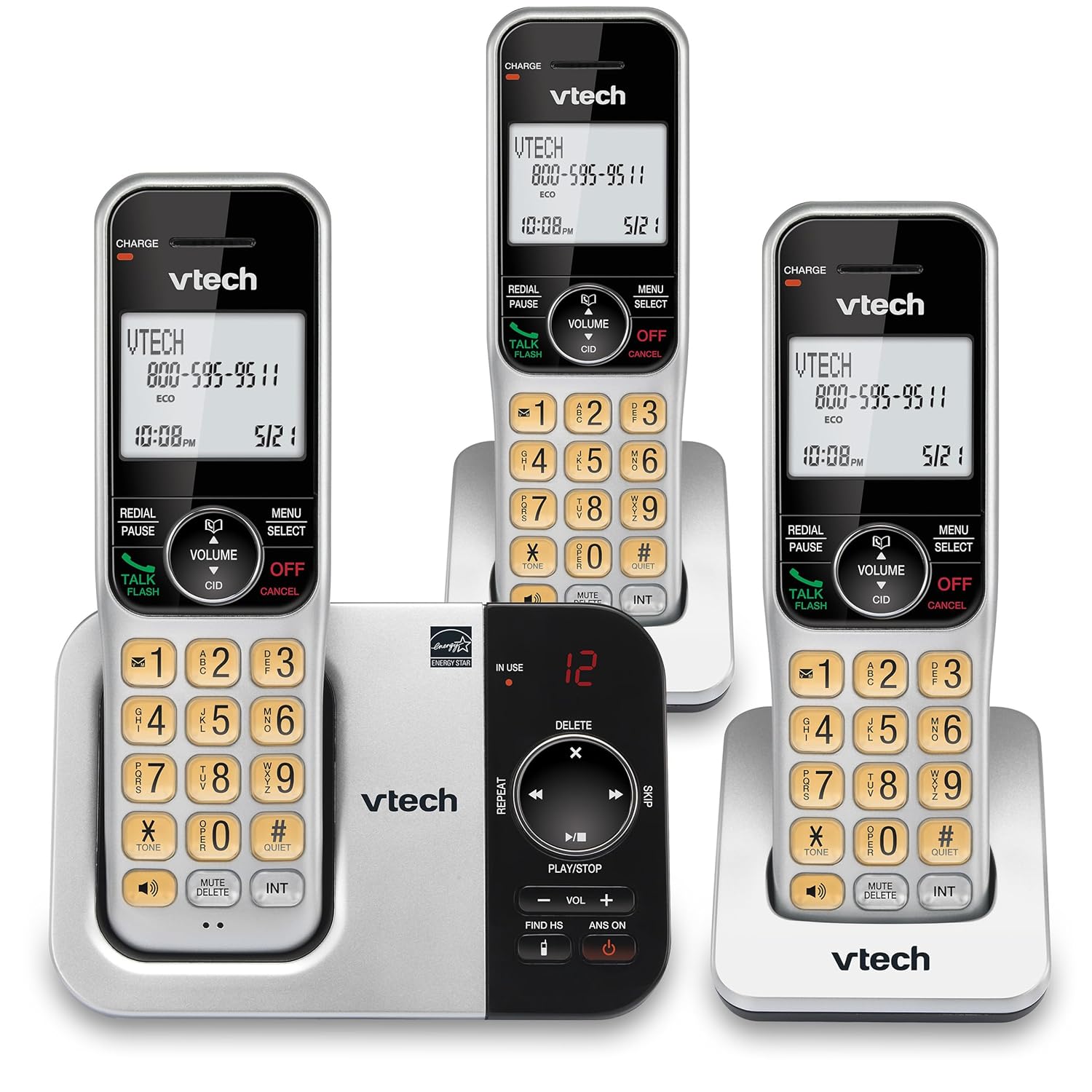
చిత్రం: ఒక ప్రత్యామ్నాయం view of the VTech CS5329-3 phone system, highlighting the compact design of the handsets and charging cradles.
2. ఆపరేటింగ్ సూచనలు
2.1 కాల్స్ చేయడం మరియు స్వీకరించడం
కాల్ చేయడానికి, నొక్కండి టాక్ / ఫ్లాష్ button, then dial the number. To receive a call, simply lift the handset from the cradle or press any key (except ఆఫ్/రద్దు).
2.2 డిజిటల్ సమాధాన వ్యవస్థ
The integrated digital answering system offers up to 23 minutes of recording time for incoming messages, announcements, and memos. You can play back messages directly from the base unit or any handset. The lighted display on the handset indicates the number of new messages waiting.
2.3 ఫుల్ డ్యూప్లెక్స్ స్పీకర్ ఫోన్
Enjoy clear, natural conversations with the full-duplex handset speakerphone. This feature allows both parties to speak and be heard simultaneously, enhancing call quality and participation.
2.4 కాలర్ ID
Caller ID entries are displayed on the large, backlit LCD screen of the handset, making it easy to identify callers even in low-light conditions. The screen provides high-contrast text for readability.
2.5 Call Block
Effectively manage unwanted calls by utilizing the Call Block feature. You can input and/or save up to 150 names and numbers in the call block directory to prevent them from ringing through.
2.6 విస్తరణ
The VTech CS5329-3 system is expandable up to 5 handsets using only one phone jack. Additional CS5309 accessory handsets (sold separately) can be placed anywhere in your home or office near an outlet, providing flexible and convenient communication throughout your space.

Image: Another perspective of the VTech CS5329-3 phone system, showcasing the sleek design and keypad layout of the handsets.
3. నిర్వహణ
3.1 మీ ఫోన్ను శుభ్రపరచడం
ఫోన్ మరియు బేస్ యూనిట్ను మృదువైన, కొద్దిగా d తో తుడవండి.amp వస్త్రం. శుభ్రపరిచే స్ప్రేలు లేదా కఠినమైన రసాయనాలను ఉపయోగించవద్దు, ఎందుకంటే అవి ముగింపు లేదా విద్యుత్ భాగాలను దెబ్బతీస్తాయి.
3.2 బ్యాటరీ సంరక్షణ
To maintain optimal battery life, ensure handsets are placed on their charging cradles when not in use. Avoid exposing batteries to extreme temperatures.
4. ట్రబుల్షూటింగ్
If you experience issues with your VTech CS5329-3 phone system, try the following common troubleshooting steps:
- డయల్ టోన్ లేదు: Ensure the telephone line cord is securely connected to both the base unit and the wall jack. Check if other phones in your home have a dial tone.
- శక్తి లేదు: Verify that the AC adapter is properly plugged into the base unit and a working electrical outlet.
- పేలవమైన ధ్వని నాణ్యత: బేస్ యూనిట్ దగ్గరగా వెళ్లండి. సిగ్నల్కు అంతరాయం కలిగించే పెద్ద లోహ వస్తువులు లేదా ఇతర ఎలక్ట్రానిక్ పరికరాలు లేవని నిర్ధారించుకోండి.
- హ్యాండ్సెట్ ఛార్జింగ్ లేదు: Make sure the handset is properly seated in the charging cradle and the charging contacts are clean.
- జవాబు వ్యవస్థ రికార్డ్ చేయడం లేదు: Check the recording time available. Ensure the answering system is turned ON.
For more detailed troubleshooting, refer to the Abridged User’s Manual included in your package.
5. స్పెసిఫికేషన్లు
| ఫీచర్ | వివరాలు |
|---|---|
| ఉత్పత్తి కొలతలు | 5.54 x 7.31 x 2.99 అంగుళాలు; 2.36 పౌండ్లు |
| అంశం మోడల్ సంఖ్య | CS5329-3 |
| బ్యాటరీలు | 3 AAA బ్యాటరీలు అవసరం. (చేర్చబడి) |
| తయారీదారు | వీటెక్ |
| రంగు | వెండి/నలుపు |
| టెలిఫోన్ రకం | కార్డ్లెస్ |
| మెటీరియల్ | ప్లాస్టిక్ |
| శక్తి మూలం | కార్డెడ్ ఎలక్ట్రిక్ |
| సమాధానం సిస్టమ్ రకం | డిజిటల్ |
| వస్తువు బరువు | 1.07 కిలోలు |
| అనుకూల పరికరాలు | PSTN Landline Connections |
6. వారంటీ మరియు మద్దతు
Your VTech CS5329-3 Cordless Phone System is covered by a manufacturer's warranty. Please refer to the warranty information provided in your Abridged User’s Manual for specific terms and conditions.
For technical support, product registration, or to purchase additional accessories, please visit the official VTech website or contact their customer service. Contact details can typically be found in your product documentation or on the VTech brand store page.
మరిన్ని వివరాలకు, మీరు సందర్శించవచ్చు అమెజాన్లో VTech స్టోర్.


