పరిచయం
Welcome to your new ROCAM Digital Alarm Clock. This manual provides detailed instructions for setting up, operating, and maintaining your alarm clock to ensure optimal performance and longevity.

చిత్రం: ముందు భాగం view of the ROCAM Digital Alarm Clock, displaying the time 10:28 AM and Monday.
ఉత్పత్తి లక్షణాలు
- Large, easy-to-read digital display with adjustable brightness.
- User-friendly design for simple setup and operation.
- Dual alarms with customizable weekday/weekend modes.
- Soft night light with three adjustable brightness levels.
- Battery backup for time memory during power outages.
- USB and Type-C charging ports.
- Snooze function for additional rest.
- 12-hour/24-hour time format and DST (Daylight Saving Time) function.

Image: The alarm clock display showing its 7.5-inch width and 1.85-inch height, highlighting its clear and bold numbers.
సెటప్
పవర్ ఆన్
Connect the alarm clock to a power source using the provided USB cable and a compatible power adapter (not included).
బ్యాటరీ బ్యాకప్ సంస్థాపన
For power-off memory, insert 3 AAA batteries (not included) into the battery compartment located at the bottom of the clock. This will maintain time and alarm settings during power outages.
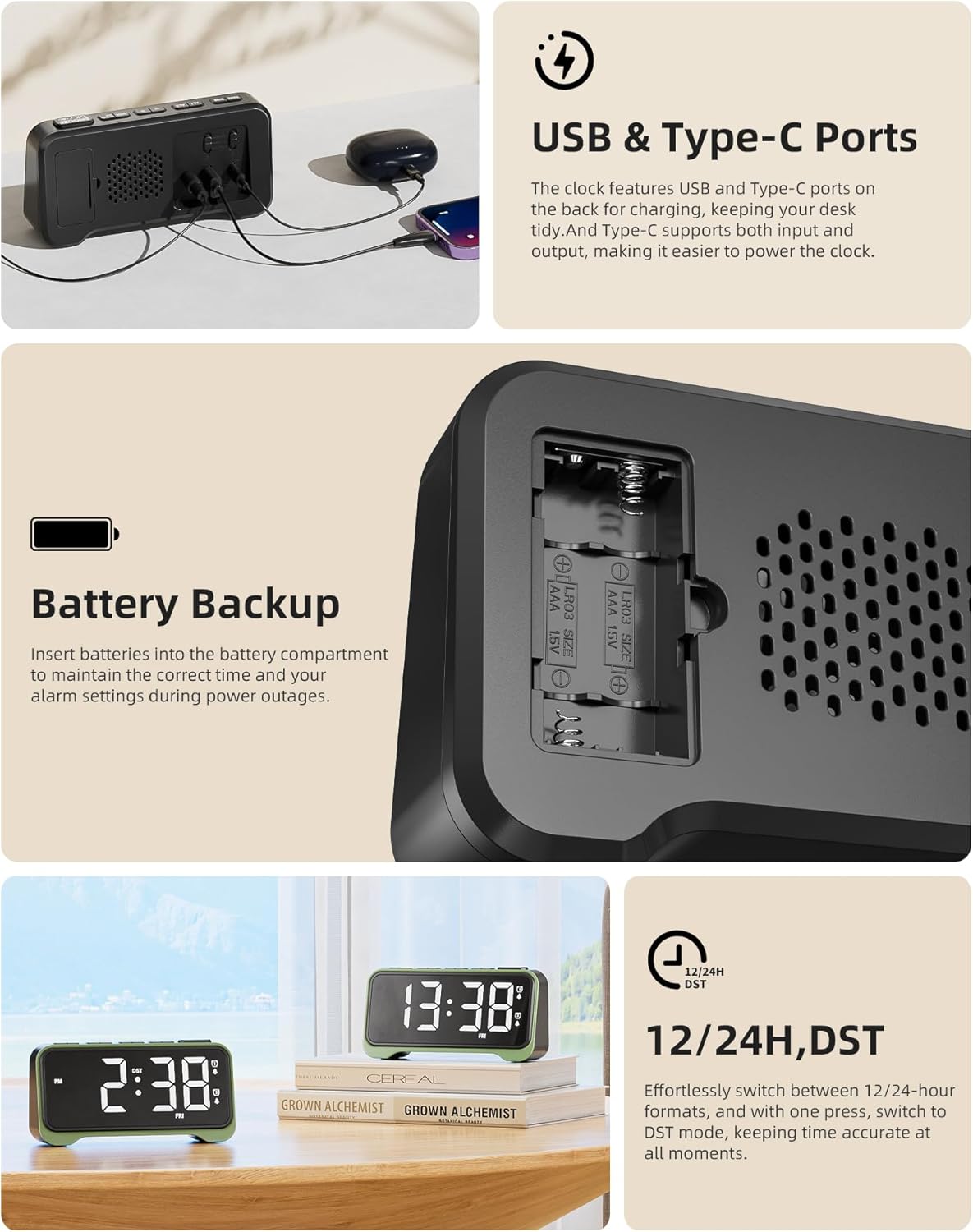
Image: Close-up of the back of the alarm clock showing the USB and Type-C charging ports, and the battery compartment for AAA batteries.
ఆపరేటింగ్ సూచనలు
సమయాన్ని సెట్ చేస్తోంది
- నొక్కండి టైమ్ సెట్ బటన్. గంట అంకెలు ఫ్లాష్ అవుతాయి.
- ఉపయోగించండి + or - గంటను సర్దుబాటు చేయడానికి బటన్లు.
- నొక్కండి టైమ్ సెట్ again to confirm the hour and move to minute setting.
- ఉపయోగించండి + or - నిమిషాలను సర్దుబాటు చేయడానికి బటన్లు.
- నొక్కండి టైమ్ సెట్ సమయాన్ని ఆదా చేయడానికి.
12/24 Hour Format and DST
నొక్కండి 12/24H DST button to switch between 12-hour and 24-hour time formats. Press and hold the 12/24H DST button to activate or deactivate Daylight Saving Time (DST).
అలారాలను సెట్ చేస్తోంది
This clock features dual alarms (Alarm 1 and Alarm 2).
- నొక్కండి AL1 button to set Alarm 1. The hour digits will flash.
- ఉపయోగించండి + or - అలారం గంటను సర్దుబాటు చేయడానికి బటన్లు.
- నొక్కండి AL1 again to confirm the hour and move to minute setting.
- ఉపయోగించండి + or - అలారం నిమిషాలను సర్దుబాటు చేయడానికి బటన్లు.
- నొక్కండి AL1 అలారం సమయాన్ని ఆదా చేయడానికి.
- Repeat for Alarm 2 using the AL2 బటన్.
Weekday/Weekend Alarm Mode
On the side of the clock, there are switches to set the alarm mode for Alarm 1 and Alarm 2:
- సోమ-శుక్రవారం: Alarm sounds only on weekdays.
- SAT-SUN: Alarm sounds only on weekends.
- సోమ-సూర్యుడు: Alarm sounds every day.

Image: The alarm clock display with two example alarm times (7:30 AM and 9:30 AM) and close-ups of the physical switches for setting weekday/weekend alarm modes.
స్నూజ్ ఫంక్షన్
అలారం మోగినప్పుడు, పెద్ద బటన్ను నొక్కండి తాత్కాలికంగా ఆపివేయండి/సరే button to activate the snooze function. The alarm will temporarily stop and sound again after a few minutes.
డిస్ప్లే ప్రకాశాన్ని సర్దుబాటు చేస్తోంది
నొక్కండి DIM button to cycle through different brightness levels for the display. There is also a low-light mode for night.
నైట్ లైట్ ఫంక్షన్
నొక్కండి తాత్కాలికంగా ఆపివేయండి/సరే button (when not snoozing) to turn on/off the warm night light. Press and hold the తాత్కాలికంగా ఆపివేయండి/సరే button to adjust the night light brightness through three levels.

Image: Two ROCAM Digital Alarm Clocks on a nightstand, one with the warm night light illuminated, demonstrating its soft glow.
అలారం వాల్యూమ్ని సర్దుబాటు చేస్తోంది
ఉపయోగించండి VOL+ or వాల్యూమ్ - buttons to adjust the alarm volume. There are 5 volume levels, from soft to 110 dB.

Image: The alarm clock with visual sound waves emanating from it, illustrating its loud alarm feature suitable for heavy sleepers.
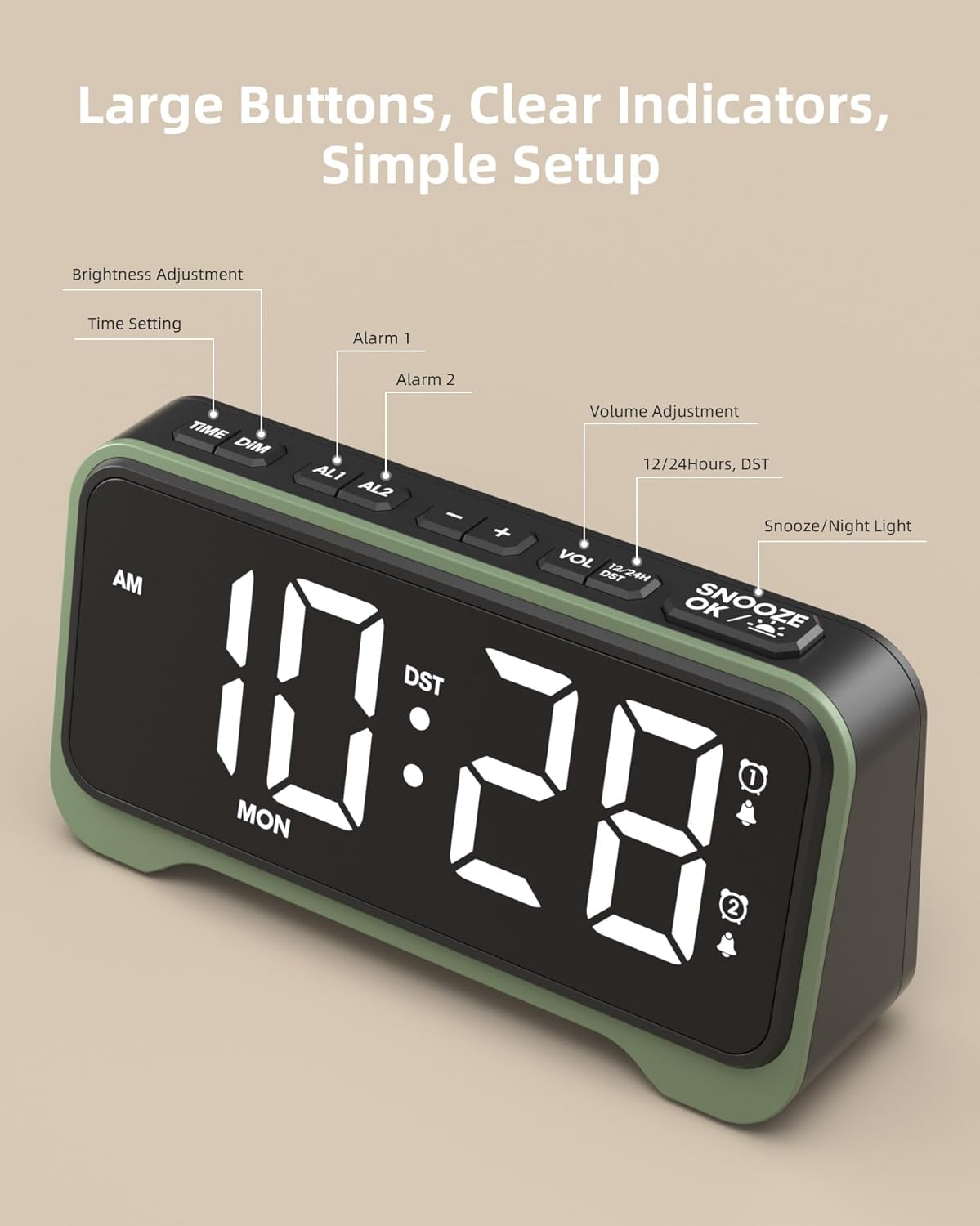
చిత్రం: కోణీయ view of the alarm clock, with labels pointing to the "TIME DIM", "AL1", "AL2", "+", "-", "VOL", "12/24H DST", and "SNOOZE OK / Night Light" buttons, indicating their functions.
నిర్వహణ
- గడియార ఉపరితలాన్ని మృదువైన, పొడి వస్త్రంతో శుభ్రం చేయండి.
- రాపిడి క్లీనర్లు లేదా ద్రావకాలు ఉపయోగించవద్దు.
- Keep the clock away from water and high humidity.
- If not in use for an extended period, remove the backup batteries.
ట్రబుల్షూటింగ్
| సమస్య | పరిష్కారం |
|---|---|
| గడియార ప్రదర్శన ఖాళీగా ఉంది. | Ensure the USB power cable is securely connected to a power source and the clock. Check if the power adapter is working. |
| అలారం మోగడం లేదు. | Verify that the alarm is set and activated. Check the alarm volume level. Ensure the weekday/weekend mode switch is set correctly. |
| పవర్ తర్వాత సమయం తప్పుగా ఉంది outage. | Ensure backup batteries are installed and have sufficient charge. Reset the time if necessary. |
| డిస్ప్లే చాలా ప్రకాశవంతంగా/మసకగా ఉంది. | నొక్కండి DIM డిస్ప్లే ప్రకాశాన్ని సర్దుబాటు చేయడానికి బటన్. |
స్పెసిఫికేషన్లు
- బ్రాండ్: రోకామ్
- రంగు: ఆకుపచ్చ
- ఉత్పత్తి కొలతలు: 16.9W x 8.6H centimeters (approx. 16.9 x 3.81 x 8.6 cm; 300 g)
- ప్రదర్శన రకం: డిజిటల్
- ప్రత్యేక లక్షణాలు: Loud Alarm, Large Display, Adjustable Brightness, Night Mode, Charging Port
- వస్తువు బరువు: 300 గ్రా
- శక్తి మూలం: USB (DC 5V), 3x AAA batteries for backup (not included)
వారంటీ మరియు మద్దతు
For warranty information and customer support, please refer to the product packaging or contact ROCAM customer service directly.
For common questions and further assistance, visit the ROCAM official webసైట్ లేదా వారి మద్దతు బృందాన్ని సంప్రదించండి.


