1. పరిచయం
This user manual provides detailed instructions for the installation, operation, and maintenance of your BoyKeep D112-10 Light Bulb Security Camera. Please read this manual thoroughly before using the product to ensure proper functionality and safety.

Figure 1.1.1: BoyKeep D112-10 Light Bulb Security Camera (10-pack). This image displays the product as a bundle of ten light bulb-shaped security cameras.
2. ఉత్పత్తి ముగిసిందిview
2.1. ప్యాకేజీ విషయాలు
The package for the BoyKeep D112-10 Light Bulb Security Camera (10-pack) includes:
- 10 x BoyKeep D112-10 Light Bulb Security Camera bodies
- వినియోగదారు మాన్యువల్ (ఈ పత్రం)
2.2 కీ ఫీచర్లు
- 1080P High-Resolution Video: స్పష్టమైన మరియు వివరణాత్మక చిత్రాలను అందిస్తుంది.
- కలర్ నైట్ విజన్: తక్కువ కాంతి పరిస్థితుల్లో కూడా దృశ్యమానతను పెంచుతుంది.
- 24/7 Real-time Motion Alerts: Notifies your device upon motion detection.
- ద్విముఖ చర్చ: కమ్యూనికేషన్ కోసం అంతర్నిర్మిత మైక్రోఫోన్ మరియు స్పీకర్.
- One-Touch Connection: Simplifies pairing with your device.
- బహుళ పరికరం Viewing & Sharing: Monitor multiple cameras and share access.
- Cloud & Memory Card Storage: Flexible recording options (memory card not included).
- 360° పాన్ & 95° టిల్ట్: Wide area coverage with remote control.
- సులభమైన సంస్థాపన: Designed for standard E27 light sockets.
2.3. కెమెరా భాగాలు

Figure 2.3.1: Camera Component Diagram. This image illustrates the various parts of the BoyKeep D112-10 camera, including the E27 light socket base, enhanced WiFi module, microphone, 4 array LEDs, HD lens, 4 white LEDs, light sensor, memory card slot, and reset button. Dimensions are also shown: 6 cm (2.35 in) width and 15 cm (5.9 in) height.
3. సెటప్
3.1. సంస్థాపన
The BoyKeep D112-10 camera is designed for easy installation into a standard E27 light bulb socket.
- పవర్ ఆఫ్: Ensure the power to the light socket is turned off before installation to prevent electrical shock.
- స్క్రూ ఇన్: Carefully screw the camera into a standard E27 light socket until it is securely fastened.
- పవర్ ఆన్: లైట్ సాకెట్కు పవర్ను పునరుద్ధరించండి. కెమెరా పవర్ ఆన్ చేసి దాని స్టార్టప్ సీక్వెన్స్ను ప్రారంభిస్తుంది.
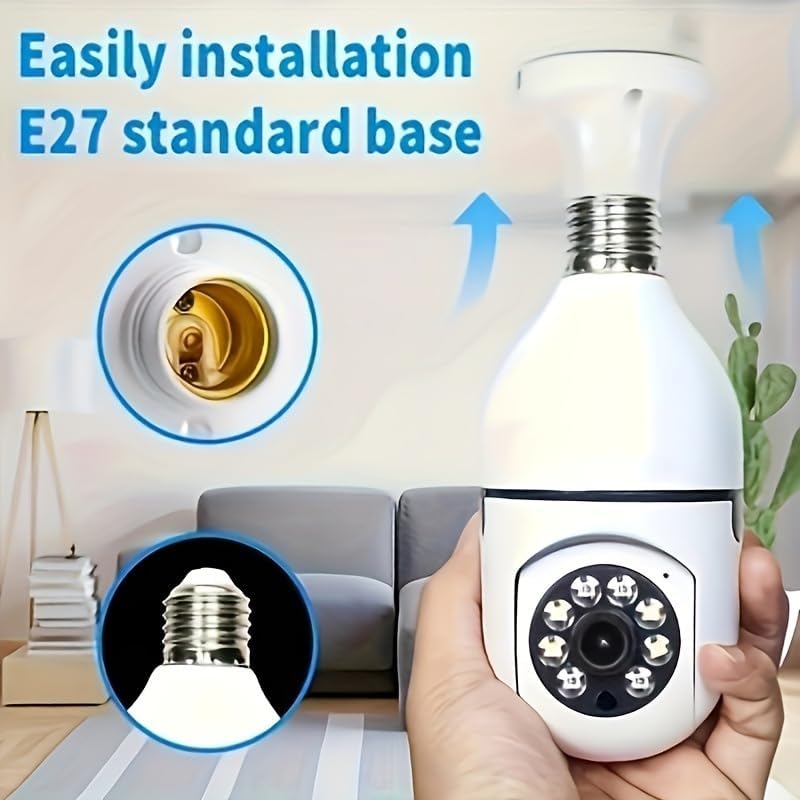
Figure 3.1.1: Easy Installation. This image demonstrates the simple process of screwing the camera into a standard E27 light bulb socket for quick setup.
3.2. యాప్ డౌన్లోడ్ మరియు కనెక్షన్
To operate the camera, you need to download the dedicated mobile application.
- అనువర్తనాన్ని డౌన్లోడ్ చేయండి: కోసం వెతకండి the "BoyKeep" app (or specified app name in product packaging) on your smartphone's app store (Google Play Store for Android or Apple App Store for iOS).
- నమోదు/లాగిన్: కొత్త ఖాతాను నమోదు చేసుకోవడానికి లేదా మీకు ఇప్పటికే ఒకటి ఉంటే లాగిన్ అవ్వడానికి యాప్ను తెరిచి, స్క్రీన్పై ఉన్న సూచనలను అనుసరించండి.
- పరికరాన్ని జోడించండి: In the app, select "Add Device" or the '+' icon. Choose the camera type (e.g., "Smart Camera" or "Light Bulb Camera").
- Wi-Fiకి కనెక్ట్ చేయండి: Ensure your smartphone is connected to a 2.4GHz Wi-Fi network. The camera only supports 2.4GHz Wi-Fi. Follow the app's instructions to connect the camera to your Wi-Fi network. This usually involves scanning a QR code generated by the app with the camera, or entering Wi-Fi credentials.
- పూర్తి: Once connected, the camera will appear in your device list within the app.
గమనిక: Ensure your Wi-Fi router supports 2.4GHz and that your phone is connected to the 2.4GHz band during setup. 5GHz networks are not supported by this device.
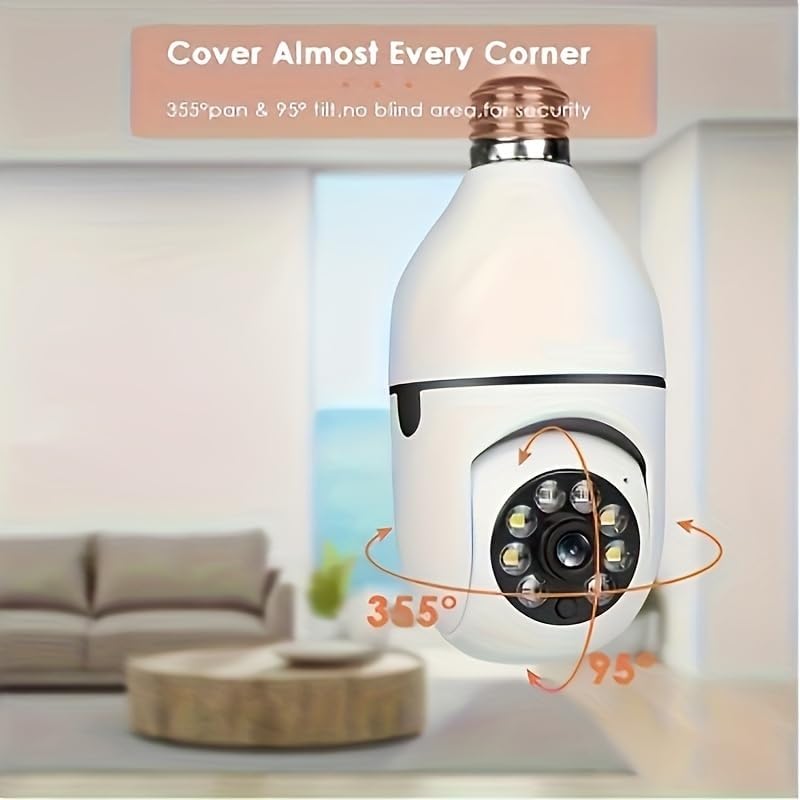
Figure 3.2.1: Wi-Fi Connection and Two-Way Talk. This diagram illustrates how the camera connects to a 2.4GHz Wi-Fi network and enables two-way communication between the camera and a smartphone or computer via the internet, allowing for interactions like speaking to a delivery person.
4. ఆపరేటింగ్ సూచనలు
4.1. లైవ్ View మరియు ప్లేబ్యాక్
- ప్రత్యక్షం View: Open the app and select the camera from your device list to view ప్రత్యక్ష ఫీడ్.
- ప్లేబ్యాక్: రికార్డ్ చేసిన fooని యాక్సెస్ చేయండిtage by selecting the "Playback" option within the camera's interface in the app. You can navigate through the timeline to view నిర్దిష్ట సంఘటనలు.
4.2. పాన్ మరియు టిల్ట్ నియంత్రణ
The camera offers 360° horizontal pan and 95° vertical tilt capabilities.
- నియంత్రణ: ప్రత్యక్ష ప్రసారంలో view interface of the app, use the directional controls (usually a joystick or arrow icons) to remotely adjust the camera's viewing కోణం.
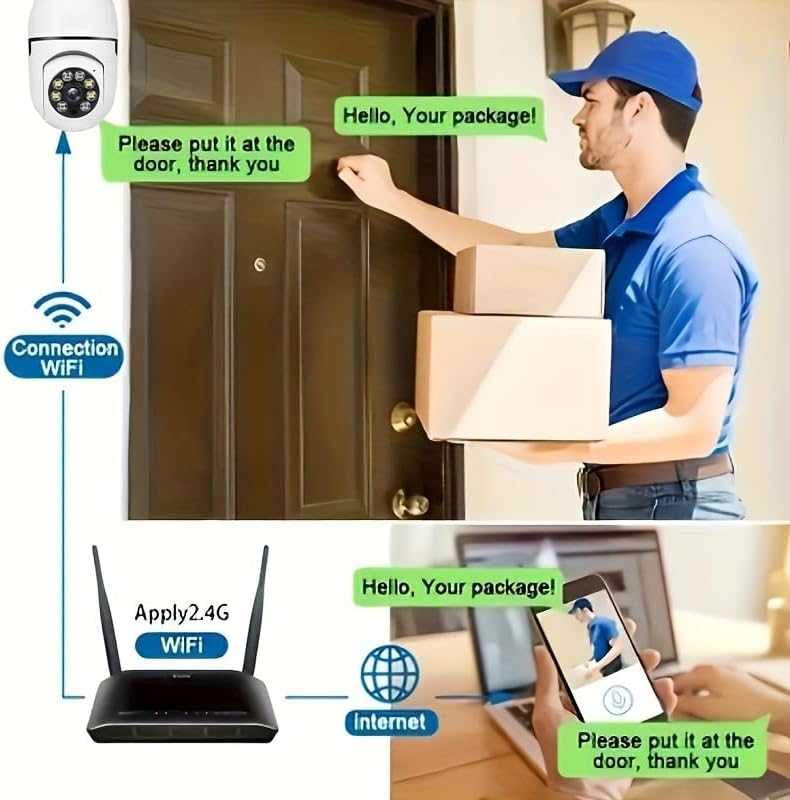
Figure 4.2.1: Pan and Tilt Coverage. This image demonstrates the camera's ability to cover almost every corner with its 355° pan and 95° tilt functions, eliminating blind spots for comprehensive security.
4.3. మోషన్ డిటెక్షన్ మరియు హెచ్చరికలు
- ఎనేబుల్/డిసేబుల్: Navigate to the camera settings in the app to enable or disable motion detection.
- సున్నితత్వం: Adjust the motion detection sensitivity level to minimize false alarms.
- హెచ్చరికలు: When motion is detected, the camera will send push notifications to your smartphone. Recorded events will be stored in the cloud (if subscribed) or on the inserted memory card.
4.4. టూ-వే ఆడియో
- సక్రియం చేయండి: ప్రత్యక్ష ప్రసారంలో view, tap the microphone icon to speak through the camera's speaker. Tap it again to mute.
- వినండి: The camera's microphone is active during live view, allowing you to hear audio from the camera's vicinity.
- One-Touch Call: If available, press the physical one-touch call button on the camera (if present) to initiate a call to your linked smartphone.
4.5. నైట్ విజన్ మోడ్లు
The camera supports both infrared and full-color night vision.
- ఆటోమేటిక్ మోడ్: The camera automatically switches between day and night vision based on ambient light.
- ఇన్ఫ్రారెడ్ నైట్ విజన్: Provides clear black and white images in complete darkness.
- పూర్తి-రంగు రాత్రి దృష్టి: Utilizes built-in white LEDs to provide color images in low light, similar to daytime viewing. This mode can be activated manually or set to trigger upon motion detection.

Figure 4.5.1: Smart Dual Light LED Night Vision. This image compares the visual output of infrared night vision (top, black and white) and full-color night vision (bottom, color) provided by the camera's smart dual light LEDs, showcasing improved visibility in low-light conditions.
4.6. నిల్వ ఎంపికలు
- Memory Card (MicroSD): Insert a compatible MicroSD card (up to 128GB, Class 10 or higher recommended, not included) into the camera's memory card slot for local storage of recordings. The camera supports 24/7 continuous recording to the memory card.
- క్లౌడ్ నిల్వ: The camera offers cloud storage services (e.g., a 30-day trial may be included). Refer to the app for subscription details and management.
5. నిర్వహణ
- శుభ్రపరచడం: కెమెరా లెన్స్ మరియు బాడీని శుభ్రం చేయడానికి మృదువైన, పొడి వస్త్రాన్ని ఉపయోగించండి. ద్రవ క్లీనర్లు లేదా రాపిడి పదార్థాలను ఉపయోగించవద్దు.
- ఫర్మ్వేర్ నవీకరణలు: Regularly check the app for firmware updates. Keeping the firmware updated ensures optimal performance and security.
- నెట్వర్క్ స్థిరత్వం: అంతరాయం లేకుండా పనిచేయడానికి కెమెరా స్థానంలో మీ Wi-Fi నెట్వర్క్ స్థిరంగా మరియు బలంగా ఉందని నిర్ధారించుకోండి.
- పర్యావరణ పరిస్థితులు: The camera is designed for indoor use. Avoid exposing it to extreme temperatures, direct sunlight, or high humidity.
6. ట్రబుల్షూటింగ్
| సమస్య | సాధ్యమైన కారణం | పరిష్కారం |
|---|---|---|
| కెమెరా ఆన్ కావడం లేదు. | No power to the light socket; camera not screwed in properly. | లైట్ సాకెట్కు పవర్ ఉందని నిర్ధారించుకోండి. కెమెరాను సాకెట్లోకి మళ్ళీ గట్టిగా స్క్రూ చేయండి. |
| Wi-Fiకి కనెక్ట్ చేయడం సాధ్యపడదు. | Incorrect Wi-Fi password; connecting to 5GHz network; weak Wi-Fi signal. | Verify Wi-Fi password. Ensure you are connecting to a 2.4GHz network. Move camera closer to router or use a Wi-Fi extender. Reset camera and try again. |
| Motion alerts not received. | Motion detection disabled; app notifications turned off; low sensitivity. | Enable motion detection in app settings. Check phone's notification settings for the app. Increase motion detection sensitivity. |
| పేలవమైన వీడియో నాణ్యత. | బలహీనమైన Wi-Fi సిగ్నల్; మురికి లెన్స్. | Improve Wi-Fi signal strength. Clean the camera lens with a soft, dry cloth. |
| రెండు-మార్గాల ఆడియో పనిచేయడం లేదు. | Microphone/speaker muted in app; network issues. | Check audio settings in the app. Ensure stable network connection. |
7. స్పెసిఫికేషన్లు
| ఫీచర్ | వివరాలు |
|---|---|
| మోడల్ పేరు | D112-10 |
| వీడియో రిజల్యూషన్ | 1080P |
| కనెక్టివిటీ | 2.4GHz వై-ఫై (IEEE 802.11b/g/n) |
| శక్తి మూలం | Corded Electric (E27 Light Socket) |
| పాన్/టిల్ట్ పరిధి | 355° క్షితిజ సమాంతర, 95° నిలువు |
| నైట్ విజన్ | Infrared & Full-Color Night Vision |
| నిల్వ ఎంపికలు | MicroSD Card (up to 128GB, not included), Cloud Storage |
| ఆడియో | టూ-వే టాక్ (బిల్ట్-ఇన్ మైక్ & స్పీకర్) |
| ఇండోర్/అవుట్డోర్ వినియోగం | ఇండోర్ |
| కొలతలు (కెమెరా బాడీ) | Approx. 6 cm (2.35 in) diameter, 15 cm (5.9 in) height |
| చేర్చబడిన భాగాలు | కెమెరా బాడీ |
8. వారంటీ సమాచారం
BoyKeep products are manufactured to the highest quality standards. This product comes with a standard manufacturer's warranty. Please refer to the product packaging or the official BoyKeep website for specific warranty terms and conditions, including duration and coverage details.
9. కస్టమర్ మద్దతు
For technical support, troubleshooting assistance, or any inquiries regarding your BoyKeep D112-10 Light Bulb Security Camera, please contact our customer support team:
- ఆన్లైన్ మద్దతు: Visit the official BoyKeep store on Amazon: BoyKeep Store
- ఇమెయిల్ మద్దతు: Refer to the contact information provided in your product packaging or on the BoyKeep webసైట్.
When contacting support, please have your product model number (D112-10) and purchase details ready.


