పరిచయం
This manual provides instructions for the HCDZ Replacement Remote Control. This remote is designed to be compatible with various beFree Sound Subwoofer Portable Party PA Speaker models, including BFS-7777X, BFS-6100, BFS-4500, BFS-9000, BFS-7900, BFS-5700, BFS-6550, and BFS-4600. It functions as a direct replacement and requires no programming.
The package includes one remote control. Batteries and additional instructions are not included in the package.
సెటప్: బ్యాటరీ ఇన్స్టాలేషన్
రిమోట్ కంట్రోల్కు రెండు AAA బ్యాటరీలు అవసరం (చేర్చబడలేదు). బ్యాటరీలను ఇన్స్టాల్ చేయడానికి ఈ దశలను అనుసరించండి:
- రిమోట్ కంట్రోల్ వెనుక బ్యాటరీ కంపార్ట్మెంట్ కవర్ను గుర్తించండి.
- బ్యాటరీ కంపార్ట్మెంట్ కవర్ను క్రిందికి జారండి లేదా లాచ్ నొక్కి, దాన్ని తెరవండి.
- రెండు కొత్త AAA బ్యాటరీలను చొప్పించండి, పాజిటివ్ (+) మరియు నెగటివ్ (-) టెర్మినల్స్ కంపార్ట్మెంట్ లోపల ఉన్న గుర్తులతో సరిగ్గా సమలేఖనం చేయబడ్డాయని నిర్ధారించుకోండి.
- బ్యాటరీ కంపార్ట్మెంట్ కవర్ సురక్షితంగా క్లిక్ అయ్యే వరకు దాన్ని తిరిగి స్థానంలోకి జారడం ద్వారా దాన్ని మార్చండి.

Image: Back of the remote control with the battery compartment open, showing the correct orientation for inserting two AAA batteries.
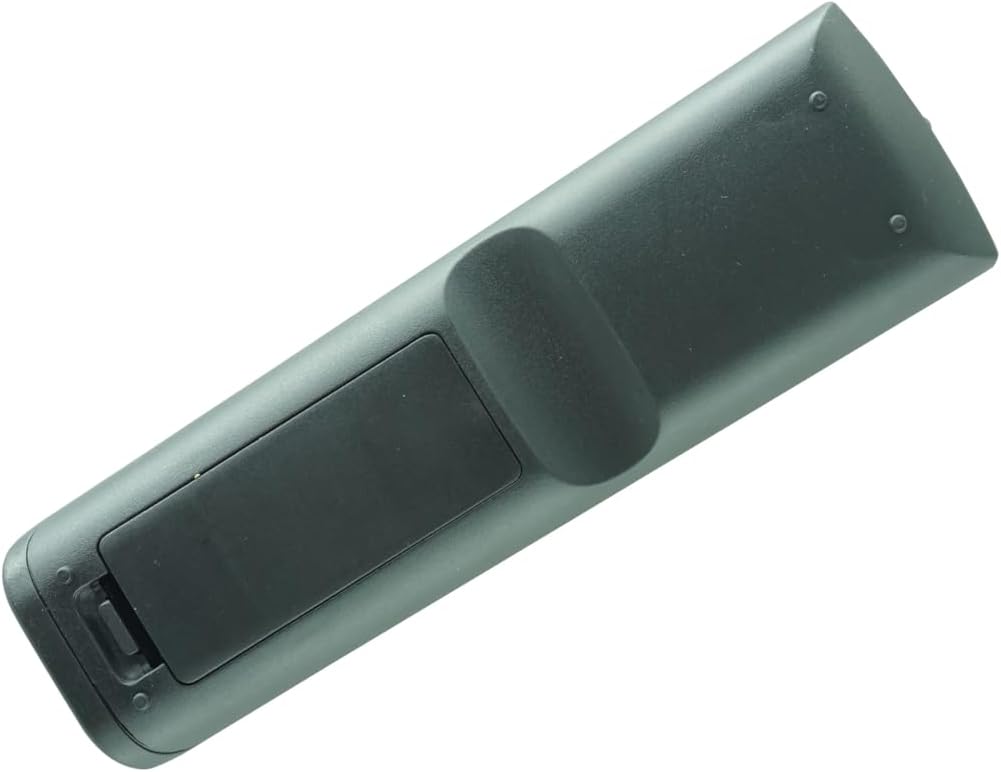
Image: Back of the remote control with the battery compartment securely closed after installation.
Once new batteries are inserted, the remote control will be ready for use immediately. No programming is required.
ఆపరేషన్
This HCDZ replacement remote control operates using infrared (IR) technology. To control your beFree Sound speaker, point the remote control directly towards the IR sensor on the speaker.
The remote provides standard functions for controlling your speaker. Refer to your beFree Sound speaker's original manual for specific button functions if needed.
నిర్వహణ మరియు సంరక్షణ
- నిల్వ: Do not leave the remote control in extremely hot or humid environments.
- బ్యాటరీ వినియోగం: Avoid mixing new batteries with old ones. Always replace all batteries with new ones simultaneously.
- ప్రత్యక్ష సూర్యకాంతి: Do not expose the remote control's IR sensor to direct sunlight or strong lighting apparatuses, as this may cause a malfunction.
- దీర్ఘ-కాల నిల్వ: If the remote control will not be used for an extended period, remove the batteries to prevent potential damage from battery leakage and corrosion.
- శుభ్రపరచడం: రిమోట్ కంట్రోల్ను మృదువైన, పొడి గుడ్డతో తుడవండి. ద్రవ క్లీనర్లను లేదా రాపిడి పదార్థాలను ఉపయోగించవద్దు.
ట్రబుల్షూటింగ్
If the remote control is not functioning as expected, consider the following troubleshooting steps:
- బ్యాటరీలను భర్తీ చేయండి: The most common cause of remote control malfunction is depleted batteries. Replace both AAA batteries with fresh ones.
- బ్యాటరీ టెర్మినల్స్ తనిఖీ చేయండి: Ensure the battery terminals inside the compartment are clean and that the batteries are inserted with the correct polarity (+/-).
- Proximity to Device: The remote control operates within a certain range. Move closer to your beFree Sound speaker to ensure it is within effective operating distance.
- అడ్డంకులు: Remove any physical obstructions between the remote control and the IR sensor on your speaker. Ensure a clear line of sight.
- స్పీకర్ పవర్: Verify that your beFree Sound speaker is properly plugged in and powered on. The remote cannot control a device that is off or unplugged.
స్పెసిఫికేషన్లు
| బ్రాండ్ | HCDZ |
| అనుకూల పరికరాలు | beFree Sound Subwoofer Portable Party PA Speakers (BFS-7777X, BFS-6100, BFS-4500, BFS-9000, BFS-7900, BFS-5700, BFS-6550, BFS-4600) |
| కనెక్టివిటీ టెక్నాలజీ | ఇన్ఫ్రారెడ్ (IR) |
| మద్దతు ఉన్న పరికరాల గరిష్ట సంఖ్య | 1 |
| ప్రత్యేక ఫీచర్ | ప్రోగ్రామింగ్ అవసరం లేదు |
| బ్యాటరీలు అవసరం | 2 AAA బ్యాటరీలు (చేర్చబడలేదు) |
| ప్యాకేజీ కొలతలు | సుమారు 5.91 x 3.94 x 1.18 అంగుళాలు |
| తయారీదారు | HCDZ |
వారంటీ మరియు మద్దతు
Specific warranty information for this HCDZ replacement remote control is not provided in the product details. For any support inquiries or further assistance, please refer to the seller or manufacturer directly.
మీరు సందర్శించవచ్చు HCDZ Store on Amazon బ్రాండ్ మరియు దాని ఉత్పత్తుల గురించి మరింత సమాచారం కోసం.