పరిచయం
Thank you for choosing the MageGee V550 Wireless Gaming Keyboard and Mouse Combo. This manual provides detailed instructions on how to set up, operate, and maintain your new device. Please read this manual thoroughly before use to ensure optimal performance and longevity of your product.
పెట్టెలో ఏముంది
ప్యాకేజీని తెరిచినప్పుడు, దయచేసి కింది అంశాలన్నీ చేర్చబడ్డాయో లేదో తనిఖీ చేయండి:
- వైర్లెస్ కీబోర్డ్
- వైర్లెస్ మౌస్
- USB రిసీవర్
- USB టైప్-సి ఛార్జింగ్ కేబుల్
- వినియోగదారు మాన్యువల్ (ఈ పత్రం)
ఉత్పత్తి ముగిసిందిview
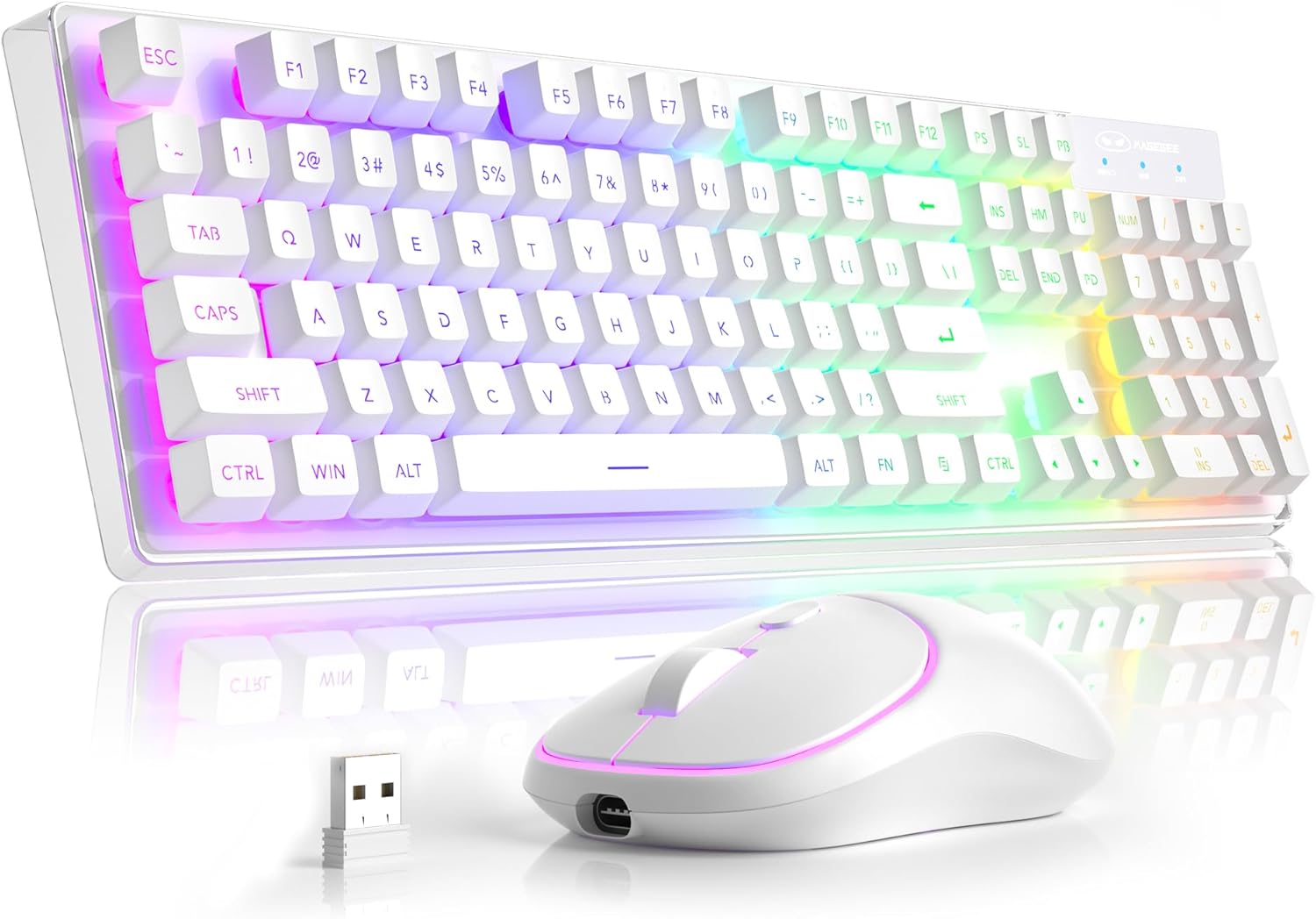
ప్రధాన భాగాలు: The MageGee V550 combo includes a full-sized wireless keyboard and a wireless mouse, both designed for gaming and general computer use. The keyboard features a transparent base and RGB backlighting, while the mouse is compact and includes an RGB light strip.

సింగిల్ USB రిసీవర్: Both the keyboard and mouse connect wirelessly via a single 2.4G USB receiver. This receiver is conveniently stored in a slot on the bottom of the mouse for safekeeping and portability.

Transparent Housing: The keyboard features a unique transparent base, allowing the RGB backlighting to illuminate not only around the keys but also through the entire keyboard structure, enhancing its visual appeal.

డైనమిక్ RGB బ్యాక్లైట్: The keyboard offers multiple lighting settings, including 5 light modes, 7 solid color backlights, and 1 rainbow backlight. Brightness and speed are adjustable, and the backlight can be turned off as needed. The keys are shine-through for visibility in low-light conditions.

Wireless RGB Mouse: The accompanying mouse is lightweight and features a silent click design. It offers three adjustable tracking speed levels (1000-1200-1600 DPI) to suit various user preferences and tasks. An RGB light strip adds to its aesthetic.

USB-C పునర్వినియోగపరచదగినది: Both the keyboard and mouse are rechargeable via the included USB Type-C cable, eliminating the need for frequent battery replacements. This design promotes convenience and environmental responsibility.

ఉత్పత్తి కొలతలు: The keyboard measures approximately 17.13 inches in length, 5.4 inches in width, and 1.34 inches in height. The mouse measures approximately 4.45 inches in length, 2.56 inches in width, and 1.42 inches in height.

Bottom Features: The bottom of both the keyboard and mouse feature on/off switches and anti-slip pads. The mouse also houses the USB receiver slot and its charging port. The keyboard has indicators for Win Lock, Num Lock, and Caps Lock.
సెటప్ సూచనలు
- USB రిసీవర్ను గుర్తించండి: The 2.4G USB receiver is stored in a dedicated slot on the bottom of the wireless mouse. Gently remove it.
- రిసీవర్ని కనెక్ట్ చేయండి: Plug the USB receiver into an available USB port on your computer (PC, Laptop, Desktop, or Notebook).
- పవర్ ఆన్ పరికరాల: Locate the power switches on the bottom of both the keyboard and the mouse. Turn both switches to the "ON" position.
- ఆటోమేటిక్ కనెక్షన్: The keyboard and mouse should automatically connect to your computer. No additional drivers are required.
- కనెక్షన్ని ధృవీకరించండి: Test the keyboard by typing and the mouse by moving the cursor to ensure they are functioning correctly.
ఆపరేటింగ్ సూచనలు
కీబోర్డ్ విధులు
- పూర్తి-పరిమాణ లేఅవుట్: The keyboard features a standard 104-key layout, including a number pad.
- మల్టీమీడియా సత్వరమార్గాలు: Access 12 multimedia shortcuts for quick control of media playback, volume, and more. Refer to the key legends for specific functions.
- యాంటీ-గోస్టింగ్: The keyboard supports 19-key anti-ghosting, ensuring accurate input during fast typing or gaming.
- Win Lock Function: నొక్కండి FN + F12 గేమింగ్ సమయంలో ప్రమాదవశాత్తు నొక్కకుండా నిరోధించడానికి, విండోస్ కీని లాక్ చేయడానికి.
- WASD and Arrow Key Exchange: నొక్కండి FN + W to exchange the functions of the WASD keys with the arrow keys.
మౌస్ విధులు
- Tracking Speed Adjustment: The mouse offers 3 tracking speed levels: 1000, 1200, and 1600 DPI. Press the DPI button (usually located near the scroll wheel) to cycle through these settings.
- సైలెంట్ క్లిక్ డిజైన్: The mouse buttons are designed for quiet operation, minimizing disturbance.
RGB Backlight Control (Keyboard)
The keyboard's dynamic RGB backlight offers various customization options:
- లైట్ మోడ్లు: Cycle through 5 different light modes.
- ఘన రంగులు: Choose from 7 solid color backlights.
- రెయిన్బో బ్యాక్లైట్: Activate a vibrant rainbow lighting effect.
- ప్రకాశం స్థాయిలు: Adjust between 3 brightness levels to suit your environment.
- Light Speeds: Modify the speed of dynamic lighting effects (4 speeds available).
- Turn Off Backlight: The backlight can be turned off completely at any time.
Specific key combinations for backlight control are typically marked on the keyboard itself, often involving the FN key combined with other function keys (e.g., FN + Scroll Lock, FN + Page Up/Down). Please refer to your keyboard's keycap legends for precise controls.
ఛార్జింగ్ మరియు పవర్ సేవింగ్
- ఛార్జింగ్: Use the included USB Type-C cable to charge both the keyboard and the mouse. Connect the cable to the charging port on each device and a USB power source (e.g., computer USB port, wall adapter).
- బ్యాటరీ సూచికలు: The devices will typically have an indicator light to show charging status and when fully charged.
- ఆటో-స్లీప్ మోడ్: To conserve battery life, both the keyboard and mouse feature an auto-sleep mode. If inactive for a period, they will enter a low-power state.
- Waking Up Devices: To wake up the keyboard or mouse from auto-sleep mode, simply click any key or button. This action will not register as an input on your computer screen.
- Separate Power Switches: Each device has its own power switch. Turning off one device will not affect the other. It is recommended to turn off the devices when not in use for extended periods to maximize battery life.
ట్రబుల్షూటింగ్
| సమస్య | సాధ్యమైన కారణం | పరిష్కారం |
|---|---|---|
| కీబోర్డ్/మౌస్ స్పందించడం లేదు |
|
|
| బ్యాక్లైట్ పనిచేయడం లేదు లేదా మసకగా ఉంది |
|
|
| Mouse cursor erratic or slow |
|
|
| తక్కువ బ్యాటరీ జీవితం |
|
|
స్పెసిఫికేషన్లు
| ఫీచర్ | వివరాలు |
|---|---|
| మోడల్ సంఖ్య | V550 |
| బ్రాండ్ | మేజ్గీ |
| కనెక్టివిటీ టెక్నాలజీ | 2.4G వైర్లెస్ |
| కీబోర్డ్ లేఅవుట్ | Full-sized 104-key |
| కీబోర్డ్ బ్యాక్లైట్ | Dynamic RGB (5 modes, 7 solid colors, 1 rainbow, 3 brightness, 4 speeds) |
| మౌస్ DPI స్థాయిలు | 1000-1200-1600 DPI |
| ఛార్జింగ్ పోర్ట్ | USB టైప్-C |
| అనుకూల పరికరాలు | Laptop, Personal Computer (PC, Desktop, Notebook) |
| కీబోర్డ్ కొలతలు (L x W x H) | 17.13 x 5.4 x 1.34 అంగుళాలు |
| మౌస్ కొలతలు (L x W x H) | 4.45 x 2.56 x 1.42 అంగుళాలు |
| వస్తువు బరువు | 2.18 పౌండ్లు (కాంబో) |
| ప్రత్యేక లక్షణాలు | Backlit, Ergonomic, Rechargeable, Transparent Base, Silent Click Mouse, Auto-Sleep Mode |
వారంటీ మరియు మద్దతు
MageGee products are designed for reliability and performance. For warranty information or technical support, please refer to the contact details provided with your purchase or visit the official MageGee webవారంటీ క్లెయిమ్ల కోసం దయచేసి మీ కొనుగోలు రుజువును మీ వద్ద ఉంచుకోండి.
For further assistance, you may contact MageGee Direct, the seller, through the Amazon platform or their official support channels.


