1. పరిచయం
This manual provides essential instructions for the safe operation, setup, and maintenance of your DEERC Amphibious Remote Control Car, Model 1609. Please read this manual thoroughly before using the product to ensure proper function and longevity.

Image 1.1: The DEERC Amphibious RC Car, showcasing its waterproof design, stunt capabilities, and compatibility with building blocks.
2. భద్రతా సమాచారం
ముఖ్యమైన భద్రతా జాగ్రత్తలు:
- Children under 8 years old require adult supervision during operation.
- Do not use the product in public roads or areas with heavy traffic.
- Avoid operating near people, pets, or obstacles to prevent injury or damage.
- ఉపయోగించిన వెంటనే మోటారును తాకవద్దు, ఎందుకంటే అది వేడిగా ఉండవచ్చు.
- Ensure all battery compartments are securely closed before operating, especially in water.
- Use only the provided charging cable and battery.
- ఉత్పత్తిని విడదీయవద్దు లేదా సవరించవద్దు.
3. ప్యాకేజీ విషయాలు
క్రింద జాబితా చేయబడిన అన్ని వస్తువులు మీ ప్యాకేజీలో చేర్చబడ్డాయని ధృవీకరించండి:
- 1 x Amphibious RC Stunt Truck
- 1 x Handle Remote Control
- 2 x Rechargeable Battery (Lithium Ion)
- 1 x USB ఛార్జింగ్ కేబుల్
- 1 x యూజర్ మాన్యువల్ (ఈ పత్రం)
- 1 x Bagged Building Blocks
- 1 x స్క్రూడ్రైవర్

Image 3.1: Visual representation of the complete package contents.
4. భాగాలు ఓవర్view
Familiarize yourself with the main parts of your RC car and remote control.
4.1 RC కారు ఫీచర్లు
- Ampహైబియస్ డిజైన్: Operates on land and water.
- IPX-7 Waterproofing: Protects internal components from water immersion.
- 4WD సిస్టమ్: Provides strong power for various terrains.
- స్టంట్ సామర్థ్యాలు: Includes 360° rotation and upright driving.
- Building Block Compatibility: Allows customization with included and other building blocks.
- LED లైట్లు: For enhanced visibility and visual effects.
4.2 రిమోట్ కంట్రోల్
The remote control operates on a 2.4GHz frequency, allowing multiple cars to be used simultaneously without interference. It features controls for forward, backward, left, right, 360° spin, and one-click head lift (upright driving).
5. సెటప్
5.1 కారు బ్యాటరీని ఛార్జ్ చేయడం
- RC కారు దిగువ భాగంలో బ్యాటరీ కంపార్ట్మెంట్ను గుర్తించండి.
- Use the included screwdriver to open the battery compartment cover.
- Carefully disconnect the battery from the car's wiring.
- USB ఛార్జింగ్ కేబుల్కు బ్యాటరీని కనెక్ట్ చేయండి.
- USB ఛార్జింగ్ కేబుల్ను ప్రామాణిక USB పవర్ అడాప్టర్ (చేర్చబడలేదు) లేదా కంప్యూటర్ USB పోర్ట్లోకి ప్లగ్ చేయండి.
- USB కేబుల్లోని ఛార్జింగ్ ఇండికేటర్ లైట్ ఛార్జింగ్ సమయంలో వెలుగుతుంది మరియు పూర్తిగా ఛార్జ్ అయిన తర్వాత ఆపివేయబడుతుంది.
- Once charged, reconnect the battery to the car's wiring and secure the battery compartment cover.
A full charge provides over 60 minutes of playtime.
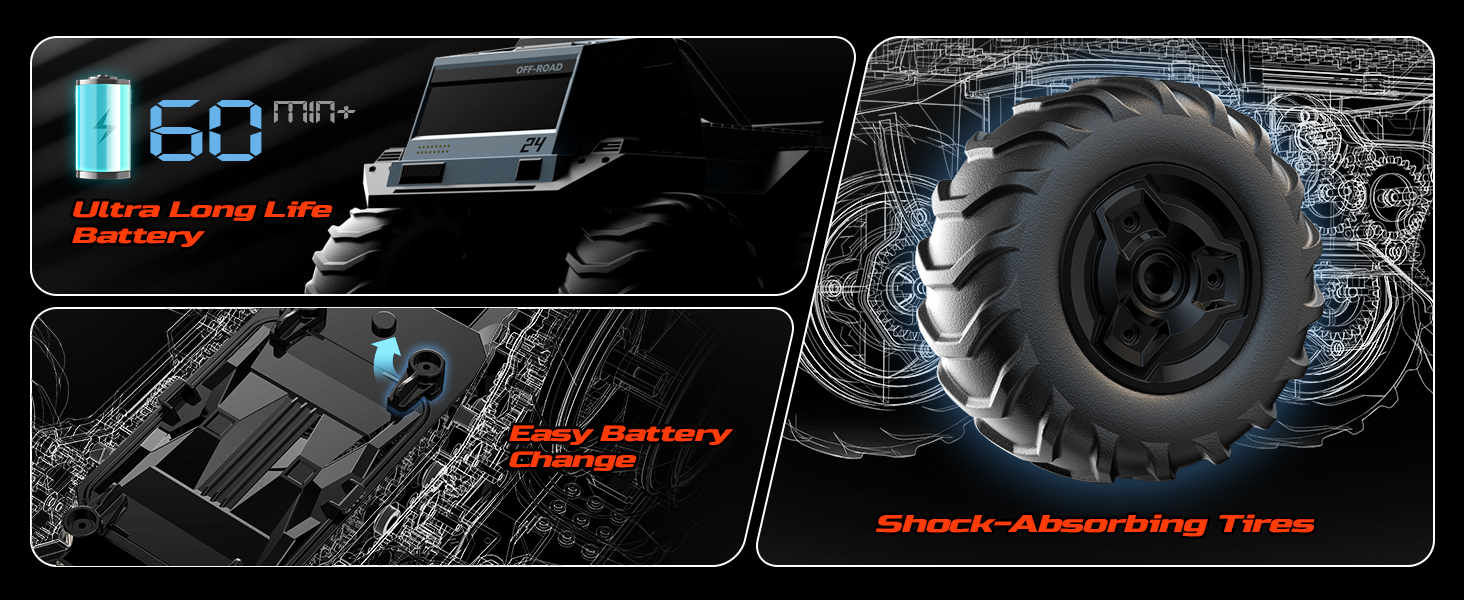
Image 5.1: Illustration of the battery and charging process, emphasizing extended playtime.
5.2 రిమోట్ కంట్రోల్ బ్యాటరీలను ఇన్స్టాల్ చేయడం
- రిమోట్ కంట్రోల్ వెనుక బ్యాటరీ కంపార్ట్మెంట్ను తెరవండి.
- Insert 2 x AA batteries (not included) according to the polarity markings.
- బ్యాటరీ కంపార్ట్మెంట్ కవర్ను సురక్షితంగా మూసివేయండి.
5.3 రిమోట్ కంట్రోల్ జత చేయడం
- Ensure the car battery is charged and installed, and the car is powered off.
- రిమోట్ కంట్రోల్ ఆన్ చేయండి. ఇండికేటర్ లైట్ వెలుగుతుంది.
- Turn on the RC car.
- రిమోట్ కంట్రోల్ ఇండికేటర్ లైట్ దృఢంగా మారుతుంది, ఇది విజయవంతమైన జతను సూచిస్తుంది.
6. ఆపరేటింగ్ సూచనలు
6.1 ప్రాథమిక నియంత్రణలు
- ముందుకు/వెనుకకు: Push the left joystick up or down.
- ఎడమ/కుడి తిరగండి: Push the right joystick left or right.
- Combined Movement: Use both joysticks for precise steering.
6.2 Stunt Features
- 360° In-Situ Rotation: Push both joysticks in opposite directions (e.g., left joystick up, right joystick down) to perform a spin in place.
- Upright Driving (One-Click Head Lift): Press the dedicated stunt button on the remote control to make the car drive on its rear wheels.

Image 6.1: The RC car demonstrating its 360° rotation and upright driving capabilities.
6.3 Amphibious Operation
The DEERC 1609 is designed for both land and water use. Its IPX-7 waterproof rating allows it to glide on water surfaces like an RC boat.
- Ensure the battery compartment is completely sealed before entering water.
- Operate in clean, shallow water bodies. Avoid saltwater or heavily debris-filled water.
- The car's wheels act as propellers in water, allowing for movement.

Image 6.2: The RC car demonstrating its IPX-7 waterproofing and amphibious capabilities in different water settings.
6.4 Building Blocks Feature
The car's shell is compatible with standard building blocks. Use the included blocks or your own to customize the appearance of your RC truck.
- Attach building blocks to the designated studs on the car's body.
- Ensure any attached blocks do not interfere with wheel movement or stunt functions.

Image 6.3: A child customizing the RC car with building blocks, highlighting the creative play aspect.
7. నిర్వహణ
- శుభ్రపరచడం: After use, especially in water or dirty environments, wipe the car with a damp గుడ్డ. కఠినమైన రసాయనాలను ఉపయోగించవద్దు.
- ఎండబెట్టడం: Ensure the car is completely dry before storing, particularly after water play. Open the battery compartment to allow it to air dry if necessary.
- బ్యాటరీ సంరక్షణ: Always disconnect and remove the battery from the car when not in use. Store batteries in a cool, dry place. Do not overcharge or completely discharge the battery.
- నిల్వ: Store the RC car and remote control in a dry place away from direct sunlight and extreme temperatures.
8. ట్రబుల్షూటింగ్
| సమస్య | సాధ్యమైన కారణం | పరిష్కారం |
|---|---|---|
| కారు రిమోట్కు స్పందించదు. | Low car battery, low remote battery, not paired, interference. | Charge car battery, replace remote batteries, re-pair the remote, move to an area with less interference. |
| కారు నెమ్మదిగా లేదా అస్థిరంగా కదులుతుంది. | Low car battery, debris in wheels/axles. | Charge car battery, clean wheels and axles. |
| Car does not move in water. | Battery compartment not sealed, water ingress, low battery. | Ensure compartment is sealed, dry the car thoroughly, charge battery. |
| Remote control indicator light flashes continuously. | Not paired with car. | Follow pairing instructions in Section 5.3. |
9. స్పెసిఫికేషన్లు
- మోడల్ సంఖ్య: 1609
- ఉత్పత్తి కొలతలు: 9.26 x 7.64 x 6.69 అంగుళాలు
- వస్తువు బరువు: 3.12 పౌండ్లు
- తయారీదారు సిఫార్సు చేసిన వయస్సు: 8 సంవత్సరాలు మరియు అంతకంటే ఎక్కువ
- బ్యాటరీలు: 1 Lithium Ion battery (included for car), 2 AA batteries (not included for remote)
- ఆట సమయం: 60+ minutes (per charged car battery)
- నియంత్రణ ఫ్రీక్వెన్సీ: 2.4GHz
- జలనిరోధిత రేటింగ్: IPX-7
10. వారంటీ మరియు మద్దతు
DEERC is committed to product quality. If you encounter any issues or have questions regarding your DEERC Amphibious Remote Control Car Model 1609, please do not hesitate to contact our customer service. We take full ownership and responsibility for the quality of our products and will assist you promptly and efficiently.
For support, please refer to the contact information provided on the product packaging or the official DEERC webసైట్.


