hohem iSteady X3 SE Plus

hohem iSteady X3 SE ప్లస్ గింబాల్ స్టెబిలైజర్ యూజర్ మాన్యువల్

Brand: hohem | Model: iSteady X3 SE Plus

పరిచయం

The hohem iSteady X3 SE Plus is a 3-axis phone gimbal stabilizer designed to capture smooth and stable footage with your smartphone. It features a detachable remote control, an extendable rod, and advanced stabilization technology to enhance your mobile videography experience.

పెట్టెలో ఏముంది

ప్యాకేజీని తెరిచిన తర్వాత, మీరు ఈ క్రింది అంశాలను కనుగొంటారు:

Contents of hohem iSteady X3 SE Plus package including gimbal, remote, tripod, pouch, and cables.

Image: All components included in the hohem iSteady X3 SE Plus package.

Video: Unboxing the hohem iSteady X3 Gimbal, demonstrating package contents and initial setup steps.

సెటప్ గైడ్

1. గింబాల్‌ను విప్పడం

  1. Hold the gimbal firmly.
  2. Lift the arm upwards to unfold the gimbal into its operational position. Ensure it forms a "7" shape with the phone holder clip facing up.
Foldable design of hohem iSteady X3 SE Plus gimbal, showing compact and unfolded states.

Image: The gimbal in its compact, folded state and then unfolded, ready for use.

2. Mounting the Phone

  1. Pull open the phone holder clamp.
  2. మీ స్మార్ట్‌ఫోన్‌ను clలో చొప్పించండిamp, ensuring the camera is on the top side.
  3. cl లోపల ఫోన్ స్థానాన్ని సర్దుబాటు చేయండిamp so it is centrally balanced. The back of the smartphone should be tightly pressed against the phone clamp.
hohem iSteady X3 SE Plus gimbal with a smartphone mounted, ready for stabilization.

Image: A smartphone securely mounted on the gimbal stabilizer.

3. పవర్ ఆన్

Long press the power button on the gimbal's handle for three seconds to turn it on. The gimbal will automatically balance the mounted smartphone.

4. బ్లూటూత్ ద్వారా కనెక్ట్ చేస్తోంది

The gimbal features automatic Bluetooth connection. Once powered on, it will attempt to pair with your smartphone. For full functionality, download the "Hohem Joy" app from your device's app store.

hohem iSteady X3 SE Plus gimbal showing Bluetooth connectivity icon and payload capacity.

Image: Gimbal displaying Bluetooth connection status.

ఆపరేటింగ్ సూచనలు

ప్రాథమిక నియంత్రణలు

  • పవర్ బటన్: Long press to power on/off. Single press to check battery level.
  • మోడ్ బటన్: Single press to switch between different gimbal modes (e.g., Pan Follow, Pan & Tilt Follow, All Lock). Double press to switch between landscape and portrait modes.
  • జాయ్ స్టిక్: గింబాల్ యొక్క పాన్ మరియు టిల్ట్ కదలికలను నియంత్రిస్తుంది.
  • Zoom Wheel: Located on the side, allows for smooth zoom in/out when used with the Hohem Joy app.

Gimbal Modes & Stabilization

The iSteady X3 SE Plus features advanced iSteady 8.0 anti-shake technology for ultra-smooth footage. Utilize various modes for creative shots:

  • 3-Axis Stabilization: Ensures stable footage across pan, tilt, and roll axes.
  • Landscape/Portrait Switching: Double-press the mode button to quickly switch between horizontal and vertical shooting orientations.
  • ప్రారంభ మోడ్: Create dynamic 180° roll rotations for cinematic effects (available via Hohem Joy App).
  • Timelapse Mode: Capture time-lapse videos with precise stabilization.
hohem iSteady X3 SE Plus gimbal demonstrating 3-Axis Stabilization with iSteady 8.0 technology.

Image: Gimbal stabilizing a smartphone during video recording.

వేరు చేయగలిగిన రిమోట్ కంట్రోల్

The innovative detachable remote controller allows you to operate the gimbal from up to 32 feet away via Bluetooth. This is ideal for group photos, self-recording, and creative angles.

  • వేరుచేయడం: Hold down the buttons on the side of the remote module to release it from the gimbal handle.
  • రీఛార్జ్ చేయడం: The remote recharges automatically when docked in the gimbal handle.
hohem iSteady X3 SE Plus gimbal with detachable remote control, illustrating remote operation for group photos.

Image: Detachable remote control in use, showing its range and convenience.

విస్తరించదగిన రాడ్

The gimbal features a built-in 8-inch extendable rod, allowing you to capture wider shots, higher angles, or perfect selfies without additional accessories.

hohem iSteady X3 SE Plus gimbal with its built-in 8-inch extendable rod fully extended for selfie shots.

Image: The gimbal's extendable rod in use.

AI ట్రాకింగ్ & సంజ్ఞ నియంత్రణ

Through the Hohem Joy app, the gimbal supports AI tracking and gesture control for hands-free operation.

  • AI Face/Object Tracking: The gimbal can automatically follow a designated face or object, keeping it in focus.
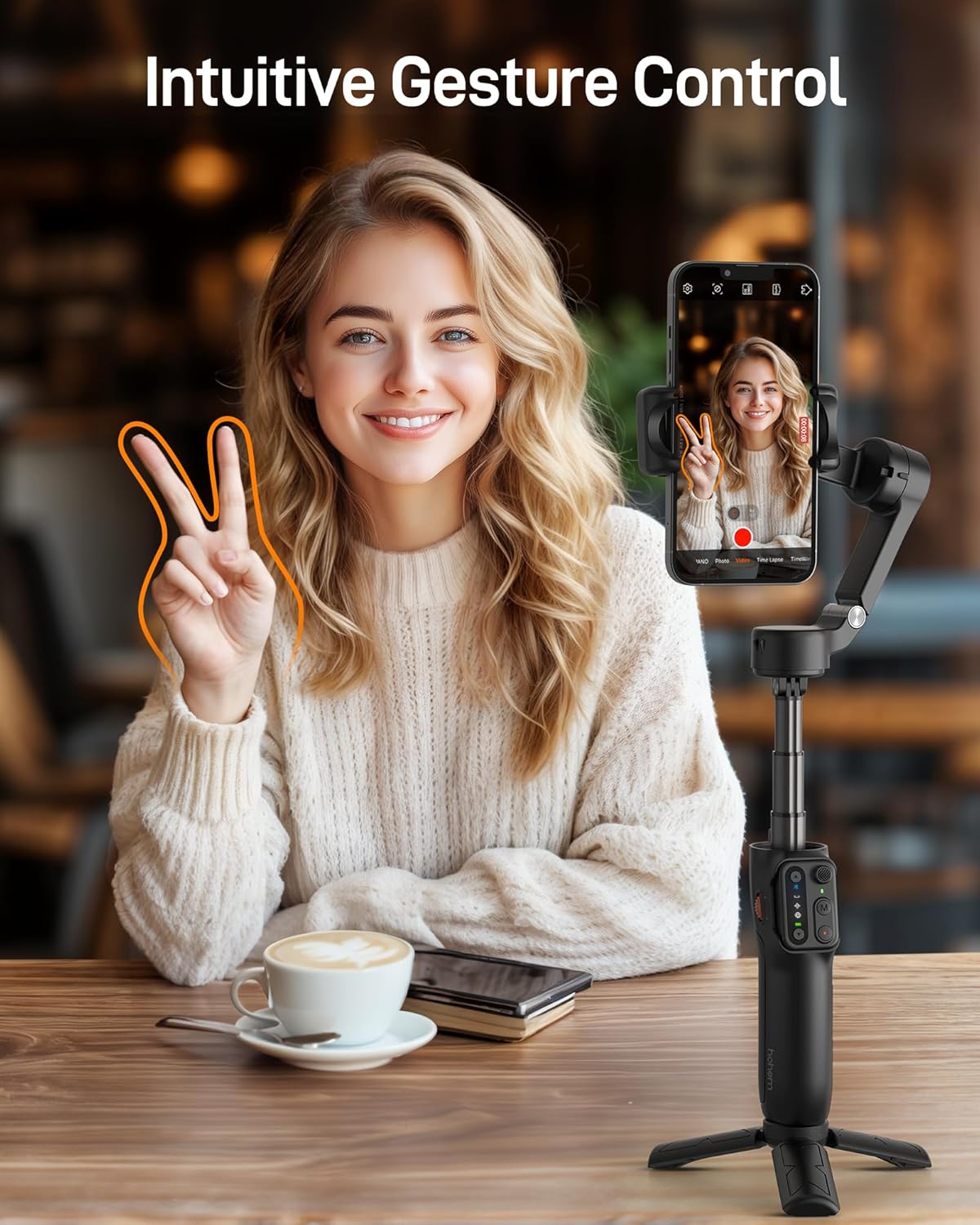
  • సంజ్ఞ నియంత్రణ: Use specific hand gestures to start/stop recording or enable/disable tracking.
hohem iSteady X3 SE Plus gimbal demonstrating AI face tracking feature with a person running.

Image: AI tracking feature in action, keeping a subject in focus.

hohem iSteady X3 SE Plus gimbal showing intuitive gesture control for starting and stopping video recording.

Image: Hand gestures used to control the gimbal's recording functions.

హోహెమ్ జాయ్ యాప్

The Hohem Joy app unlocks the full potential of your iSteady X3 SE Plus. It provides advanced features such as AI tracking, gesture control, and various shooting templates to enhance your content creation.

బ్యాటరీ లైఫ్ & ఛార్జింగ్

The gimbal offers up to 11 hours of continuous filming on a single charge. A full charge takes approximately 2 hours using the provided Type C charging cable.

hohem iSteady X3 SE Plus gimbal highlighting its 11-hour battery life and 2-hour fast charging capability.

Image: Visual representation of the gimbal's battery performance.

పోర్టబిలిటీ

Weighing only 0.85 lbs and featuring a foldable design, the iSteady X3 SE Plus is ultra-portable and can easily fit into your bag or pocket, making it convenient for on-the-go content creation.

hohem iSteady X3 SE Plus gimbal in its folded, compact state, fitting into a pocket.

Image: The gimbal's compact size demonstrated by fitting into a pocket.

స్మార్ట్ఫోన్ అనుకూలత

The gimbal supports a payload of up to 0.66 lbs and is compatible with most smartphones, including various iPhone and Android models. For a detailed list of supported models and features, refer to the Hohem Joy app or the official Hohem webసైట్.

Compatible Devices (Exampలెస్)
బ్రాండ్మోడల్స్
ఆపిల్iPhone 16, 15, 14, 13, 12, 11 Pro Max
శామ్సంగ్Galaxy S21/S21 Ultra, S23 Ultra
OnePlusOnePlus 12, 11, 10, 9
HuaweiMate 60, 50, 40, 30 RS Pro

నిర్వహణ

ట్రబుల్షూటింగ్

స్పెసిఫికేషన్లు

ఫీచర్వివరాలు
ఉత్పత్తి కొలతలు3.86 x 1.73 x 6.32 అంగుళాలు
వస్తువు బరువు13.6 ఔన్సులు (0.85 పౌండ్లు)
పేలోడ్ కెపాసిటీ0.66 పౌండ్లు వరకు
బ్యాటరీ లైఫ్11 గంటల వరకు
ఛార్జింగ్ సమయంసుమారు 2 గంటలు
ఎక్స్‌టెన్షన్ రాడ్ పొడవు8 inches (built-in)
రిమోట్ కంట్రోల్ రేంజ్32 అడుగుల వరకు
మోడల్ సంఖ్యఐస్టీడీ X3SE+

వారంటీ & మద్దతు

This product comes with a standard manufacturer's warranty. Please refer to the included Warranty Card for detailed terms and conditions. For technical support or service inquiries, visit the official hohem webసైట్ లేదా వారి కస్టమర్ సేవను సంప్రదించండి.

మీరు కూడా సందర్శించవచ్చు hohem Store on Amazon మరిన్ని సమాచారం మరియు ఉత్పత్తుల కోసం.

సంబంధిత పత్రాలు - ఐస్టీడీ X3 SE ప్లస్

ముందుగాview హోహెమ్ ఐస్టీడీ X2 యూజర్ మాన్యువల్: ఫీచర్లు, ఆపరేషన్ మరియు స్పెసిఫికేషన్లు
హోహెమ్ ఐస్టీడీ X2 స్మార్ట్‌ఫోన్ గింబాల్ స్టెబిలైజర్ కోసం సమగ్ర యూజర్ మాన్యువల్. సెటప్, ఆపరేషన్, బటన్ ఫంక్షన్‌లు, వర్కింగ్ మోడ్‌లు, స్పెసిఫికేషన్‌లు మరియు వారంటీ గురించి తెలుసుకోండి.
ముందుగాview హోహెమ్ iSteady M6 కిట్ యూజర్ మాన్యువల్
3-యాక్సిస్ స్మార్ట్‌ఫోన్ గింబాల్ స్టెబిలైజర్ అయిన హోహెమ్ ఐస్టీడీ M6 కిట్ కోసం సమగ్ర యూజర్ మాన్యువల్. ఈ గైడ్ ఉత్పత్తి లక్షణాలు, సెటప్, మౌంటింగ్, బ్యాలెన్సింగ్, బ్యాటరీ మరియు ఛార్జింగ్, AI ట్రాకింగ్, యాప్ ఇంటిగ్రేషన్ (హోహెమ్ జాయ్), క్రమాంకనం, ఫర్మ్‌వేర్ అప్‌డేట్‌లు, స్పెసిఫికేషన్‌లు మరియు వారంటీ సమాచారాన్ని కవర్ చేస్తుంది.
ముందుగాview హోహెమ్ ఐస్టెడీ M6 కిట్ గింబాల్ స్టెబిలైజర్ యూజర్ మాన్యువల్ - సెటప్, ఫీచర్లు మరియు స్పెసిఫికేషన్లు
హోహెమ్ ఐస్టీడీ M6 కిట్ స్మార్ట్‌ఫోన్ గింబాల్ స్టెబిలైజర్ కోసం సమగ్ర యూజర్ మాన్యువల్, సెటప్, ఫీచర్లు, యాప్ వినియోగం, క్రమాంకనం, స్పెసిఫికేషన్లు మరియు వారంటీ సమాచారాన్ని కవర్ చేస్తుంది.
ముందుగాview హోహెమ్ iSteady X3 SE+ యూజర్ మాన్యువల్
హోహెమ్ ఐస్టీడీ X3 SE+ 3-యాక్సిస్ స్మార్ట్‌ఫోన్ గింబాల్ స్టెబిలైజర్ కోసం సమగ్ర వినియోగదారు మాన్యువల్, దాని లక్షణాలు, ఆపరేషన్, స్పెసిఫికేషన్‌లు మరియు సమ్మతి సమాచారాన్ని వివరిస్తుంది.
ముందుగాview hohem iSteady X3 Gimbal స్టెబిలైజర్ యూజర్ మాన్యువల్: సెటప్, ఆపరేషన్ మరియు ఫీచర్లు
ఈ యూజర్ మాన్యువల్ హోహెమ్ ఐస్టీడీ X3 గింబాల్ స్టెబిలైజర్ కోసం వివరణాత్మక సూచనలను అందిస్తుంది, దాని ఉత్పత్తి జాబితాను కవర్ చేస్తుంది.view, ఛార్జింగ్, అన్‌ఫోల్డింగ్, యూసేజ్ మోడ్‌లు, మాగ్నెటిక్ ఫిల్ లైట్, బ్లూటూత్ కనెక్షన్, బటన్‌లు, రిమోట్ కంట్రోల్, యాప్ ఇంటిగ్రేషన్, క్రమాంకనం, స్పెసిఫికేషన్‌లు, సమ్మతి మరియు వారంటీ.
ముందుగాview హోహెమ్ iSteady మల్టీ 3-యాక్సిస్ గింబల్ యూజర్ గైడ్
కాంపాక్ట్ డిజిటల్ కెమెరాలు, స్మార్ట్‌ఫోన్‌లు మరియు యాక్షన్ కెమెరాల కోసం హోహెమ్ ఐస్టీడీ మల్టీ 3-యాక్సిస్ స్టెబిలైజింగ్ గింబాల్ కోసం యూజర్ గైడ్. సెటప్, బ్యాలెన్సింగ్, ఆపరేషన్, యాప్ సూచనలు మరియు ట్రబుల్షూటింగ్‌ను కలిగి ఉంటుంది.