1. పరిచయం
The Raspberry Pi 5 is the latest addition to the Raspberry Pi lineup, representing a significant leap in performance and capability. It boasts impressive enhancements, including a faster Broadcom BCM2712 SoC, with a 2.4GHz ARM Cortex-A76 CPU and a VideoCore VII GPU that supports OpenGL ES 3.1 and Vulkan 1.2. A new disaggregated chiplet architecture improves the digital functions of the board. The intricately designed RP1 is the new I/O controller for Raspberry Pi 5 and strengthens the USB, Ethernet, camera, display, and general-purpose interfaces. The Renesas DA9091 PMIC comes with a real-time clock, which has circuitry for external power supply, and a PC-style power button, which supports hard and soft power-on/off events. The Raspberry Pi 5 is a versatile and powerful single-board computer suitable for a wide range of applications, including DIY projects, educational tools, media centers, servers, desktop computers, and various IoT applications, making it the recommended choice for professionals and tech enthusiasts alike.
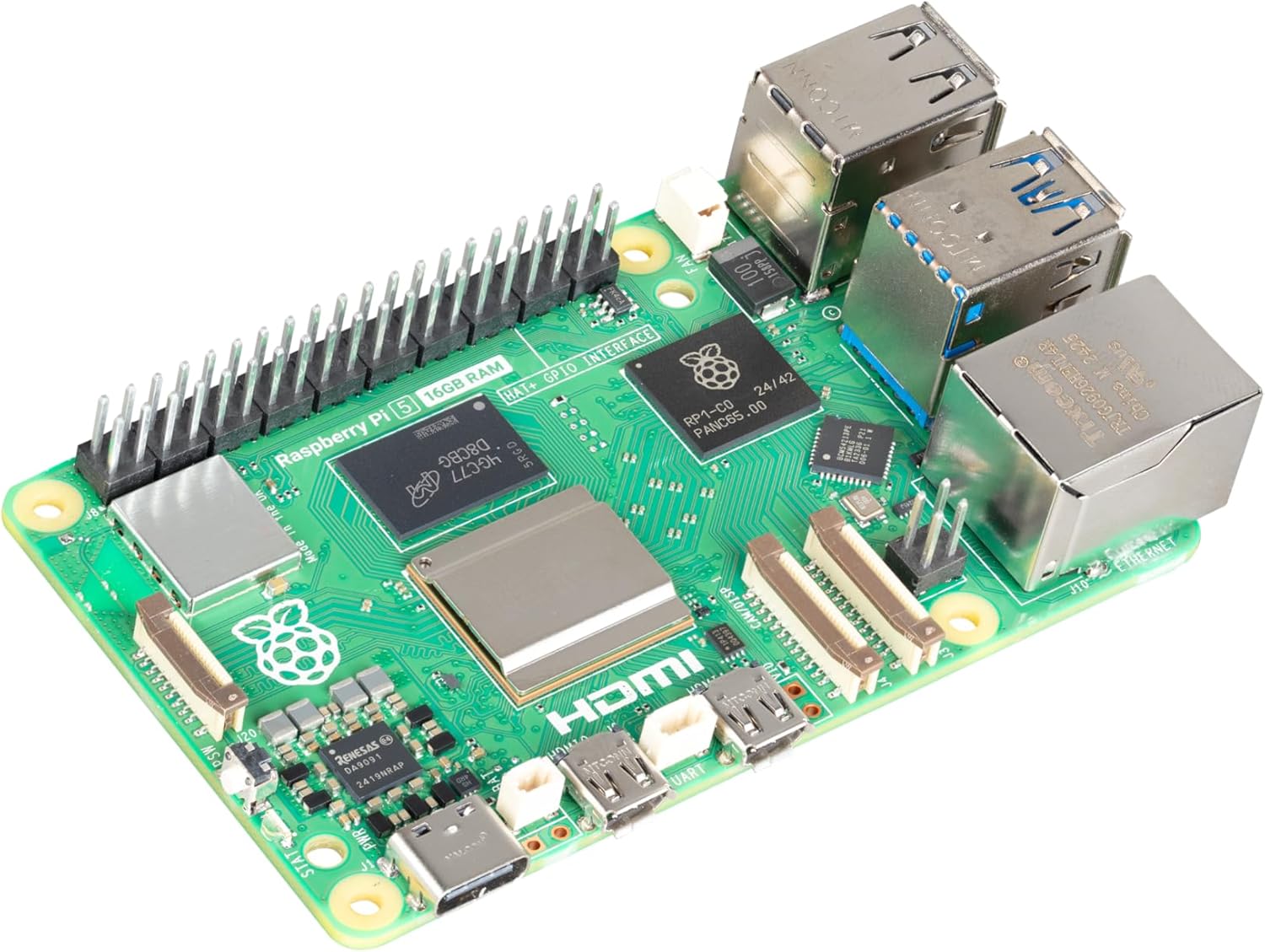
Figure 1.1: The Raspberry Pi 5 (16GB) single-board computer, showcasinదాని కాంపాక్ట్ డిజైన్ మరియు వివిధ పోర్టులు.
2. పెట్టెలో ఏముంది
Your Raspberry Pi 5 (16GB) package should contain the following items:
- Raspberry Pi 5 (16GB) Board
గమనిక: Additional accessories such as a power supply, microSD card, case, and peripherals are sold separately and are required for full functionality.
3. సెటప్ గైడ్
Follow these steps to set up your Raspberry Pi 5:
- Prepare the Operating System: Download the latest Raspberry Pi OS image from the official Raspberry Pi website. Use a tool like Raspberry Pi Imager to write the OS image to a high-quality microSD card (minimum 8GB, Class 10 or higher recommended).
- మైక్రో SD కార్డ్ని చొప్పించండి: Carefully insert the prepared microSD card into the card slot on the underside of the Raspberry Pi 5 board.
- పెరిఫెరల్స్ కనెక్ట్ చేయండి:
- Connect a display to one of the two micro-HDMI ports using a micro-HDMI to HDMI cable.
- Connect a USB keyboard and mouse to the USB 2.0 or USB 3.0 ports.
- (Optional) Connect an Ethernet cable to the Gigabit Ethernet port for wired network access.

Figure 3.1: Detail of the Gigabit Ethernet port and USB 3.0 ports on the Raspberry Pi 5, essential for connectivity.
- విద్యుత్ సరఫరాను కనెక్ట్ చేయండి: Connect the recommended Raspberry Pi 27W USB-C Power Supply to the USB-C power input port. The Raspberry Pi 5 features a PC-style power button for convenient power management.

Figure 3.2: The USB-C power input and the integrated power button, allowing for controlled power-on/off events.
- పవర్ ఆన్: Once all connections are secure, press the power button to boot your Raspberry Pi 5. The system will begin to load the operating system from the microSD card.
4. ఆపరేటింగ్ సూచనలు
Once your Raspberry Pi 5 has successfully booted, you can begin using it:
- First Boot Configuration: On the first boot, Raspberry Pi OS will guide you through an initial setup wizard. This includes setting your country, language, timezone, creating a user account, and connecting to Wi-Fi.
- Desktop Environment: After setup, you will be presented with the Raspberry Pi OS desktop environment. You can navigate using the connected keyboard and mouse.
- సాఫ్ట్వేర్ అప్డేట్లు: It is highly recommended to update your system software regularly. Open a terminal (usually found in the Accessories menu) and run the following commands:
sudo apt update
sudo apt full-upgrade -y - GPIO Usage: The Raspberry Pi 5 features a 40-pin GPIO header for connecting various electronic components and HATs (Hardware Attached on Top). Refer to the official Raspberry Pi documentation for detailed pinout diagrams and programming guides.

Figure 4.1: The 40-pin GPIO header on the Raspberry Pi 5, providing extensive connectivity for custom projects and hardware.
- షట్ డౌన్: Always shut down your Raspberry Pi properly to prevent data corruption. You can do this via the desktop menu (Shutdown > Shutdown) or by using the command line:
sudo shutdown -h now
5 కీ ఫీచర్లు
The Raspberry Pi 5 (16GB) offers a range of powerful features:
- Broadcom BCM2712 2.4GHz quad-core 64-bit Arm Cortex-A76 CPU, with cryptography extensions, 512KB per-core L2 caches and a 2MB shared L3 cache
- Dual-band 802.11ac Wi-Fi Bluetooth 5.0 / Bluetooth Low Energy (BLE)
- 2 × USB 3.0 ports, supporting simultaneous 5Gbps operation / 2 × USB 2.0 ports
- గిగాబిట్ ఈథర్నెట్, PoE+ మద్దతుతో (ప్రత్యేక PoE+ HAT అవసరం)
- The Raspberry Pi 27W USB-C Power Supply is recommended for delivering the power you need to keep your Raspberry Pi running at peak performance
6. స్పెసిఫికేషన్లు
Detailed technical specifications for the Raspberry Pi 5 (16GB):
| ఫీచర్ | విలువ |
|---|---|
| బ్రాండ్ | రాస్ప్బెర్రీ పై |
| మోడల్ పేరు | రాస్ప్బెర్రీ పై 5 |
| అంశం మోడల్ సంఖ్య | SC1113 |
| ప్రాసెసర్ | Broadcom BCM2712 2.4GHz quad-core 64-bit Arm Cortex-A76 CPU |
| ప్రాసెసర్ల సంఖ్య | 4 |
| RAM | 16 GB DDR4 |
| వైర్లెస్ రకం | Dual-band 802.11ac Wi-Fi, Bluetooth 5.0 / BLE |
| USB పోర్ట్లు | 2 × USB 3.0, 2 × USB 2.0 |
| ఈథర్నెట్ | Gigabit Ethernet (with PoE+ support) |
| ఆపరేటింగ్ సిస్టమ్ | Linux (Raspberry Pi OS recommended) |
| ఉత్పత్తి కొలతలు | 3.55 x 2.76 x 1.18 అంగుళాలు |
| వస్తువు బరువు | 1.59 ఔన్సులు |
| మొదట అందుబాటులో ఉన్న తేదీ | జనవరి 10, 2025 |

చిత్రం 6.1: ఓవర్ హెడ్ view of the Raspberry Pi 5 board, illustrating the arrangement of its various components and connectors.
7. నిర్వహణ
Proper maintenance ensures the longevity and optimal performance of your Raspberry Pi 5:
- శీతలీకరణ: The Raspberry Pi 5 can generate significant heat under heavy load. Consider using an active cooling solution (e.g., a fan or heatsink) to prevent thermal throttling and ensure stable performance.
- శుభ్రపరచడం: Periodically clean the board and any attached cooling solutions to remove dust buildup, which can impede airflow and heat dissipation. Use compressed air or a soft brush.
- సాఫ్ట్వేర్ అప్డేట్లు: Regularly update your Raspberry Pi OS and installed software packages to benefit from bug fixes, security patches, and new features. Use the
sudo apt updateమరియుsudo apt full-upgradeఆదేశాలు. - మైక్రో SD కార్డ్ హెల్త్: MicroSD cards have a limited number of write cycles. For applications requiring frequent writes, consider using a high-endurance microSD card or booting from an external SSD via USB 3.0 for improved reliability and speed.
8. ట్రబుల్షూటింగ్
If you encounter issues with your Raspberry Pi 5, try the following troubleshooting steps:
- పవర్ లేదు/బూట్ లేదు:
- Ensure you are using the recommended 27W USB-C power supply. Insufficient power is a common cause of issues.
- Check that the microSD card is properly inserted and contains a valid Raspberry Pi OS image.
- Verify that the power button has been pressed to initiate boot.
- డిస్ప్లే అవుట్పుట్ లేదు:
- Confirm that the micro-HDMI cable is securely connected to both the Raspberry Pi and the display.
- Ensure your display is set to the correct input source.
- Try a different micro-HDMI port or cable.
- నెట్వర్క్ కనెక్టివిటీ సమస్యలు:
- For wired connections, check the Ethernet cable and router status lights.
- For Wi-Fi, ensure the correct network name (SSID) and password are entered during setup.
- Verify that Wi-Fi is enabled in the Raspberry Pi OS settings.
- వేడెక్కడం:
- If the board feels excessively hot or performance degrades, ensure adequate ventilation.
- Install a heatsink and/or fan for improved thermal management.
9. భద్రతా సమాచారం
Please observe the following safety guidelines when using your Raspberry Pi 5:
- విద్యుత్ సరఫరా: Only use the recommended 27W USB-C power supply or a high-quality, compliant 5V/5A USB-C power supply. Using an inadequate power supply can lead to instability or damage.
- నిర్వహణ: Handle the Raspberry Pi 5 board by its edges to avoid touching components, especially when powered on. Static electricity can damage sensitive electronics.
- పర్యావరణం: Operate the Raspberry Pi 5 in a well-ventilated area. Avoid exposing it to extreme temperatures, humidity, or direct sunlight. Keep it away from liquids and conductive materials.
- సవరణలు: Do not attempt to modify the hardware of the Raspberry Pi 5 beyond its intended use (e.g., connecting HATs or peripherals). Unauthorized modifications may void your warranty and pose safety risks.
10. వారంటీ మరియు మద్దతు
The Raspberry Pi 5 (16GB) comes with a standard manufacturer's warranty. For specific warranty terms and conditions, please refer to the official Raspberry Pi webసైట్ లేదా మీ కొనుగోలు కేంద్రాన్ని సంప్రదించండి.
For technical support, documentation, community forums, and additional resources, please visit the official Raspberry Pi webసైట్: www.raspberrypi.com.


